
Fake code of conduct emails targeted 35,000 users in Microsoft 365 phishing attack


 6 min. read
  Published on
A large phishing campaign used fake code of conduct notices to target more than 35,000 users across 13,000 organizations in 26 countries.
Microsoft Defender Research said the campaign ran between April 14 and April 16, 2026. The United States was the main target, accounting for 92% of recipients.

Access content across the globe at the highest speed rate.
70% of our readers choose Private Internet Access
70% of our readers choose ExpressVPN

Browse the web from multiple devices with industry-standard security protocols.

Faster dedicated servers for specific actions (currently at summer discounts)
The goal was not only to steal passwords. The attackers used an adversary-in-the-middle phishing flow to capture session tokens after victims signed in, which can let attackers access accounts even when standard MFA is enabled.
What made the emails convincing
The phishing messages looked like internal HR, compliance, or regulatory notices. They warned recipients that a code of conduct review or internal case log had been opened against them.
Display names included Internal Regulatory COC, Workforce Communications, and Team Conduct Report. Subject lines included Internal case log issued under conduct policy and Reminder: employer opened a non-compliance case log.
The emails also used polished layouts and authenticity statements. A green banner falsely claimed that the message had been encrypted using Paubox, a real HIPAA-compliant communications service.
| Campaign detail | What Microsoft reported |
|---|---|
| Timeframe | April 14 to April 16, 2026 |
| Users targeted | More than 35,000 |
| Organizations targeted | More than 13,000 |
| Countries affected | 26 |
| Main target country | United States, with 92% of targets |
| Main technique | Adversary-in-the-middle phishing |
How the attack chain worked
Each email included a PDF attachment with a workplace-themed filename. Examples included Awareness Case Log File and Disciplinary Action Employee Device Handling Case.
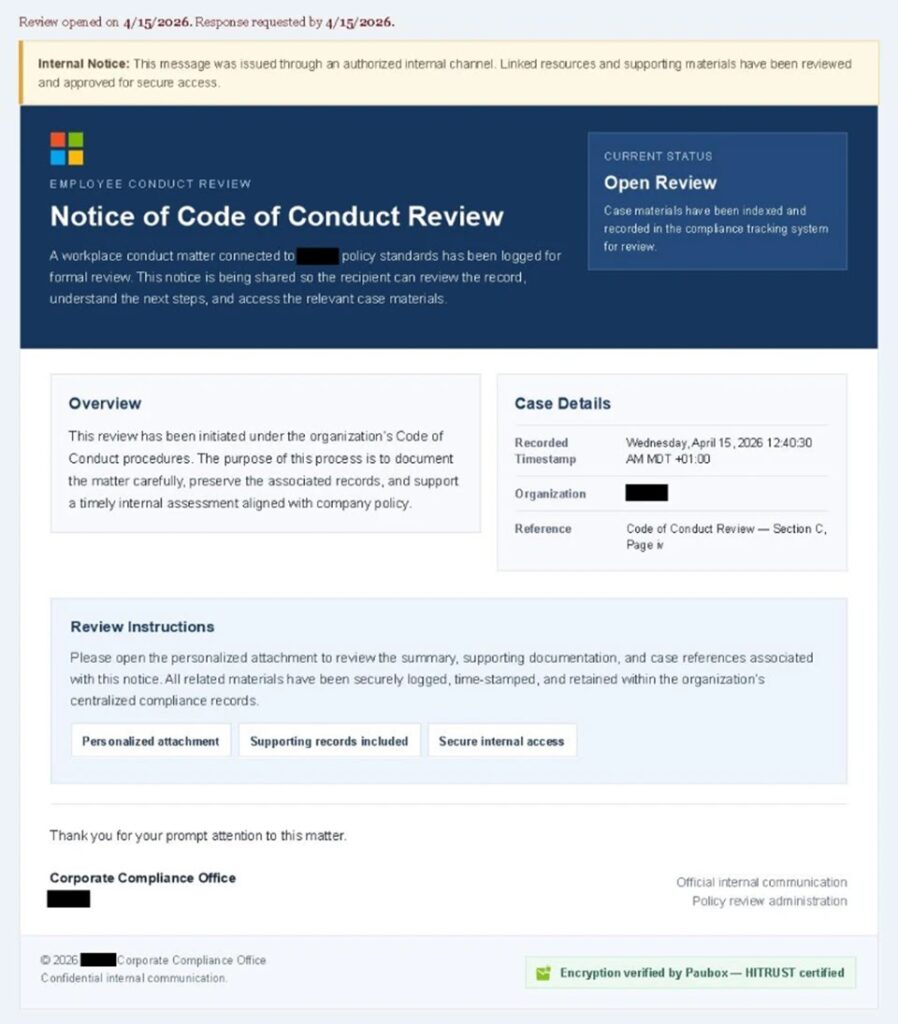
The PDF did not directly contain malware. Instead, it pushed the user to click a Review Case Materials link, which started a multi-stage phishing path.
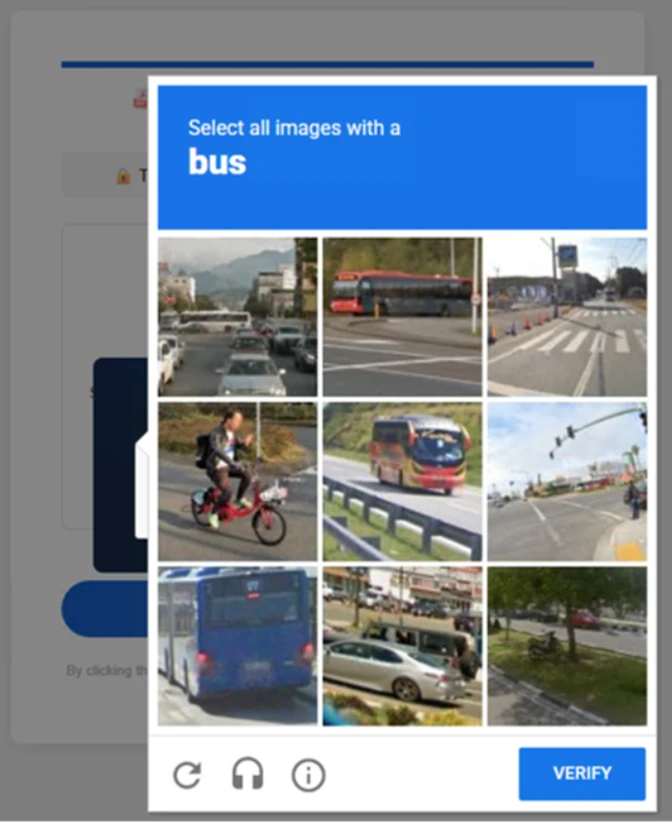
The first landing page showed a Cloudflare CAPTCHA. This likely helped the attackers filter out automated scanners and security sandboxes before sending the victim deeper into the phishing flow.
- The user received a fake code of conduct email.
- The email told the user to open a personalized PDF attachment.
- The PDF contained a Review Case Materials link.
- The first landing page displayed a Cloudflare CAPTCHA.
- The next page said account verification was required.
- The user entered an email address and completed another CAPTCHA.
- The final page showed a Microsoft sign-in flow controlled through an AiTM proxy.
Why AiTM phishing is harder to stop
In a normal phishing attack, criminals try to steal a password and reuse it later. AiTM phishing works differently because the attacker sits between the victim and the real sign-in service.
When the victim signs in, the attacker proxies the session in real time. If the victim completes MFA, the attacker can still capture the authenticated session token.
That token can give account access without asking for the password or MFA code again. This is why Microsoft says non-phishing-resistant MFA can be bypassed in this type of attack.
| Security layer | Why the attack can still work |
|---|---|
| Password | The attacker captures it during the proxied sign-in flow. |
| Standard MFA | The victim completes MFA on the real service through the proxy. |
| Session token | The attacker steals the token after authentication succeeds. |
| Email filtering | The campaign used PDFs, CAPTCHAs, and legitimate delivery infrastructure. |
| User judgment | The fake conduct notice created pressure and urgency. |
Which industries were hit hardest
The campaign did not focus on a single industry. Microsoft said it affected a broad set of organizations, with healthcare and life sciences receiving the largest share.
Financial services followed closely, then professional services and technology companies. These sectors are attractive because compromised accounts can expose sensitive data, payment workflows, customer records, and internal systems.
The use of a code of conduct lure also made the campaign suitable for many workplaces. Nearly any employee could believe that an internal compliance message requires immediate attention.
| Industry | Share of targeted users |
|---|---|
| Healthcare and life sciences | 19% |
| Financial services | 18% |
| Professional services | 11% |
| Technology and software | 11% |
Why the timing and pressure worked
The emails used accusations, compliance language, and time pressure. That combination can make employees act before they verify the message.
The attack also used staged pages that appeared to prepare a secure case file. Each step made the process look more formal, from CAPTCHA checks to encrypted-document claims and Microsoft sign-in prompts.
Microsoft said the final page varied depending on whether the victim used a desktop or mobile device. That shows more planning than a basic credential-harvesting page.
What organizations should do now
Organizations should treat this campaign as a warning that standard MFA alone is no longer enough against advanced phishing. Phishing-resistant authentication should become the priority for sensitive accounts.
Microsoft recommends passwordless and phishing-resistant options such as Windows Hello, FIDO security keys, and Microsoft Authenticator where supported. Conditional Access policies can also protect privileged users with stronger controls.
Email defenses still matter. Microsoft recommends Safe Links, Safe Attachments, Zero-hour auto purge, network protection in Defender for Endpoint, SmartScreen-supported browsers, and manual purging of similar phishing emails when needed.
- Enable phishing-resistant MFA for administrators and high-risk users.
- Turn on Safe Links and Safe Attachments in Microsoft Defender for Office 365.
- Enable Zero-hour auto purge to remove malicious emails after delivery.
- Use Conditional Access policies for privileged and sensitive accounts.
- Train employees to verify HR, legal, and compliance notices before clicking.
- Monitor for anomalous tokens and unfamiliar sign-in properties.
- Investigate users who clicked suspicious URLs in PDFs.
What employees should watch for
Employees should be careful with any unexpected message that claims a conduct case, policy violation, disciplinary review, or compliance issue has been opened against them.
A real internal notice should come through known HR or compliance channels. If a message asks the user to open a PDF and sign in through a link, the safer move is to verify it with the internal team first.
Users should also report messages that contain pressure, legal-sounding language, unusual sender domains, PDF links, CAPTCHA checks, or repeated prompts to sign in.
| Warning sign | Safer response |
|---|---|
| Unexpected code of conduct notice | Verify with HR or compliance through a known channel. |
| PDF asks you to click a review link | Do not click until security checks it. |
| CAPTCHA appears before a work document | Treat it as suspicious and report it. |
| Microsoft sign-in appears after several redirects | Close the page and access Microsoft 365 directly. |
| Message creates fear or urgency | Pause, verify, and report the email. |
FAQ
Yes, it can bypass non-phishing-resistant MFA because the victim completes authentication through the proxy while the attacker captures the resulting session token.
An adversary-in-the-middle phishing attack places the attacker between the user and the real sign-in service. This lets the attacker capture session tokens after authentication.
Microsoft said the campaign targeted more than 35,000 users across more than 13,000 organizations in 26 countries.
It is a Microsoft 365 phishing campaign that used fake HR and compliance notices to trick users into opening PDFs and signing in through attacker-controlled pages.


Read our disclosure page to find out how can you help VPNCentral sustain the editorial team Read more


Improve this guide

User forum
0 messages