
GhostTree attack can make EDR tools hang by abusing NTFS junction loops


 8 min. read
  Published on
A new Windows evasion technique called GhostTree can cause endpoint security tools to hang while scanning files, potentially leaving malicious payloads unchecked. The technique abuses NTFS junctions to create recursive directory structures that generate huge numbers of valid-looking file paths.
Varonis Threat Labs disclosed the research on May 20, 2026, and said the method can affect tools that recursively scan folders, including EDR products. The researchers tested the technique against Microsoft Defender and said it could be used to evade folder scans before Microsoft later patched the issue.

Access content across the globe at the highest speed rate.
🔥 Save 81% + 2 bonus months! 🔥
70% of our readers choose Private Internet Access
70% of our readers choose ExpressVPN
2
Browse the web from multiple devices with industry-standard security protocols.
🔥 Save 73%! 🔥

Faster dedicated servers for specific actions (currently at summer discounts)
🔥 Save 69%! 🔥
GhostTree does not rely on a traditional malware exploit or a kernel vulnerability. Instead, it abuses normal Windows file system behavior in a way that can exhaust scanners and make a folder effectively unscannable.
How GhostTree works
NTFS junctions are Windows file system links that make one directory point to another directory. They have legitimate uses, including storage redirection, compatibility with older applications, and file organization without physically moving data.
Microsoft’s hard links and junctions guidance explains that NTFS supports hard links and junctions as file system link types. That same flexibility creates risk when attackers intentionally point a child folder back to a parent folder.
When a scanner follows that folder path recursively, it can enter a loop. GhostTree expands the idea by creating multiple recursive branches, which produces a binary tree-like path explosion rather than one simple loop.
| Technique | What it does | Defender impact |
|---|---|---|
| GhostBranch | Creates one junction that points a child folder back to its parent. | Produces a recursive loop with many paths to the same file. |
| GhostTree | Creates multiple junction branches that point back to the same parent. | Generates a massive number of paths that can stall recursive scanning. |
Why the attack can hide malicious files
The attack works because security scanners often inspect folders by walking directory trees. If the directory tree never ends in a practical sense, the scanning process can get stuck before it reaches every file that needs inspection.
The Varonis research says an attacker can place malware in the parent directory, create the GhostTree structure, and cause the containing folder to become effectively unscannable. The malicious file remains nearby, but the scanner spends its time following repeated paths.
This creates a different kind of evasion. The attacker does not need to hide a file with encryption, packing, or code obfuscation. The attacker can manipulate how the scanner reaches the file.
Why NTFS junctions make the technique practical
GhostTree is practical because creating junctions does not require full administrator control in many ordinary cases. A user with write access to a folder can create a junction and point it to another folder path.
Microsoft’s mklink documentation lists the /j option for creating a directory junction. Attackers can abuse that normal operating system feature after gaining low-privilege access to a writable location.
This lowers the barrier for abuse. An attacker who cannot disable an EDR agent directly may still try to confuse or exhaust its scanning logic by changing the file system structure around the payload.
The path explosion is the real problem
Windows path handling adds another factor. Varonis notes that traditional Windows paths have a 260-character limit, while NTFS can support longer paths in some cases. That limit still leaves enough room for many recursive levels.
In the simpler GhostBranch version, single-letter folder names can create roughly 126 levels of directory depth. GhostTree then adds branching, so each level can take more than one route while still resolving to the same underlying files.
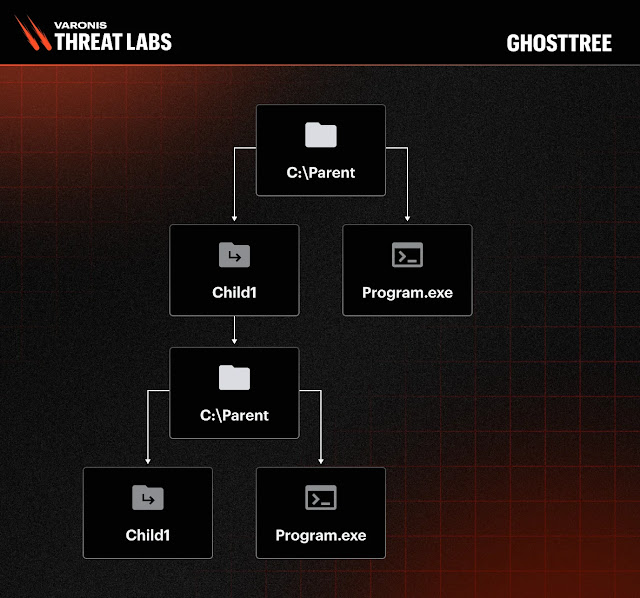
Varonis calculated that a two-branch GhostTree structure can create about 2^126 possible path combinations. That number is so large that a scanner trying to finish every route may never complete the task in a useful time window.
Why this matters for security teams
GhostTree matters because it targets a basic assumption in endpoint scanning: that the file system can be traversed safely and completely. Recursive links break that assumption when tools do not detect loops or cap traversal properly.
Attackers may use the technique after they already have access to a Windows system. They could place a payload in a writable folder, create recursive junctions around it, and rely on scanning instability to reduce the chance of detection.
The technique also shows why security teams cannot depend only on scheduled scans or endpoint file inspection. They need monitoring that can detect unusual file system behavior before a payload runs.
What defenders should monitor
Security teams should look for abnormal junction creation, recursive directory structures, excessive scan duration, scanner hangs, and repeated access to the same file through many different paths. These signals can reveal GhostTree-like activity even when the payload itself has not yet been detected.
- Monitor creation of NTFS junctions in user-writable directories.
- Alert on recursive folder structures that point back to parent paths.
- Watch for endpoint scanner processes that hang or consume unusual resources.
- Compare file access paths that resolve to the same executable or script.
- Review directories where scans fail, timeout, or never finish.
- Investigate malware detections that sit near recently created junctions.
The mklink command reference can help defenders understand how junctions are created and which syntax may appear in command-line telemetry. This is useful for writing detections around suspicious junction activity.
Microsoft patched Defender after the report
Varonis says it reported the issue to Microsoft, but the original ticket was closed with the explanation that bypassing Defender did not cross a defined security boundary. The researchers said Microsoft later patched the recursive scanning behavior anyway.
That sequence matters for defenders because some bypasses may not receive a CVE or a traditional security advisory. Teams still need to treat them seriously when they affect scanning reliability or create a practical blind spot.
Organizations should ensure Defender and other endpoint products remain updated, then test whether their tools handle recursive junctions safely. A patch in one product does not guarantee that every EDR, antivirus engine, backup scanner, or file indexing tool behaves correctly.
How to reduce GhostTree risk
Defenders should focus on both prevention and detection. Limiting where users can write files reduces abuse opportunities, while monitoring junction creation helps catch the technique before it affects security scanning.
- Keep Microsoft Defender and third-party EDR products fully updated.
- Restrict write access in folders where users do not need it.
- Block or alert on unusual junction creation in temporary and user profile paths.
- Configure scanners to detect recursive paths and stop safely.
- Use data-layer monitoring to identify suspicious file access patterns.
- Test backup, DLP, indexing, and EDR tools against recursive junction structures.
Microsoft’s junction documentation also helps administrators distinguish normal file system links from suspicious ones. Legitimate junctions often support known applications or system layouts, while attacker-created junctions may appear suddenly in unusual folders.
Why GhostTree is a warning for endpoint security
GhostTree shows how native operating system features can become evasion tools when security products follow file paths too trustingly. Attackers do not always need to exploit a memory bug or disable an agent if they can make the agent waste time in a loop.
The technique also highlights the value of layered detection. File scanning matters, but it should sit alongside command-line monitoring, file system telemetry, behavior analytics, and data access visibility.
Security teams should treat GhostTree as a defensive testing prompt. If an endpoint tool hangs on recursive junctions, attackers may be able to hide files in a place where protection appears active but does not finish its job.
The best response is to update endpoint tools, detect suspicious junction creation, and investigate any folder that repeatedly causes scanning failures or unusual file traversal behavior.
FAQ
GhostTree is a Windows evasion technique that abuses NTFS junctions to create recursive directory structures. These structures can cause endpoint security scanners to hang and leave files unscanned.
Varonis Threat Labs disclosed GhostTree on May 20, 2026. The researchers said they tested the technique against Microsoft Defender and later saw Microsoft patch the scanning behavior.
Not always. The technique abuses NTFS junctions, which can often be created by a user with write access to a folder. That makes it useful to attackers with limited access.
GhostTree can trap recursive folder scanners in a large or effectively endless path structure. This can cause scans to stall, timeout, or miss malicious files placed nearby.
Defenders should monitor NTFS junction creation, recursive directory structures, scanner hangs, abnormal file traversal, and repeated access to the same file through many different paths.


Read our disclosure page to find out how can you help VPNCentral sustain the editorial team Read more


Improve this guide




User forum
0 messages