
TrapDoor Supply Chain Attack Hits npm, PyPI, and Crates.io With Crypto-Stealing Packages


 8 min. read
  Published on
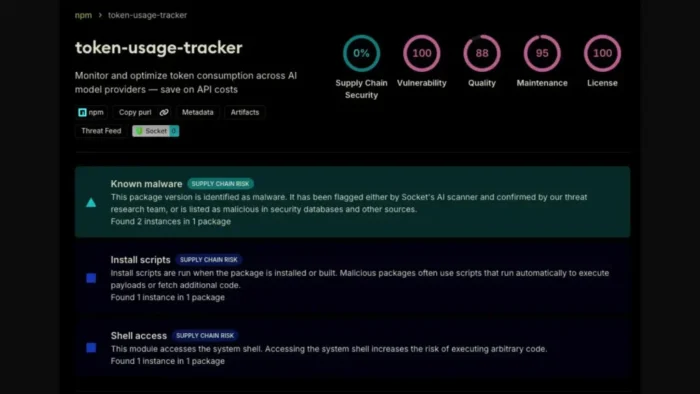
A new software supply chain campaign called TrapDoor is targeting developers through malicious packages published across npm, PyPI, and Crates.io. According to Socket’s TrapDoor research, the campaign spans more than 34 malicious packages and 384 related versions or artifacts across the three open source ecosystems.
The attack focuses on developers working in crypto, DeFi, Solana, Sui, Move, AI, and security tooling. The packages use names that look like normal developer utilities, such as wallet scanners, prompt engineering tools, Solidity helpers, and environment audit packages.

Access content across the globe at the highest speed rate.
70% of our readers choose Private Internet Access
70% of our readers choose ExpressVPN

Browse the web from multiple devices with industry-standard security protocols.

Faster dedicated servers for specific actions (currently at summer discounts)
TrapDoor is not a simple typo-based package scam. It uses different execution methods for each registry, then attempts to steal credentials, wallet data, SSH keys, browser data, API keys, GitHub tokens, AWS credentials, and local development configuration files.
What TrapDoor is trying to steal
TrapDoor targets developer machines because they often contain high-value secrets. A single infected workstation may expose wallet keys, source code access, cloud credentials, SSH access, and CI/CD tokens.
Socket says the earliest observed package was the PyPI package eth-security-auditor, uploaded on May 22, 2026. The campaign then expanded across npm, PyPI, and Crates.io in waves, using related infrastructure and similar behavior across ecosystems.
The most serious risk is not only direct wallet theft. If attackers steal SSH keys, GitHub tokens, or cloud credentials, they may pivot into repositories, deployment environments, private packages, or connected infrastructure.
| Targeted data | Why attackers want it |
|---|---|
| Crypto wallet data | Can expose Sui, Solana, Aptos, or other wallet assets |
| SSH keys | Can allow access to servers, repositories, or internal systems |
| AWS credentials | Can expose cloud resources, storage, and deployment systems |
| GitHub tokens | Can expose private repositories and CI/CD workflows |
| Browser profile data | Can contain saved sessions, local databases, and extension data |
| Environment variables | Often contain API keys, secrets, and service credentials |
How the attack works across three registries
The npm packages use installation-time behavior to run malicious code. The official npm scripts documentation explains that lifecycle scripts can run during package operations such as install, prepare, and publish, which makes them a known risk area when a package is malicious.
In the TrapDoor campaign, the npm side uses postinstall execution and a shared payload called trap-core.js. Socket says that payload scans for secrets, validates some stolen credentials through live API calls, and attempts to maintain access through developer-environment hooks.
The Rust packages use Cargo build scripts. The Cargo build scripts documentation explains that a package can include a build script that Cargo compiles and runs before the package itself is built, which attackers can abuse if a crate is malicious.
| Ecosystem | Execution path | Main risk |
|---|---|---|
| npm | Postinstall scripts | Credential harvesting and persistence on developer machines |
| PyPI | Import-time execution | Remote payload loading through a developer workflow |
| Crates.io | Rust build.rs scripts | Wallet and keystore theft during the build process |
AI coding tools are part of the target surface
TrapDoor also attempts to abuse AI coding workflows. The campaign uses project files such as .cursorrules and CLAUDE.md, which developers often use to guide AI assistants inside a codebase.
Socket’s analysis says the attacker used hidden zero-width Unicode characters and AI-facing instructions to make malicious behavior look like a security scan or developer automation task. This makes the campaign notable because it targets not only package managers but also the tools developers use around them.
The same attacker infrastructure was also tied to GitHub activity. Socket reported that the attacker account opened pull requests against AI and developer tooling projects, trying to introduce files that appeared to define project standards or build verification guidance.
Why the campaign is dangerous even with low-volume packages
Many TrapDoor packages appear to have been created for targeted reach rather than mass downloads. That still creates serious risk because the names were chosen for communities where valuable secrets are common.
A package named like a wallet checker, DeFi scanner, prompt tool, or Move build helper may attract exactly the kind of developer the attacker wants. The attack does not need millions of downloads if it lands on one machine with high-value keys or deployment access.
This is why cross-registry visibility matters. A suspicious PyPI package may look isolated until related npm and Crates.io packages reveal the same infrastructure, naming pattern, payload behavior, and target profile.
What developers should check now
Developers should review dependency files, lockfiles, package manager logs, and recent local installs from May 22, 2026 onward. The review should focus on packages that look like crypto security tools, DeFi scanners, wallet utilities, AI prompt helpers, or Sui and Move build helpers.
Teams should also check whether any affected developer machines stored wallet keys, cloud credentials, GitHub tokens, SSH keys, browser profiles, or CI/CD secrets. If exposure seems possible, treat those credentials as compromised and rotate them.
Because npm lifecycle scripts can run during install, organizations should review whether they need scripts enabled by default. The npm documentation can help teams understand where these scripts run and why they deserve extra review in sensitive environments.
- Search lockfiles and dependency manifests for suspicious crypto, DeFi, AI, wallet, and build-helper package names.
- Review recent package installs across developer laptops and CI runners.
- Rotate GitHub tokens, cloud keys, SSH keys, and wallet credentials if exposure is possible.
- Check for unexpected
.cursorrules,CLAUDE.md, Git hooks, shell hooks, cron entries, and systemd services. - Audit outbound connections from build machines and developer workstations.
- Review pull requests that add AI assistant instruction files to active repositories.
Rust and Python teams should review build and import behavior
Rust developers should treat unknown crates with build.rs files as higher risk, especially when the crate relates to wallets, Sui, Move, DeFi, or developer automation. The Cargo documentation notes that build scripts can perform host-specific setup before compilation, which makes review important before adding new dependencies.
Python teams should review new PyPI packages that run code on import or fetch remote content during normal use. In this campaign, the PyPI side reportedly used import-time execution to load a remote JavaScript payload, allowing the attacker to change behavior outside the package release itself.
Security teams should also watch for developer machines that have Node.js installed even when the project is mainly Python or Rust. Cross-language payload behavior can make an attack harder to spot if teams only monitor one ecosystem.
How teams can reduce package supply chain risk
TrapDoor shows why package review should include names, maintainers, install behavior, scripts, build files, and network access. A dependency that looks useful can still run code before the developer ever calls one of its functions.
Organizations should add controls around new dependencies, especially in crypto, AI, and security projects. Reviewers should ask why a package needs install scripts, build scripts, remote payloads, or AI assistant configuration files.
For high-risk repositories, teams should require approval for new dependencies and block unreviewed packages in CI. They should also monitor package additions in pull requests and scan for suspicious files that can affect AI coding assistants.
| Risk area | Recommended control |
|---|---|
| New dependencies | Require review before merge |
| Install scripts | Flag packages with lifecycle scripts for extra review |
| Build scripts | Inspect Rust build.rs files before approving crates |
| Secrets on developer machines | Move long-lived secrets out of local environments where possible |
| AI assistant files | Review .cursorrules, CLAUDE.md, and similar files like code |
| CI/CD access | Use short-lived tokens and least-privilege permissions |
TrapDoor shows where supply chain attacks are heading
TrapDoor combines familiar package malware tactics with newer attacks against AI coding workflows. It uses package installation, build systems, import behavior, hidden instructions, and developer tooling habits as one connected attack surface.
The main lesson for developers is clear: package names and project descriptions are not enough. Teams need to inspect how a dependency behaves during install, build, import, and AI-assisted development.
As attackers continue to target open source developers, the safest response is a mix of dependency review, fast credential rotation, strong CI controls, secret scanning, and careful treatment of AI instruction files inside repositories.
FAQ
TrapDoor is a software supply chain campaign that uses malicious packages across npm, PyPI, and Crates.io to steal developer secrets, crypto wallet data, SSH keys, cloud credentials, GitHub tokens, browser data, and environment variables.
TrapDoor targeted npm, PyPI, and Crates.io. Socket said the campaign involved more than 34 malicious packages and 384 related versions or artifacts across those ecosystems.
Developers in crypto, DeFi, Solana, Sui, Move, AI, and security tooling communities face the highest risk because the package names were designed to look useful to those groups.
TrapDoor used files such as .cursorrules and CLAUDE.md to target AI-assisted development workflows. The campaign attempted to make malicious instructions look like normal project guidance or security automation.
Developers should remove suspicious packages, check lockfiles and install logs, rotate exposed credentials, review SSH keys and wallet data, inspect AI assistant configuration files, and audit developer machines for persistence mechanisms such as Git hooks, shell hooks, cron jobs, and systemd services.


Read our disclosure page to find out how can you help VPNCentral sustain the editorial team Read more


Improve this guide


User forum
0 messages