
New PureLogs Variant Uses MsBuild.exe Process Hollowing to Steal Windows Data


 9 min. read
  Published on
A new PureLogs phishing campaign is using malicious JavaScript, hidden PowerShell execution, and process hollowing through MsBuild.exe to steal sensitive data from Windows systems. The campaign starts with purchase-order-themed emails that try to convince victims to open a RAR archive containing an obfuscated JavaScript file.
Fortinet’s FortiGuard Labs analysis says the attack chain drops a PowerShell script, loads .NET modules in memory, hollows a legitimate MsBuild.exe process, and then runs a PureLogs plugin that collects credentials, browser data, cryptocurrency wallet files, and other information.

Access content across the globe at the highest speed rate.
70% of our readers choose Private Internet Access
70% of our readers choose ExpressVPN

Browse the web from multiple devices with industry-standard security protocols.

Faster dedicated servers for specific actions (currently at summer discounts)
The campaign matters because it uses trusted Windows and .NET components to make detection harder. Instead of running the final payload as a clear standalone executable, the malware injects it into a legitimate process that many development and enterprise environments already allow.
How the PureLogs Attack Starts
The attack begins with a fake purchase order email. Fortinet observed an attached archive named PO 2026-P0803.rar, which carried a malicious JavaScript file called kpankocrs.js.
When the victim opens the script, it decrypts PowerShell code and writes it to a randomly named .ps1 file in the C:\Temp folder. The script then runs PowerShell with flags that bypass execution policy, hide the window, and avoid loading a user profile.
From there, the PowerShell stage decodes and decrypts more content. It loads .NET modules directly in memory, which helps the campaign reduce obvious files on disk and avoid simpler signature-based detection.
PureLogs Infection Chain at a Glance
| Stage | What Happens | Why It Matters |
|---|---|---|
| Phishing email | The victim receives a fake purchase order message with a RAR attachment. | Business-themed lures increase the chance that employees will open the file. |
| JavaScript execution | The archive contains an obfuscated JavaScript file. | The script starts the malware chain through Windows scripting components. |
| PowerShell stage | The script drops and executes an encrypted PowerShell file. | The attack moves into memory-based execution. |
| .NET loader | The PowerShell stage loads .NET modules in memory. | The payload avoids a simple file-on-disk execution path. |
| Process hollowing | The malware injects code into MsBuild.exe. | The final payload runs inside a trusted Windows process. |
| Data theft | PureLogs steals browser, crypto wallet, app, and system data. | Attackers can use the stolen data for account takeover and fraud. |
Why MsBuild.exe Is Useful to Attackers
MsBuild.exe is a legitimate Microsoft build tool. The Microsoft MSBuild documentation describes the Microsoft Build Engine as a platform for building applications, and notes that Visual Studio uses MSBuild while MSBuild can also run without Visual Studio.
That legitimacy makes MsBuild.exe attractive for abuse. If defenders do not monitor how it starts, what launches it, and what network activity follows, malicious code can hide behind a process name that looks normal at first glance.
In this campaign, the loader uses the hardcoded path C:\Windows\Microsoft.NET\Framework\v4.0.30319\MsBuild.exe as the hollowed process. Fortinet reported that the PowerShell stage invokes .NET code that creates a suspended MsBuild.exe process and injects the next module into it.
How Process Hollowing Helps PureLogs Evade Detection
Process hollowing is a form of process injection. An attacker starts a legitimate process in a suspended state, removes or replaces parts of its memory, writes malicious code into that process, and then resumes execution.
MITRE ATT&CK describes process hollowing as a technique where attackers inject code into suspended and hollowed processes to evade process-based defenses. Fortinet saw APIs associated with this pattern, including CreateProcessA, ZwUnmapViewOfSection, WriteProcessMemory, SetThreadContext, and ResumeThread.
The result is a deceptive process tree. Security tools and analysts may see MsBuild.exe running, but the code inside that process no longer matches normal build activity.
What PureLogs Steals
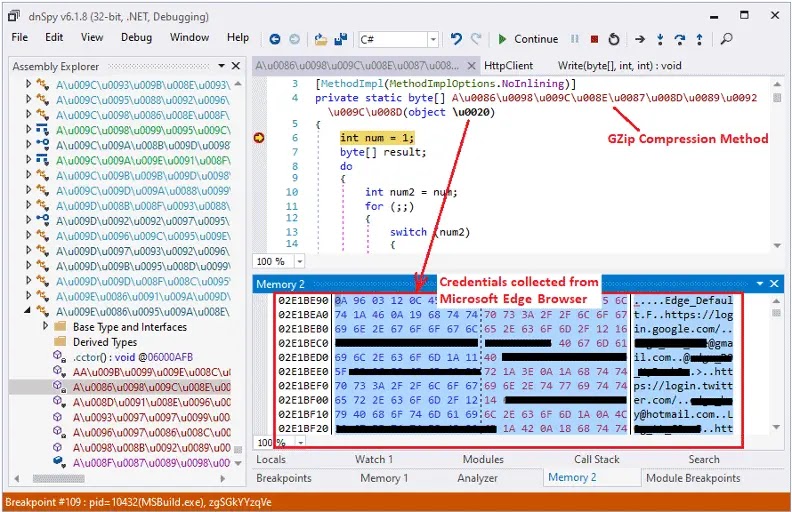
PureLogs is a .NET-based information stealer. Once loaded by the downloader module, it collects system details and sensitive application data before compressing, encrypting, and sending the results to the command-and-control server.
The malware captures a screenshot, antivirus product details, operating system information, processor details, username, screen resolution, memory size, clipboard data, and the current date and time. It also targets browsers, messaging apps, crypto wallets, email clients, FTP tools, and VPN clients.
| Target Category | Examples of Data or Apps Targeted |
|---|---|
| Browsers | Saved logins, cookies, history, autofill data, payment data, and session tokens |
| Cryptocurrency wallets | Wallet files, private keys, cached sessions, wallet databases, and transaction-related data |
| Email clients | Microsoft Outlook, Foxmail, MailBird, and MailMaster credentials |
| File transfer tools | FileZilla credentials and configuration data |
| VPN clients | OpenVPN and ProtonVPN data |
| System data | Screenshot, OS version, username, clipboard, installed security software, and hardware details |
Encrypted C2 Traffic Makes Analysis Harder
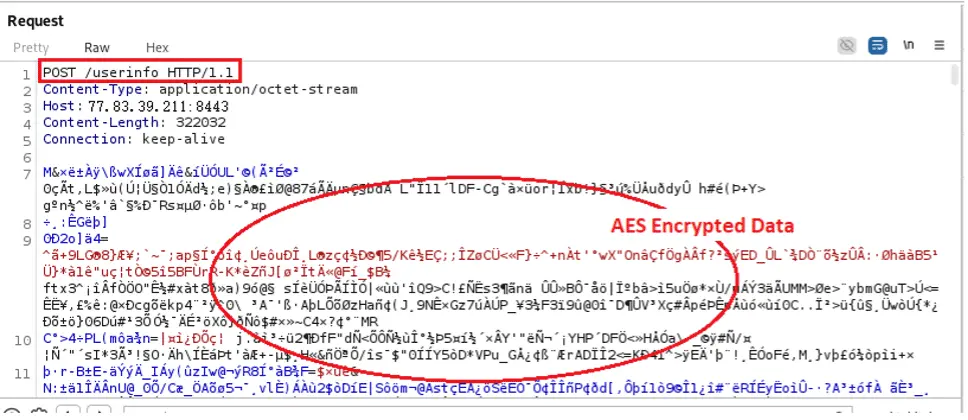
The downloader contacts a command-and-control server and asks for plugin modules. Fortinet observed requests to a server at 77[.]83[.]39[.]211 over port 8443.
The malware sends a GET request to /ping and then posts encrypted data to /plugin to retrieve the PureLogs module. The collected data later travels through endpoints such as /userinfo, /browser, /discord, /crypto, and /application.
The FortiGuard Labs report says the plugin module is protected with commercial .NET obfuscation tools such as .NET Reactor or IntelliLock. That protection makes reverse engineering harder and slows down security analysis.
Key Indicators From the Campaign
| Type | Indicator | Context |
|---|---|---|
| File | kpankocrs.js | Obfuscated JavaScript file in the phishing attachment |
| File | ps_qnSEGUkU0LIY_1777592585573.ps1 | Dropped PowerShell stage |
| File | zgSGkYYzqVe.dll | PureLogs plugin module |
| Process | MsBuild.exe | Legitimate process hollowed by the malware |
| C2 | 77[.]83[.]39[.]211:8443 | Command-and-control server observed by Fortinet |
| Technique | Process hollowing | Memory injection used to run the payload inside MsBuild.exe |
Why This Campaign Is Harder to Spot
The PureLogs chain combines several evasion layers. The phishing file is obfuscated, the PowerShell stage is encrypted and decoded at runtime, the .NET loader runs in memory, and the final payload executes from a hollowed trusted process.
The campaign also blends into common enterprise noise. Purchase orders are normal business documents, PowerShell exists on Windows endpoints, and MsBuild.exe may appear legitimate on developer machines or systems with .NET tooling.
MITRE ATT&CK’s process hollowing entry explains why this approach can evade process-based defenses: malicious code runs inside the address space of another live process. That means defenders need memory, parent-child process, and behavior-based telemetry, not only file names.
Detection Ideas for Security Teams
- Block or quarantine JavaScript files inside email attachments and compressed archives.
- Watch for wscript.exe launching PowerShell with hidden windows or execution policy bypass flags.
- Alert when PowerShell loads .NET assemblies in memory from suspicious scripts.
- Monitor MsBuild.exe when it starts without normal build arguments or from unusual parent processes.
- Investigate MsBuild.exe making outbound HTTPS connections to unknown servers.
- Detect process hollowing patterns involving suspended processes and memory writes.
- Search for the observed C2 endpoints and PureLogs-related file names in endpoint logs.
Microsoft’s MSBuild documentation makes clear that msbuild.exe has a legitimate development purpose. That is why organizations should avoid blindly blocking it everywhere and instead apply context-aware controls based on parent process, command line, location, and network behavior.
Developer systems may need MsBuild.exe, but finance, HR, and general office endpoints often do not. Limiting where MsBuild.exe can run can reduce the attack surface without disrupting all users.
How Organizations Can Reduce the Risk
Security teams should focus first on the delivery vector. Purchase-order-themed phishing works because it blends into everyday business communication, so email security controls and employee reporting workflows matter.
Organizations should also harden Windows scripting. If users do not need JavaScript execution through Windows Script Host, administrators can restrict wscript.exe and cscript.exe through application control tools. PowerShell logging, constrained language mode, and script block logging can help reveal later stages.
Endpoint tools should treat MsBuild.exe as a process that needs monitoring, not automatic trust. Process hollowing through a legitimate tool can hide malware, but the surrounding behavior still leaves useful clues.
Why PureLogs Remains a Serious Threat
PureLogs is dangerous because it targets data that attackers can monetize quickly. Browser cookies and session tokens can help bypass passwords. Crypto wallet files can lead directly to financial theft. VPN and email credentials can support deeper compromise inside a company.
Commodity stealers also spread quickly because many actors can buy, rent, or modify them. That creates more campaigns, more delivery themes, and more chances for a single employee click to turn into a broader incident.
The uploaded campaign summary also highlights the same chain: phishing, obfuscated JavaScript, PowerShell, in-memory .NET loading, MsBuild.exe process hollowing, and PureLogs data theft across browsers, wallets, email clients, FTP tools, and VPN clients. :contentReference[oaicite:0]{index=0}
FAQ
The new PureLogs campaign is a phishing attack that uses purchase-order-themed emails, an obfuscated JavaScript attachment, hidden PowerShell execution, in-memory .NET loaders, and MsBuild.exe process hollowing to deploy an information stealer on Windows systems.
PureLogs uses MsBuild.exe because it is a legitimate Microsoft build tool. By injecting malware into MsBuild.exe through process hollowing, the payload can hide inside a trusted process and make detection harder.
PureLogs can steal browser credentials, cookies, session tokens, autofill data, payment information, cryptocurrency wallet files, email client credentials, FTP credentials, VPN data, screenshots, clipboard content, and system details.
Process hollowing is a technique where malware starts a legitimate process in a suspended state, replaces memory inside that process with malicious code, and then resumes execution so the malware runs under the trusted process name.
Organizations can monitor for JavaScript attachments, wscript.exe launching hidden PowerShell, PowerShell loading .NET assemblies in memory, MsBuild.exe spawned by unusual parent processes, MsBuild.exe network connections, and process hollowing behavior involving suspended processes and memory writes.
Companies can block JavaScript attachments, inspect compressed archives, restrict Windows Script Host where possible, enable PowerShell logging, apply application control to MsBuild.exe, train users on purchase-order phishing, and monitor outbound traffic from unusual processes.


Read our disclosure page to find out how can you help VPNCentral sustain the editorial team Read more


Improve this guide

User forum
0 messages