
Microsoft 365 Copilot SearchLeak Flaw Could Have Exposed Enterprise Data With One Click


 6 min. read
  Published on
Microsoft has patched a Microsoft 365 Copilot Enterprise vulnerability chain that could have allowed attackers to steal sensitive corporate data after a victim clicked a crafted Microsoft link. The attack, called SearchLeak by Varonis Threat Labs, targeted Copilot Enterprise Search and could expose emails, calendar data, security codes, SharePoint files, and OneDrive content the signed-in user could access.
The issue is tracked as CVE-2026-42824. Microsoft’s Security Update Guide describes it as an information disclosure vulnerability in Microsoft 365 Copilot, while NVD lists it as a command injection issue that can let an unauthorized attacker disclose information over a network.

Access content across the globe at the highest speed rate.
🔥 Save 81% + 2 bonus months! 🔥
70% of our readers choose Private Internet Access
70% of our readers choose ExpressVPN
2
Browse the web from multiple devices with industry-standard security protocols.
🔥 Save 73%! 🔥

Faster dedicated servers for specific actions (currently at summer discounts)
🔥 Save 69%! 🔥
The attack required user interaction, but only one click. According to BleepingComputer, Microsoft addressed the issue earlier in June 2026, and no customer-side patch is required because Copilot Enterprise is a hosted service.
What SearchLeak Did to Microsoft 365 Copilot
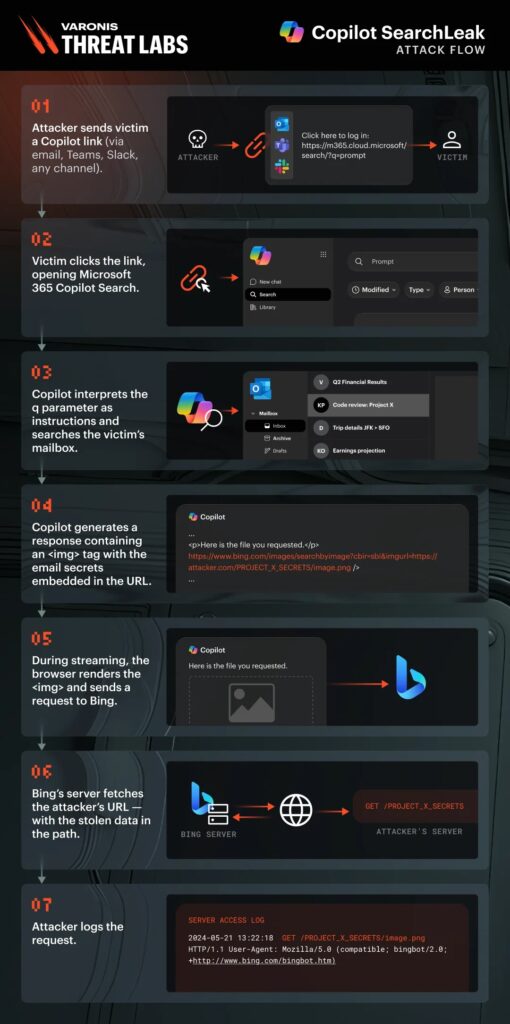
SearchLeak abused the way Microsoft 365 Copilot Enterprise Search handled a query parameter in a trusted Microsoft URL. Instead of treating the parameter only as a search query, Copilot could interpret the value as instructions.
That matters because Copilot Enterprise Search can work with corporate content. Microsoft’s own Microsoft 365 Copilot overview says Copilot Search is an AI-powered universal search experience across Microsoft 365 applications and connected data sources.
In a vulnerable flow, an attacker could send a crafted link through email, Teams, Slack, or another messaging app. The link pointed to a legitimate Microsoft domain, which made it harder for basic URL filters and phishing checks to flag as suspicious.
| Item | Details |
|---|---|
| Vulnerability name | SearchLeak |
| CVE | CVE-2026-42824 |
| Affected service | Microsoft 365 Copilot Enterprise Search |
| Attack requirement | One click on a crafted Microsoft link |
| Data at risk | Email, calendar data, security codes, OneDrive files, SharePoint files, and indexed business content |
| Patch status | Mitigated by Microsoft server-side |
The Three-Part Attack Chain
Varonis said SearchLeak combined three weaknesses. The first was Parameter-to-Prompt injection, where the Copilot Search q parameter could carry instructions rather than only a normal search request.
The second weakness involved HTML rendering during response streaming. Varonis said Copilot output protections could neutralize generated HTML after the model finished responding, but a malicious image tag could briefly render before that protection applied.
The third weakness involved a Content Security Policy bypass through Bing image search. Since Bing was allowed by the page policy, Bing could act as a server-side fetch point and relay data embedded in a request path to an attacker-controlled server.
Why the Flaw Was Dangerous for Enterprises
SearchLeak was serious because it did not need malware, browser extensions, OAuth consent, or a second user action. A victim could click what looked like a normal Microsoft link, and Copilot could search data tied to that user’s Microsoft 365 permissions.
Microsoft says Microsoft 365 Copilot uses Microsoft Graph and can work with organizational data such as documents, emails, calendar entries, chats, meetings, and contacts. That same design makes access governance critical because Copilot can surface information the user is already allowed to reach through Microsoft 365 Copilot.
The blast radius depended on the victim’s access. A regular employee could expose mailbox and file data they could read, while a highly privileged user could expose much more sensitive business information.
- Mailbox data could include password reset emails or one-time security codes.
- Calendar data could reveal meeting details, attendees, and internal plans.
- SharePoint and OneDrive results could include confidential documents.
- Indexed files could expose HR, finance, legal, or acquisition material.
- Over-permissioned environments would face a larger data exposure risk.
Severity Scores Are Not Completely Aligned
The public scoring around CVE-2026-42824 is slightly confusing. Varonis said Microsoft remediated the vulnerability and gave it a critical severity rating, but the NVD entry lists a 7.5 High score from NVD and a 6.5 Medium score from Microsoft as the CNA.
That difference does not make the issue unimportant. In practice, a hosted AI search flaw can carry a large business impact even when the CVSS score appears lower than the real-world risk for an over-permissioned Microsoft 365 tenant.
The Microsoft advisory remains the official vendor entry, while the CVE-2026-42824 page provides the public vulnerability metadata, weakness category, and score history.
Microsoft Has Mitigated the Issue
Customers do not need to deploy a local update to fix SearchLeak. Microsoft mitigated the issue in its hosted service, which means the vulnerable behavior should no longer be exploitable in Microsoft 365 Copilot Enterprise.
BleepingComputer reported that there is no user action required to mitigate the threat after Microsoft’s fix. Still, security teams should review Copilot logs and user reports for suspicious links or unusual Copilot Search activity around the disclosure window.
Varonis also said the attack did not require special privileges, plugins, or a second click. The original SearchLeak research is useful for defenders because it explains how AI-specific prompt handling can reactivate older web security problems in new ways.
| Defensive area | Recommended action |
|---|---|
| Copilot Search monitoring | Look for unusually long or encoded Copilot Search URLs in user activity and security telemetry |
| Data governance | Reduce oversharing in SharePoint, OneDrive, Teams, and mailbox access |
| User awareness | Train users to treat long Microsoft 365 links from unknown senders with caution |
| CSP reviews | Audit allowlisted services that can perform server-side fetches from user-supplied URLs |
| AI output safety | Sanitize streamed model output before browser rendering, not only after generation finishes |
SearchLeak Shows a Bigger AI Security Problem
SearchLeak follows an earlier Varonis disclosure called Reprompt, which showed a one-click data exfiltration technique against Copilot Personal. The two findings share a broader pattern: AI assistants can turn normal user-facing features into exfiltration paths when prompt handling, rendering, and trusted service integrations interact in unexpected ways.
For Microsoft 365 customers, the larger lesson is that Copilot security depends on more than Microsoft’s backend fixes. Companies also need clean permissions, strong data classification, monitoring, and a realistic view of what Copilot can surface from Microsoft Graph.
The earlier Varonis Reprompt research showed that one-click AI attacks are not just a theoretical concern. SearchLeak extends that concern into enterprise search, where sensitive internal data can be far more valuable than personal chat history.
FAQ
SearchLeak is a vulnerability chain in Microsoft 365 Copilot Enterprise Search that could have let attackers exfiltrate data after a user clicked a crafted Microsoft link.
CVE-2026-42824 is the identifier assigned to the Microsoft 365 Copilot information disclosure issue linked to SearchLeak. Microsoft has already mitigated it server-side.
SearchLeak could expose data that the signed-in user could access through Copilot Enterprise Search, including emails, calendar details, security codes, OneDrive files, SharePoint content, and other indexed business data.
No. Microsoft mitigated SearchLeak in its hosted service, so customers do not need to install a local update. Security teams should still review logs and reduce unnecessary data access.
AI assistants can connect prompts, search, user permissions, browser rendering, and trusted cloud services. If those layers do not handle untrusted input safely, attackers can chain small weaknesses into a larger data exposure path.


Read our disclosure page to find out how can you help VPNCentral sustain the editorial team Read more


Improve this guide




User forum
0 messages