
Xctdoor Backdoor Uses Fake Resume LNK Files, PowerShell, VBScript, and BAT Scripts


 9 min. read
  Published on
A new Xctdoor backdoor campaign is using malicious Windows shortcut files disguised as resumes to target corporate users. The attack chain abuses LNK files, PowerShell scripts, VBScript, BAT files, scheduled tasks, startup shortcuts, and DLL side-loading to gain persistence and run the backdoor inside a legitimate process.
The campaign was detailed by AhnLab ASEC, which said the malicious files use names that resemble real resume documents, often including company names and job titles. When opened, the file displays a decoy resume while the malware chain runs silently in the background.

Access content across the globe at the highest speed rate.
🔥 Save 81% + 2 bonus months! 🔥
70% of our readers choose Private Internet Access
70% of our readers choose ExpressVPN
2
Browse the web from multiple devices with industry-standard security protocols.
🔥 Save 73%! 🔥

Faster dedicated servers for specific actions (currently at summer discounts)
🔥 Save 69%! 🔥
This makes the attack especially risky for recruitment, HR, sales, customer support, and business teams that regularly receive external documents. A user may think they opened a normal resume, while the system has already created scripts, registered a scheduled task, downloaded payloads, and prepared the Xctdoor backdoor.
How the Xctdoor resume attack starts
The initial file is a Windows shortcut, not a normal document. Attackers disguise it with resume-themed naming so it looks relevant to business workflows and less likely to raise suspicion.
After execution, the LNK file opens a legitimate-looking decoy document. At the same time, embedded commands create multiple script files in C:\Users\Public\Videos\, including BAT, PowerShell, and VBScript files with random names.
The infection chain then uses those scripts to move into the next stage. A PowerShell script registers a recurring task, while VBScript and BAT files help execute additional commands and download more components from attacker-controlled infrastructure.
| Stage | What happens | Why it matters |
|---|---|---|
| Initial lure | A resume-themed LNK file is opened | The victim believes they are viewing a normal job document |
| Decoy document | A real-looking resume appears on screen | The visible file lowers user suspicion |
| Script creation | BAT, PS1, and VBS files are created in a public folder | The attack chain spreads execution across several script types |
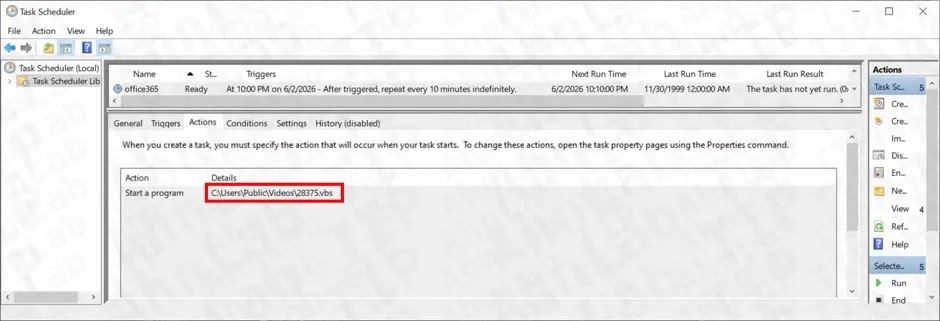
| Persistence | A scheduled task named office365 runs every 10 minutes | The malware can restart after reboot or process termination |
| Backdoor launch | Xctdoor is loaded through DLL side-loading | The payload runs inside a legitimate process |
Attackers use scheduled tasks for persistence
ASEC said the malware registers a Task Scheduler job named “office365” to run a VBScript file every 10 minutes. The name is designed to look like a familiar business service, which can make it easier to miss during a quick review.
This behavior aligns with the MITRE ATT&CK Scheduled Task technique, where attackers abuse Windows Task Scheduler to execute malicious code at set intervals or during recurring system activity.
In this case, the recurring task gives the malware a simple persistence channel. Even if one part of the infection stops, the scheduled task can restart the chain and keep the attacker’s access alive.
- Check Task Scheduler for tasks named like common cloud or office services.
- Investigate scheduled tasks that run VBS, BAT, or PowerShell files from user-writable folders.
- Review tasks that trigger every few minutes without a clear business reason.
- Remove suspicious tasks only after collecting evidence needed for incident response.
PowerShell, VBScript, and BAT files work together
The attack does not rely on a single executable at the beginning. Instead, it chains Windows scripting tools together, which can make detection harder if security tools focus mainly on standalone malware files.
The BAT file uses curl to download additional files from an external server. Some files arrive Base64-encoded, and the chain later decodes them into additional PowerShell content, including p2.ps1 under C:\Users\Public\Pictures\.
Microsoft’s PowerShell security guidance highlights controls such as script block logging, module logging, AMSI support, and application control. These features can help defenders capture suspicious scripts and inspect what actually ran on the endpoint.
DLL side-loading hides the Xctdoor payload
The second-stage script creates several components, including ProximityUxHost.exe, ProximityCommon.dll, settings.dat, and MicrosoftBing.lnk. The chain then uses MicrosoftBing.lnk to launch ProximityUxHost.exe.
ProximityUxHost.exe is abused as the legitimate host process, while ProximityCommon.dll is loaded alongside it. This is the DLL side-loading stage, where a trusted executable loads a malicious DLL placed in the same execution path.
MITRE ATT&CK DLL Side-Loading describes how attackers plant a malicious DLL next to a legitimate application and then invoke that application to execute the payload. In this campaign, settings.dat contains the Xctdoor-family backdoor that is injected into the legitimate process.
| Observed component | Role in the attack |
|---|---|
| Resume-themed LNK file | Initial lure and execution trigger |
| Random .bat files | Script execution and payload download support |
| Random .ps1 files | PowerShell staging and payload handling |
| Random .vbs files | Scheduled task execution bridge |
| p2.ps1 | Second-stage decoding, decryption, and component setup |
| ProximityUxHost.exe | Legitimate executable abused for side-loading |
| ProximityCommon.dll | Malicious DLL loaded by the legitimate executable |
| settings.dat | Xctdoor-family backdoor component |
| MicrosoftBing.lnk | Startup shortcut used to continue execution |
Why this campaign is hard to detect
The campaign combines several layers of disguise. It uses a fake resume name, opens a decoy document, creates randomly named scripts, registers a task with a business-like name, and launches the backdoor through a legitimate executable.
Each individual step may look less suspicious than a direct malware launch. Together, they give attackers a multi-stage path to persistence, payload execution, and remote access.
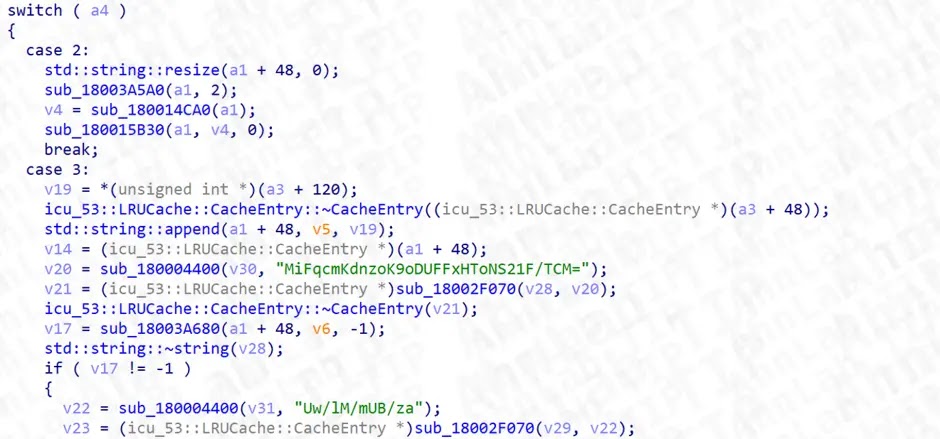
The ASEC analysis warns that the sequence is more difficult to detect than a single malicious file because it uses legitimate-looking documents, service-like task names, and legitimate executable loading behavior.
What Xctdoor can give attackers
Xctdoor is a backdoor family that can allow attackers to maintain access to a compromised system and communicate with a command-and-control server. ASEC said the malware attempted to contact an external C2 server after execution.
Once a backdoor is active, attackers may use the compromised machine for follow-on activity, depending on the access level and environment. That can include reconnaissance, data theft, lateral movement preparation, or delivery of more malware.
This makes early containment important. Teams should not treat the incident as a simple suspicious attachment if scheduled tasks, startup shortcuts, side-loaded DLLs, or Xctdoor components are present.
Where defenders should look first
Security teams should review C:\Users\Public\Videos\ for randomly named BAT, PS1, and VBS files. They should also check C:\Users\Public\Pictures\ for p2.ps1 or other unexpected PowerShell scripts created around the time the suspicious file was opened.
ASEC also recommends checking the affected user profile path C:\Users\{User}\AppData\Local\Packages\Microsoft.BingSearch365_8wekyb3d8bbwe\AppData\ for suspicious files such as ProximityCommon.dll, settings.dat, and MicrosoftBing.lnk.
Task Scheduler review is equally important. The Scheduled Task technique is often used for persistence, so defenders should investigate tasks that run scripts from public folders, user folders, temporary directories, or unusual package paths.
- Search for office365 scheduled tasks that execute VBS or BAT files.
- Look for newly created scripts under C:\Users\Public\Videos\ and C:\Users\Public\Pictures\.
- Check startup folders for MicrosoftBing.lnk or other suspicious shortcuts.
- Hunt for ProximityCommon.dll and settings.dat outside expected software directories.
- Review process chains where ProximityUxHost.exe launches from unusual locations.
- Inspect outbound traffic from affected systems to unknown external servers.
How organizations can reduce exposure
Companies that handle many external documents should tighten attachment workflows. HR teams can require applicants to upload resumes through a portal instead of sending executable or archive attachments by email.
Administrators can also use application control policies to block LNK execution from untrusted locations, prevent scripts from running from public directories, and restrict unknown executables in user-writable paths.
PowerShell visibility matters as well. PowerShell script block logging can help defenders reconstruct suspicious commands, while AMSI integration can give security tools more visibility into script content before execution.
| Defensive action | Purpose |
|---|---|
| Block LNK files from email attachments | Reduce shortcut-based execution risk |
| Use application control | Prevent scripts and binaries from running in risky paths |
| Enable script logging | Capture PowerShell activity for investigation |
| Audit scheduled tasks | Find recurring malware execution paths |
| Monitor DLL loads | Detect suspicious side-loading behavior |
| Train high-risk teams | Help HR, sales, and support staff spot disguised executables |
Incident response steps for suspected Xctdoor infections
If an organization finds signs of this campaign, it should isolate the affected endpoint before removing files. Isolation helps stop C2 communication and preserves evidence for a proper investigation.
Responders should collect the original LNK file, script files, scheduled task details, startup entries, process trees, DLL load events, and network indicators. This helps confirm whether Xctdoor executed or whether the attack stopped at an earlier stage.
Teams should also review DLL loading behavior using the DLL Side-Loading technique as a guide. Legitimate executables loading DLLs from odd directories can reveal payload execution that basic file-name checks may miss.
- Disconnect the affected endpoint from the network.
- Preserve the suspected LNK file and created scripts for analysis.
- Export the office365 scheduled task details before deletion.
- Check startup entries and remove malicious shortcuts after evidence collection.
- Scan for ProximityCommon.dll, settings.dat, and p2.ps1.
- Review outbound traffic and block confirmed C2 infrastructure.
- Reset exposed credentials if the endpoint handled sensitive systems or accounts.
FAQ
Xctdoor is a backdoor malware family that can give attackers ongoing access to a compromised Windows system. In this campaign, it is delivered through fake resume LNK files and executed through DLL side-loading.
The attack starts when a victim opens a malicious LNK file disguised as a resume. The shortcut displays a decoy document while creating BAT, PowerShell, and VBScript files, registering a scheduled task, downloading additional components, and launching the Xctdoor payload.
Resume-themed LNK files are dangerous because they look like normal business documents but can execute embedded commands. This makes them effective against HR, recruiting, sales, and support teams that often open external files.
Defenders should look for random BAT, PS1, and VBS files under C:\Users\Public\Videos\, p2.ps1 under C:\Users\Public\Pictures\, suspicious office365 scheduled tasks, MicrosoftBing.lnk, ProximityCommon.dll, and settings.dat in unusual AppData package paths.
Organizations can block LNK files from email attachments, use application control, restrict script execution from public and user-writable folders, enable PowerShell logging, monitor scheduled tasks, and require resume submissions through trusted portals instead of email attachments.


Read our disclosure page to find out how can you help VPNCentral sustain the editorial team Read more


Improve this guide




User forum
0 messages