
SmartApeSG Hackers Abused Okendo Reviews Widget to Target E-Commerce Visitors


 6 min. read
  Published on

Hackers linked to SmartApeSG injected malicious JavaScript into the Okendo Reviews widget, turning a trusted third-party e-commerce script into a malware delivery point for online shoppers. The campaign was documented by Zscaler ThreatLabz, which first spotted unusual SmartApeSG activity on May 14, 2026.
The attack mattered because Okendo Reviews is widely used on online stores, including homepages, product pages, and review submission pages. Okendo describes itself as a customer marketing platform for e-commerce brands, and Zscaler said the affected widget is used by more than 18,000 brands.

Access content across the globe at the highest speed rate.
🔥 Save 81% + 2 bonus months! 🔥
70% of our readers choose Private Internet Access
70% of our readers choose ExpressVPN
2
Browse the web from multiple devices with industry-standard security protocols.
🔥 Save 73%! 🔥

Faster dedicated servers for specific actions (currently at summer discounts)
🔥 Save 69%! 🔥
Zscaler said the malicious script has since been removed after the incident was reported to Okendo. However, the compromise still shows how one popular third-party widget can expose many downstream websites without attackers needing to break into each store separately.
How the Okendo Reviews supply chain attack worked
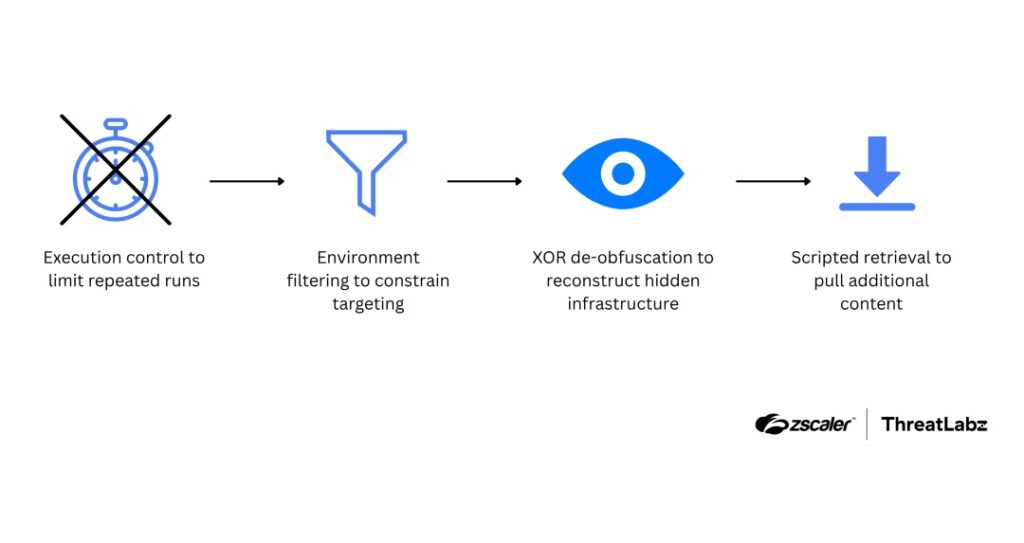
The malicious JavaScript did not immediately drop malware on every visitor. Instead, it acted as a staged loader that checked the browser environment before deciding whether to continue.
The script used localStorage to track whether it had already run on a device. This helped limit repeated execution and reduced the chance that researchers or site owners would see the same behavior again during casual testing.
It also checked the browser’s User-Agent string and filtered out mobile users. Zscaler said this behavior matched later ClickFix-style infection steps, which rely on desktop users following Windows-based instructions.
| Attack element | Details |
|---|---|
| Threat actor | SmartApeSG, also tracked as ZPHP or HANEYMANEY |
| Compromised component | Okendo Reviews widget script |
| Discovery date | May 14, 2026 |
| Primary targets | Desktop visitors to affected e-commerce websites |
| Technique | Malicious JavaScript injection, staged loading, and ClickFix social engineering |
| Possible payloads | NetSupport RAT, Remcos RAT, StealC, and Sectop RAT |
SmartApeSG used ClickFix-style malware delivery
After the initial checks, the injected script reconstructed a hidden next-stage URL using obfuscated code. Zscaler said the code split the delivery path into encoded fragments, then rebuilt it at runtime to make static analysis harder.
Victims who passed the filters could then see a fake CAPTCHA or verification prompt. This technique is commonly known as ClickFix, because it tricks users into performing actions that appear to fix or verify something on the page.
In these attacks, the prompt tells the user to open the Windows Run box and paste a command. That command can then fetch a PowerShell script or HTML Application file that starts the malware installation chain.
Why SmartApeSG remains a serious threat
Malpedia tracks SmartApeSG as a JavaScript-based threat cluster also known as HANEYMANEY and ZPHP. The group has a history of using fake update and fake verification lures to deliver malware.
Recent reporting from Blumira also described SmartApeSG activity using ClickFix-style social engineering and obfuscation to push remote access tools, especially NetSupport Manager.
These tools can give attackers remote control of an infected machine or help them steal sensitive data. Depending on the payload, attackers may look for passwords, browser data, financial information, business documents, or access to corporate systems.
- SmartApeSG has been linked to fake CAPTCHA and fake update lures.
- The campaign can deliver remote access tools and information stealers.
- Desktop Windows users face the highest risk from ClickFix instructions.
- Compromised third-party scripts can affect many websites at once.
- Blocked attempts do not always mean confirmed infections.
The campaign reached high-traffic retail sites
Zscaler said affected websites ranged from mid-sized online stores to large retail brands. Some sites using the widget received hundreds of thousands to several million monthly visits.
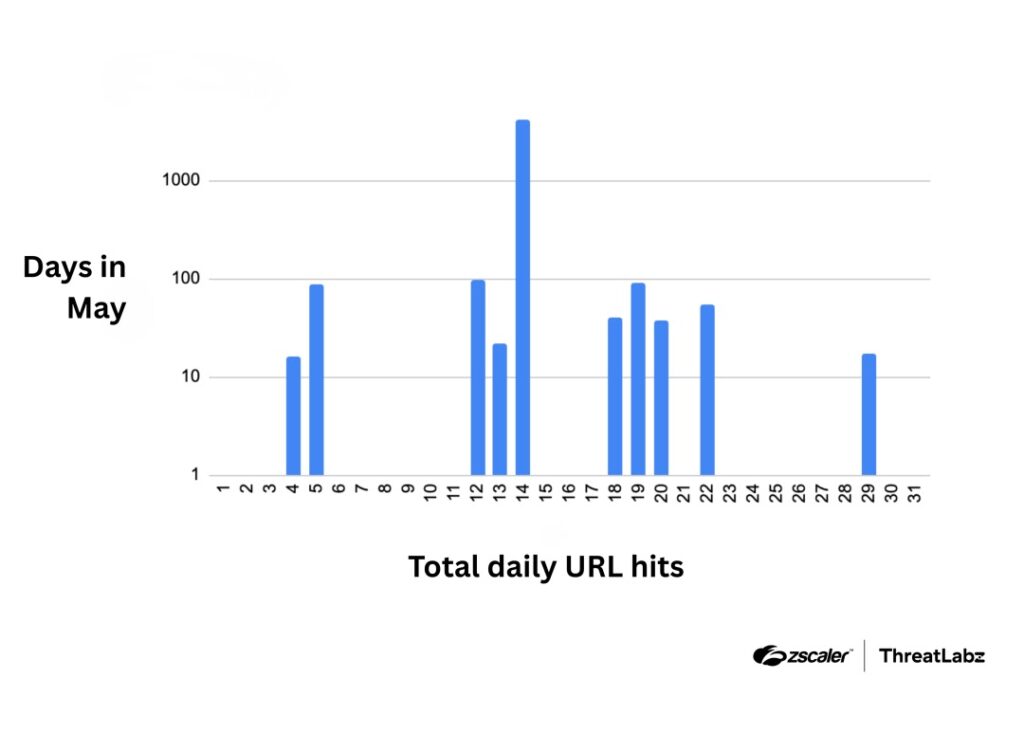
In one case, the company said an affected U.S. retail website receives about 7 million monthly visitors. Zscaler also observed a sharp spike on May 14, with nearly 15,000 SmartApeSG blocks in a single day.
The company stressed that traffic estimates do not equal confirmed infections. Still, the scale shows why third-party scripts deserve the same security attention as first-party code.
Indicators tied to the Okendo Reviews compromise
The known indicators include the compromised Okendo widget script and two next-stage SmartApeSG delivery URLs. Security teams should treat these indicators as starting points, not a complete detection strategy.
| Type | Indicator | Purpose |
|---|---|---|
| URL | hxxp://cdn-static[.]okendo[.]io/reviews-widget-plus/js/okendo-reviews[.]js | Compromised Okendo Reviews widget script |
| URL | hxxps://api[.]wigetticks[.]com/logout/private-response[.]php?8D1V4th3 | SmartApeSG next-stage delivery URL |
| URL | hxxps://api[.]wizzleticks[.]com/claims/scope-schema[.]php?4ManBBdA | SmartApeSG next-stage delivery URL |
| Detection name | JS.Injection.SmartApeSG | Zscaler detection for related injected JavaScript activity |
What e-commerce site owners should check
Store owners should review all third-party scripts loaded on their sites, not only the Okendo widget. Review tools, analytics tags, chat widgets, ad scripts, and personalization tools all run code inside the shopper’s browser.
The Zscaler report said Okendo restored the script to a clean state, but site owners should still review logs and browser telemetry for suspicious redirects, fake verification screens, or unexpected script loads from unfamiliar domains.
Businesses that use Okendo should confirm the widget is loading from expected locations and that no copied or cached version of the compromised script remains on their own infrastructure.
- Inventory all third-party scripts on the website.
- Check whether the Okendo Reviews widget was loaded during the affected period.
- Review web analytics for unusual redirects or verification pages.
- Search security logs for the listed SmartApeSG delivery domains.
- Inspect content security policy rules and tighten script sources where possible.
- Warn support teams about fake CAPTCHA and Windows Run prompt scams.
- Ask third-party vendors about incident response, integrity checks, and script signing controls.
How users can reduce the risk
Shoppers should be suspicious of any website prompt that asks them to open Windows Run, paste a command, or run PowerShell. A normal CAPTCHA does not require those steps.
Users who followed a suspicious verification prompt should disconnect the device from sensitive accounts, run a trusted security scan, and check for unauthorized access to email, banking, shopping, and business accounts.
Security teams should also train employees on ClickFix attacks. SmartApeSG campaigns often rely on the user executing the final command, while Blumira’s analysis shows the group continues to adjust its obfuscation and delivery methods.
FAQ
Hackers linked to SmartApeSG injected malicious JavaScript into the Okendo Reviews widget. The compromised third-party script could run on e-commerce websites that loaded the widget and then push selected visitors toward ClickFix-style malware delivery.
Yes. Zscaler said it reported the incident to Okendo, and Okendo confirmed awareness of the issue and restored the widget script to a clean state.
SmartApeSG is a threat cluster also tracked as ZPHP or HANEYMANEY. It has been linked to fake CAPTCHA, fake update, and ClickFix-style campaigns that can deliver remote access trojans and information stealers.
No. Zscaler reported broad exposure and a large number of blocks, but traffic estimates and blocked attempts do not equal confirmed infections. The malicious script also used filters that focused on selected desktop environments.
Users should not run any command from a web page. If they already did, they should disconnect from sensitive accounts, run a trusted malware scan, check for suspicious account activity, and change passwords from a clean device.


Read our disclosure page to find out how can you help VPNCentral sustain the editorial team Read more


Improve this guide




User forum
0 messages