
Sniper Dz Scams Target MENA Users With Fake Facebook Offers and Browser Notification Traps


 9 min. read
  Published on
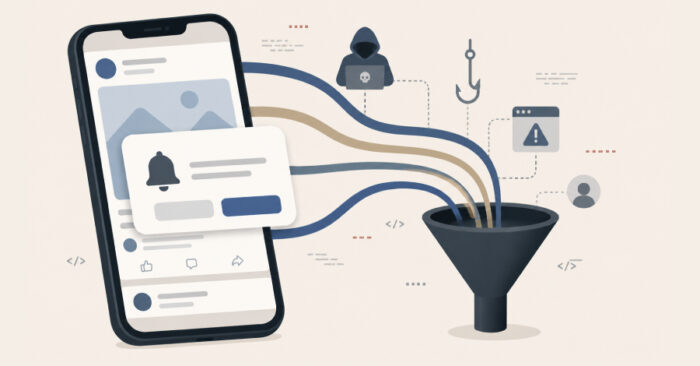
Sniper Dz-linked scams have been targeting users across the Middle East and North Africa with fake Facebook offers, browser notification prompts, and redirect chains that turn social media clicks into fraud traffic. The campaigns use fake accounts impersonating politicians, public figures, telecom providers, and trusted organizations to promote offers such as free mobile internet, financial compensation, and government subsidies.
The latest Group-IB research says the campaigns are part of a wider SniperDz ecosystem that combines phishing-as-a-service, push-notification abuse, premium SMS fraud, premium-rate calls, investment scams, and affiliate monetization. The operation does not rely on traditional malware. It abuses trust, browser features, and legitimate web services.

Access content across the globe at the highest speed rate.
🔥 Save 81% + 2 bonus months! 🔥
70% of our readers choose Private Internet Access
70% of our readers choose ExpressVPN
2
Browse the web from multiple devices with industry-standard security protocols.
🔥 Save 73%! 🔥

Faster dedicated servers for specific actions (currently at summer discounts)
🔥 Save 69%! 🔥
The findings follow an INTERPOL Operation Ramz announcement that reported 201 arrests across the MENA region, 3,867 victims identified, and 53 servers seized. Algeria, Bahrain, Egypt, Iraq, Jordan, Lebanon, Libya, Morocco, Oman, Palestine, Qatar, Tunisia, and the UAE took part in the operation.
How the Sniper Dz scam funnel works
The attack usually starts with a localized Facebook lure. Scammers create posts or pages that look like they belong to a telecom provider, public office, politician, or well-known organization. The posts promise rewards that fit the local context, such as free data packages or financial aid.
Instead of sending victims directly to a clearly malicious domain, the campaign first routes them through trusted link-aggregation services. Group-IB found that attackers used services such as Linktree and Linkbio as an intermediary layer, making the links look less suspicious to users and automated security checks.
After several redirects, victims land on pages that ask them to click Allow to continue. That prompt is not needed to claim an offer. It gives the website permission to send browser notifications, which can later push more scam links, fake alerts, and unwanted promotions.
| Stage | What users see | What attackers gain |
|---|---|---|
| Social media lure | Fake Facebook posts offering free data, subsidies, or compensation | Clicks from users who trust the impersonated identity |
| Link-in-bio page | A page hosted on a trusted link service | A way to hide the final destination |
| Browser prompt | A request to click Allow to continue | Permission to send future browser notifications |
| Monetization | Ads, surveys, premium SMS flows, calls, or fake investment pages | Affiliate revenue, carrier billing abuse, or stolen personal data |
Why fake Facebook offers are effective in MENA
Group-IB said the campaigns used Arabic-language content and carrier-specific branding to make the offers look local. Some pages impersonated telecom providers such as Algérie Télécom, while others relied on the credibility of public figures or official-looking subsidy programs.
The social engineering works because the offer appears familiar and useful. Free mobile data, relief payments, prize eligibility checks, and government benefits can attract users who might otherwise avoid suspicious links.
The Group-IB SniperDz investigation says the platform operated for nearly a decade and offered 80 phishing templates in five languages. It impersonated more than 30 global brands, including social media, streaming, payment, gaming, telecom, email, and government-related services.
- Scammers impersonate local identities to increase trust.
- Fake offers use urgent or reward-based language.
- Trusted link services hide the final scam destination.
- Browser prompts turn a one-time visit into repeat exposure.
- Traffic distribution systems choose the next scam based on device, location, and carrier.
Browser notifications are central to the scam
The browser notification step is important because it gives scammers a persistent channel back to the user. The Push API allows web applications to receive messages from a server, including when the web app is not open, as long as the user has granted permission.
Group-IB found that the Sniper Dz-linked pages used a VAPID public key to subscribe users to a push-notification system. The same key appeared across campaigns impersonating telecom providers in Algeria and investment scams targeting users in multiple regions, which gave researchers an infrastructure link between campaigns.
Users can remove suspicious permissions from their browser settings. Google explains in its Chrome notification guide that users can block or allow site notifications from Privacy and security, Site settings, and Notifications.
Back-button traps and tab-under redirects keep users inside the funnel
The campaigns also used browser-history manipulation. Group-IB said some pages injected 10 fake history entries, which made the Back button behave differently from what users expected. Instead of returning to the previous site, users could remain trapped inside attacker-controlled pages.
The pages also used a tab-under technique. When a user opened a link in a new tab, a delayed script could redirect the original tab to another destination controlled by the operators. This kept traffic moving through the fraud ecosystem after the user thought they had left.
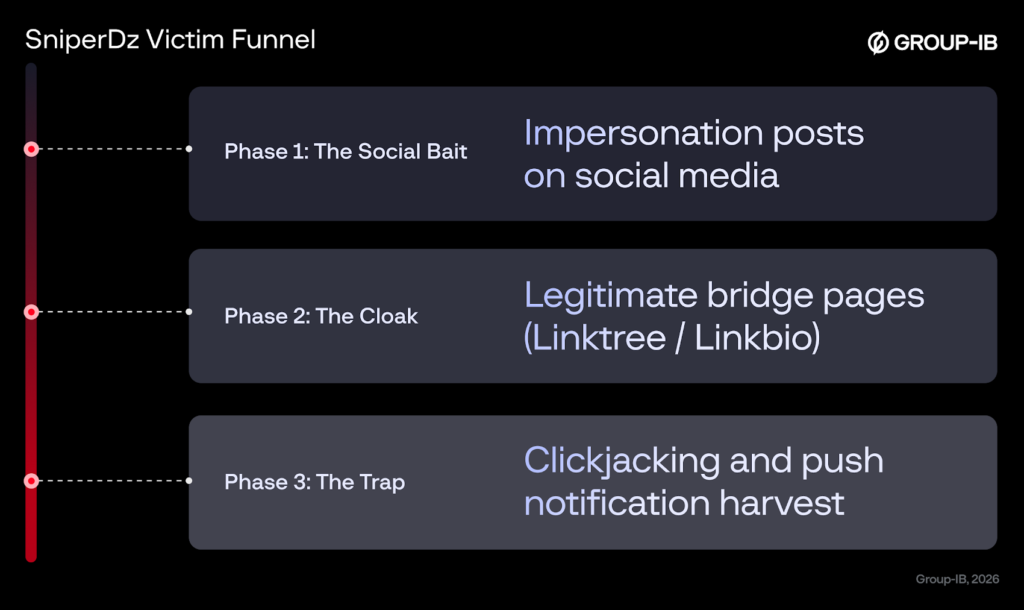
The result is a browser-based trap that does not need malware installation. It uses permissions, redirects, and interface manipulation to keep victims exposed to ads, phishing pages, subscription fraud, and fake investment offers.
| Technique | Purpose | User risk |
|---|---|---|
| Push notification abuse | Send future scam alerts after the user leaves the page | Repeated exposure to phishing and fraud links |
| Back-button hijacking | Keep users inside attacker-controlled content | More ad impressions and scam page views |
| Tab-under redirect | Redirect the original tab after a new tab opens | Hidden continuation of the scam flow |
| Traffic distribution system | Choose the most profitable scam by device, carrier, and location | Premium SMS, premium calls, investment scams, or phishing |
Sniper Dz was already a known phishing platform
Sniper Dz did not appear suddenly. A 2024 Unit 42 analysis described it as a phishing-as-a-service platform that provided an admin panel and phishing pages for popular social media platforms and online services.
Unit 42 found more than 140,000 phishing websites associated with the Sniper Dz platform over one year. It also reported that Sniper Dz abused legitimate software-as-a-service platforms to host phishing pages and used proxy infrastructure to hide backend phishing content.
The newer research shows the ecosystem went beyond stealing passwords. It turned social media traffic into a monetization pipeline where users who did not submit credentials could still generate revenue through ads, browser notifications, premium billing, or scam lead forms.
Operation Ramz disrupted part of the ecosystem
The law enforcement response also gives the campaign more context. INTERPOL said Operation Ramz ran from October 2025 to February 28, 2026, and focused on phishing, malware, and cyber scams across the MENA region.
In Algeria, authorities identified and dismantled a website offering phishing as a service. INTERPOL said police seized a server, computer, mobile phone, and hard drives containing phishing software and scripts, and one suspect was taken into custody.
The separate SniperDz enforcement update from Group-IB says investigators helped INTERPOL and Algerian authorities identify the primary developer and administrator of the platform. Group-IB said the ecosystem had more than 20,000 unique domains associated with it over nine years.
What users should do if they clicked Allow
Users who clicked Allow on a suspicious page should remove the permission immediately. In Chrome, the notification controls are available from Settings, Privacy and security, Site settings, and Notifications, according to Google’s support instructions.
Users should also check phone bills for unexpected premium SMS subscriptions or premium-rate call charges. If a suspicious charge appears, they should contact their mobile carrier and ask it to block or reverse unauthorized services where possible.
Microsoft gives similar guidance for Edge users. Its Edge notification settings page explains that users can block notifications from specific websites through site permissions.
- Open your browser’s site notification settings.
- Remove or block unfamiliar websites allowed to send notifications.
- Close suspicious tabs and restart the browser.
- Review recent SMS charges, call charges, and subscriptions.
- Report fake Facebook pages or posts impersonating public figures or companies.
- Avoid offers that require notification permission, multiple redirects, or personal data before verification.
Why this matters for browser security
The Sniper Dz campaigns show how fraud groups can abuse normal web features instead of installing malware. Browser notifications, link-in-bio services, redirects, and analytics tools all have legitimate uses, but attackers can combine them into a scalable fraud funnel.
The web push model depends on user permission, which makes social engineering central to the attack. Once a victim grants notification access, the scam can continue after the original web page disappears from view.
For defenders, the important signal is not only the final phishing page. Security teams should also monitor suspicious link-aggregation pages, repeated VAPID key reuse, abnormal redirect chains, browser notification enrollment, and traffic distribution systems tied to premium billing or investment fraud.
How organizations and users can reduce exposure
Brands, telecom providers, and public agencies in the MENA region should monitor fake social media pages that use their names, logos, and public trust to promote scams. Fast takedown requests can reduce the reach of campaigns before links spread widely.
Security teams can use the earlier Unit 42 research and newer Group-IB findings to understand how Sniper Dz operators used phishing templates, legitimate hosting platforms, and redirect infrastructure. The same patterns can help detect copycat campaigns.
Users should treat free-data offers, subsidy posts, and investment promotions on social media with caution, especially if they lead through several sites or ask for browser permissions. Legitimate telecoms and government programs do not require users to click Allow on a browser alert to receive a benefit.
Edge users can also review site permissions through Microsoft Edge settings and block websites that send unwanted alerts. Removing notification access cuts off one of the main ways these scams return to the victim after the initial click.
FAQ
The Sniper Dz scam campaign is a fraud operation targeting users with fake social media offers, phishing pages, browser notification prompts, redirect chains, premium SMS schemes, premium-rate calls, and fake investment pages. Group-IB linked the activity to the SniperDz phishing-as-a-service ecosystem.
The campaigns focused on users across the Middle East and North Africa. Scammers used fake Facebook accounts impersonating politicians, public figures, telecom providers, and trusted organizations to promote fake offers such as free internet packages and government subsidies.
The Allow button gives the website permission to send browser notifications. Once permission is granted, scammers can continue sending fake alerts, scam promotions, phishing links, and unwanted ads even after the user leaves the original page.
Operation Ramz disrupted parts of the Sniper Dz ecosystem. INTERPOL reported 201 arrests across the MENA region, while Group-IB said its investigation helped INTERPOL and Algerian authorities identify and dismantle infrastructure linked to the SniperDz phishing-as-a-service platform.
Users should open their browser notification settings and block or remove the suspicious website. They should also check their phone bills for premium SMS or premium-rate call charges, report fake social media pages, and avoid entering personal information on pages reached through unexpected redirects.


Read our disclosure page to find out how can you help VPNCentral sustain the editorial team Read more


Improve this guide




User forum
0 messages