
Over a Third of LG and Samsung Smart TV Apps May Be Monetizing Your IP Address


 7 min. read
  Published on
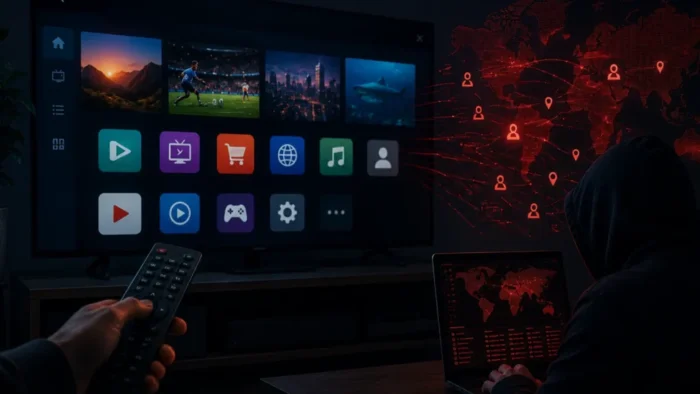
More than a third of apps scanned across LG and Samsung smart TV platforms contained residential proxy software, according to new research from Spur Intelligence Labs.
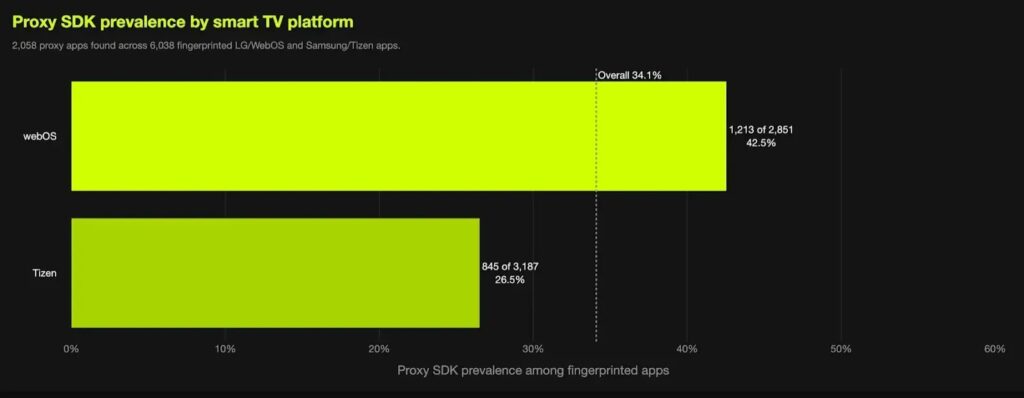
The Spur Intelligence Labs research found 2,058 proxy-enabled apps out of 6,038 apps across LG webOS and Samsung Tizen. Spur said the rate was 42.5% on LG webOS and 26.9% on Samsung Tizen, bringing the combined total to 34.1%.

Access content across the globe at the highest speed rate.
70% of our readers choose Private Internet Access
70% of our readers choose ExpressVPN

Browse the web from multiple devices with industry-standard security protocols.

Faster dedicated servers for specific actions (currently at summer discounts)
These apps often look harmless on the TV screen. Spur said examples included clocks, fish tanks, games, screen savers, and novelty apps. In the background, however, some of them can turn a smart TV into a residential proxy node, meaning third-party internet traffic may route through the user’s home IP address.
Smart TVs are attractive proxy hosts
Smart TVs make useful proxy hosts because they stay plugged in, remain connected to home Wi-Fi, and rarely receive the same scrutiny as phones or computers. Many people install a TV app once and then forget it exists.
That matters because residential proxy services value real household IP addresses. Traffic coming from a home connection can look more trusted than traffic from a data center, which makes it useful for web scraping, testing localized content, ad verification, and other commercial tasks.
The concern is not only bandwidth use. A home IP address can appear in third-party logs as the source of automated traffic. If a proxy provider’s controls fail, the TV could also become a risky bridge between outside traffic and the user’s local network.
| Platform | Spur finding | What it means |
|---|---|---|
| LG webOS | 42.5% of scanned apps contained proxy SDKs | The issue was most common in LG’s app ecosystem. |
| Samsung Tizen | 26.9% of scanned apps contained proxy SDKs | More than one in four scanned apps contained proxy code. |
| Combined sample | 2,058 of 6,038 apps contained proxy SDKs | Residential proxy monetization appeared at large scale across both platforms. |
Consent prompts may not explain the full trade-off
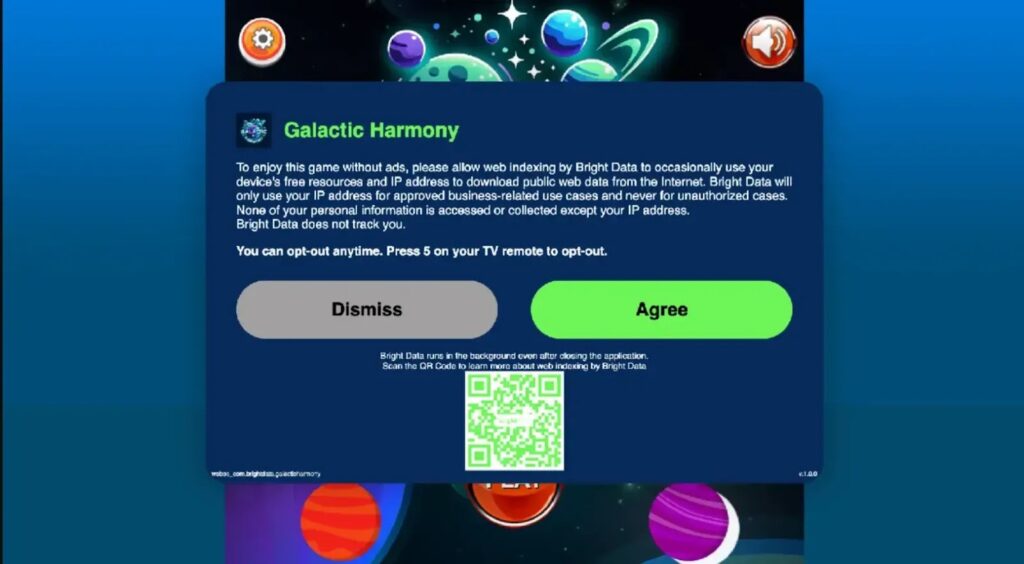
Spur said the issue changes the consent equation for smart TV users. A prompt accepted with a remote control can disappear into the setup flow, while the proxy component may continue to run after the user closes the app.
Earlier reporting by The Verge described how Bright Data’s SDK lets participating apps offer users fewer ads or a free experience in exchange for allowing the device’s IP address and spare resources to download public web data.
That trade-off can be hard for ordinary users to understand. A user may think they accepted fewer ads in one app, while the real arrangement allows the device to become part of a wider commercial proxy network.
Proxy SDKs create a new app monetization model
Many of the affected apps are not designed for heavy user engagement. A clock, aquarium, or simple game may not have enough screen time to support normal advertising without hurting the user experience.
By embedding a residential proxy SDK, developers can keep the app looking clean while earning money from the TV’s internet connection. Spur said one Tizen Pac-Man app presented the choice as ads or participation in Bright Data’s web indexing network.
The Include Security research published earlier this month also examined Bright Data’s SDK model and said smart TVs are especially appealing for this kind of network because they are usually always powered, always on Wi-Fi, and rarely monitored by security tools.
- Proxy SDKs can route third-party traffic through a user’s home IP address.
- Some apps may keep proxy activity running after the app is closed.
- Users may not understand that accepting a prompt can monetize their home network.
- Free or quiet apps may use proxy SDKs instead of traditional ads.
- Smart TV platforms may not give users clear ongoing controls for this activity.
Platform rules differ across TV ecosystems
Amazon has already drawn a clear line. Its Device and System Abuse Policy prohibits apps that facilitate proxy services for third parties, meaning anyone other than the device owner.
Roku has also reportedly restricted similar behavior. The Verge’s earlier report said Roku bars developers from using Bright SDK and similar proxy services, and that some affected apps disappeared from Roku’s store after the company was contacted.
Spur said LG and Samsung have not published equivalent public restrictions for webOS and Tizen. That policy gap matters because the same type of monetization that other platforms restrict can still appear across major smart TV app stores.
Why this could become a home network risk
For many users, the first concern will be privacy. Your IP address can reveal your approximate location, internet provider, and residential network status. If third-party scraping traffic uses that address, websites may associate that activity with your household connection.
The risk can go further. If a proxy system allows or mistakenly permits access to local or private network addresses, the TV could become a path toward routers, printers, NAS devices, cameras, developer machines, or other systems on the same home network.
Spur’s methodology said researchers downloaded LG webOS and Samsung Tizen app packages, unpacked them, and scanned for confirmed SDK artifacts from proxy providers including Bright Data, Massive, and Honeygain or Oxylabs.
What consumers can do now
There may not be a simple security patch for this issue, because proxy SDK use is often part of an app’s monetization model rather than a traditional software vulnerability. Users should treat smart TV apps more like phone apps and review what they install.
Home users can remove old or unnecessary TV apps, avoid installing obscure apps with unclear publishers, and check whether an app offers an opt-out option. Users who manage their own networks can also monitor outbound DNS traffic for known proxy SDK domains.
Include Security’s defense section recommends blocking known Bright SDK hostnames at the router or DNS level for concerned users. The same research notes that network-level blocking works best for devices that route traffic through the home network.
What LG and Samsung should address
The research puts pressure on smart TV platform owners to decide whether proxy SDKs belong in consumer TV apps at all. At minimum, users need clear disclosures, simple opt-out controls, and a way to see which apps can relay traffic through their home network.
Amazon’s policy shows that platforms can ban this category if they choose. A second reference to Amazon’s app rules is important because it shows the issue is not only technical. It is also a store policy and consumer protection question.
Smart TVs are now general-purpose networked computers in the living room. If app stores allow them to become residential proxy nodes, users need more than a one-time consent screen. They need meaningful control over whether their home IP address becomes part of someone else’s infrastructure.
FAQ
Not across both platforms combined. Spur found that 2,058 of 6,038 scanned apps across LG webOS and Samsung Tizen contained residential proxy SDKs, or 34.1%. The nearly-half figure applies more closely to LG webOS, where the rate was 42.5%.
A residential proxy SDK is software embedded in an app that can route third-party internet traffic through a user’s residential IP address. In this case, the SDK can make a smart TV act as an exit node for proxy traffic.
Smart TVs are usually plugged in, connected to fast home Wi-Fi, and rarely monitored like phones or computers. That makes them attractive devices for background proxy activity.
The issue is not necessarily malware in the traditional sense. The research focuses on apps that contain commercial proxy SDKs, often tied to monetization or consent prompts. The concern is whether users understand and control that arrangement.
Remove unnecessary TV apps, avoid obscure free apps with unclear publishers, review consent prompts carefully, and use router-level DNS blocking for known proxy SDK domains if you manage your home network.


Read our disclosure page to find out how can you help VPNCentral sustain the editorial team Read more


Improve this guide



User forum
0 messages