
Fake Income Tax Assessment Notice Delivers RAT-Like Malware to Windows Users


 7 min. read
  Published on
A new phishing campaign is targeting Windows users in India with a fake Income Tax Department assessment notice that downloads RAT-like malware. The campaign uses a fraudulent tax portal and a malicious file chain designed to look like official assessment paperwork, according to a new CYFIRMA report.
The attack relies on urgency. Victims see an official-looking assessment order with tax terms, legal references, compliance language, and financial penalties. A button labeled “Download Assessment Order & Workings” then downloads a ZIP archive that starts the malware infection process.

Access content across the globe at the highest speed rate.
🔥 Save 81% + 2 bonus months! 🔥
70% of our readers choose Private Internet Access
70% of our readers choose ExpressVPN
2
Browse the web from multiple devices with industry-standard security protocols.
🔥 Save 73%! 🔥

Faster dedicated servers for specific actions (currently at summer discounts)
🔥 Save 69%! 🔥
Taxpayers should only verify notices through the official Income Tax e-Filing portal and should avoid downloading files from links in unexpected emails, messages, or websites. The Income Tax Department also maintains a separate phishing reporting page for fake tax websites and messages.
How the fake tax notice malware works
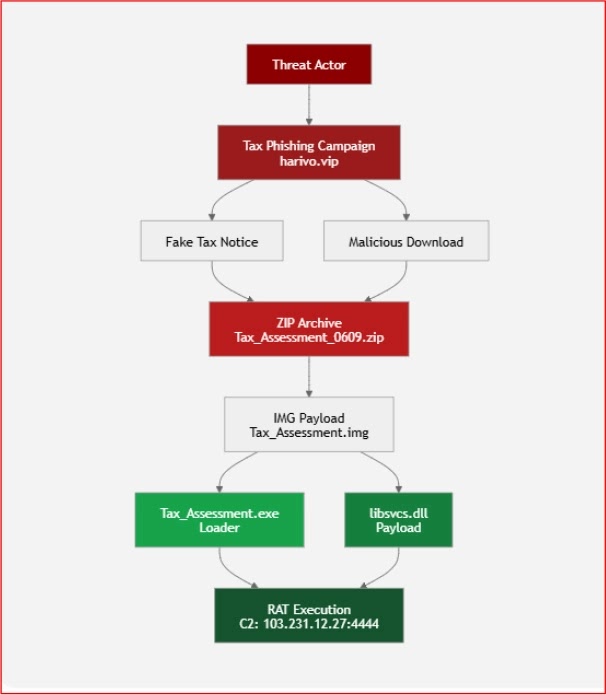
The fake portal hosts a file named Tax_Assessment_0609.zip. Once opened, the archive reveals a disk image file called Tax_Assessment.img, which contains two main components: Tax_Assessment.exe and libsvcs.dll.
Tax_Assessment.exe works as a loader. It uses .NET reflection to load and execute libsvcs.dll, while keeping the core malicious functions in the DLL. This split makes the infection chain harder to analyze and can help the malware bypass basic detection checks.
CYFIRMA’s researchers found that both the executable and DLL used ConfuserEx obfuscation. The loader also hides its console window, modifies registry settings, and uses misleading metadata to make the files appear less suspicious.
| Attack stage | File or action | Purpose |
|---|---|---|
| Phishing lure | Fake income tax assessment portal | Creates urgency and pushes the victim to download a file |
| Initial download | Tax_Assessment_0609.zip | Delivers the staged malware package |
| Disk image | Tax_Assessment.img | Contains the loader and DLL payload |
| Loader | Tax_Assessment.exe | Loads libsvcs.dll through reflection |
| Payload | libsvcs.dll | Provides RAT-like persistence, reconnaissance, and remote access behavior |
The payload behaves like a remote access trojan
The DLL payload pretends to be a Microsoft-related component called “Runtime Service Host.” This fake identity helps it blend in with legitimate Windows services and reduces the chance that a user or basic tool will notice it quickly.
The CYFIRMA analysis says the payload includes RAT-like functions such as startup registration, scheduled task creation, system information collection, security product discovery, user activity checks, dynamic payload execution, and encrypted command-and-control communication.
The behavior overlaps with XWorm-style malware activity. However, the available evidence supports a RAT-like classification rather than a definitive public attribution to one specific malware family.
- The malware targets Windows systems.
- It uses a fake Indian Income Tax Department notice as the lure.
- It delivers a ZIP archive and disk image file.
- It separates the loader from the main DLL payload.
- It uses obfuscation and fake Microsoft metadata to slow analysis.
- It communicates with attacker infrastructure over an encrypted channel.
Attackers keep abusing tax-themed lures in India
This is not the first recent campaign to use Indian tax anxiety as bait. Earlier this month, CYFIRMA also documented Operation TaxShadow, another tax-themed phishing campaign that used government branding, urgency, and staged malware delivery.
Other researchers have seen the same pattern. Seqrite previously reported an Indian Income Tax-themed phishing campaign that targeted local businesses with fake compliance notices and a multi-stage infection chain.
The timing makes these lures more convincing. During tax filing, refund, and assessment periods, users expect messages from tax authorities. Attackers exploit that expectation by copying official language and making the victim feel that ignoring the notice could lead to penalties.
Command-and-control server and infrastructure
The malware uses a hardcoded command-and-control endpoint at 103[.]231[.]12[.]27 on port 4444. CYFIRMA says the infrastructure is geolocated in Hong Kong and that the malware contains an embedded 32-byte encryption key for socket-based communication.
The fake tax portal was hosted on harivo[.]vip. The domain was registered in September 2025 and is tied to infrastructure in Hong Kong, according to the research. CYFIRMA assessed the activity as financially motivated, but attribution remains unconfirmed.
The infrastructure does not prove where the attacker is located. Threat actors often use third-party hosting, proxy services, compromised servers, and regional infrastructure to hide their origin and make investigations harder.
| Indicator type | Indicator | Use |
|---|---|---|
| Domain | harivo[.]vip | Block or monitor |
| IP address | 103[.]231[.]12[.]27 | Monitor outbound traffic on port 4444 |
| File name | Tax_Assessment_0609.zip | Search email gateways, downloads, and endpoint telemetry |
| File name | Tax_Assessment.img | Search mounted disk image activity |
| File name | Tax_Assessment.exe | Search process creation and file execution logs |
| File name | libsvcs.dll | Search DLL loading and persistence events |
How users can avoid fake tax notice malware
The Income Tax Department says it does not ask for PINs, passwords, or similar access details for credit cards, banks, or other financial accounts through email. Its official phishing guidance also tells users not to reply to suspicious emails, open attachments, or click links in messages claiming to come from the department.
Users who receive a tax notice should manually visit the Income Tax e-Filing website and check their account directly. They should not trust links in emails, WhatsApp messages, SMS alerts, or pop-ups that ask them to download assessment files.
If a user already opened the file, the safest step is to disconnect the device from the network and contact IT or a security professional. Organizations should preserve evidence, collect endpoint logs, check for persistence, and reset credentials used on the infected system.
- Do not open tax-related ZIP, IMG, EXE, or DLL files from unknown sources.
- Verify notices only by typing the official tax portal address into the browser.
- Block disk image execution from the Downloads folder where possible.
- Monitor Windows autorun registry keys and scheduled tasks.
- Alert on unusual outbound traffic to unknown external IPs.
- Use endpoint protection that detects obfuscated .NET loaders and suspicious DLL loading.
- Report fake tax sites and emails to the Income Tax Department and CERT-In.
What security teams should monitor
Security teams should look for the downloaded ZIP archive, mounted IMG files, execution of Tax_Assessment.exe, suspicious DLL loading of libsvcs.dll, registry changes, scheduled task creation, and outbound traffic to 103[.]231[.]12[.]27:4444.
The campaign also fits a broader trend of Indian tax-themed malware activity. CYFIRMA’s earlier TaxShadow research and Seqrite’s tax phishing analysis both show how attackers use official-looking notices to push victims toward malware downloads.
That pattern matters because these attacks do not rely only on technical stealth. They first rely on trust. A realistic tax notice can bypass a user’s skepticism before the malware ever reaches the endpoint.
FAQ
It is a phishing campaign targeting Windows users in India with a fake Income Tax Department assessment notice. The fake portal tricks victims into downloading a malicious ZIP file that leads to RAT-like malware execution.
The attack uses Tax_Assessment_0609.zip, Tax_Assessment.img, Tax_Assessment.exe, and libsvcs.dll. The executable acts as a loader, while the DLL contains the main RAT-like payload.
CYFIRMA described the malware as RAT-like and consistent with behavior commonly seen in XWorm-style malware. Public reporting does not confirm it as a definitive XWorm sample.
Taxpayers should avoid links and attachments in unexpected tax messages. They should visit the official Income Tax e-Filing portal directly and verify notices inside their account.
They should disconnect the device from the network, contact IT or a security professional, preserve evidence, scan the system, check for persistence, and reset passwords used on that computer.


Read our disclosure page to find out how can you help VPNCentral sustain the editorial team Read more


Improve this guide




User forum
0 messages