
Google Adds Computer Use to Gemini 3.5 Flash for Browser, Mobile and Desktop Agents


 7 min. read
  Published on
Google has added built-in computer use capabilities to Gemini 3.5 Flash, giving developers a more direct way to build agents that can interact with digital environments. The update lets agents see a screen, reason about the task, and suggest actions such as clicks, typing, scrolling, and navigation.
The capability was announced in Google’s June 24 announcement. Google says computer use is now integrated into the main Gemini 3.5 Flash model after previously being available through a standalone Gemini 2.5 computer-use model.

Access content across the globe at the highest speed rate.
70% of our readers choose Private Internet Access
70% of our readers choose ExpressVPN

Browse the web from multiple devices with industry-standard security protocols.

Faster dedicated servers for specific actions (currently at summer discounts)
This makes Gemini 3.5 Flash more useful for agentic workflows, including browser automation, software testing, enterprise app navigation, data entry, and long-running knowledge-work tasks. It also raises new security questions because these systems can act inside live software environments.
What Gemini 3.5 Flash computer use does
Computer use allows an AI agent to work with a graphical interface instead of only returning text. The model can inspect screenshots, understand what appears on the screen, and generate a proposed action for the developer’s app to execute.
The Gemini API documentation says developers still need to implement the execution layer. In other words, Gemini suggests the next action, but the developer’s system must handle the actual click, text input, screenshot capture, and task loop.
Google says Gemini 3.5 Flash supports browser, mobile, and desktop environments for computer use. It also introduces intent fields, configurable safety policies, and prompt injection detection for developers building these agents.
| Feature | What it means for developers |
|---|---|
| Screen understanding | The model can use screenshots to understand the current interface. |
| UI actions | The model can suggest clicks, typing, scrolling, and other interface actions. |
| Intent field | Gemini 3.5 Flash can explain why it chose a specific action. |
| Multi-environment support | Developers can build agents for browser, mobile, and desktop tasks. |
| Safety decisions | Applications can require confirmation or stop actions when risks appear. |
Gemini 3.5 Flash was already rolling out before this update
The model itself is not entirely new. Google Cloud said in May that Gemini 3.5 Flash was rolling out as the first model in the Gemini 3.5 series, with a focus on agents, coding, and long-horizon tasks.
The new June update adds computer use directly into that model. This matters because developers no longer need to rely only on a separate computer-use preview model for these workflows.
Google positions Gemini 3.5 Flash as a faster and lower-cost model for agentic work compared with larger flagship systems. That makes the computer-use update especially relevant for companies testing agents at scale.
How Gemini agents complete tasks
A computer-use agent works in a loop. The application sends Gemini a goal and a screenshot. The model reviews the screen and returns a suggested action. The application executes that action, captures the new screen state, and sends the updated state back to Gemini.
The Computer Use guide says this loop continues until the task finishes, fails, or gets stopped by a safety rule or user decision. This structure allows agents to perform multi-step workflows that would be difficult to complete with a single API call.
Common examples include filling forms, testing web applications, collecting product information, navigating internal dashboards, and helping users move through complex software. These use cases explain why the update has drawn attention from developers building enterprise automation tools.
- Automated testing of websites and user flows
- Repetitive data entry and form completion
- Research across multiple pages or applications
- Browser-based enterprise workflow automation
- Assisted navigation inside complex business tools
Performance and benchmark details
Google’s model card lists Gemini 3.5 Flash with a 1 million token context window and up to 64K output tokens. The model accepts text, images, audio, and video as inputs, with text output.
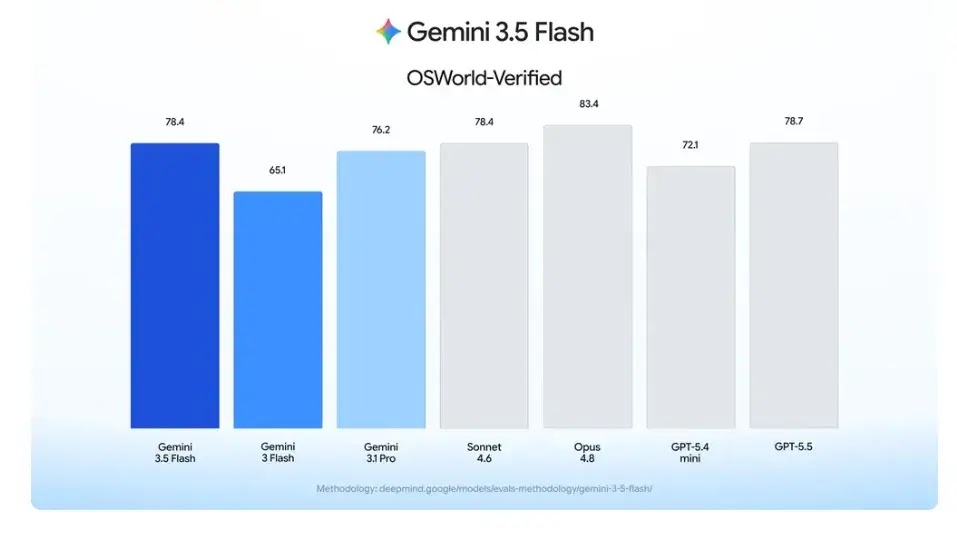
The same model card reports a 78.4% score for Gemini 3.5 Flash on OSWorld-Verified, a benchmark category focused on agentic computer use. It also lists results across coding, agentic tool use, multimodal reasoning, long-context, and other evaluation areas.
Benchmarks do not guarantee safe or reliable real-world operation, but they show why Google is pushing the model into agent workflows. The Gemini 3.5 Flash model card also describes the model as suited for users, developers, and enterprises working on agentic workflows, coding tasks, and longer business processes.
Security safeguards are central to the release
Computer-use agents create a wider risk surface because they can interact with real interfaces. A poorly controlled agent could click the wrong button, expose data, change settings, or follow malicious instructions hidden inside a web page or document.
Google says it used targeted adversarial training to reduce prompt injection risks in Gemini 3.5 Flash computer use. The company also introduced optional enterprise safeguards that can require user confirmation for sensitive or irreversible actions and stop tasks when indirect prompt injection is detected.
The Enterprise Agent Platform documentation warns that computer-use tools may still make errors and may face security vulnerabilities during preview. It advises close supervision for important tasks and warns against using the capability for critical decisions, sensitive data, or actions where mistakes cannot be corrected.
| Risk | Recommended control |
|---|---|
| Prompt injection | Enable detection and stop tasks when malicious instructions appear. |
| Irreversible action | Require explicit user confirmation before execution. |
| Data exposure | Limit agent permissions and avoid sensitive workflows during testing. |
| Unintended clicks | Run agents in sandboxes and log every action. |
Availability for developers and enterprises
Developers can use Gemini 3.5 Flash computer use through the Gemini API. Google also says enterprises can access the capability through the Gemini Enterprise Agent Platform, where organizations can build and manage agents for business workflows.
Google has published a reference implementation on GitHub. The project supports local Playwright and Browserbase environments and lists gemini-3.5-flash as the default model for the agent command-line tool.
The Google Cloud documentation also covers enterprise computer-use setup, supported models, safety responses, prompt injection detection, and browser automation workflows.
Why this update matters
The release moves Gemini 3.5 Flash further into practical agent development. Instead of only answering questions or calling tools, the model can now help control interfaces across browsers, mobile apps, and desktop environments when developers provide the right execution layer.
The change could speed up software testing, internal process automation, and task assistance inside business tools. It also forces companies to treat AI agents more like active software operators, not simple chatbots.
The safest path is to start with sandboxed environments, limited permissions, logging, and human approval for risky steps. The GitHub implementation gives developers a starting point, but production deployments will need stronger controls, monitoring, and security reviews.
FAQ
Gemini 3.5 Flash computer use is a built-in tool that lets developers build agents that can inspect screenshots, reason about a task, and suggest interface actions such as clicking, typing, and scrolling.
Google announced built-in computer use for Gemini 3.5 Flash on June 24, 2026. The Gemini 3.5 Flash model itself had already started rolling out in May 2026.
Developers can build agents for browser automation, software testing, form completion, research workflows, and assisted navigation inside web, mobile, and desktop environments.
Google describes computer use as a preview capability that can make errors and may present security risks. Organizations should avoid sensitive or irreversible tasks unless they use strong supervision, sandboxing, access controls, and human confirmation.
Gemini 3.5 Flash computer use is available through the Gemini API and the Gemini Enterprise Agent Platform. Google also provides documentation and a GitHub reference implementation for developers.


Read our disclosure page to find out how can you help VPNCentral sustain the editorial team Read more


Improve this guide

User forum
0 messages