
Fake Perplexity AI Chrome Extension Intercepted Search Queries and Address Bar Input


 7 min. read
  Published on

A fake Chrome extension posing as Perplexity AI was caught intercepting users’ search queries, address-bar input, and browser request data before sending them to legitimate search engines.
The malicious extension was called “Search for perplexity ai” and used the extension ID flkebkiofojicogddingbdmcmkpbplcd. According to Microsoft Threat Intelligence, its main purpose was search traffic interception and data collection.

Access content across the globe at the highest speed rate.
🔥 Save 81% + 2 bonus months! 🔥
70% of our readers choose Private Internet Access
70% of our readers choose ExpressVPN
2
Browse the web from multiple devices with industry-standard security protocols.
🔥 Save 73%! 🔥

Faster dedicated servers for specific actions (currently at summer discounts)
🔥 Save 69%! 🔥
Google removed the extension from the Chrome Web Store after responsible disclosure. A separate report from BleepingComputer also noted that Microsoft found no evidence of credential theft, although the extension’s permissions created a serious privacy risk.
Fake AI branding helped the extension look trustworthy
The extension used Perplexity AI-related branding to appear like a legitimate search or productivity tool. It also used the typosquatted domain perplexity-ai[.]online, which looks close to the real Perplexity domain.
That branding made the extension more convincing for everyday users. AI search tools have become popular, and attackers are now copying their names, layouts, and setup flows to make malicious software look familiar.
The real Perplexity – AI Search extension on the Chrome Web Store is offered by Perplexity AI and lets users search Perplexity from the browser URL box. The fake extension used a different name, different infrastructure, and a suspicious intermediary domain.
| Item | Fake extension | Legitimate Perplexity extension |
|---|---|---|
| Name | Search for perplexity ai | Perplexity – AI Search |
| Extension ID | flkebkiofojicogddingbdmcmkpbplcd | bnaffjbjpgiagpondjlnneblepbdchol |
| Main domain used | perplexity-ai[.]online | perplexity.ai |
| Observed behavior | Intercepted search queries and address-bar suggestions | Sets Perplexity as a search option from the browser URL box |
How the extension captured search activity
The fake extension changed the browser’s default search provider through the chrome_settings_overrides manifest key. The official Chrome settings override documentation explains that extensions can use this feature to modify selected browser settings, including the search provider.
In this case, the extension set itself as the default search provider and routed searches through perplexity-ai[.]online first. Users still saw normal search results after the redirect, so the interception was easy to miss.
The most sensitive part was the suggest_url field. Microsoft said the extension routed real-time search suggestions through the attacker-controlled domain, meaning typed address-bar input could be transmitted before the user pressed Enter.
The redirect chain hid the data collection
The extension did not need to show an obvious warning sign. It sent the user’s query to the attacker-controlled server, logged request data, then redirected the user to a legitimate search provider.
The Microsoft analysis said the extension’s server-side code logged incoming requests, including the URL, HTTP headers, user-agent data, and source IP address.
That design allowed the extension to collect browser signals while preserving the normal search experience. To the user, the search still worked. Behind the scenes, the query had already passed through an untrusted intermediary.
- Full search queries typed into the browser address bar
- Real-time suggestion input before the user submitted a search
- Request URLs sent through the intermediary domain
- HTTP headers attached to the request
- User-agent strings that identify browser and device details
- Source IP addresses visible to the attacker-controlled server
Powerful Chrome permissions increased the risk
The extension requested declarativeNetRequest, declarativeNetRequestFeedback, and declarativeNetRequestWithHostAccess permissions. These permissions can support legitimate browser features, but they also give an extension strong control over request handling.
The official declarativeNetRequest API documentation says the API lets extensions block or modify network requests by using declarative rules. Microsoft said the fake extension used this type of browser-native rule system to route traffic through its own infrastructure.
The extension also included modular rulesets for Perplexity, Google, and Bing traffic. Only the Perplexity ruleset was active in the analyzed version, but the disabled Google and Bing rulesets showed that the operator could have expanded the campaign with limited changes.
| Permission or feature | Normal use | Observed risk in this case |
|---|---|---|
| chrome_settings_overrides | Changes search provider, homepage, or startup pages | Set the fake extension as the default search provider |
| suggest_url | Provides real-time search suggestions | Sent typed address-bar input to the attacker-controlled domain |
| declarativeNetRequest | Blocks or modifies network requests using rules | Helped create a search interception and redirect chain |
| declarativeNetRequestFeedback | Helps debug which rules match | Could confirm which interception rules fired |
| Host permissions | Allow access to selected domains | Gave the extension control over requests to perplexity-ai[.]online |
Onboarding page reduced suspicion after install
After installation, the extension opened an onboarding page at extension.tilda[.]ws/perplexityai. The page looked like a normal product setup flow, which helped reduce suspicion while the extension changed browser settings.
This technique is common in extension-based adware and search-hijacking campaigns. A clean-looking welcome page can make users believe they installed a normal productivity add-on.
The fake extension also included wasm-unsafe-eval in its content security policy. Microsoft did not observe WebAssembly modules in version 2.2, but the setting could allow future WebAssembly-based functionality without a major policy change.
Why this matters for businesses
Search queries often contain sensitive business context. Employees may type customer names, internal project names, error messages, legal questions, unreleased product details, or security investigation terms into the browser address bar.
Even without stealing passwords, a malicious search extension can build a detailed profile of a user, device, organization, and browsing pattern. That data can support targeted advertising, phishing, account discovery, or future social engineering.
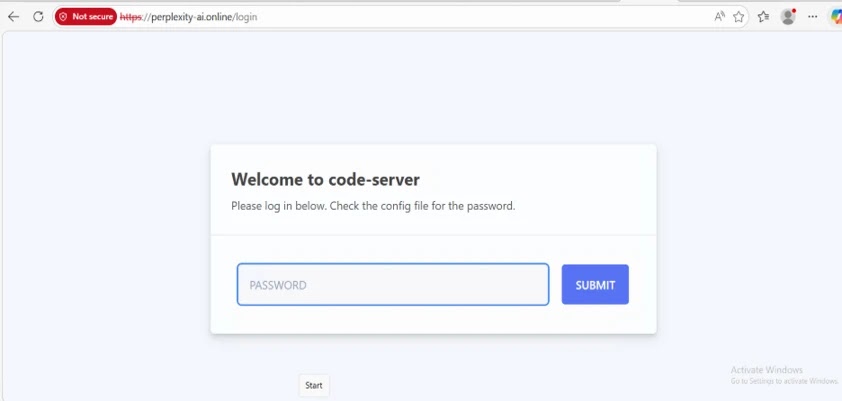
This risk increases in managed environments where employees install browser extensions without review. A single risky extension can quietly affect daily search behavior across many workstations.
- Restrict extension installs to an approved allowlist
- Block extensions that change the default search provider without business need
- Review extensions that request network modification permissions
- Monitor for outbound traffic to lookalike or intermediary domains
- Audit browser search settings across managed devices
- Train users to verify publisher names and domains before installing AI-themed tools
Indicators of compromise
Security teams should search endpoints and browser telemetry for the malicious extension ID and its related infrastructure. The same indicators were also summarized by BleepingComputer’s coverage of the campaign.
| Type | Indicator | Description |
|---|---|---|
| Domain | perplexity-ai[.]online | Typosquatted domain used for search interception and redirection |
| Extension ID | flkebkiofojicogddingbdmcmkpbplcd | Malicious Chromium extension identifier |
| Onboarding URL | extension.tilda[.]ws/perplexityai | Post-installation onboarding page shown to users |
How users can stay safe
Users who installed “Search for perplexity ai” should remove it from Chrome or any Chromium-based browser immediately. They should also reset their default search provider and review recently installed extensions.
Although Microsoft did not confirm credential theft, users should still consider changing passwords for important accounts if they searched for sensitive account-related terms while the extension was installed.
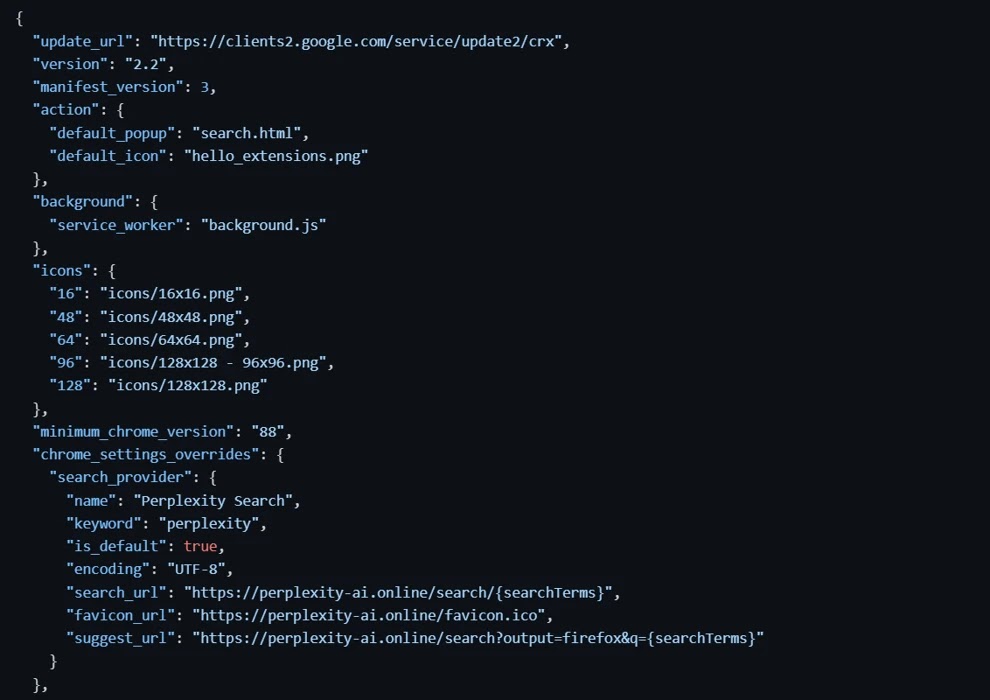
Users who want the official browser add-on should verify the publisher and extension ID on the Perplexity – AI Search listing. They should also avoid extensions that use lookalike domains, vague publisher names, or permissions that go beyond the feature being offered.
What administrators should monitor
Administrators should monitor Chrome and Edge extension folders for the ID flkebkiofojicogddingbdmcmkpbplcd. They should also search network logs for perplexity-ai[.]online and extension.tilda[.]ws.
Teams should check whether any installed extension uses Chrome settings overrides alongside extra permissions. Google’s documentation says using settings overrides while requesting additional capabilities can conflict with the single-purpose policy.
They should also review extensions using the declarativeNetRequest permissions, especially when those extensions also set a default search provider or route traffic through an unfamiliar domain.
FAQ
The malicious extension was called Search for perplexity ai. Microsoft reported that it used the extension ID flkebkiofojicogddingbdmcmkpbplcd and the typosquatted domain perplexity-ai[.]online.
The extension routed full search queries, real-time address-bar suggestion input, HTTP headers, user-agent data, and source IP addresses through attacker-controlled infrastructure before redirecting users to legitimate search services.
Microsoft said it found no evidence that the extension stole credentials or other sensitive information beyond the observed search interception and data collection. However, its permissions still created a serious privacy risk.
Open your browser’s extension settings, remove Search for perplexity ai if it appears, reset your default search engine, and review other recently installed extensions for suspicious permissions or unknown publishers.
Organizations should enforce browser extension allowlists, monitor search-provider changes, audit extensions with network-modification permissions, and block outbound traffic to suspicious lookalike domains.


Read our disclosure page to find out how can you help VPNCentral sustain the editorial team Read more


Improve this guide




User forum
0 messages