
Microsoft 365 Phishing Panel ARToken Uses OAuth Device Code Flow to Steal Tokens


 9 min. read
  Published on
A phishing-as-a-service panel called ARToken is helping attackers compromise Microsoft 365 accounts by abusing the OAuth device code flow. Instead of stealing passwords, the kit tricks victims into approving an attacker-controlled sign-in through Microsoft’s legitimate device login process.
Once the victim enters the code, attackers can receive access and refresh tokens tied to the victim’s Microsoft 365 account. That access can expose Outlook, SharePoint, OneDrive, and other cloud services without requiring the attacker to know the user’s password.

Access content across the globe at the highest speed rate.
70% of our readers choose Private Internet Access
70% of our readers choose ExpressVPN

Browse the web from multiple devices with industry-standard security protocols.

Faster dedicated servers for specific actions (currently at summer discounts)
Cisco Talos said ARToken exposes more than 80 API endpoints through a React-based operator dashboard. The panel supports device code phishing, token refresh, Primary Refresh Token workflows, email access, business email compromise operations, and SharePoint data access.
How ARToken Abuses Microsoft Device Code Login
The OAuth device code flow exists for devices that have limited input options, such as smart TVs, printers, or other hardware that cannot easily support a normal browser sign-in. Microsoft describes this as a legitimate OAuth 2.0 device authorization grant in its identity platform documentation.
Attackers abuse that same process by starting the sign-in flow from their own infrastructure. The phishing page then shows the victim a code and tells them to enter it on Microsoft’s real device login page.
Because the victim completes authentication on a genuine Microsoft page, the attack can look safer than a traditional fake login form. The victim may think they are approving access to a file or invoice, but they are actually authorizing the attacker’s session.
The Lure Starts With Vendor Impersonation
In one case analyzed by Talos, the phishing email impersonated an accounts-payable contact at a legitimate contractor. The message targeted a U.S. life-sciences company and used an unpaid invoice theme, a common business workflow that finance teams handle every day.
The visible link text appeared to point to a real SharePoint tenant. However, the actual link sent the victim to a similar attacker-controlled SharePoint workspace, which kept the lure close enough to normal Microsoft 365 behavior to reduce suspicion.
The campaign also used small content changes, such as random strings and an inline signature image named pumber.png, to make messages harder to block with basic matching rules.
ARToken’s Attack Chain
The phishing kit does not need the victim’s password to begin the compromise. It needs the victim to trust the prompt and approve the code.
| Step | What the attacker does | Why it works |
|---|---|---|
| 1. Email lure | Sends a vendor or invoice-themed phishing email. | The message matches a normal business task. |
| 2. Redirect | Sends the victim to a fake Microsoft 365-themed page. | The link can involve trusted Microsoft services such as SharePoint. |
| 3. Device code | Displays a code generated by the attacker’s backend. | The victim sees a familiar device login workflow. |
| 4. Token capture | Receives access and refresh tokens after approval. | The attacker can access Microsoft 365 without the password. |
| 5. Post-compromise activity | Reads mail, creates rules, and accesses files. | The stolen session becomes a business email compromise entry point. |
Microsoft warned in an April 2026 device code phishing campaign report that attackers have moved toward automation and dynamic code generation. This helps them avoid the usual 15-minute device code expiration problem because the code can be generated only when the victim clicks.
Why Tokens Make This Different From Password Phishing
Traditional phishing focuses on stealing usernames, passwords, and MFA codes. Device code phishing changes the target. The attacker wants the victim to authorize the session, which then gives the attacker OAuth tokens.
The FBI issued a warning about a similar Microsoft 365 token theft model in its Kali365 public service announcement. The agency said attackers can capture OAuth access and refresh tokens and use them to access Microsoft 365 services without another MFA challenge.
ARToken goes further by offering operators tools to refresh tokens, export them, share them, and use them for follow-on activity. That turns a single victim click into a longer post-compromise workflow.
ARToken Includes Anti-Analysis Checks
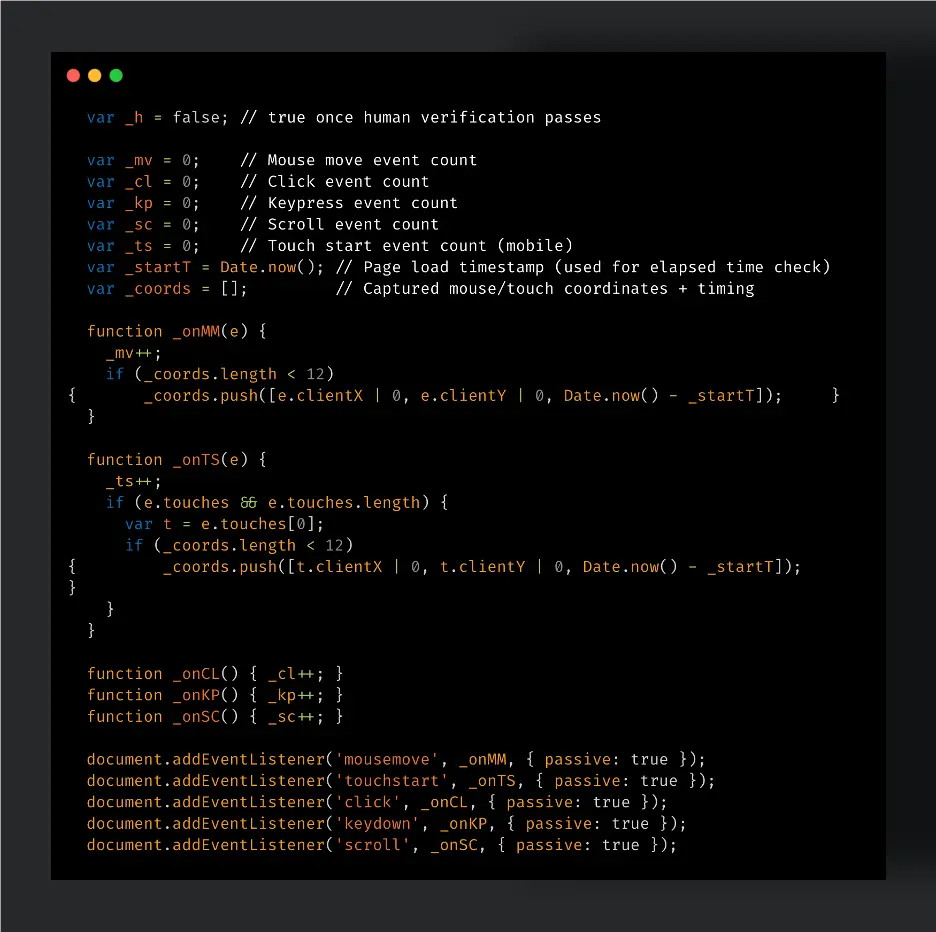
The phishing kit also tries to filter out scanners and automated security tools before it shows the actual payload. Talos found seven layers of client-side checks, including user-agent filtering, automation framework detection, browser fingerprinting, window-size checks, movement tracking, and a short timing delay.
The page also looks for human behavior, such as mouse movement or touch input. This can help the kit avoid automated analysis systems that load phishing pages without interacting like a real user.
The payload also tries to steal an existing JSON Web Token from local storage using the artoken_jwt key. It then extracts the victim’s email from a URL hint parameter and calls the attacker’s device code API.
Panel Features Support Business Email Compromise
The ARToken dashboard gives operators more than basic token capture. According to Talos Intelligence, the panel includes tools for reading Outlook mailboxes, sending email as the victim, creating inbox rules, downloading attachments, and searching across compromised accounts.
Those functions support business email compromise attacks. An attacker can watch conversations, hide warning emails, forward messages, and send payment-related requests from a trusted mailbox.
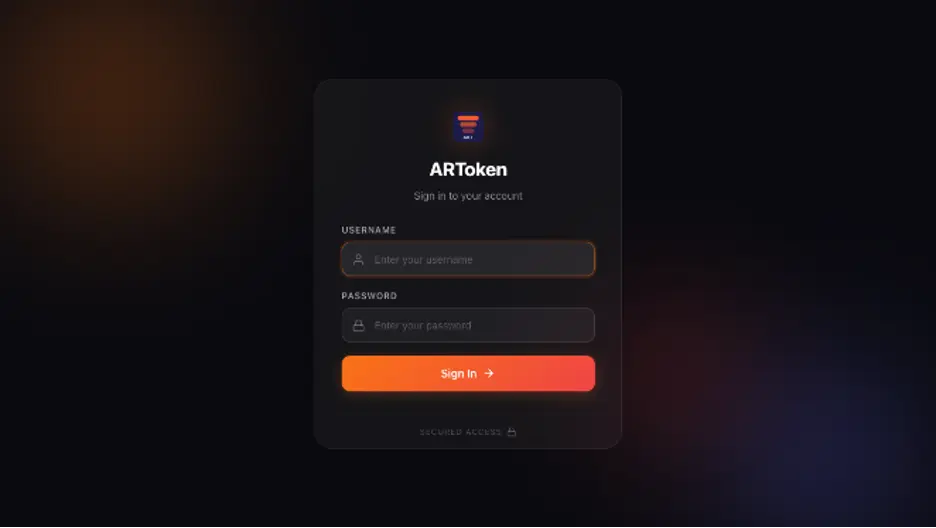
The panel also supports SharePoint and OneDrive actions, including browsing, uploading, downloading, and changing permissions. This can expose sensitive documents and allow attackers to place malicious files for more phishing.
Link to EvilTokens Phishing-as-a-Service
ARToken shares infrastructure, API patterns, and operational behavior with EvilTokens, another Microsoft 365 device code phishing platform. Sekoia first documented EvilTokens in March 2026 as a turnkey device code phishing-as-a-service kit.
Sekoia’s tracking found around 500 Cloudflare Workers results connected to EvilTokens pages by March 23, 2026. Other tracking methods found over 1,000 results tied to EvilTokens phishing pages, including Cloudflare Workers domains and affiliate-hosted domains.
Microsoft later said the broader device code phishing activity had become more automated and more effective. The company linked the rise of these campaigns to tools such as EvilTokens, which made the technique easier for more attackers to use.
Primary Refresh Token Claims Need Careful Handling
ARToken’s interface advertises a Primary Refresh Token feature that can help operators maintain access after password changes. Microsoft’s Primary Refresh Token documentation explains that PRTs support single sign-on and can request access tokens for apps and websites.
However, token persistence depends on the token type, device state, authentication method, and administrative response. A password reset alone may not fully remove attacker access if valid sessions, refresh tokens, malicious inbox rules, or registered devices remain active.
Security teams should revoke sessions, revoke refresh tokens, review registered devices, remove malicious inbox rules, and check audit logs. They should not treat a password reset as the only recovery step.
What Security Teams Should Monitor
Microsoft’s Microsoft Security Blog recommends monitoring for suspicious device code authentication, unusual token activity, inbox rule creation, and Microsoft Graph access patterns after a phishing click.
- Unexpected device code authentication from unusual IP addresses or locations.
- Successful sign-ins after a user clicked a suspicious email link.
- New inbox rules that forward, delete, or hide messages.
- Microsoft Graph activity that reads mail or accesses files at unusual times.
- New registered devices or suspicious changes to authentication state.
- SharePoint or OneDrive downloads from unfamiliar infrastructure.
The FBI IC3 alert also recommends limiting or blocking device code flow where business use does not require it. Organizations should audit legitimate usage first to avoid breaking valid workflows.
How Organizations Can Reduce Risk
The strongest control is to restrict device code flow through Conditional Access, with exceptions only for approved business cases. Microsoft Entra administrators should also watch for device code sign-ins from nonstandard locations and risky infrastructure.
Security awareness training should cover a simple rule: users should not enter a device code unless they personally started the sign-in process on a device they control. Invoice emails, file-sharing prompts, and vendor messages should not ask users to approve random device codes.
Administrators should also review Microsoft device code flow usage across the tenant. This helps identify real business dependencies before applying stricter policies.
Indicators of Compromise
The following indicators appeared in the reported ARToken activity and can help defenders with triage. They should be used with behavior-based detection because attackers can rotate domains and infrastructure quickly.
| Type | Indicator | Description |
|---|---|---|
| Domain | dashboard-bl.pamconj[.]com | ARToken operator dashboard |
| Domain | spx.pamconj[.]com | Command-and-control API endpoint |
| Domain | clear90489058903-document.workers[.]dev | Cloudflare Workers phishing lure infrastructure |
| File | pumber.png | Inline signature image used in phishing emails |
| Identifier | 84eb384d-cd3e-4c90-a283-c960ce557913 | Hardcoded operator UUID used in device code API calls |
| Storage key | artoken_jwt | Local storage key targeted for session correlation |
Bottom Line
ARToken shows how Microsoft 365 phishing has moved beyond fake password pages. The campaign abuses a legitimate OAuth workflow, captures tokens, and then gives operators a full dashboard for mailbox access, file theft, and business email compromise.
The continued growth of EvilTokens-style phishing means organizations need controls that look beyond credentials. Device code flow restrictions, session revocation, inbox rule monitoring, and token-aware detection now matter as much as user password resets.
Microsoft’s PRT guidance also makes clear that token handling sits at the center of modern Microsoft Entra authentication. Defenders need to protect those tokens, detect abnormal use, and remove attacker access quickly when a user authorizes a suspicious code.
FAQ
ARToken is a phishing-as-a-service panel that targets Microsoft 365 accounts by abusing the OAuth device code flow to capture access and refresh tokens.
ARToken tricks victims into entering a device code on Microsoft’s real device login page. When the victim approves the request, the attacker receives tokens that can be used to access Microsoft 365 services.
No. The attack does not need the victim’s password. It relies on the victim approving an attacker-controlled device code sign-in through Microsoft’s legitimate authentication process.
Attackers can read email, send messages as the victim, create inbox rules, access attachments, browse SharePoint and OneDrive files, and use the account for business email compromise.
Organizations should restrict device code flow where possible, monitor suspicious device code authentication, revoke sessions after compromise, remove malicious inbox rules, and train users not to enter device codes they did not request.


Read our disclosure page to find out how can you help VPNCentral sustain the editorial team Read more


Improve this guide


User forum
0 messages