
Hackers Abuse VLC Executable and Malicious libvlc.dll to Deploy ValleyRAT


 8 min. read
  Published on
Hackers are using a legitimate VLC media player executable with a malicious libvlc.dll file to deploy ValleyRAT, a remote access trojan that can give attackers control over infected Windows systems.
The campaign was detailed by LevelBlue SpiderLabs, which said the malware reaches victims through fake installers and malicious emails. The email-based version uses business-themed lures tied to personnel transfers and salary adjustments.

Access content across the globe at the highest speed rate.
70% of our readers choose Private Internet Access
70% of our readers choose ExpressVPN

Browse the web from multiple devices with industry-standard security protocols.

Faster dedicated servers for specific actions (currently at summer discounts)
The attack does not rely on VLC being vulnerable. Instead, attackers abuse the trust users and security tools place in a known media player executable, then force it to load a malicious DLL from the same archive.
How the ValleyRAT Campaign Starts
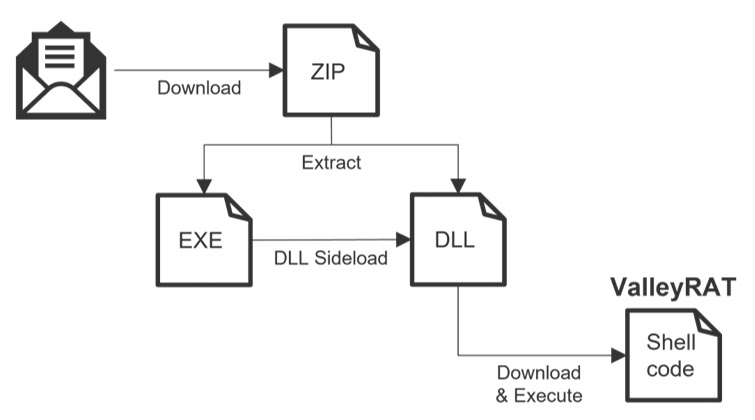
According to Cybersecurity News, the infection begins with a phishing email that contains a download link. The downloaded ZIP file includes two files: an executable and a DLL.
The executable uses a Japanese filename related to the lure, but its file properties identify it as VLC media player. LevelBlue found that the hash of the EXE matches a legitimate VLC executable, while the accompanying libvlc.dll file carries the malicious code.
When the victim runs the executable, Windows loads the DLL placed next to it. This technique lets attackers run malicious code through a process that appears connected to trusted software.
The Attack Chain at a Glance
| Stage | What happens | Why it matters |
|---|---|---|
| Phishing email | The victim receives a business-themed message about salary or personnel changes | The lure creates urgency and pushes the user to open the file on a PC |
| ZIP download | The archive contains a VLC executable and a malicious libvlc.dll file | The package looks more legitimate than a standalone unknown EXE |
| DLL sideloading | The VLC executable loads the malicious DLL | The attacker hides execution behind a trusted application name |
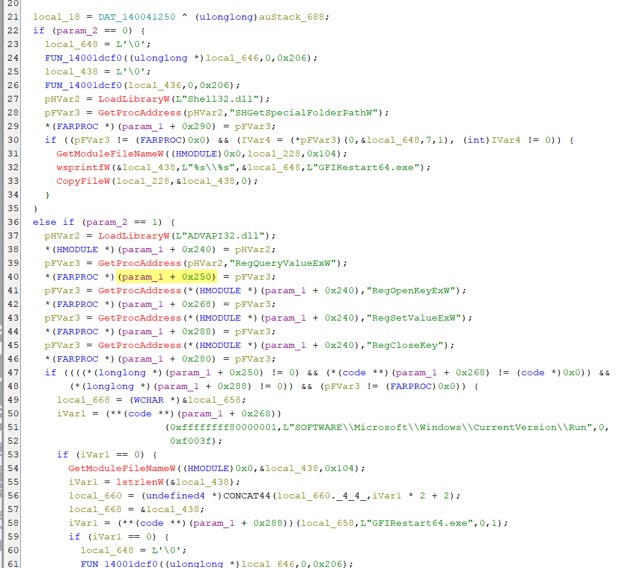
| Persistence | The malware copies files to a fixed folder and creates a Run registry entry | The infection can restart when the user logs back in |
| Payload delivery | The DLL downloads and decrypts ValleyRAT in memory | The final payload avoids being written to disk |
The VLC media player brand makes the lure more convincing because many users recognize the application. That recognition can make employees less suspicious when a file’s metadata or icon looks familiar.
Security teams should note that this is an abuse of legitimate software behavior, not a warning that users should remove VLC from trusted sources. The risk comes from running a bundled executable and DLL received through an email link or unofficial download.
Why DLL Sideloading Helps the Attack
MITRE ATT&CK tracks this type of activity under DLL search order hijacking, where attackers execute payloads by influencing which DLL a legitimate program loads.
Microsoft’s guidance on Dynamic-Link Library Security explains that applications should avoid unsafe DLL loading patterns and use safer search paths. Attackers keep abusing these gaps because a malicious DLL can run inside a trusted process.
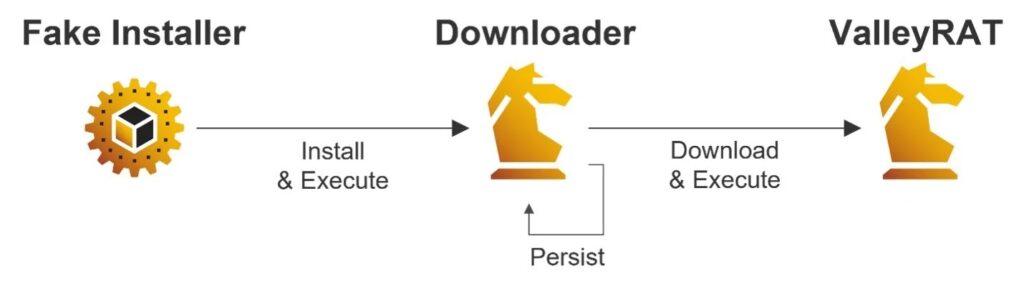
In this campaign, the malicious DLL performs two key jobs. It establishes persistence on the infected computer, then downloads and executes ValleyRAT as the final payload.
ValleyRAT Uses Anti-Analysis Checks
LevelBlue said the malicious DLL includes several evasion checks before it performs its main activity. These checks help the malware avoid sandboxes and automated analysis systems.
- It checks the amount of available physical memory.
- It measures whether sleep delays behave normally.
- It checks the processor count on the machine.
- It validates the return value of the IsNativeVhdBoot() API.
- It includes junk code to slow reverse engineering.
LevelBlue SpiderLabs said the malware stops if these checks suggest an analysis environment. That behavior can reduce the chance that automated tools observe the full infection chain.
The Final Payload Runs in Memory
The campaign also uses fileless execution to reduce its footprint. The DLL downloads an RC4-encrypted ValleyRAT payload, decrypts it in memory, and injects it into a suspended rundll32.exe process.
That process injection step makes detection harder because the final ValleyRAT payload does not need to be saved as a normal file on disk. Endpoint tools must watch behavior, memory activity, unusual DLL loading, and suspicious child processes rather than only scanning files.
Fortinet has previously described ValleyRAT as a multi-stage malware family that can monitor and control compromised machines. Its research also noted heavy use of shellcode and in-memory execution in earlier campaigns.
Who Is Being Targeted?
The malicious email chain analyzed by LevelBlue appears to target Japanese-speaking users, while related campaign evidence also includes Chinese-language material. The company said ValleyRAT activity should not be treated as a purely local threat.
Morphisec has also linked ValleyRAT activity to campaigns that target high-value business roles, including finance, accounting, and sales teams. Those employees often have access to sensitive systems and internal business data.
Global companies should pay attention even if their headquarters sit outside East Asia. Branch offices, partners, and regional teams can become entry points into larger corporate networks.
Indicators of Compromise
| Type | Indicator | Description |
|---|---|---|
| SHA1 | e8be03f19ada1f5cec74b143e21d4939e781671d | Malicious email sample |
| Domain | frehf.oss-cn-hongkong.aliyuncs[.]com | Domain used in the malicious email link |
| SHA1 | 65168c8dd93b16d3b77092fb70c0fa6fba4dffcc | ZIP archive linked to the fake VLC delivery chain |
| Network indicator | 154.92.16[.]22 / xz.bin | ValleyRAT payload download location, defanged for safety |
| SHA1 | eca7ed7b699835fadc2c2997a2845864e02b8dfe | RC4-encrypted ValleyRAT sample |
These indicators can help with threat hunting, but they should not become the only detection method. Attackers can quickly change domains, filenames, hashes, and infrastructure.
How Organizations Can Detect the Campaign
Security teams should hunt for suspicious DLL loading where a trusted executable runs from a user-writable or unusual directory. They should also review cases where VLC-named files appear inside ZIP archives linked to email lures.
MITRE ATT&CK notes that hijacked DLL loading can support persistence, privilege escalation, and defense evasion. That makes this activity important even before the final RAT payload appears.
Endpoint detection tools should also watch for rundll32.exe process injection, registry Run key creation, and file copies into public user folders. These behaviors can reveal the attack even when the final payload never touches disk.
Recommended Defensive Steps
- Block or quarantine ZIP files that contain both an EXE and DLL from unknown senders.
- Train employees to treat salary, HR, and personnel-transfer emails with caution.
- Review messages from free webmail domains that impersonate internal business topics.
- Monitor DLL loading from temporary, downloads, public documents, and user profile folders.
- Alert on suspicious Run key creation after opening an archive file.
- Use EDR rules for process injection into rundll32.exe and other common Windows utilities.
Microsoft’s Dynamic-Link Library Security guidance also shows why developers should avoid unsafe library loading. For defenders, the same guidance helps explain where attackers look for execution opportunities.
What to Do After an Infection
If a system shows signs of ValleyRAT compromise, isolate it from the network before cleaning it. This prevents the attacker from continuing remote control or moving laterally.
Cybersecurity News reported that affected organizations should review security logs to understand what the attacker did after infection. A clean operating system reinstall may be the safer option in severe cases.
Teams should also reset credentials used on the affected machine, review browser-stored secrets, and check access to internal business systems. A RAT infection should always trigger an incident response review, not just malware removal.
Why the VLC Angle Matters
The campaign shows how attackers can misuse familiar software names without exploiting the software vendor. The VLC media player executable helped the campaign look normal, while the malicious DLL did the actual work.
Fortinet has previously warned that ValleyRAT can give attackers control over infected machines and deliver additional components. That makes early detection at the delivery and sideloading stages especially important.
Morphisec also observed ValleyRAT operators using fake websites, phishing lures, and legitimate signed executables in earlier delivery chains. The latest VLC-themed campaign follows the same broader pattern: make the first file look safe, then let the hidden payload take over.
FAQ
It is a malware campaign where attackers bundle a legitimate VLC media player executable with a malicious libvlc.dll file. When the executable runs, it loads the malicious DLL and starts the ValleyRAT infection chain.
The reports do not describe a VLC vulnerability. Attackers abuse a legitimate VLC executable and place a malicious DLL next to it, causing the executable to load attacker-controlled code.
DLL sideloading is an attack technique where a legitimate program loads a malicious DLL placed in a location the program checks. This lets attackers run code under the cover of a trusted application.
ValleyRAT is a remote access trojan that can allow attackers to control infected systems, monitor activity, and deliver additional malware or plugins depending on the campaign.
Organizations should block suspicious ZIP files, train users on HR-themed phishing lures, monitor DLL loading from unusual folders, detect process injection, and isolate any system that shows signs of ValleyRAT infection.


Read our disclosure page to find out how can you help VPNCentral sustain the editorial team Read more


Improve this guide



User forum
0 messages