
PamStealer Mac Malware Poses as Maccy Clipboard Manager to Steal Passwords and Clipboard Data


 8 min. read
  Published on
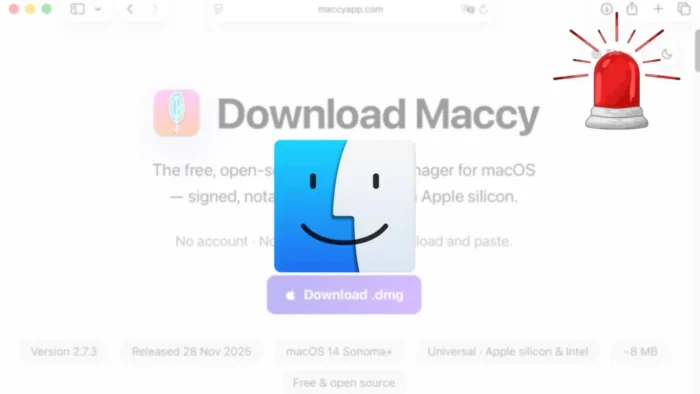
PamStealer is a newly identified macOS infostealer that disguises itself as Maccy, a legitimate clipboard manager for Mac. Jamf Threat Labs says the malware uses a fake Maccy download, a compiled AppleScript lure, and a Rust-based second-stage payload to steal credentials, browser data, Keychain-related information, wallet data, and clipboard contents.
The campaign is notable because it does not rely only on obvious shell commands. According to the Jamf Threat Labs report, the first stage uses JavaScript for Automation and native macOS APIs to download and stage the payload, reducing visible process activity that defenders often watch for.

Access content across the globe at the highest speed rate.
70% of our readers choose Private Internet Access
70% of our readers choose ExpressVPN

Browse the web from multiple devices with industry-standard security protocols.

Faster dedicated servers for specific actions (currently at summer discounts)
Maccy itself is not malware. The real Maccy website describes the app as a lightweight, open-source clipboard manager for macOS and warns users about fake websites impersonating the project.
How PamStealer Reaches Mac Users
The attack starts with a malicious disk image that presents itself as a Maccy download. Inside it, users find a compiled AppleScript file that opens in Script Editor when double-clicked.
The visible script content looks harmless and tells the user to run it. The actual malicious logic sits much lower in the file, hidden behind a large amount of blank space, which makes the script look less suspicious during a quick glance.
Jamf says the lure also uses homoglyph characters in the word Maccy. These characters look like normal Latin letters to a person, but they can frustrate simple text-matching checks that try to detect the fake branding.
| Stage | What happens | Why it matters |
|---|---|---|
| Fake download | A disk image pretends to offer Maccy | Users may trust the name of a known Mac app |
| AppleScript lure | The user is asked to run a script in Script Editor | The attack depends on social engineering |
| JXA downloader | The script retrieves a second-stage payload | Native APIs reduce obvious shell activity |
| Rust stealer | The payload harvests data and maintains persistence | The malware can collect several types of sensitive information |
The First Stage Uses Native macOS APIs
The first stage acts as a lightweight dropper. Instead of using common command-line tools such as curl or zsh, the malware uses JavaScript for Automation with NSURLSession and the Objective-C bridge.
This matters because many endpoint tools monitor process chains and command-line behavior. A dropper that uses native APIs can create fewer obvious signals than a script that launches several external utilities.
Apple says macOS malware protection relies on several layers, including the App Store, Gatekeeper, notarization, and XProtect, according to its macOS malware protection guidance. PamStealer shows why attackers continue to mix trusted-looking downloads with user-driven execution prompts.
Environment Checks Help the Malware Stay Quiet
PamStealer does not immediately run the same way on every machine. Jamf found that the dropper builds a key from host details such as CPU architecture, locale, keyboard layout, and time zone.
If the environment does not match the expected profile, the configuration does not unlock and the malware quietly exits. Jamf also observed region-based exclusions tied to locales, time zones, country codes, and keyboard layouts associated with Russia and several nearby regions.
These checks can help malware avoid analysis systems, sandbox environments, and devices outside the attacker’s intended target set.
- The malware checks system architecture and regional settings before running.
- It uses a two-stage infection chain instead of putting everything in the first file.
- It disguises staged payloads as familiar macOS components such as Finder or Software Update.
- It uses persistence mechanisms so the malicious payload can continue running after restart.
The Second Stage Steals Passwords, Browser Data and Clipboard Contents
The second stage is a Rust-based Mach-O binary. Jamf says it handles credential theft, browser data collection, persistence, clipboard monitoring, and data exfiltration.
The payload targets browser data through local databases and can collect stored passwords, cookies, and wallet-related information. It also attempts to access Keychain-related data and uses macOS security frameworks in ways that can make static analysis harder.
The clipboard component is especially risky because users often copy passwords, one-time codes, API tokens, recovery phrases, cryptocurrency addresses, and private notes. A clipboard-monitoring stealer can capture sensitive data even if the user never saves it to a file.
PamStealer Validates the Mac Password Before Stealing It
One of PamStealer’s most unusual features is its password prompt. The malware shows a fake system-style dialog that asks the user to enter the Mac login password.
Jamf found that the malware validates the password locally through macOS Pluggable Authentication Modules before harvesting it. This gives the attacker a confirmed working password rather than a random string typed by a suspicious user.
After that, the malware may show a fake damaged-app message to make the user think the Maccy download simply failed. The real official Maccy site remains the safest place to verify the app’s legitimate download options and the project’s warning about impersonation attempts.
Full Disk Access Prompt Adds Another Risk
PamStealer also attempts to trick users into granting Full Disk Access. That permission can give an app broader access to protected user files and data that macOS normally restricts.
Apple’s safe app opening guidance says Gatekeeper checks apps for known malware and verifies whether a developer signing certificate has been revoked. However, social engineering can still push users into running suspicious files or granting powerful permissions.
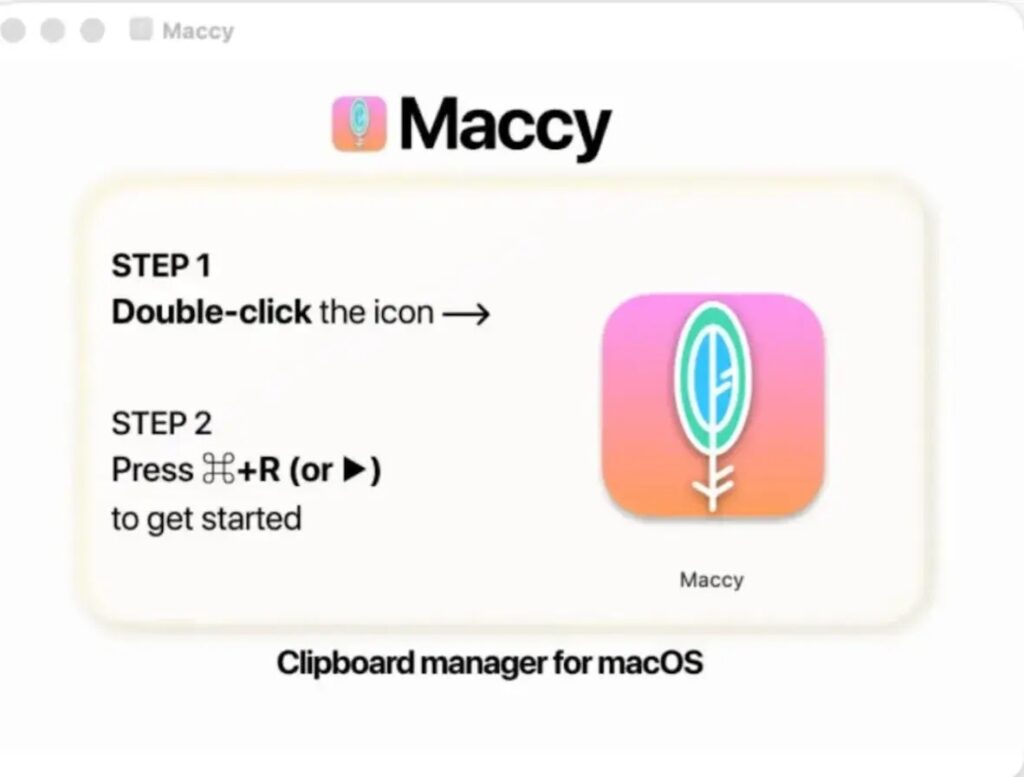
This is why the attack is dangerous even on systems with built-in protections. The malware tries to make each step look like part of normal app setup, then delays or stages some prompts to avoid matching user suspicion with the original launch.
| Data or access targeted | Why attackers want it |
|---|---|
| Mac login password | Can support account access and further local compromise |
| Browser cookies | Can help hijack active sessions |
| Stored browser data | May expose passwords, autofill data, and wallet details |
| Clipboard contents | May capture secrets copied temporarily by the user |
| Full Disk Access | Can expand access to protected files and app data |
Command-and-Control and IOCs
Jamf observed PamStealer sending encrypted data to attacker-controlled infrastructure. The malware used JSON requests with encrypted payloads and connected to command-and-control infrastructure after harvesting data.
The technical analysis lists indicators including fake distribution infrastructure, payload delivery endpoints, staged file paths, bundle identifiers, and hashes for AppleScript droppers and Mach-O payloads.
Security teams should treat the following as starting points for detection and investigation, not as a complete list of all possible variants.
| Indicator type | Examples reported by Jamf |
|---|---|
| Fake distribution domain | maccyapp[.]com |
| Payload delivery infrastructure | api.sync-master[.]online, api.live-updates[.]online, avngr.netlify[.]app |
| Exfiltration endpoint | avenger-sync[.]live |
| Suspicious staged paths | ~/Library/Application Support/com.apple.finder.core/ and related fake system-style folders |
| Fake bundle names | Finder, Software Update, System Settings |
How Mac Users Can Reduce the Risk
Mac users should avoid downloading Maccy or any other app from lookalike domains, ads, unsolicited links, or unofficial mirrors. The safest approach is to start from the developer’s official site, a trusted package manager, or the Mac App Store when available.
Apple’s guidance for safely opening apps also encourages users to pay attention to app source and security prompts. A clipboard manager should not need users to run a script in Script Editor from a disk image.
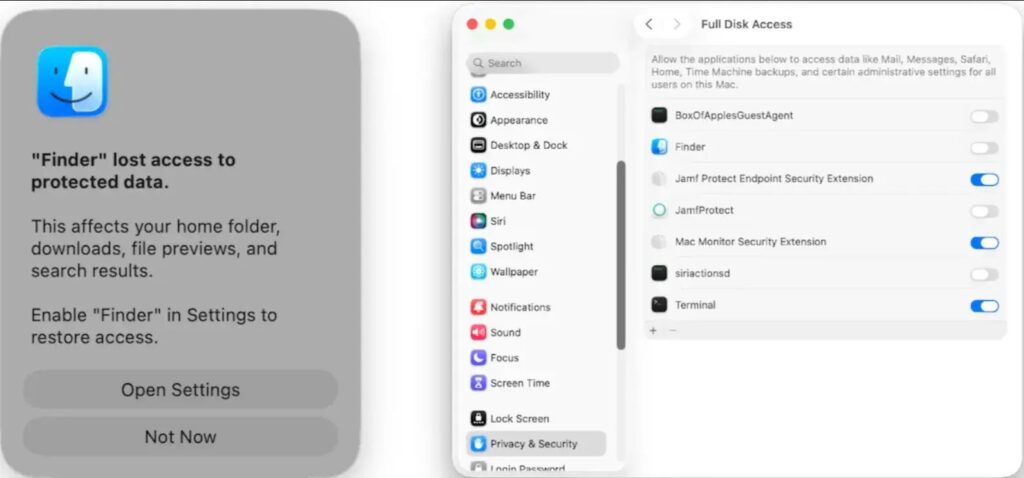
Users should also be cautious with any prompt that asks for a Mac login password outside a trusted system context. If a newly downloaded app immediately asks for Full Disk Access or shows unusual setup steps, stop and verify the app before continuing.
- Download Maccy only from the official project page or trusted distribution channels.
- Do not run AppleScript files from disk images unless the source and purpose are fully trusted.
- Do not enter your Mac password into unexpected prompts from newly downloaded apps.
- Review Login Items and Full Disk Access permissions if you suspect infection.
- Keep macOS and built-in security updates enabled.
- Rotate passwords and revoke active sessions if credentials may have been exposed.
Why PamStealer Matters
PamStealer shows how macOS infostealers continue to evolve. The malware combines a fake app download, Script Editor social engineering, native macOS APIs, Rust payload development, password validation, clipboard monitoring, and persistence.
The attack also highlights a broader security problem for popular open-source tools. Attackers can copy branding, build lookalike websites, and exploit user trust in a legitimate project while the real developer has no connection to the malware.
Apple’s malware defence model gives macOS users several built-in protections, but PamStealer depends heavily on convincing users to run the wrong file and approve the wrong prompts. That makes careful download habits and permission review just as important as technical controls.
FAQ
PamStealer is a macOS infostealer discovered by Jamf Threat Labs. It disguises itself as the Maccy clipboard manager and uses a two-stage infection chain to steal passwords, browser data, wallet-related data, Keychain-related information, and clipboard contents.
No. Maccy is a legitimate open-source clipboard manager for macOS. PamStealer abuses the Maccy name through fake downloads and impersonation sites, but the real project is not the malware.
PamStealer shows a fake system-style password prompt and validates the entered password locally through macOS Pluggable Authentication Modules. This lets the malware confirm that the captured Mac login password is correct before stealing it.
PamStealer can monitor clipboard contents and may capture anything copied by the user, including passwords, tokens, recovery phrases, cryptocurrency addresses, private notes, and other sensitive text.
Mac users should download Maccy only from the official project website or trusted channels, avoid running AppleScript files from unknown disk images, question unexpected password prompts, and review Full Disk Access and Login Items if they suspect compromise.


Read our disclosure page to find out how can you help VPNCentral sustain the editorial team Read more


Improve this guide



User forum
0 messages