
Google Patched Dialogflow CX Rogue Agent Flaw That Could Have Hijacked AI Chatbots


 7 min. read
  Published on
Google has patched a serious Dialogflow CX vulnerability that could have allowed an attacker with limited edit access to inject malicious code into AI chatbot workflows and monitor user conversations.
The flaw, named Rogue Agent by Varonis Threat Labs, affected organizations that used Dialogflow CX Playbooks with custom Code Blocks. It was not an unauthenticated internet attack, but it showed how one compromised developer account or insider permission could become a much larger AI security problem.

Access content across the globe at the highest speed rate.
🔥 Save 81% + 2 bonus months! 🔥
70% of our readers choose Private Internet Access
70% of our readers choose ExpressVPN
2
Browse the web from multiple devices with industry-standard security protocols.
🔥 Save 73%! 🔥

Faster dedicated servers for specific actions (currently at summer discounts)
🔥 Save 69%! 🔥
According to Axios, Google said the underlying issue has been fully mitigated and that it has no known indication of customer compromise. Varonis also said it is not aware of exploitation in the wild before the patch.
What happened in Dialogflow CX
Dialogflow CX is Google Cloud’s platform for building conversational agents, including customer support chatbots and voice assistants. Its Playbooks feature helps developers guide an agent through tasks, while Google’s Code Blocks documentation describes Code Blocks as inline Python code that can help control agent behavior.
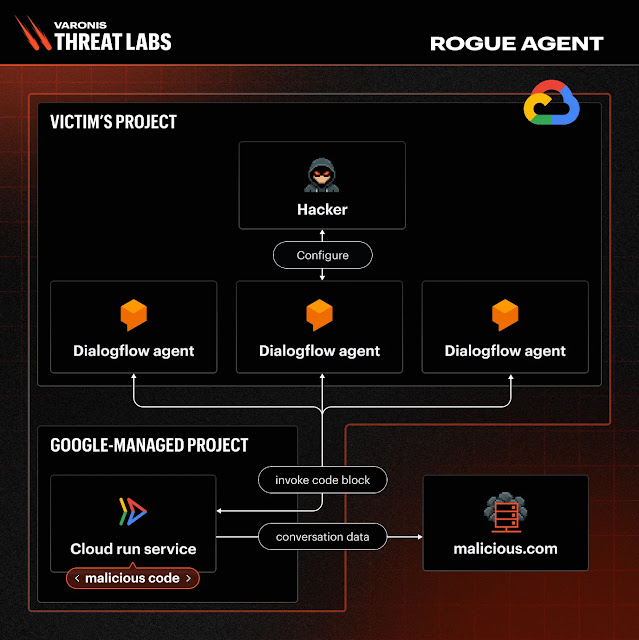
Varonis found that Code Blocks ran inside a Google-managed Cloud Run environment. The key problem was that multiple Dialogflow agents using Code Blocks in the same Google Cloud project shared the same execution environment.
The researchers also found that a file called code_execution_env.py was writable. That file helped execute Code Block logic through Python’s exec() function. By overwriting it, an attacker could persist malicious logic inside the shared runtime.
| Area | Details |
|---|---|
| Affected product | Google Cloud Dialogflow CX agents using Playbooks with Code Blocks |
| Research name | Rogue Agent |
| Required access | dialogflow.playbooks.update permission on one agent |
| Main risk | Conversation monitoring, data exfiltration, chatbot impersonation, and phishing prompts |
| Status | Google issued an initial update in April 2026 and fully resolved the issue in June 2026 |
How Rogue Agent could have worked
The attack relied on a permission that may look narrow at first. The dialogflow.playbooks.update permission can be scoped to one agent, but Varonis found that it could still allow a user to configure Code Blocks and execute arbitrary Python inside the shared environment.
Once inside that environment, malicious code could access session-related variables, including conversation history and state data. Varonis said the code could also call internal functions such as respond(), which could make the chatbot send attacker-controlled messages that looked like normal agent responses.
The same Rogue Agent report said an attacker could restore the visible Code Block configuration afterward, while the overwritten runtime file continued operating in the background. That made the compromise harder for customers to detect from the console.
- Read live or recent chatbot conversations
- Send conversation data to an external server
- Impersonate normal chatbot responses
- Display fake reauthentication messages to collect credentials
- Affect other Code Block-enabled agents in the same Google Cloud project
Why the shared runtime increased the risk
The most important finding was not simply that custom Python could run. Code Blocks are meant to support custom logic, and Google’s Code Blocks page explains that developers can use inline Python functions when defining a playbook.
The risk came from how that code was isolated. Varonis said all agents using Code Blocks in the same project effectively shared one Google-managed execution environment, which customers could not directly inspect or control.
Two related issues made the impact worse. First, the Cloud Run environment had outbound internet access, which could have turned it into a covert data exfiltration path. Second, researchers said the Instance Metadata Service was reachable, allowing retrieval of access tokens tied to a low-privileged Google-managed service account.
| Weakness | Security impact |
|---|---|
| Writable runtime file | Allowed persistent malicious code inside the Code Block execution pipeline |
| Shared execution environment | Allowed one affected agent to influence other Code Block-enabled agents in the same project |
| Outbound internet access | Created a possible path for data exfiltration outside expected controls |
| IMDS exposure | Exposed low-privilege Google-managed service account tokens inside the runtime |
What Google and customers said about the patch
Varonis reported the vulnerability to Google in November 2025 through Google’s Vulnerability Reward Program. Google shipped an initial security update in April 2026 and fully resolved the issue in June 2026.
In a statement reported by Axios, Google Cloud said it appreciated Varonis’ responsible disclosure, fully mitigated the issue, and had no known indication of customer compromise. Google also said no customer action is required for the fix itself.
However, organizations that used Dialogflow CX Playbooks with Code Blocks before the fix may still want to review their environments. That is especially important for companies that use chatbots for customer support, banking, healthcare, insurance, retail, or internal workflows that process sensitive data.
How teams can check for suspicious activity
Security teams should start by reviewing who has or had permission to update Dialogflow playbooks. Any account with dialogflow.playbooks.update should be treated as having access to code-execution behavior, not only chatbot content editing.
Google’s Dialogflow CX audit logging documentation says Data Access audit logs include data read and data write operations, but Data Access logs must be explicitly enabled. That detail matters because some older suspicious activity may not exist in logs if the right logging category was not active at the time.
Varonis recommends reviewing DATA_WRITE audit logs for Dialogflow API activity, looking for unusual playbook update events, and correlating them with rare users, unfamiliar IP addresses, or unusual access times. Teams should also inspect failed requests and review protoPayload.status.message for exceptions that may point to malicious Code Block behavior.
- Check which users and service accounts can update Dialogflow playbooks
- Review historical playbook update events where DATA_WRITE audit logs are available
- Compare suspicious updates with login time, IP address, and user behavior
- Search Cloud Logging for failed Dialogflow requests linked to Code Block exceptions
- Manually review each Playbook and confirm that only approved Code Blocks remain
Why Rogue Agent matters for AI security
Rogue Agent stands out because it did not depend on fooling a chatbot with a prompt. It abused a normal developer feature and a shared runtime behind that feature. In practice, it turned a limited editing permission into a potential execution and surveillance path.
The issue also lands at a time when enterprise AI agents are moving quickly into production. Microsoft’s Cyber Pulse AI security report says over 80% of Fortune 500 companies are deploying active agents built with low-code or no-code tools.
That growth makes permissions, runtime isolation, logging, and agent visibility more important. The same Microsoft report recommends applying Zero Trust principles to AI agents, including least privilege, explicit verification, and an assumption that compromise can occur.
Bottom line
Google has fixed the Dialogflow CX Rogue Agent issue, and there is no known evidence of customer compromise. Even so, the case gives cloud and AI teams a clear warning: chatbot editing rights can carry more risk than they appear to carry.
Organizations should treat AI agent configuration, Code Blocks, service accounts, and runtime permissions as security-sensitive assets. They should also confirm that Dialogflow CX audit logging is enabled where needed, because strong logs may be the only practical way to investigate past activity after a managed service has already been patched.
FAQ
Rogue Agent is the name Varonis gave to a patched Dialogflow CX vulnerability that could have allowed an attacker with playbook update permission to inject persistent malicious code into Code Block-enabled chatbot workflows.
Varonis said it is not aware of exploitation in the wild before Google’s patch. Google also said it has no known indication of customer compromise.
The risk applied to organizations that used Dialogflow CX Playbooks with Code Blocks before Google fully resolved the issue. The attack required dialogflow.playbooks.update permission on at least one agent, so it was more realistic for a compromised developer account or malicious insider than for an unauthenticated remote attacker.
Attackers could have accessed chatbot conversation history and session-related data available inside the Code Block execution scope. They could also have manipulated chatbot replies and created phishing-style prompts to collect sensitive information from users.
Google says the underlying issue has been mitigated, but teams that used Code Blocks before the fix should review playbook update permissions, check DATA_WRITE audit logs where available, look for unusual playbook updates, and manually confirm that current Code Blocks are approved.


Read our disclosure page to find out how can you help VPNCentral sustain the editorial team Read more


Improve this guide




User forum
0 messages