
RedHook Android RAT Abuses ADB Wireless Debugging to Gain Shell-Level Access


 10 min. read
  Published on
RedHook, an Android remote access trojan and banking malware family, has returned with a more dangerous privilege-abuse technique that uses ADB Wireless Debugging to gain shell-level access on infected devices.
According to Group-IB researchers, the latest RedHook variant can obtain shell-level privileges, known as uid 2000, by automating Android developer features after tricking the victim into enabling Accessibility Service.

Access content across the globe at the highest speed rate.
🔥 Save 81% + 2 bonus months! 🔥
70% of our readers choose Private Internet Access
70% of our readers choose ExpressVPN
2
Browse the web from multiple devices with industry-standard security protocols.
🔥 Save 73%! 🔥

Faster dedicated servers for specific actions (currently at summer discounts)
🔥 Save 69%! 🔥
The result is a stronger mobile threat. RedHook can already monitor screens, collect keystrokes, and steal banking data, but shell-level access lets it silently grant permissions, modify secure settings, install or remove apps, and capture low-level touch input.
What RedHook is and why it matters
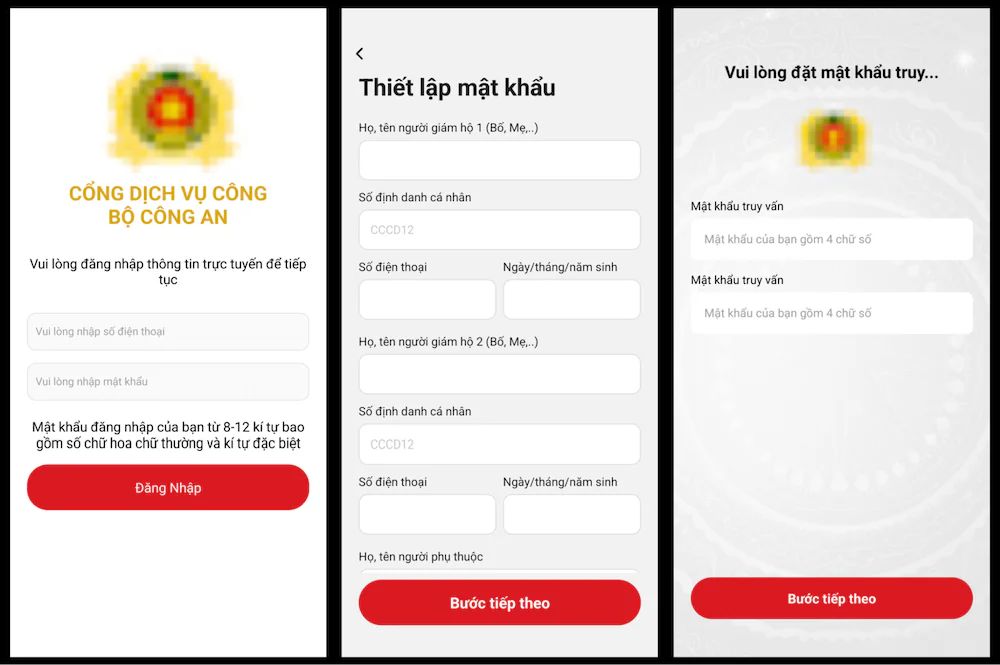
RedHook was first publicly documented in July 2025 as a banking trojan targeting Vietnamese users through spoofed government and financial websites. Cyble’s analysis said the malware combined phishing, RAT functions, keylogging, WebSocket-based control, and screen capture.
The new campaign keeps those core features but adds a more advanced privilege chain. Instead of relying only on overlays and screen capture prompts, the malware now turns a developer workflow into a local privilege path.
Group-IB says the latest activity also shows broader regional targeting. RedHook’s focus has expanded beyond Vietnam to include users in Indonesia, suggesting a wider push across Southeast Asia.
| Feature | Earlier RedHook activity | Latest RedHook activity |
|---|---|---|
| Targeting | Vietnam-focused banking and government phishing | Vietnam and Indonesia activity reported |
| Access method | Accessibility abuse, overlays, phishing, screen capture | Accessibility-driven ADB Wireless Debugging setup |
| Privilege level | Normal malicious app permissions plus Accessibility abuse | Shell-level access through uid 2000 |
| Command set | Over 30 server-issued commands | 53 server-issued commands |
| Main risk | Banking credential theft and remote control | Deeper device control and stealthier permission abuse |
How the malware reaches victims
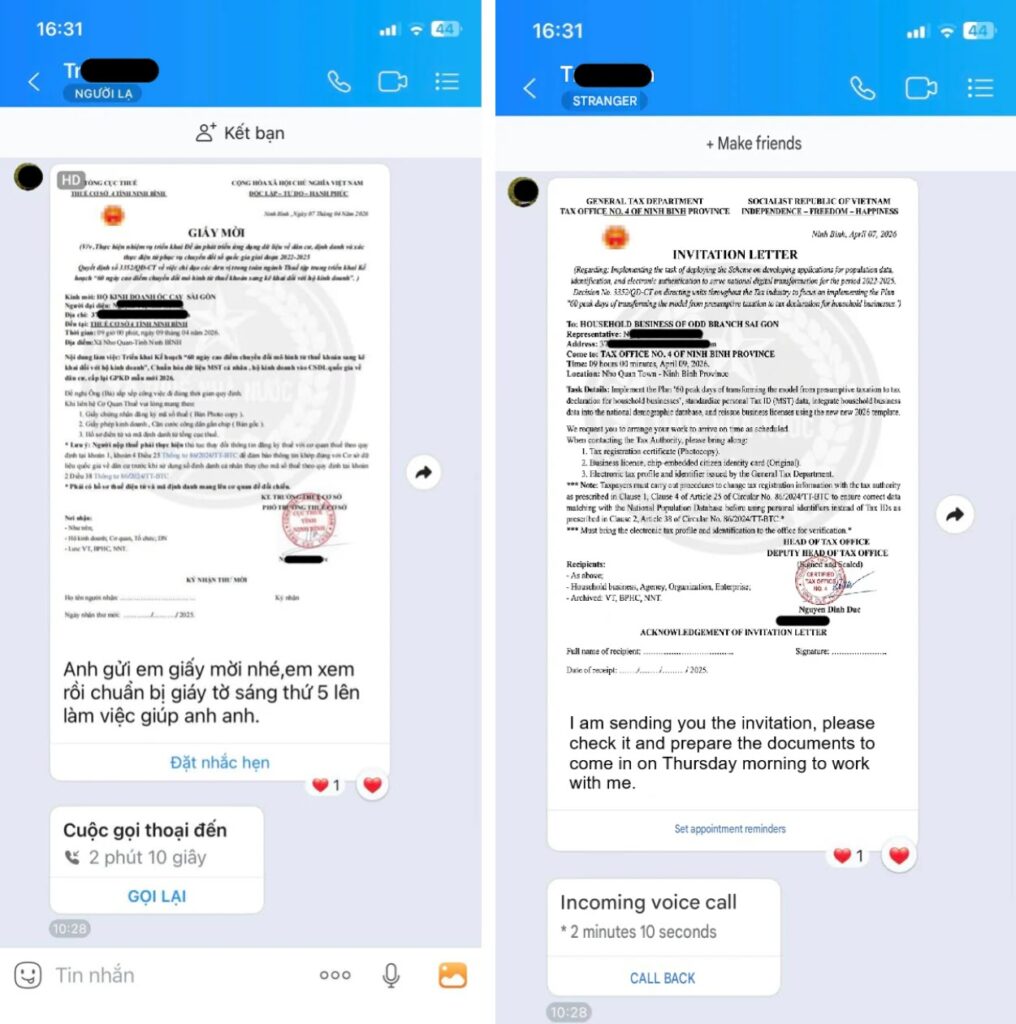
RedHook spreads through social engineering rather than a direct app-store install. Attackers contact victims through phone calls or messaging apps and impersonate trusted organizations, government offices, bank staff, or support personnel.
The victim is then sent to a fake website that mimics Google Play or a trusted service. The malicious APK may be hosted on legitimate cloud or development platforms, including GitHub repositories and AWS S3 buckets, which can make the download look less suspicious.
After installation, RedHook uses a guided flow to convince the victim to grant Accessibility Service permission. Android’s own Accessibility Service documentation says these services can inspect screen content and interact with apps on a user’s behalf, which explains why banking trojans value this permission so highly.
ADB Wireless Debugging becomes the privilege path
ADB, short for Android Debug Bridge, normally lets developers communicate with an Android device from a computer. Google’s Android Debug Bridge documentation explains that Android 11 and later support wireless debugging over Wi-Fi after a pairing process.
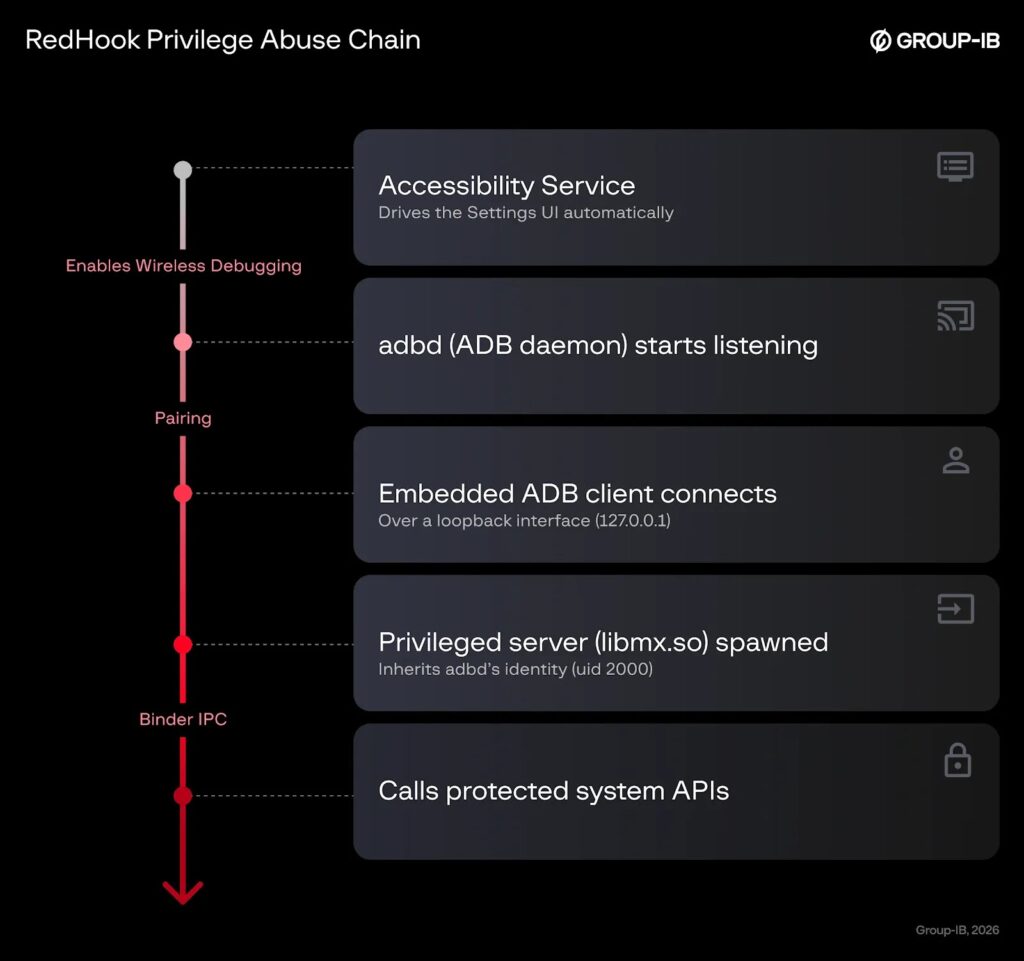
RedHook abuses that same workflow on the infected phone. Once Accessibility Service has been enabled, the malware performs automated taps through Settings, enables Developer Options, turns on Wireless Debugging, selects pairing by code, and retrieves the pairing code while a full-screen overlay hides the activity from the user.
The malware then behaves as if the phone is its own trusted host. It connects to the local ADB daemon through the loopback address and launches a privileged server process under Android’s shell user, uid 2000.
Shizuku-style code helps RedHook borrow shell privileges
Group-IB found that RedHook’s privileged shell implementation heavily references code from Shizuku, an open-source Android project that lets normal apps use system APIs through a process started with ADB or root privileges.
Shizuku has legitimate uses for developers and power users. RedHook’s operators repurpose the same idea for malware, using a privileged process to call system APIs that ordinary apps cannot normally access.
Once active, RedHook can grant itself runtime permissions, run shell commands, modify secure Android settings, and capture low-level touch events. That gives attackers a stronger position than standard overlay malware.
| Stage | What RedHook does | Security impact |
|---|---|---|
| Initial lure | Uses calls or messages to impersonate trusted organizations | Pushes the victim toward APK sideloading |
| Installation | Delivers a malicious APK from fake service pages | Places the RAT on the device |
| Permission abuse | Guides the victim into enabling Accessibility Service | Allows automated taps, overlays, and UI inspection |
| ADB setup | Enables Developer Options and Wireless Debugging | Creates the path to ADB pairing |
| Local pairing | Uses the device as its own ADB host | Gains shell-level uid 2000 access |
| Post-access actions | Grants permissions, changes settings, captures input, and controls apps | Expands control without normal confirmation prompts |
Why shell-level access changes the threat model
Ordinary Android apps operate inside the app sandbox and need user-approved permissions for sensitive actions. RedHook’s shell-level access gives it a more trusted identity inside the system.
That does not mean the malware fully roots the device. It means RedHook can act as the Android shell user, which has more power than a normal app and can perform actions that usually belong to developer workflows.
This allows the malware to install and uninstall apps, grant sensitive permissions, change secure settings, and stream the screen in ways that bypass some normal consent prompts.
Persistence features keep RedHook alive
RedHook also includes a layered persistence stack designed to keep its services and command channels running. The malware uses foreground activity spoofing, silent audio playback, wake locks, process resurrection, boot-start behavior, and process-priority manipulation.
Group-IB says RedHook can launch a nearly invisible one-pixel activity when the screen turns off. It can also play silent audio through MediaSession and hold a WakeLock so Android is less likely to suspend the process.
Two services monitor each other and relaunch a partner process if one dies. This mutual-resurrection behavior can make manual removal harder, especially if the user tries to stop the app without revoking permissions first.
- One-pixel activity keeps the malware classified as foreground.
- Silent audio playback raises process priority.
- WakeLock prevents suspension during idle states.
- Cross-process service binding relaunches killed components.
- Boot receiver restarts the malware after device reboot.
- ADB keys and shell privileges can be restored after startup.
Command and control uses WebSockets and APIs
RedHook uses WebSocket channels for command delivery and screen streaming. Larger stolen data payloads go to REST API endpoints, including data related to logins, screenshots, device information, passwords, keylogs, SMS messages, and verification codes.
When the shell-privileged server is active, RedHook can also stream video through RTMP. Group-IB says this can bypass the normal MediaProjection consent dialog because the capture occurs with shell-level privileges.
The command set has grown to 53 server-issued commands. Those commands include screen capture, coordinate upload, opening apps, uninstalling apps, ADB setup, permission granting, reconnect behavior, overlays, and other remote-control functions.
OEM-specific code hints at future expansion
RedHook includes brand-specific routines for enabling Wireless ADB on devices from Google, Huawei, Meizu, Oppo, Samsung, Vivo, and Xiaomi. Group-IB says those routines were present in the code but not invoked in the observed execution flow.
That suggests the operators may prepare future campaigns that handle differences across Android skins and OEM settings layouts. Such work matters because permission screens and developer menus can differ by manufacturer.
The technical direction is clear. RedHook’s developers are improving automation so the malware can navigate more device models with less manual support from operators.
Indicators of compromise
The following IoCs were published for defensive monitoring. Hosts are defanged to prevent accidental access.
| Type | Indicator | Description |
|---|---|---|
| SHA-256 | 453333bffdd1850ea2e0647f7c805530b578919978a01b1e2be52d6eb2add946 | Malicious RedHook APK payload |
| Host | api.3n7wj[.]com | Command-and-control API endpoint |
| Host | skt.3n7wj[.]com | Command-and-control WebSocket channel |
| Host | sktv.3n7wj[.]com | Screen-streaming WebSocket endpoint |
How financial institutions should respond
Financial organizations should treat RedHook as both a malware problem and a fraud problem. The malware can observe customer sessions, capture credentials, read messages, and control screens during high-risk banking moments.
Session monitoring can help detect unusual device behavior before customers enter sensitive information. Digital risk protection can also help identify fake websites, copied branding, and malicious APK distribution pages before they reach more victims.
Useful controls include:
- Monitor mobile sessions for signs of overlay abuse, remote control, and abnormal input patterns.
- Detect suspicious device states such as enabled Wireless Debugging on customer devices during banking sessions.
- Watch for traffic to RedHook infrastructure and similar WebSocket-based control channels.
- Track fake websites that copy bank, government, or support branding.
- Warn customers not to install APKs sent through calls, chats, or unofficial links.
- Use step-up authentication when device risk signals suggest malware activity.
How Android users can reduce the risk
For individual users, the most important protection is to avoid installing apps from links sent through calls, SMS, chat apps, or social media messages. RedHook depends on convincing people to sideload an APK and enable powerful permissions.
Users should treat Accessibility Service requests with caution. The Android Accessibility Service guide describes the feature as a tool for assisting users, not a normal requirement for banking, government, delivery, or support apps.
Users should also keep Developer Options and Wireless Debugging disabled unless they need them for legitimate development. Google’s ADB guidance shows that wireless debugging requires pairing, but RedHook demonstrates how malware can automate that setup after gaining Accessibility control.
- Install apps only from trusted official stores.
- Do not enable Accessibility Service for unknown or newly installed apps.
- Keep Wireless Debugging turned off unless actively developing.
- Do not follow instructions from unknown callers to change security settings.
- Uninstall suspicious apps and revoke Accessibility permissions immediately.
- Contact the bank directly using the official phone number if fraud is suspected.
- Freeze or monitor accounts if banking credentials were entered on an infected device.
Why RedHook’s approach matters
RedHook shows how mobile malware can become more powerful without exploiting a new operating-system vulnerability. The malware chains social engineering, Accessibility abuse, legitimate debugging features, and open-source privilege techniques into a practical attack path.
The Shizuku project itself is legitimate, but RedHook’s reuse of the concept shows how attacker tooling often borrows from developer and enthusiast communities.
The earlier Cyble report already showed RedHook’s banking-theft foundation. The newer Group-IB report shows that the operators are now pushing deeper into device control, persistence, and regional expansion.
FAQ
RedHook is an Android banking trojan and remote access trojan. It can steal credentials, monitor screens, collect keystrokes, control device actions, and communicate with command-and-control servers through WebSocket channels.
RedHook uses Accessibility Service to automate taps through Android settings, enable Developer Options, turn on Wireless Debugging, retrieve a pairing code, and connect to the local ADB daemon. This lets it launch a privileged shell process under uid 2000.
No. RedHook does not need traditional root access for this technique. It abuses ADB Wireless Debugging and Shizuku-style code to obtain shell-level privileges after the victim installs the APK and enables Accessibility Service.
Cyble first documented RedHook as a Vietnam-focused banking trojan in 2025. Group-IB now reports recent activity that includes users in Indonesia, suggesting a broader Southeast Asia focus.
Users should install apps only from trusted official stores, avoid APK links sent through calls or messages, reject Accessibility Service requests from unknown apps, keep Wireless Debugging disabled, and contact their bank directly if they suspect fraud.


Read our disclosure page to find out how can you help VPNCentral sustain the editorial team Read more


Improve this guide




User forum
0 messages