
GigaWiper Malware Attacks Windows Systems With Data Wipers and Fake Ransomware Behavior


 9 min. read
  Published on
Microsoft has identified GigaWiper, a destructive Windows backdoor that combines remote-control features with multiple data-wiping capabilities, including disk destruction, unrecoverable file encryption, and system sabotage.
The malware was first tied to destructive wiping activity in compromised environments in October 2025. According to Microsoft Threat Intelligence, GigaWiper is written in Golang and works as a modular implant that can receive commands before triggering destructive actions.

Access content across the globe at the highest speed rate.
🔥 Save 81% + 2 bonus months! 🔥
70% of our readers choose Private Internet Access
70% of our readers choose ExpressVPN
2
Browse the web from multiple devices with industry-standard security protocols.
🔥 Save 73%! 🔥

Faster dedicated servers for specific actions (currently at summer discounts)
🔥 Save 69%! 🔥
The threat matters because it does not behave like traditional ransomware. One component imitates ransomware by encrypting files and changing extensions, but it does not save the key or leave a ransom note, which makes recovery through decryption impossible.
What is GigaWiper?
GigaWiper is a destructive backdoor for Windows systems. It gives attackers a way to maintain access, collect information, execute commands, manage services and Registry keys, capture screens, record activity, and later wipe or corrupt data.
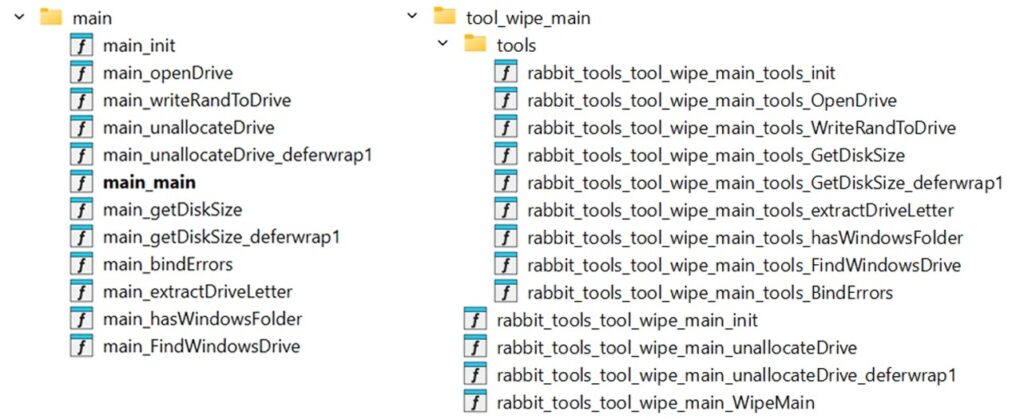
Microsoft says the tool combines pieces of at least three malware families. The standalone disk wiper is embedded inside the backdoor, while two additional destructive commands are linked to Crucio and FlockWiper code.
Google Threat Intelligence Group and Binary Defense track the same malware as BLUERABBIT. Microsoft tracks it as GigaWiper.
| Capability | How it works | Impact |
|---|---|---|
| Physical disk wiping | Finds physical drives, removes partition references, overwrites raw disk content, and forces a reboot | Can make systems and stored data unusable |
| Fake ransomware encryption | Encrypts files with random key material that is not saved and renames files with .candy | Leaves no usable decryption path |
| Multi-pass Windows drive wiping | Wipes the Windows installation drive with multiple overwrite passes | Increases the chance of permanent data loss |
| System sabotage | Deletes recovery, boot, and kernel files and can trigger a blue screen condition | Can prevent normal boot and recovery |
| Backdoor control | Uses RabbitMQ for commands and Redis for output and status updates | Allows broadcast or targeted attacker instructions |
How the disk wiper damages Windows systems
GigaWiper’s standalone wiper operates at the physical disk level. Rather than deleting documents one by one, it attacks the drive structures that Windows needs to locate data and boot correctly.
The wiper enumerates physical disks through Windows Management Instrumentation, identifies the drive that contains the Windows installation, and removes partition references from other disks. It then overwrites raw disk content in large chunks.
After wiping, the malware forces an immediate restart. That combination can leave a victim with unbootable systems, missing partitions, and damaged data stores.
The fake ransomware routine offers no recovery
One GigaWiper command uses code linked to Crucio ransomware. It reads files, encrypts them with AES-CBC, deletes the originals, and renames the encrypted files with the .candy extension.
The routine looks like ransomware at first glance, but it does not operate like a normal extortion tool. Microsoft found that the key and initialization vector are randomly generated and not saved anywhere.
That means the attacker has no apparent ability to decrypt the data. The malware also does not drop a ransom note, although it can set a warning image as the wallpaper.
GigaWiper also borrows from FlockWiper
The second major wiping command, called WipeCMain, is linked to FlockWiper. Microsoft says the logic is essentially identical to a standalone FlockWiper sample, although GigaWiper reimplements it in Golang and updates parts of the behavior.
This command focuses on the Windows installation drive, usually the C drive. It performs multiple overwrite passes using different byte patterns, including zeros, 0xFF values, and random bytes.
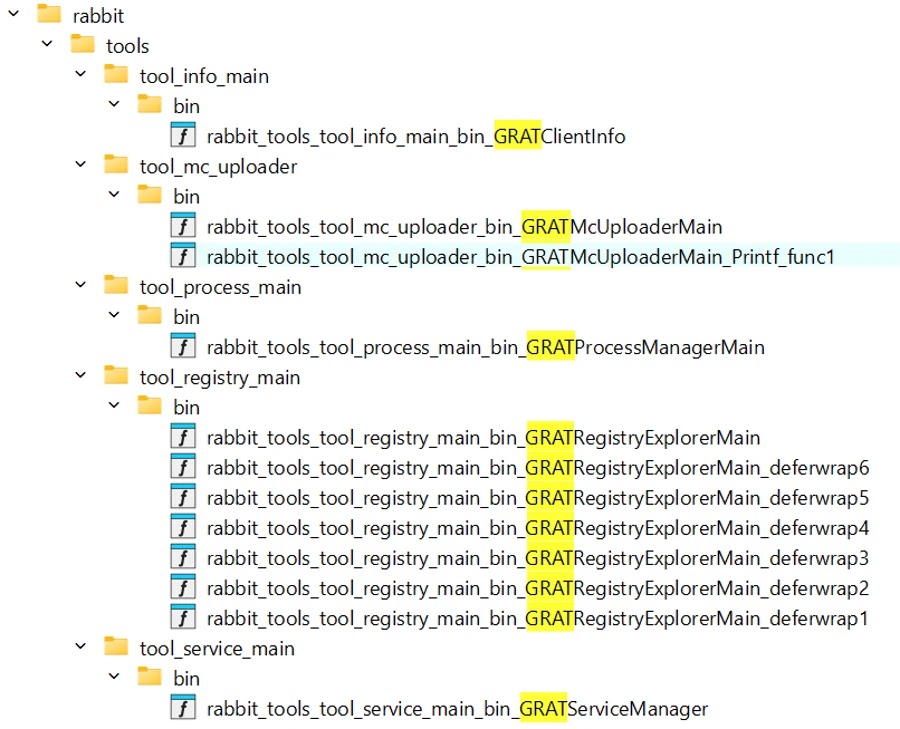
The Microsoft analysis also notes references to “GRAT” in FlockWiper program database paths and GigaWiper function names, suggesting a possible related framework or unrecovered component.
Backdoor commands give attackers many options
GigaWiper includes 20 numeric command codes. Some are destructive, while others support surveillance, remote control, system discovery, process management, service management, Registry management, and event log clearing.
The backdoor can take screenshots from active displays and record the screen when the system is unlocked and the user is not idle. It can also start a VNC-like remote-control server that streams the screen and allows keyboard and mouse control.
It can clear Windows event logs, including System, Setup, Application, ForwardedEvents, and Security logs. That behavior can slow incident response by removing traces of attacker activity.
- Command 1 triggers the embedded physical disk wiper.
- Command 2 deletes recovery, boot, and kernel files and can prevent booting.
- Command 3 launches the ransomware-like file encryption routine.
- Command 7 runs shell commands and supports queue-management actions.
- Command 8 manages RabbitMQ routing for targeted commands.
- Command 9 captures screenshots.
- Command 10 records the screen.
- Command 12 launches the multi-pass Windows drive wiper.
- Command 15 collects system information.
- Command 19 clears Windows event logs.
- Command 20 enables VNC-like remote control.
RabbitMQ and Redis support attacker control
GigaWiper uses RabbitMQ over AMQP to receive commands from its command-and-control server. It uses Redis to send back command status and output.
One analyzed sample used 185.182.193[.]21 on port 5544 for RabbitMQ and the same IP on port 7542 for Redis. The malware decrypts a hard-coded configuration that includes connection details and credentials.
The backdoor can receive broadcast tasks through a fanout exchange named All. It can also bind to a topic exchange named Topic for targeted commands, giving operators a way to control many infected devices at once or focus on specific systems.
Persistence hides behind OneDrive names
GigaWiper uses familiar Microsoft-themed names to reduce suspicion. It creates the Registry key HKCU\SOFTWARE\OneDrive\Environment to track execution count.
It also creates a scheduled task named OneDrive Update. The task runs at startup and then runs again every minute, helping the implant stay active after reboot or process termination.
That naming can blend into enterprise environments where OneDrive is already common. Defenders should still investigate new or unusual scheduled tasks using Microsoft product names, especially when the executable path does not match a legitimate Microsoft location.
Indicators of compromise
Microsoft published hashes and command-and-control indicators for GigaWiper and related components. Security teams should use these indicators with behavior-based hunting because wiper operators can change infrastructure and file hashes quickly.
| Type | Indicator | Description |
|---|---|---|
| SHA-256 | 633d4cbd496b1094495da89a64f5e6c31a0f6d4d1488411db5b0cba1cfe42001 | GigaWiper backdoor |
| SHA-256 | ce9ad5f6c12019f4aae5b189bd8ddf5bb09e75b06a0a587b25a855c65948c913 | GigaWiper backdoor |
| SHA-256 | f622ed85ef31ad4ab973f4e74524866fe1bb44f0965ad2b2ad796cd657a05bfd | GigaWiper backdoor |
| SHA-256 | 9706a192e2c1a1faaf0a521daf31c2af60ff4590e3f47bbb4abc227f42af0683 | GigaWiper backdoor |
| SHA-256 | 3c30deb6556a94cfb84ae51798f4aecfae8c7358e55fdb321c5f2376579631cd | GigaWiper standalone wiper |
| SHA-256 | 440b5385d3838e3f6bc21220caa83b65cd5f3618daea676f271c3671650ce9a3 | Crucio |
| SHA-256 | 12c39f052f030a77c0cd531df86ad3477f46d1287b8b98b625d1dcf89385d721 | FlockWiper |
| SHA-256 | db41e0da7ab3305be8d9720769c6950b4dc1c1984ef857d3310eb873a0fc7674 | FlockWiper |
| IP address | 185.182.193[.]21 | GigaWiper command-and-control server |
| IP address | 212.8.248[.]104 | GigaWiper command-and-control server |
How defenders should hunt for GigaWiper
Security teams should treat possible GigaWiper activity as an urgent business continuity event. The malware can shift from surveillance to destruction quickly once operators issue commands.
Useful hunting signals include suspicious scheduled task creation, OneDrive-themed Registry keys in unexpected contexts, RabbitMQ or Redis connections to unknown external servers, screen recording output, and sudden use of disk-management or event-log clearing commands.
Teams should also look for ransomware-like file encryption followed by .candy extensions, missing recovery files, unexpected firewall rule changes, and VNC-like remote-control behavior.
- Search for the scheduled task name OneDrive Update on endpoints and servers.
- Review HKCU\SOFTWARE\OneDrive\Environment for suspicious execution tracking.
- Block or investigate outbound traffic to known GigaWiper C2 IP addresses.
- Hunt for RabbitMQ and Redis communication from endpoints that should not use them.
- Investigate wevtutil activity that clears Windows event logs.
- Review unexpected deletion of boot, kernel, and recovery files.
- Look for .candy file extensions and wallpaper changes tied to suspicious binaries.
- Check for new firewall rules impersonating legitimate Windows components.
Mitigation steps for Windows environments
Microsoft recommends enabling tenant-wide tamper protection to stop attackers from disabling security settings or adding antivirus exclusions during an intrusion.
Organizations should also use EDR in block mode so Defender for Endpoint can block malicious artifacts found through behavioral detection, including cases where Microsoft Defender Antivirus runs in passive mode.
Microsoft also recommends running automated investigations in full automated mode so endpoint response actions can begin quickly after alerts are raised.
Backup and recovery planning is critical
GigaWiper shows why offline, immutable, or otherwise protected backups are essential. A wiper can destroy both the operating system and local data, and fake ransomware encryption may leave no decryption option.
Organizations should test recovery plans under conditions where systems cannot boot, logs are missing, and network services are unavailable. Recovery procedures should include bare-metal restore, replacement hardware, clean credential recovery, and validation that backups were not modified before the wipe.
Security teams should also separate backup infrastructure from normal domain access where possible. If attackers can use stolen administrator credentials to reach backups, recovery may fail during the most damaging stage of an incident.
Why GigaWiper raises the risk level
GigaWiper gives attackers a menu of options. They can observe a system, execute commands, collect data, record screens, manipulate services and Registry entries, and then trigger destructive commands when they decide the timing is right.
This design blurs the line between espionage malware and destructive malware. It allows quiet access first, then rapid impact later.
Defenders should pair detection with resilience. The tamper protection guidance, EDR in block mode guidance, and automated investigation guidance all support faster prevention and response, but organizations also need tested backups and practiced recovery playbooks.
FAQ
GigaWiper is a destructive Windows backdoor tracked by Microsoft. It combines remote-control capabilities with disk wiping, unrecoverable ransomware-like file encryption, event log clearing, system sabotage, and other commands.
GigaWiper includes ransomware-like behavior, but Microsoft describes it as a destructive backdoor and wiper. Its file encryption routine does not save the key or leave a ransom note, so victims do not have a normal decryption path.
The .candy extension is used by GigaWiper’s fake ransomware component after it encrypts files. Because the encryption key and IV are not saved, those files should be treated as unrecoverable unless clean backups exist.
GigaWiper creates the Registry key HKCU\SOFTWARE\OneDrive\Environment and a scheduled task named OneDrive Update. The task runs at startup and then every minute, helping the backdoor remain active.
Organizations should isolate suspected hosts, block known C2 infrastructure, enable tamper protection, use EDR in block mode, allow automated investigation and remediation, monitor scheduled tasks and Registry changes, and maintain protected offline backups.


Read our disclosure page to find out how can you help VPNCentral sustain the editorial team Read more


Improve this guide




User forum
0 messages