
Study Finds 281 Android VPN Apps Expose Traffic, Identifiers, and Configuration Data


 14 min. read
  Published on
A large study of 281 free Android VPN apps found widespread security and privacy weaknesses, including unencrypted communications, traffic leaks, advertising tracking, and unsafe VPN configurations.
Researchers found that 61 apps exchanged data over cleartext connections. Five apps downloaded sensitive VPN configuration files without encryption, creating an opportunity for an attacker to modify the files and redirect users through a malicious server.

Access content across the globe at the highest speed rate.
70% of our readers choose Private Internet Access
70% of our readers choose ExpressVPN

Browse the web from multiple devices with industry-standard security protocols.

Faster dedicated servers for specific actions (currently at summer discounts)
The study also identified 29 apps that leaked user traffic outside the VPN tunnel and 76 that transmitted Android Advertising IDs. Apps with at least one reported issue represented more than 2.4 billion combined Google Play installs.
Researchers tested 281 free Android VPN apps
The findings come from MVPNalyzer research presented at the 2026 NDSS Symposium.
The team collected operational free VPN apps through 40 Google Play searches and the store’s VPN Proxy and Tools category. Each app ran in its default configuration on Android 14.
The researchers came from the University of Michigan, the University of New Mexico, and other institutions. They designed MVPNalyzer to examine how VPN apps collect information, establish tunnels, handle configuration files, and route network traffic.
| Finding | Number of apps |
|---|---|
| Transmitted unencrypted data | 61 |
| Downloaded VPN configuration files in cleartext | 5 |
| Leaked traffic outside the VPN tunnel | 29 |
| Leaked DNS requests | 24 |
| Transmitted Android Advertising IDs | 76 |
| Contacted advertising or tracking URLs | 246 |
| Failed at least one OpenVPN configuration test | 107 of 108 tested apps |
| Failed to obfuscate VPN traffic | 169 |
Why VPN apps require a high level of trust
Android VPN apps use a privileged system interface that allows them to route network connections from other applications.
This access enables a legitimate VPN to encrypt traffic before sending it to a remote server. It may also give the provider visibility into destinations, connection metadata, DNS requests, and other activity.
Google’s VpnService policy for Google Play requires developers to encrypt data between a device and the VPN tunnel endpoint. It also restricts undisclosed collection of personal or sensitive information.
MVPNalyzer combines static and dynamic testing
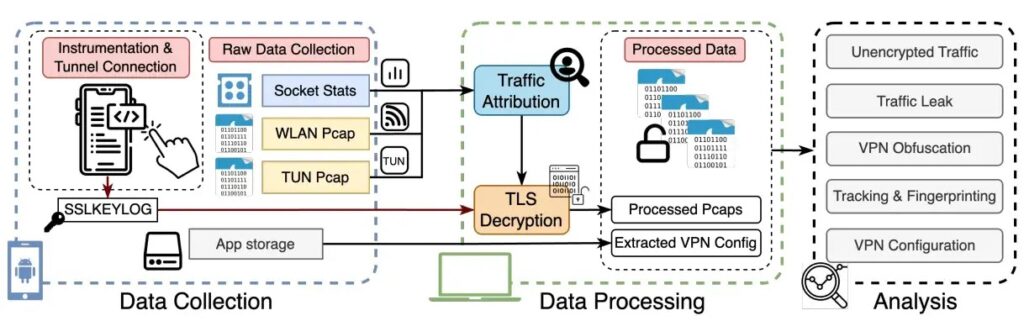
MVPNalyzer automates several stages of Android VPN analysis that previously required extensive manual work.
The framework installs each app on a physical Android device, attempts to establish a tunnel, generates different types of network activity, and records how the app handles that traffic.
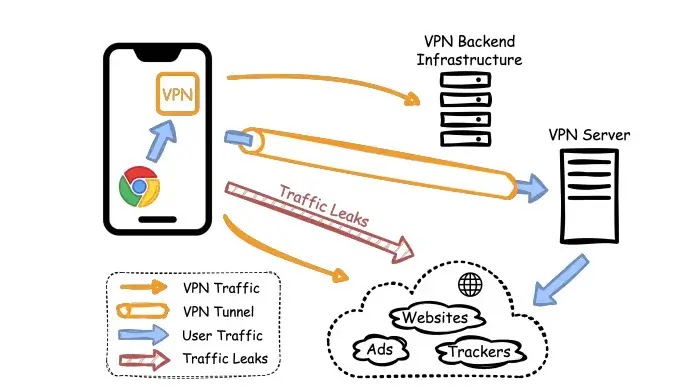
It also extracts application files and studies embedded configurations. This approach allows researchers to compare an app’s code and settings with its behavior during a live VPN connection.
- Collects popular VPN apps from Google Play
- Installs apps on physical Android test devices
- Automates VPN connection workflows
- Generates web, DNS, and application traffic
- Captures traffic before and after tunnel creation
- Extracts OpenVPN and other configuration files
- Identifies trackers and transmitted device information
- Tests VPN traffic for censorship resistance
61 VPN apps transmitted unencrypted data
The researchers observed 10,552 cleartext flows involving 61 VPN apps.
The unencrypted content included web pages, JavaScript, JSON resources, images, configuration data, and files connected to VPN infrastructure.
The full MVPNalyzer paper explains that cleartext connections can expose content to internet providers, public Wi-Fi operators, and other attackers positioned between the phone and the destination.
Cleartext traffic can be read or modified
When an app sends information through HTTP or another unencrypted protocol, an on-path attacker may observe the contents.
The attacker may also alter scripts, web content, advertisements, redirects, or configuration files before they reach the VPN app.
This risk becomes more serious when the unencrypted data controls how the VPN connection itself operates.
| Cleartext content | Possible risk |
|---|---|
| Web pages | An attacker can read or modify displayed content |
| JavaScript | An attacker can inject malicious code |
| JSON responses | An attacker can change app settings or server information |
| Advertising content | An attacker can replace ads or redirects |
| VPN configuration files | An attacker can redirect the tunnel to a controlled server |
Five apps exposed VPN configuration files
Five tested apps retrieved OpenVPN configuration files over unencrypted connections.
These files can contain VPN server addresses, connection parameters, certificates, and instructions that determine where the app sends a user’s traffic.
An attacker controlling the local network could intercept the download and replace the legitimate configuration with a modified file.
Researchers demonstrated VPN tunnel hijacking
The team tested whether a modified configuration file could redirect a VPN connection to infrastructure under the attacker’s control.
The attack worked in the controlled environment. Once the app accepted the altered configuration, the device established a tunnel using the attacker-supplied settings.
This could allow the malicious server operator to inspect unencrypted traffic passing through the tunnel and manipulate certain network responses.
- The VPN app requests a configuration file over an unencrypted connection.
- An attacker intercepts the request on the local network.
- The attacker returns a modified configuration file.
- The app accepts the configuration without detecting the change.
- The VPN connects to an attacker-controlled server.
- The attacker gains visibility into traffic routed through that tunnel.
29 VPN apps leaked traffic outside the tunnel
A VPN should direct protected traffic through the encrypted connection instead of the phone’s ordinary network interface.
The researchers found that 29 apps leaked at least some user traffic outside the VPN tunnel. This exposed activity to the local network or internet provider.
The University of Michigan summary of the study says many tested apps failed at the basic privacy protections users expect from a VPN.
DNS leaks affected 24 apps
Twenty-four apps leaked Domain Name System requests outside the protected tunnel.
DNS translates domain names into network addresses. A leaked request can reveal which website or online service a user attempted to reach, even when the page content uses HTTPS.
Internet providers, Wi-Fi operators, and other network observers may use these requests to create a record of visited domains.
Six apps leaked browser traffic
The researchers found six VPN apps that allowed browser traffic to leave the device outside the expected VPN tunnel.
This behavior undermines one of the main reasons users install a VPN. The local network may continue seeing traffic that the user believes receives tunnel protection.
The exact information exposed depends on the protocol. HTTPS protects page contents, but observers may still learn destination addresses and other metadata.
Four apps used unencrypted VPN tunnels
Four tested apps used tunnel protocols that did not encrypt the data carried through them.
These tunnels may change the apparent network route without providing confidentiality. Researchers could identify visited domains directly from packets crossing the network.
Users may still see a VPN icon on Android even though the underlying tunnel fails to protect their traffic from observation.
| Leak type | Number of affected apps | Information potentially exposed |
|---|---|---|
| DNS leakage | 24 | Domains requested by the user |
| Browser traffic leakage | 6 | Web destinations and possibly content |
| Unencrypted tunnel traffic | 4 | Visited domains and transmitted data |
Most apps contacted advertising or tracking services
The researchers identified 246 apps that communicated with URLs associated with advertising or tracking.
Contacting a third-party service does not automatically prove harmful behavior. Developers may use analytics for crash reporting, usage measurement, or advertising.
However, extensive tracking raises privacy concerns because VPN users often install these products to reduce monitoring and hide their online activity.
76 apps transmitted Android Advertising IDs
Seventy-six apps sent the device’s Android Advertising ID across the network.
The identifier can help advertising companies recognize the same device across different apps. Users can reset or delete it, but it may still support long-term profiling while active.
Researchers also observed apps sharing other device and network properties that could contribute to fingerprinting.
- Android Advertising ID
- Device manufacturer and model
- Android version
- API level
- Screen dimensions
- Device language
- Country information
- Public IP address
- Network and carrier details
Device details can create a persistent fingerprint
Individual device properties may appear harmless when viewed separately.
Combining model, operating system, language, screen size, country, IP address, and other details can make a device easier to recognize.
This fingerprint can allow tracking even when a user resets an advertising identifier or clears application data.
OpenVPN configuration problems appeared in 107 apps
The researchers found OpenVPN configuration files in 108 tested apps.
Only one app passed all evaluated configuration checks. The remaining 107 failed at least one test involving authentication, encryption, certificate verification, or hardening.
The findings do not mean that all 107 apps allowed an immediate compromise. Different configuration weaknesses create different levels and types of risk.
Weak configurations can enable server impersonation
Some OpenVPN configurations lacked settings designed to verify the role and identity of the remote server.
Without proper certificate checks, a client may have difficulty distinguishing the legitimate VPN server from infrastructure using an improperly trusted certificate.
Other apps included weak or outdated directives that reduced protection against attacks on the control channel.
| Configuration problem | Potential effect |
|---|---|
| Weak cryptographic settings | Reduces resistance to traffic analysis or cryptographic attacks |
| Weak authentication | Makes unauthorized server connections more likely |
| Missing server verification | Can increase the risk of server impersonation |
| Outdated directives | Retains legacy behavior with weaker safeguards |
| Missing control-channel hardening | Leaves management traffic with fewer protections |
169 apps offered weak censorship resistance
The study also examined whether network operators could easily identify and block the tested VPN connections.
Researchers found that 169 apps failed to hide recognizable characteristics of their VPN traffic.
This issue matters for people who rely on VPNs in regions where governments, internet providers, schools, or employers block common tunneling protocols.
A working VPN may still be easy to block
Encryption protects the contents of traffic but does not necessarily hide the fact that a device uses a VPN.
Network filters can identify protocol fingerprints, packet patterns, server addresses, or other characteristics and then block the connection.
A provider that advertises censorship resistance needs additional obfuscation methods beyond a standard encrypted tunnel.
The apps represented more than 2.4 billion installs
The 281 tested apps had more than 2.4 billion combined installs according to the download ranges displayed by Google Play.
This figure does not represent 2.4 billion current users. One user may install multiple VPN apps, and download totals include removed devices and past installations.
Still, the number shows that the tested products reached a large global audience.
The study does not name every app in its main findings
The paper focuses primarily on ecosystem-wide measurements and the MVPNalyzer testing framework.
It does not present the findings as proof that every VPN in the dataset leaked traffic, used weak encryption, or transmitted identifiers.
Users should avoid interpreting the total of 281 as the number of apps guilty of every reported behavior.
Google Play requires VPN traffic encryption
Google requires apps using Android’s VpnService to explain their use of the interface and comply with data-handling rules.
The Google Play VPN policy says developers must encrypt data from the device to the VPN tunnel endpoint.
It also prohibits using VpnService to redirect or manipulate traffic from other apps for monetization without an eligible core use case and proper disclosure.
App-store approval does not guarantee VPN quality
Google Play policies establish minimum expectations, but store availability does not prove that an app provides secure tunneling or strong privacy.
Configuration errors, unsafe server infrastructure, unencrypted downloads, and third-party tracking may only appear during detailed technical testing.
The researchers argue that marketplaces need more continuous and automated auditing rather than relying only on disclosures and pre-publication reviews.
MVPNalyzer could support repeated app-store testing
The researchers designed MVPNalyzer as a modular framework that can run new tests as mobile VPN threats evolve.
Its architecture includes collection, processing, and analysis components. Researchers can add checks for new tunnel protocols, privacy practices, and network attacks.
The NDSS paper page describes the system as a way to audit VPN security and privacy behavior at scale.
What Android VPN developers should change
Developers should encrypt every connection involved in downloading configurations, updating server lists, displaying app content, and managing user accounts.
VPN apps should also route DNS, browser, and application traffic through the intended tunnel unless the user deliberately enables split tunneling.
Providers need to review embedded OpenVPN files and remove weak, outdated, or unnecessary options.
- Use HTTPS with proper certificate validation for every app connection.
- Sign VPN configuration files and verify them before use.
- Prevent DNS traffic from escaping the encrypted tunnel.
- Test IPv4 and IPv6 routing for leaks.
- Use encrypted VPN protocols rather than simple forwarding tunnels.
- Apply strict server certificate verification.
- Remove unnecessary advertising and tracking SDKs.
- Minimize collection of device identifiers.
- Publish clear privacy and data-retention policies.
- Run independent security audits after major updates.
What users should check before installing a free VPN
Users should avoid selecting a VPN based only on download counts, ratings, or claims such as unlimited, anonymous, or military-grade protection.
A provider should clearly identify its company, explain how it funds a free service, and disclose what information it collects.
The University of Michigan researchers recommend stronger auditing because users cannot easily identify many of these technical failures from an app listing.
- Check who owns and operates the VPN service.
- Read the privacy policy and data-retention terms.
- Look for recent independent security audits.
- Review how the provider funds its free plan.
- Avoid apps with unclear developer identities.
- Check whether the provider publishes security updates.
- Test the VPN for DNS and IP leaks.
- Remove apps that display excessive ads or request unrelated permissions.
- Use a reputable paid or audited free service when possible.
Users can test for basic traffic leaks
A user can connect to the VPN and compare their public IP address before and after connection.
DNS leak tests can also reveal whether requests still reach the internet provider’s resolver. However, these tests may not detect cleartext configuration downloads, weak authentication, embedded trackers, or unsafe tunnel settings.
A clean result from one website therefore does not provide a complete security audit.
Organizations should control VPN installations
Companies should prevent employees from installing unapproved consumer VPN apps on managed Android devices.
A poorly configured VPN can create a new monitoring point, interfere with enterprise security controls, or send business traffic through infrastructure the company has not reviewed.
Mobile device management policies can limit installations and require approved VPN configurations for corporate access.
- Maintain a list of approved VPN applications.
- Block unknown VPN apps on managed devices.
- Use per-app VPN configurations where appropriate.
- Monitor for unexpected DNS and tunnel behavior.
- Review third-party SDKs used by approved providers.
- Require vendor security documentation and audit reports.
- Reassess applications after significant updates.
The findings highlight a wider free VPN problem
Operating a VPN requires servers, bandwidth, development work, security monitoring, and customer support.
A free provider must fund those costs through advertising, paid upgrades, investor funding, data-related business models, or another revenue source.
That does not make every free VPN unsafe. However, users should understand the business model before allowing an app to route their internet traffic.
Why the MVPNalyzer study matters
VPN apps market themselves as privacy and security tools, but users cannot easily inspect their tunnel configuration or network behavior.
The NDSS research paper shows that many tested products failed in areas directly connected to their main purpose.
The findings support stronger app-store enforcement, independent testing, safer defaults, and greater transparency from VPN developers.
FAQ
No. The researchers tested 281 apps, but different groups showed different problems. For example, 61 transmitted cleartext data, 29 leaked traffic, and 76 transmitted Android Advertising IDs.
The study found 61 apps exchanging cleartext data across 10,552 observed network flows. Five of those apps transferred VPN configuration files without encryption.
MVPNalyzer is a research framework for auditing Android VPN apps. It installs and tests apps, creates network traffic, captures tunnel behavior, extracts configuration files, and checks for security and privacy problems.
Researchers observed DNS requests, browser traffic, Android Advertising IDs, device properties, IP addresses, and other network data. Some apps also downloaded sensitive VPN configuration files over cleartext connections.
Yes. The researchers demonstrated that an on-path attacker could replace an unencrypted configuration file and direct a vulnerable app to an attacker-controlled VPN server.
Twenty-four apps leaked DNS requests outside the VPN tunnel. These requests can reveal the domains a user attempts to visit.
Some free VPN apps may provide adequate protection, but the study found widespread weaknesses. Users should check the provider, privacy policy, business model, independent audits, and security history before installing one.
Yes. Google Play’s VpnService policy requires VPN apps to encrypt data from the device to the VPN tunnel endpoint and follow rules covering sensitive data collection and disclosure.


Read our disclosure page to find out how can you help VPNCentral sustain the editorial team Read more


Improve this guide


User forum
0 messages