
LegacyHive Windows Zero-Day Lets Local Users Mount Another Account’s Registry Hive


 8 min. read
  Published on
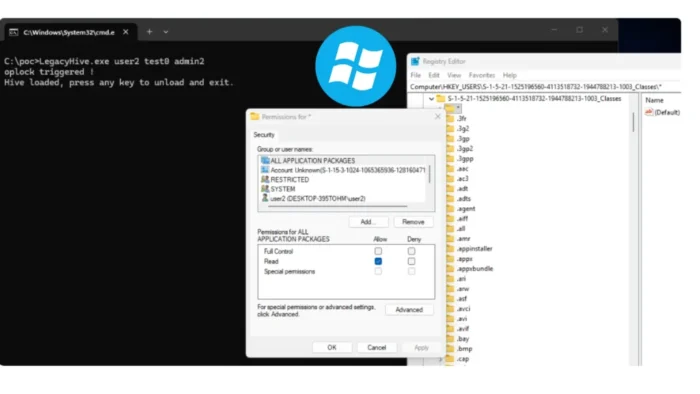
A security researcher has published proof-of-concept code for a Windows User Profile Service vulnerability called LegacyHive. The flaw can allow a standard user with local access to mount another account’s registry hive, including the hive of an administrator.
The released code targets UsrClass.dat, a registry hive containing user-specific application settings, file associations, shell information, COM configuration, and Windows Explorer artifacts. However, the public demonstration only provides read access and does not directly grant administrator or SYSTEM privileges.

Access content across the globe at the highest speed rate.
🔥 Save 81% + 2 bonus months! 🔥
70% of our readers choose Private Internet Access
70% of our readers choose ExpressVPN
2
Browse the web from multiple devices with industry-standard security protocols.
🔥 Save 73%! 🔥

Faster dedicated servers for specific actions (currently at summer discounts)
🔥 Save 69%! 🔥
Microsoft told SecurityWeek that it knows about the reported vulnerability and is investigating the validity and potential impact of the claims. No CVE, security advisory, or patch specifically addressing LegacyHive was available at publication time.
What Is the LegacyHive Windows Vulnerability?
LegacyHive affects the way the Windows User Profile Service, also known as ProfSvc, resolves paths and loads user registry hives. Windows uses this service when users sign in and when applications need access to profile-specific settings.
The public LegacyHive repository describes the issue as an arbitrary hive-load elevation-of-privilege vulnerability. The researcher behind the disclosure uses the names Nightmare-Eclipse and MSNightmare.
The attack abuses a path-resolution race involving Windows Object Manager symbolic links and an opportunistic file lock. This can trick the SYSTEM-level profile service into loading a different hive from the one it originally intended to access.
| LegacyHive detail | Current findings |
|---|---|
| Affected component | Windows User Profile Service |
| Attack type | Local registry hive-loading vulnerability |
| Public PoC target | Another user’s UsrClass.dat hive |
| Access provided by PoC | Read access to the mounted hive |
| Direct code execution | Not demonstrated by the released PoC |
| CVE assigned | No CVE announced |
| Official patch | No LegacyHive-specific patch announced |
| Microsoft response | Investigation in progress |
Public Exploit Requires Multiple Local Accounts
The restricted PoC requires credentials for a second standard Windows account and the username of a third target account. The target could be an administrator, but the attacker must already have local code execution on the computer.
When the demonstration succeeds, Windows mounts the target account’s UsrClass.dat hive beneath the current user’s registry classes root. This allows the current user to inspect information that Windows normally associates with another profile.
According to the researcher, the original technique did not require credentials for a helper account and could load hives other than UsrClass.dat. Those broader capabilities have not been included in the public code and remain claims from the researcher.
Released Code Does Not Provide Immediate Administrator Access
LegacyHive has been described as an elevation-of-privilege vulnerability, but the public version does not complete the elevation process. It demonstrates that Windows can load a registry hive belonging to a different user under an attacker-controlled context.
A ThreatLocker analysis found that the mounted UsrClass.dat hive contains application data, Explorer history, and forensic artifacts. It does not directly expose password hashes or provide privileged code execution.
An attacker would need to modify or extend the technique to achieve a more serious result. Possible research paths could involve other registry hives or values that influence COM objects, shell behavior, application launches, or file handling, but the released PoC does not demonstrate those outcomes.
- The attacker needs prior access to run code locally.
- The released PoC requires another standard user’s credentials.
- The attacker must supply the username of a separate target account.
- The demonstration mounts UsrClass.dat with read access.
- It does not directly reveal Windows password hashes.
- It does not automatically provide administrator or SYSTEM access.
How LegacyHive Manipulates Profile Loading
The exploit prepares a temporary directory and modifies an offline copy of a helper account’s NTUSER.DAT file. It changes the account’s Local AppData path so Windows resolves it through the NT Object Manager namespace.
LegacyHive then uses symbolic links and an opportunistic lock to pause the User Profile Service while it opens a decoy UsrClass.dat file. During that pause, the path changes so that it points to the target user’s real registry hive.
When the service continues, it loads the target file under the helper account’s profile context. The exploit relies on the privileged service following a path that a standard user can influence during a narrow timing window.
| Stage | Observed action |
|---|---|
| Preparation | Creates a temporary staging directory |
| Profile modification | Changes an offline NTUSER.DAT copy |
| Path redirection | Uses Object Manager directories and symbolic links |
| Race condition | Pauses file access with an opportunistic lock |
| Hive loading | Redirects ProfSvc to the target user’s UsrClass.dat |
| Result | Mounts the target hive under another user’s classes root |
Fully Patched Windows Systems May Remain Exposed
The researcher claims that LegacyHive affects supported Windows desktop and server releases with the July 2026 security updates installed. Independent analysis also reproduced the behavior on fully patched systems.
Microsoft has not confirmed the full affected-version list. Administrators should therefore treat claims that every supported Windows version is vulnerable as preliminary until Microsoft completes its investigation.
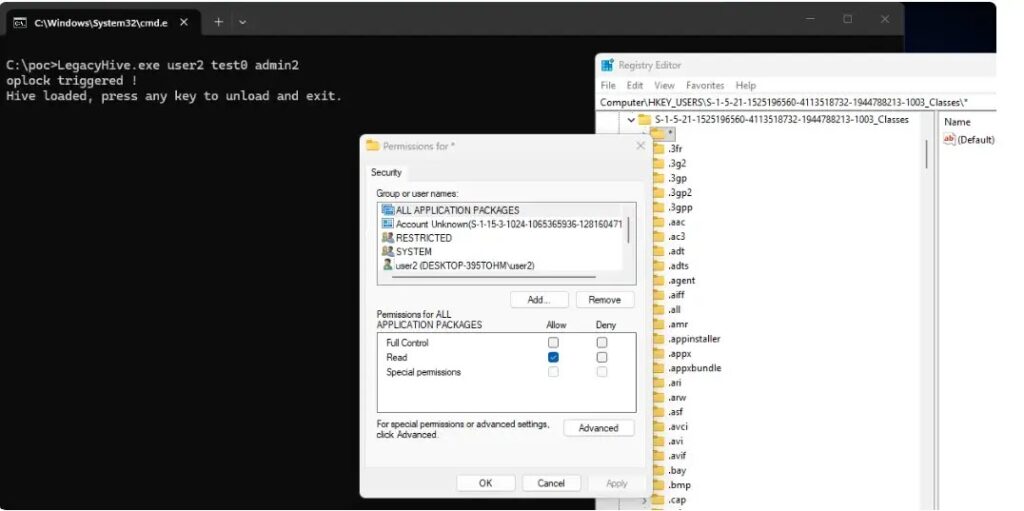
The July 2026 cumulative updates do not include a patch identified as a LegacyHive fix. Installing those updates remains important because they address other Windows vulnerabilities, even though they may not stop this technique.
Shared Systems Face the Greatest Potential Risk
LegacyHive requires local access, which limits the immediate threat to computers where an attacker can already execute code. It cannot be triggered remotely against an untouched Windows device through the released PoC.
Multi-user servers, shared workstations, virtual desktop infrastructure, development systems, and computers with several local accounts may face greater exposure. In these environments, one compromised standard account could become a starting point for accessing another user’s registry data.
Malware could also combine a future weaponized version with an initial-access technique. An attacker might first compromise a low-privilege account and then use the registry-loading weakness as part of a larger privilege-escalation chain.
How Security Teams Can Detect LegacyHive Activity
Administrators should monitor for unusual access to NTUSER.DAT and UsrClass.dat files, especially when one standard-user process touches files belonging to a different account.
The LegacyHive technical assessment recommends correlating profile-file changes, explicit credential use, new logon sessions, suspicious process creation, and registry activity occurring within a short period.
The PoC attempts to restore modified files and remove temporary artifacts when it exits. A clean directory after execution does not necessarily mean that an exploit attempt never occurred.
- Monitor for NTUSER.DAT replacement or modification by unexpected processes.
- Alert when UsrClass.dat files are copied outside their normal profile directories.
- Watch for registry hive files created in the root of the system drive or temporary folders.
- Correlate Windows event ID 4648 for explicit credential use with event ID 4624 for new logons.
- Review event ID 4688 for unusual processes launched under alternate credentials.
- Enable appropriate file auditing to capture cross-user hive access.
- Use application control to prevent standard users from running unapproved binaries.
Microsoft Is Investigating the LegacyHive Claims
Microsoft said it remains committed to investigating security reports and releasing updates when needed. The company also encouraged coordinated disclosure so it can assess vulnerabilities before technical details become public.
Until Microsoft publishes an advisory, administrators have no vendor-provided workaround specifically for LegacyHive. Reducing unnecessary local accounts, limiting interactive access, and enforcing application allowlisting can make exploitation more difficult.
Security teams can follow the researcher’s LegacyHive project for changes to the public disclosure. Any testing should take place only on isolated systems that an organization owns or has explicit permission to assess.
Organizations should also follow the updated Microsoft response and prioritize any official mitigation or security update once it becomes available.
FAQ
LegacyHive is a reported local vulnerability in the Windows User Profile Service. It can trick the service into mounting another user’s registry hive under a different user’s registry classes root.
No. The released proof of concept mounts the target’s UsrClass.dat hive with read access. It does not directly expose password hashes or provide administrator, SYSTEM, or arbitrary code-execution privileges.
The public proof of concept requires local code execution, credentials for a helper standard account, and the username of a target account. It does not provide a direct remote attack against an untouched computer.
The researcher and independent analysis report that the behavior remains possible after the July 2026 Windows updates. Microsoft is investigating and has not confirmed a complete list of affected Windows versions.
Microsoft had not assigned a public CVE or released a LegacyHive-specific patch at publication time. Administrators should monitor Microsoft security guidance and deploy any official update when it becomes available.
Organizations should restrict local access, remove unnecessary accounts, use application allowlisting, monitor cross-user access to registry hive files, and investigate unusual profile-loading and alternate-credential activity.


Read our disclosure page to find out how can you help VPNCentral sustain the editorial team Read more


Improve this guide




User forum
0 messages