
macOS Malware Steals Telegram Sessions Without Cracking 2FA


 10 min. read
  Published on
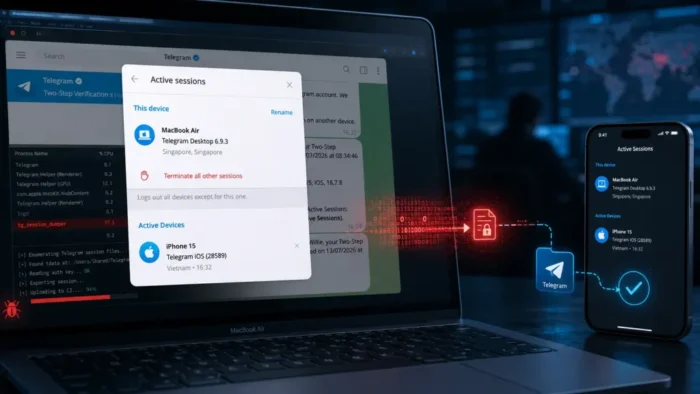
A macOS information stealer can give attackers access to Telegram accounts by copying session files from an already logged-in computer. The technique does not require the attacker to guess a password, intercept an SMS code or crack Telegram Two-Step Verification.
Researchers at SlowMist restored stolen Telegram Desktop data in an isolated environment and found that the application opened the test account without displaying its normal login screen. The findings appear in a new SlowMist macOS malware analysis.

Access content across the globe at the highest speed rate.
70% of our readers choose Private Internet Access
70% of our readers choose ExpressVPN

Browse the web from multiple devices with industry-standard security protocols.

Faster dedicated servers for specific actions (currently at summer discounts)
The same malware also targets macOS Keychain data, browser passwords, cookies, Apple Notes and cryptocurrency wallet files. It can replace selected wallet applications with deceptive programs that load attacker-controlled phishing pages.
Telegram Session Theft at a Glance
| Attack detail | Finding |
|---|---|
| Target platform | macOS |
| Telegram data targeted | Telegram Desktop tdata session files and native macOS client data |
| Authentication method | Reuse of an existing authorized session |
| Two-Step Verification | Not cracked or removed |
| SlowMist test environment | macOS 12.7 and Telegram Desktop 4.16 |
| Additional targets | Keychain, browsers, Apple Notes and 16 wallet applications |
| Victim count | Not disclosed |
How Telegram Session Cloning Works
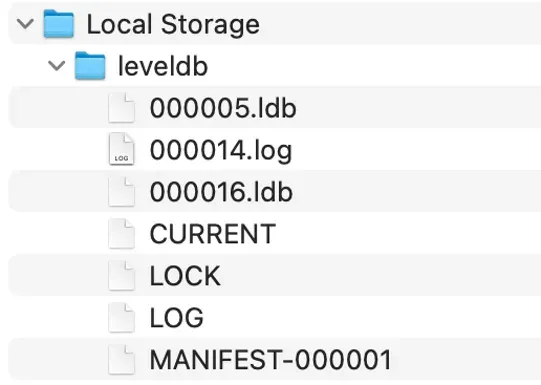
Telegram Desktop stores local information that allows the application to remain logged in between launches. On macOS, the cross-platform Telegram Desktop client keeps this information inside its tdata directory.
The malware searches for that directory, selects files connected to encryption keys, configuration and session state, and copies them to a temporary staging location. The selected data includes key_datas, matching session files and associated maps files.
After gathering the files, the malware compresses and uploads them with the rest of the stolen information. An attacker can then place the copied data into a compatible Telegram installation and attempt to resume the victim’s authorized session.
- The victim runs the macOS information stealer.
- The malware locates the Telegram Desktop data directory.
- It copies the files representing the active local session.
- The files are compressed and sent to attacker-controlled infrastructure.
- The attacker restores the files in another compatible Telegram installation.
- Telegram reads the files as an existing authorization rather than a new login.
Why Telegram 2FA Does Not Appear
Telegram Two-Step Verification protects the process of authorizing a new login. According to the official Telegram security FAQ, users who enable it need both a verification code and an additional password when logging in.
Session restoration follows a different path. The copied data tells the desktop client that Telegram has already authorized the session. As a result, the application may not ask for a phone number, verification code or Two-Step Verification password.
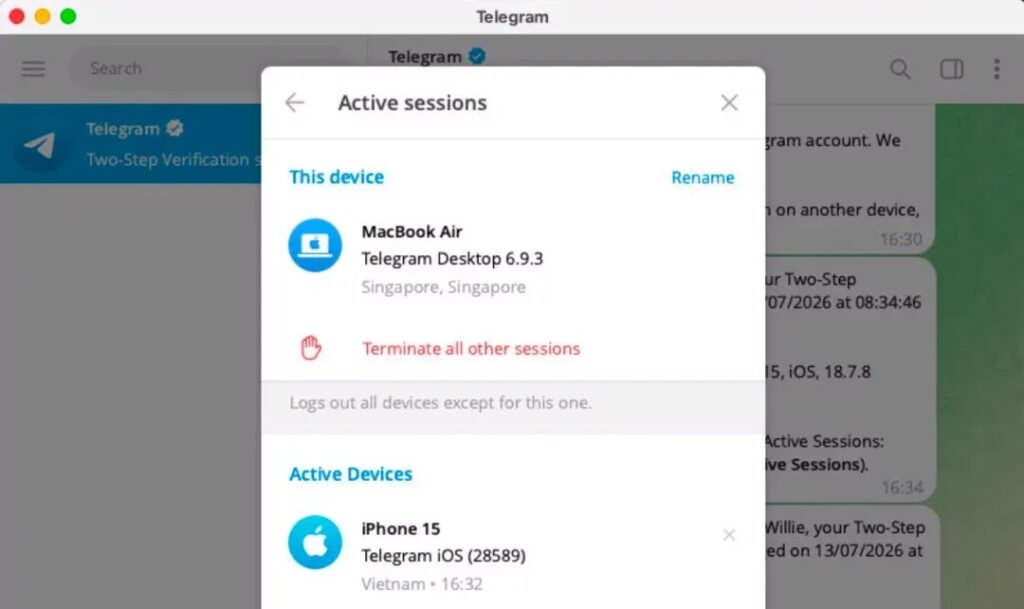
SlowMist tested an account that had Two-Step Verification enabled but did not have a separate Telegram Desktop passcode. After researchers restored the session files, Telegram Desktop synchronized the account’s cloud chat history without showing the login process.
| Security control | What it protects | Role in this attack |
|---|---|---|
| SMS or Telegram login code | New account authorization | Not requested when an existing session is restored |
| Two-Step Verification password | New logins using an additional password | Not cracked because the login stage does not begin |
| Telegram Desktop passcode | Local access to the desktop application | Can add protection to restored session data |
| macOS account security | Files and applications on the Mac | Compromise can expose Telegram and other local data |
Desktop Passcodes Add Another Barrier
SlowMist found that a Telegram Desktop passcode may stop an attacker from immediately opening a restored session. Users can configure this passcode separately from the account’s Two-Step Verification password.
However, the protection has limits when information-stealing malware controls the computer. The malware also searches Keychain records, browser storage and Apple Notes, where some users may have saved or reused the passcode.
Users should choose a unique Telegram Desktop passcode and avoid saving it in unencrypted notes. Reusing the same password for macOS, Telegram, email or cryptocurrency services increases the impact of a single information-stealing infection.
Stolen Sessions May Be Difficult to Detect
During SlowMist’s short and intermittent tests, the replicated Telegram Desktop session did not consistently appear as a clearly separate device in the account’s device list. That could prevent users from immediately recognizing the copied environment as a new login.
Longer simultaneous use may cause Telegram’s servers to invalidate one of the duplicated sessions. However, SlowMist found that short connections could continue without the copied session being immediately terminated.
The researchers also converted the stolen local data into a programmable Telegram API session. This could allow intermittent access to conversations, chat history and message-sending functions without maintaining a continuously connected desktop application.
Telegram for macOS Also Allowed Session Restoration
SlowMist separately tested the native Telegram for macOS client, which differs from the cross-platform Telegram Desktop application. Researchers reported that they could copy and restore its local session files on another Mac without entering the phone number, login code or Two-Step Verification password.
After server-side security controls restricted suspicious activity, the native client could no longer send or receive new messages. However, previously cached conversations remained available inside the application during the test.
The result reinforces an important security principle. Encryption and login protection cannot fully protect information after malware gains access to a trusted, unlocked endpoint that already holds authorized sessions and cached data.
Telegram Session Theft Is Not a New Technique
Other researchers have documented malware that targets Telegram Desktop session data. In April 2025, Imperva investigated malicious Python packages that searched for the tdata directory on Windows, compressed it and uploaded it through Telegram bots.
Those packages used names similar to a legitimate Python project, showing how software supply-chain deception can deliver a relatively simple session stealer. Once copied, a valid session can allow access to cloud chats, contacts and account functions.
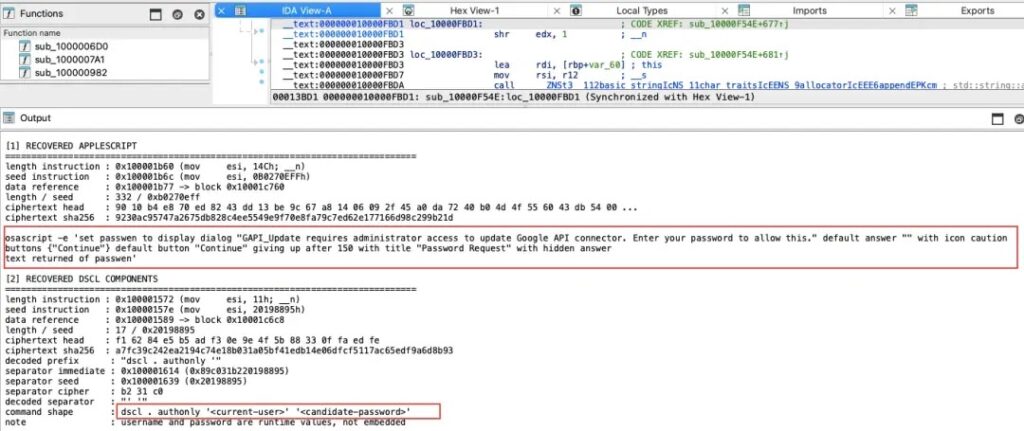
The latest SlowMist findings apply the same broad concept to macOS but combine Telegram session theft with password harvesting, wallet database collection and application replacement.
Malware Also Collects Passwords and Keychain Data
The malware displays a fake macOS password request disguised as an update for a Google API connector. It checks the submitted password against the local account, allowing it to confirm whether the victim entered a working macOS credential.
It also attempts to obtain the Chrome Safe Storage key from macOS Keychain. With this material, attackers may be able to analyse encrypted Chrome passwords and cookies after taking the data from the infected computer.
- macOS login passwords entered into a fake prompt
- Chrome Safe Storage information from Keychain
- Login data and cookies from Chromium-based browsers
- Firefox login and cookie databases
- Apple Notes database contents
- Telegram Desktop and Telegram for macOS session data
- Cryptocurrency wallet databases and configuration files
Cryptocurrency Wallet Theft Expands the Impact
The SlowMist threat report says the malware searches for data associated with 16 cryptocurrency wallet applications. The list includes software wallets, blockchain node clients and companion applications for hardware wallets.
Stealing a wallet database does not always provide immediate access because many wallets encrypt sensitive information. Attackers can still combine the database with passwords taken from Keychain, browsers, notes or fake prompts and conduct decryption attempts on another system.
| Wallet category | Applications named by SlowMist |
|---|---|
| Software wallets | Electrum, Coinomi, Exodus, Atomic, Wasabi, Monero, Electrum LTC, Electron Cash, Guarda and Sparrow |
| Core clients | Bitcoin Core, Litecoin Core, Dash Core and Dogecoin Core |
| Hardware wallet companions | Ledger Live and Trezor Suite |
Fake Wallet Applications Request Recovery Phrases
The malware can remove legitimate Ledger and Trezor applications and install replacements with familiar names and icons. SlowMist found that the replacement programs were web loaders rather than functional wallet applications.
When opened, the lookalike applications displayed attacker-controlled webpages inside an embedded browser. The pages could imitate wallet recovery or verification screens and ask users to enter a recovery phrase, PIN or passphrase.
A recovery phrase entered into one of these applications must be considered compromised. Changing the wallet application password cannot invalidate private keys or a recovery phrase that an attacker has already collected.
Indicators of Compromise
The following indicators came from SlowMist’s analysis. The network addresses have been defanged to prevent accidental connections.
| Type | Indicator | Description |
|---|---|---|
| IP address | 192[.]253[.]248[.]181 | Server associated with malicious wallet replacement archives |
| IP address | 86[.]54[.]25[.]213 | Server associated with attacker-controlled wallet pages and logging |
| URL | hxxp[:]//192[.]253[.]248[.]181/web/ledger[.]zip | Malicious Ledger replacement archive |
| URL | hxxp[:]//192[.]253[.]248[.]181/web/ledgerwallet[.]zip | Malicious Ledger Wallet replacement archive |
| URL | hxxp[:]//192[.]253[.]248[.]181/web/trezor[.]zip | Malicious Trezor replacement archive |
| SHA-256 | 41d77fef030b8515efb068defed5e15c14fbebd16259253f1f79febd6e12ebcb | ledger.zip |
| SHA-256 | 36f4ae11560ed34f32c927468a09a5370a5fbdcae41660f6e8d9a49330c8d059 | ledgerwallet.zip |
| SHA-256 | 60f33e7b8c6b84839e28c710c8c5a99a718c0b88135653561be8d45f976b794f | trezor.zip |
What Telegram Users Should Do After a Suspected Infection
Users should respond from a separate, trusted device. The infected Mac should not be used to change passwords because malware may capture the new credentials or continue accessing local data.
The Telegram account security guidance directs users to Settings, Devices or Active Sessions to terminate access on a lost or untrusted device. In a suspected session-theft case, users should terminate all existing sessions and create a fresh trusted login.
- Disconnect the suspected Mac from the network.
- Use a clean device to terminate all Telegram sessions.
- Log in again from a trusted device.
- Change the Telegram Two-Step Verification password.
- Configure a strong and unique Telegram Desktop passcode.
- Rotate passwords stored in browsers, Keychain or Apple Notes.
- Review email, cloud storage, exchange and social media sessions.
- Inspect the Mac for malicious applications and persistence mechanisms.
- Reinstall affected applications only from official sources.
Wallet Users May Need to Move Their Assets
If wallet data or a recovery phrase may have been exposed, users should create a new wallet with a new recovery phrase on a clean device or trusted hardware wallet. They should then transfer the assets to addresses controlled by the new keys.
Users should never continue using an exposed recovery phrase. Reinstalling the wallet software or changing its local password does not revoke blockchain private keys.
Organizations should also monitor developer systems for session data theft. The earlier Imperva Telegram session research shows that malicious software packages can deliver similar theft capabilities, making dependency review and application-source verification important defensive measures.
Local Device Security Remains Critical
Two-Step Verification still provides valuable protection against new Telegram login attempts. It cannot by itself secure a session that malware has copied from a computer where the user was already authenticated.
Users should keep macOS and Telegram updated, avoid untrusted installers, inspect unexpected password prompts and use unique credentials. A desktop passcode can add another barrier, but it should not replace broader endpoint protection.
The incident demonstrates why session files deserve the same protection as passwords. Once malware controls a trusted endpoint, it may steal the evidence that tells an application the user has already passed authentication.
FAQ
No. The malware copies an already authorized local session, so Telegram may not start the normal login process where the Two-Step Verification password is required.
The tdata folder contains local Telegram Desktop information used to maintain an authenticated session, along with configuration and other application data.
A Desktop passcode can add another layer of protection when copied session data is restored. However, malware may also steal or capture the passcode if it is reused or stored insecurely.
Not always. SlowMist reported that replicated sessions did not consistently appear as clearly separate devices during its short and intermittent laboratory tests.
Users should use a trusted device to terminate all Telegram sessions, create a fresh login, change the Two-Step Verification password and configure a unique Desktop passcode.
They should create a new recovery phrase on a clean device or trusted hardware wallet and transfer all assets to new addresses. The exposed recovery phrase should never be used again.


Read our disclosure page to find out how can you help VPNCentral sustain the editorial team Read more


Improve this guide



User forum
0 messages