
ClickLock macOS Stealer Kills Apps to Coerce Users Into Entering Passwords


 8 min. read
  Published on
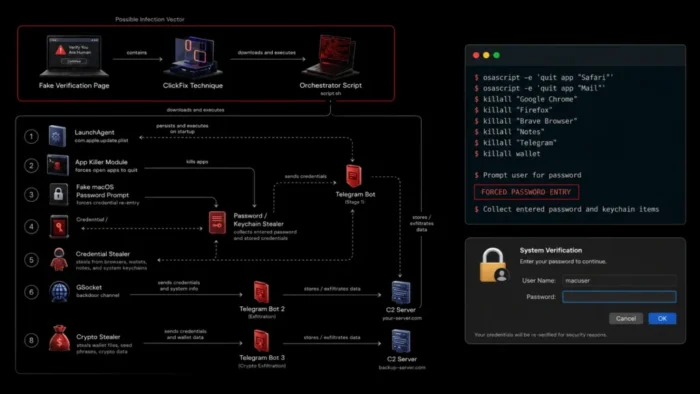
A newly identified macOS information stealer called ClickLock uses fake system prompts and repeated application crashes to pressure victims into entering their Mac login password. It also steals browser data, cryptocurrency wallets, password-manager information, Keychain content, and authentication cookies.
The malware does not exploit a macOS zero-day or gain elevated privileges on its own. Instead, it relies on social engineering. According to the Group-IB ClickLock analysis, victims likely encounter a fake browser verification page that tells them to copy a command and paste it into Terminal.

Access content across the globe at the highest speed rate.
🔥 Save 81% + 2 bonus months! 🔥
70% of our readers choose Private Internet Access
70% of our readers choose ExpressVPN
2
Browse the web from multiple devices with industry-standard security protocols.
🔥 Save 73%! 🔥

Faster dedicated servers for specific actions (currently at summer discounts)
🔥 Save 69%! 🔥
Once the victim runs the command, ClickLock downloads several modules, displays a fake macOS password dialog, and begins collecting information. If the victim refuses to enter a password, the malware installs persistence components that can make the Mac almost unusable after the next login.
How the ClickLock macOS Attack Works
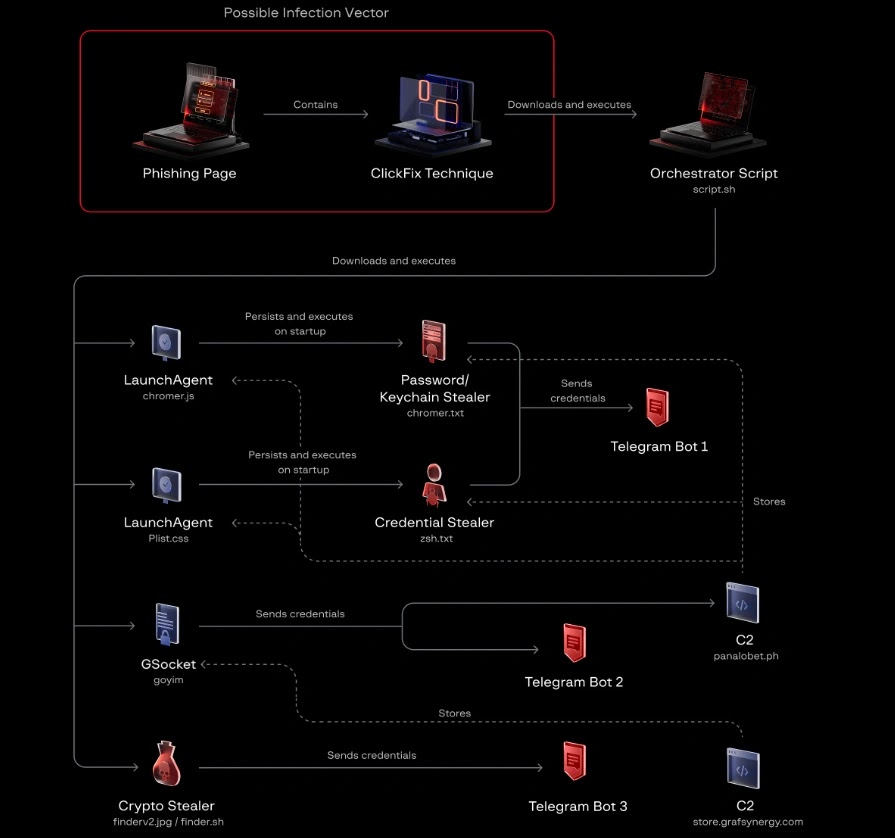
The infection chain appears to begin with the ClickFix social-engineering technique. A malicious website presents a fake Cloudflare-style verification process and instructs the visitor to run a command in Terminal.
The command launches an orchestrator script that displays a fake verification progress bar. While the user watches the animation, the script downloads separate components for password theft, Keychain access, cryptocurrency theft, data collection, and remote access.
Researchers did not directly observe the original lure page. They therefore could not confirm whether attackers directed victims to it through phishing, malicious advertising, compromised websites, social media, or search-engine poisoning.
| Attack stage | ClickLock activity |
|---|---|
| Initial lure | A suspected ClickFix page displays a fake browser verification request |
| User execution | The victim copies a command into macOS Terminal |
| Distraction | A fake Cloudflare progress animation appears |
| Payload delivery | The script downloads credential, Keychain, cryptocurrency, and backdoor modules |
| Password theft | A fake macOS authentication dialog requests the login password |
| Forced interaction | LaunchAgents repeatedly terminate applications if the victim refuses |
| Data theft | Collected information is archived and sent through Telegram infrastructure |
| Remote access | A modified GSocket component provides a persistent reverse shell |
ClickLock Uses App-Killing Loops After a Password Refusal
ClickLock initially takes a quieter approach. It uses AppleScript through the osascript utility to display a password dialog with the victim’s username and an Apple icon. The dialog resembles a legitimate macOS authentication request.
The malware checks submitted passwords against the local directory service. This verification allows it to identify a working password before sending the credential to an attacker-controlled Telegram bot.
If the user cancels the first prompt, ClickLock places two property-list files in the user’s LaunchAgents directory and exits. At the next login, the credential-stealing module starts terminating visible applications approximately every 210 milliseconds.
- Finder
- Dock
- Spotlight
- Terminal
- Activity Monitor
- System Settings
- Notification Center
- Popular web browsers
The repeated termination leaves the password dialog as one of the few usable elements on the screen. ClickLock also suppresses Notification Center for about six hours, which can prevent some security notifications from appearing.
Fake and Genuine Password Prompts Support the Attack
ClickLock uses more than one type of authentication request. Its first dialog is a fake prompt designed to capture the Mac login password. Another component attempts to access Chrome’s Safe Storage encryption key, causing macOS to display a genuine Keychain authorization request.
The malware surrounds the genuine request with another process-killing loop. This makes it difficult for the user to open tools, investigate the behavior, or dismiss the request while continuing to use the computer.
Built-in macOS defenses still provide important layers of protection. Apple’s macOS malware protection guide describes how Gatekeeper, Notarization, and XProtect block or remediate known malicious software. ClickLock attempts to sidestep these controls by convincing the victim to run a shell command directly.
What Information Does ClickLock Steal?
ClickLock is more than a password-stealing script. Group-IB found modules designed to search browser profiles, password-manager extensions, desktop cryptocurrency wallets, macOS Keychain data, shell histories, and saved file-transfer credentials.
The malware targets eight browsers, 31 cryptocurrency wallet extensions, seven password-manager extensions, and eight desktop wallet applications. It can also extract cryptocurrency addresses associated with six blockchain networks.
The latest ClickLock threat report says the campaign targeted at least 100 users across 33 countries, with more than half of the identified targets located in Europe. Researchers found evidence that the operation had been active since May 2026.
| Targeted information | Examples |
|---|---|
| System credentials | macOS login password and Keychain data |
| Browser information | Passwords, cookies, login databases, bookmarks, and browsing data |
| Password managers | Data from seven browser-based password-manager extensions |
| Cryptocurrency assets | Wallet extensions, desktop wallet files, and blockchain addresses |
| System details | Username, macOS version, CPU, memory, disk size, and public IP address |
| Developer and network data | Shell history and saved FTP credentials |
| Remote access | A persistent GSocket-based reverse shell |
ClickLock Leaves a Persistent Backdoor
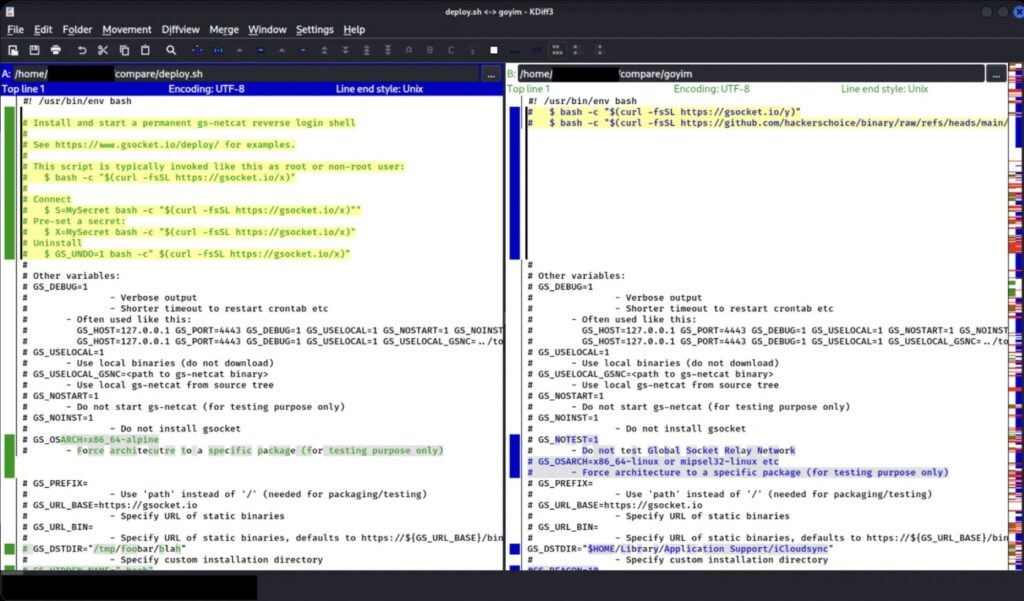
The orchestrator downloads a modified version of the open-source GSocket deployment script. This component installs a reverse shell disguised as an iCloud-related process, giving the attacker continued access to the compromised Mac.
Most ClickLock components remove themselves after stealing data. They can also alter timestamps and delete persistence files to reduce the evidence left behind. The GSocket backdoor remains installed, however, allowing access after the initial theft finishes.
This means restoring normal application behavior does not prove that the Mac is safe. An attacker may already possess the login password, browser cookies, encryption keys, wallet files, and a persistent remote connection.
What to Do if ClickLock Starts Closing Mac Apps
Users should not enter a password into an unexpected prompt that appears while applications are repeatedly closing. They should disconnect the Mac from the network and shut it down instead.
Group-IB recommends restarting the affected computer in Safe Mode for investigation. Apple provides different startup steps for Intel-based Macs and Apple silicon systems in its official Safe Mode instructions.
Anyone who ran a suspicious Terminal command should treat the device as compromised, even if the password prompt never appeared. ClickLock begins downloading and executing other modules while the fake verification animation remains on screen.
- Disconnect the Mac from Wi-Fi, Ethernet, and corporate VPN services.
- Do not enter a password into the unexpected dialog.
- Shut down the computer and restart it in Safe Mode.
- Contact the organization’s security or IT team from a separate device.
- Preserve logs and other evidence before removing files.
- Revoke browser sessions and authentication tokens.
- Change exposed passwords from a trusted, unaffected device.
- Move cryptocurrency assets to newly created wallets if wallet keys may have been exposed.
- Review accounts for unauthorized access and financial transactions.
- Rebuild the Mac if investigators cannot establish that all persistence has been removed.
Detection Opportunities for Security Teams
Signature-only detection may miss this attack. The original script had no detections on VirusTotal when Group-IB analyzed it, and some payloads came from compromised websites with previously clean reputations.
Behavioral monitoring offers stronger opportunities. Security teams can look for AppleScript password dialogs launched by shell processes, rapid application-termination commands, unexpected LaunchAgent creation, and shell scripts requesting browser Keychain entries.
Apple says XProtect combines signature-based protection with behavioral detection and receives security intelligence independently of full operating-system updates. Organizations should keep automatic security updates enabled and monitor events from Apple’s endpoint security interfaces where available through the Apple Platform Security guidance.
- Alert on repeated
pkillorkillallcommands at subsecond intervals. - Monitor shell processes that create files under
~/Library/LaunchAgents/. - Investigate unexpected files under
~/.cacheb/. - Flag
security find-generic-passwordrequests from unusual parent processes. - Detect bulk access to browser profile directories followed by archive creation.
- Review outbound connections to Telegram APIs from endpoints that do not require them.
- Alert when Terminal or a shell interpreter receives Full Disk Access.
- Restrict Terminal access on managed Macs where users do not need it.
Why ClickFix Training Matters for Mac Users
ClickLock depends on the victim carrying out the first execution step. A legitimate browser verification service does not require users to open Terminal and paste a shell command.
Security-awareness programs should specifically address copy-and-paste attacks. Training that covers only malicious attachments and suspicious links may not prepare users for a page that presents a technical-looking command as a CAPTCHA or security check.
Organizations should also document recovery procedures for Macs that become difficult to operate. Apple’s Mac Safe Mode guide explains how to start both Apple silicon and Intel systems without loading all normal startup software, which can support investigation and containment.
FAQ
ClickLock is a modular macOS information stealer that uses fake password prompts, application-killing loops, data theft modules, and a persistent backdoor.
Researchers found no evidence that ClickLock requires a zero-day vulnerability or privilege-escalation exploit. It relies mainly on social engineering and commands executed by the victim.
Group-IB assesses with high confidence that attackers use a ClickFix-style page to convince users to copy a malicious command into Terminal. The exact lure pages and traffic sources remain unconfirmed.
If the victim cancels its initial password prompt, ClickLock installs LaunchAgents that repeatedly terminate visible applications after the next login. This pressures the user to enter a password or approve Keychain access.
It targets the macOS login password, Keychain data, browser passwords and cookies, password-manager extensions, cryptocurrency wallets, shell history, FTP credentials, and system information.
They should not enter the password. They should disconnect the Mac, shut it down, restart in Safe Mode, and contact a security professional or their organization’s incident-response team.


Read our disclosure page to find out how can you help VPNCentral sustain the editorial team Read more


Improve this guide




User forum
0 messages