
Windows Bind Link Techniques Can Blind EDR and Bypass AMSI, AppLocker, and Sysmon


 10 min. read
  Published on
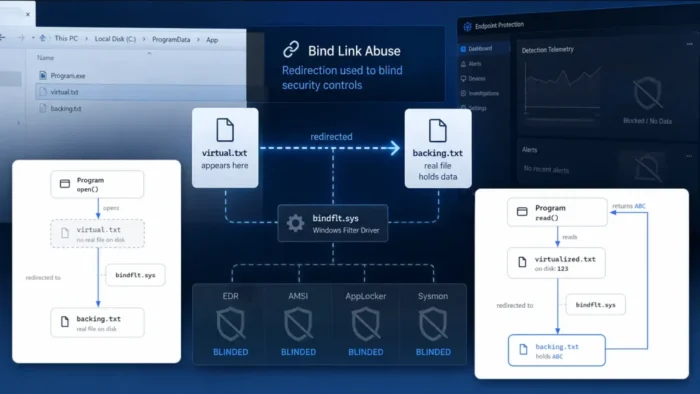
Security researchers have documented three Windows bind-link techniques that can make malicious code appear to come from trusted files. The methods can interfere with endpoint detection and response tools while bypassing defenses such as AMSI, AppLocker, Windows Firewall and Sysmon.
The techniques, called File-Binding, Process-Binding and Silo-Binding, abuse a legitimate Windows file-system virtualization feature. According to Bitdefender’s bind-link research, the primary threat model assumes that an attacker has already compromised the device and obtained local administrator privileges.

Access content across the globe at the highest speed rate.
70% of our readers choose Private Internet Access
70% of our readers choose ExpressVPN

Browse the web from multiple devices with industry-standard security protocols.

Faster dedicated servers for specific actions (currently at summer discounts)
Researchers have not reported active exploitation or a malware campaign using these methods. Instead, the findings show how attackers could use built-in Windows functionality for defense evasion after gaining control of a system.
What are Windows bind links?
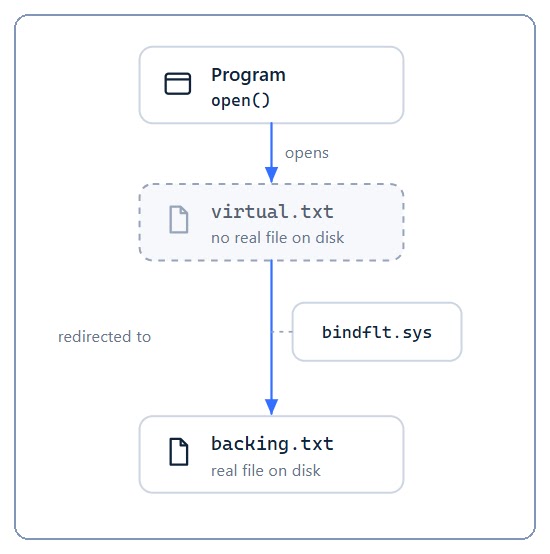
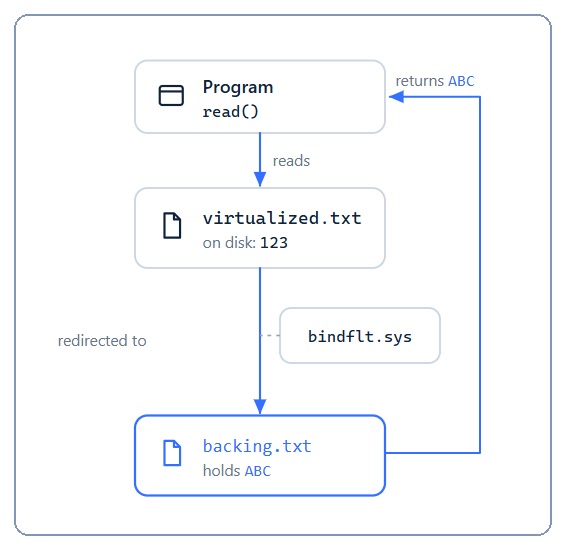
A bind link redirects a virtual file path to a separate backing path. When an application opens the virtual path, Windows returns the file or directory stored at the backing location without requiring the application to understand that redirection has occurred.
Microsoft’s Bindlink API documentation explains that the feature uses the Bind Filter minifilter driver, bindflt.sys. Legitimate uses include making remote files appear local and presenting files from several locations through a single virtual directory.
Unlike a standard symbolic link, a bind link does not need to create a visible file-system object or reparse point. The mapping resides in the Bind Filter driver’s internal table and normally disappears when Windows restarts or when a program removes it.
| Property | Bind link | Symbolic link |
|---|---|---|
| Where the redirection resides | Bind Filter mapping in memory | File-system reparse point |
| Visible during normal file enumeration | Usually no | Yes |
| Can shadow an existing file | Yes | Normally requires a link object at the source |
| Persistence | Removed when deleted or after shutdown | Remains on disk until removed |
| Required access for the documented API | Administrator privileges | Depends on the operation and system configuration |
Why bind links create a security gap
Many Windows security decisions start with a file path. An EDR product may receive the path of a newly created process, reopen that path, calculate a hash and compare the result with its security rules.
AMSI assumes that PowerShell loads the legitimate amsi.dll from the Windows System32 directory. AppLocker can approve or reject software according to its path, publisher or hash. Windows Firewall rules may also identify an application through its executable path.
A bind link can break the assumption that a path always identifies the same file. The trusted source file can remain clean and signed on disk while the Bind Filter gives a process different attacker-controlled content.
File-Binding can neutralize AMSI and EDR sensors
File-Binding redirects a trusted file or DLL path to an attacker-controlled replacement. The target application opens its usual path, but Windows supplies content from the backing file instead.
Bitdefender demonstrated the technique against the Windows Antimalware Scan Interface. A bind link redirected the normal amsi.dll path to a replacement DLL containing the expected exported functions. PowerShell loaded the replacement while continuing to identify its location as the trusted System32 path.
The demonstration made AMSI scans return clean results without modifying PowerShell or the genuine amsi.dll on disk. The same approach could target predictable DLL paths used by EDR sensors, Event Tracing for Windows providers, plugins and other user-mode security components.
- The legitimate source file remains on disk.
- The attacker does not need to patch the trusted binary.
- The target process opens its usual file path.
- Bind Filter returns the attacker-controlled backing file.
- Basic file enumeration may still show the clean original.
Process-Binding creates a false process identity
Process-Binding applies the same redirection to executable files. In Bitdefender’s demonstration, the source path pointed to the trusted Windows program winver.exe, while the backing path pointed to cmd.exe.
Launching winver.exe caused code from cmd.exe to run. However, several process-creation signals continued to report winver.exe as the image path. Security controls relying only on that reported path could therefore assign the process the identity and trust level of the wrong executable.
The basic Process-Binding method has a limitation. Its global mapping can expose inconsistencies when a security tool reopens the path or inspects loaded modules. Some views may show the trusted source name, while others reveal the real backing image.
Silo-Binding gives attackers two file-system views
Silo-Binding expands the technique by placing one mapping inside a Windows silo and another mapping outside it. A silo is an isolation boundary used by technologies such as Windows containers, packaged applications and Windows Sandbox.
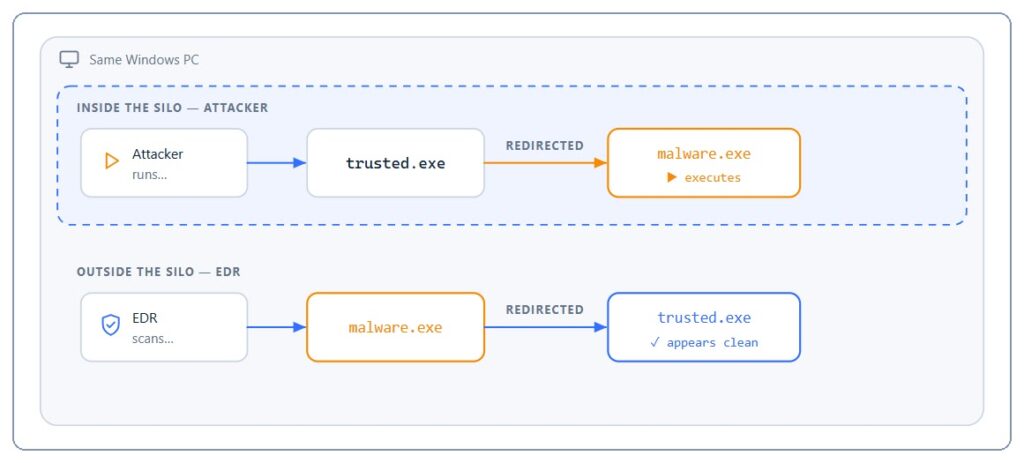
Inside the silo, a trusted executable path can redirect to malicious code. Outside the silo, an inverse bind link can redirect the malicious file’s path back to the clean executable. Security software running outside the isolated environment may therefore inspect the legitimate file even though different code runs inside.
This creates two views of the same paths:
- Inside the silo, the trusted path returns and executes the attacker’s payload.
- Outside the silo, the payload path returns the clean trusted file.
- Security tools can record the trusted name and hash during later inspection.
- The malicious backing file remains hidden behind the inverse mapping.
| Technique | Target | Potential impact |
|---|---|---|
| File-Binding | Trusted file or DLL path | AMSI bypass, EDR sensor interference and manipulated forensic artifacts |
| Process-Binding | Trusted executable path | False process identity and weakened path-based allowlisting |
| Silo-Binding | Paths inside and outside a silo | AppLocker, firewall, Sysmon and delayed-scanning evasion |
AppLocker and Windows Firewall can inspect the wrong identity
In the AppLocker demonstration, a policy allowed trusted.exe and blocked malware.exe. Silo-Binding made the trusted path return the blocked executable inside the silo. AppLocker approved the process based on the trusted identity visible from outside, allowing the other code to execute.
The researchers applied the same principle to Windows Firewall rules. A malicious application running inside the silo could inherit the apparent identity of a program permitted to access the network.
These results do not mean that every AppLocker or firewall configuration automatically fails. They show that security decisions based only on a reported path can become unreliable when an administrator-level attacker controls file-system redirection.
Sysmon may record the clean file’s hash
Sysmon records detailed information about process creation, network connections and other system activity. Microsoft describes built-in Sysmon as an optional feature for Windows 11 and Windows Server 2025 that writes security telemetry to the Windows event log.
With Silo-Binding, Sysmon can receive the trusted source path when a process starts. If it later opens the path from outside the silo to calculate a hash, the inverse mapping can return the clean file instead of the executable that supplied the running code.
The resulting event may contain the legitimate program name and its valid hash. A threat hunt based on the malicious file’s known hash could then return no matching records even though the payload executed.
The techniques require administrator access
Bitdefender said the primary methods affect Windows 10 RS4 and later, as well as Windows 11, once an attacker gains local administrator rights. Administrative access is required to communicate with bindflt.sys and create the mappings used in the demonstrations.
Microsoft’s overview of bind links also states that the public API allows administrators to create mappings between virtual and backing paths. The links remain active until software removes them or the system shuts down.
Microsoft reportedly assessed the security issue as low severity because it requires administrator access. Bitdefender argues that the condition still matters because ransomware groups and other experienced intruders frequently seek administrator privileges before disabling endpoint protection.
These are not Windows zero-day vulnerabilities
The researchers explicitly state that the techniques use legitimate operating-system behavior rather than exploiting an unknown software flaw. They have no assigned CVEs and should not be described as zero-day vulnerabilities.
Bitdefender published a technical paper and defensive testing utility in its bindutil research repository. The project states that the material exists for authorized security research and must not support harmful or unlawful activity.
The research also describes a separate Docker Desktop privilege-escalation scenario involving a member of the docker-users group. That finding has a different access model from the three administrator-level EDR evasion techniques and should not be treated as evidence that any unprivileged Windows user can create the main attacks.
How security vendors can detect bind-link abuse
Security tools should resolve the real backing file instead of treating the image path reported during process creation as definitive. A path, signature or hash check can produce the wrong result if the product reopens a virtualized path from a different execution context.
Bitdefender recommends repeating this validation whenever a product performs delayed hashing, asynchronous scanning, signature checks, remediation or forensic collection. Vendors should also enumerate active Bind Filter mappings, including links scoped to silos.
The Bitdefender report notes that Windows 24H2 added a minifilter veto mechanism that can block some bind links involving protected paths. However, the protection is unavailable on older Windows versions, applies only in certain conditions and does not replace backing-file validation.
- Resolve the backing file during process creation.
- Repeat identity checks when reopening files for scanning or hashing.
- Compare the reported process path with the actual mapped image.
- Monitor the creation of Windows silos and unusual container activity.
- Enumerate global and silo-scoped bind-link mappings.
- Correlate bind-link activity with privilege escalation and EDR tampering.
- Keep endpoint security files on the boot volume where supported protections can apply.
What organizations should do
Organizations should ask their endpoint security vendor whether its products resolve the backing file at launch and during later inspections. Products that rely entirely on standard process-notification paths may miss the identity mismatch demonstrated in the research.
Security teams should continue collecting process, network, container and administrative telemetry. Microsoft’s Sysmon guidance recommends forwarding events to a collection or SIEM platform for analysis, although defenders should avoid relying on a single path or hash field.
The Bitdefender bindutil toolset can help security vendors and authorized researchers study the behavior in controlled environments. Production testing should follow organizational policies because the utility interacts directly with Windows file-system redirection.
Bind-link abuse does not give attackers initial access to a Windows device. It creates a defense-evasion opportunity after a serious compromise has already occurred. Preventing privilege escalation, protecting administrator credentials and validating the real identity of executed files remain the most important safeguards.
FAQ
A Windows bind link redirects a local virtual file path to another local or remote backing path through the Bind Filter driver. Applications can use the virtual path without knowing that Windows is returning content from another location.
Bitdefender demonstrated that File-Binding can redirect trusted DLL paths to replacement files, potentially neutralizing AMSI or interfering with user-mode EDR sensors. The primary technique requires local administrator access.
Silo-Binding creates different file-system views inside and outside a Windows silo. Malicious code can run through a trusted path inside the silo while security tools outside it receive and inspect a clean file.
No. Bitdefender describes the techniques as abuses of legitimate Windows functionality rather than zero-day exploits. The research has no associated CVEs.
Bitdefender says the primary administrator-level techniques affect Windows 10 RS4 and later and Windows 11. An attacker must first compromise the device and obtain local administrator privileges.


Read our disclosure page to find out how can you help VPNCentral sustain the editorial team Read more


Improve this guide
User forum
0 messages