
40+ Best Free Web Proxy Sites That Work in 2026 (Tested)


 10 min. read
  Updated on
Free web proxy sites give you a quick way to unblock websites without installing software. Whether you’re looking for the best free proxy servers, a proxy site that opens YouTube at school, or a free online proxy bypass tool for social media, these services help you get around restrictions.
In this guide, we’ll look at the best web proxy sites, compare popular options like ProxyScrape, and show you how a proxy browser or online VPN browser can make your browsing easier.

Access content across the globe at the highest speed rate.
🔥 Save 81% + 2 bonus months! 🔥
70% of our readers choose Private Internet Access
70% of our readers choose ExpressVPN
2
Browse the web from multiple devices with industry-standard security protocols.
🔥 Save 73%! 🔥

Faster dedicated servers for specific actions (currently at summer discounts)
🔥 Save 69%! 🔥
They’re a quick, browser-based fix for restricted content.
Table of contents
Top 10 Best Free Web Proxy Sites
If you don’t want to scroll through dozens of options, we’ve hand-picked the 10 most reliable free proxy sites that actually work in 2025. These services are fast, secure, and widely trusted by users worldwide. Whether you need to bypass restrictions, stream videos, or browse privately, the following proxies stand out as the best free web proxy sites you can count on.
- ProxySite – Fast, popular, SSL-enabled.
- CroxyProxy – Excellent for YouTube and Google.
- KProxy – Longstanding trusted proxy site and extension.
- Hidester – Clean, modern SSL proxy.
- Whoer Proxy – Includes free proxy VPN features.
- Proxyium – Lightweight and simple browser proxy.
- Unblock Video Sites – Best for streaming videos.
- Videounblocker – Works with YouTube reliably.
- Sitenable – Classic Glype proxy still online.
- SSL Secure Proxy – HTTPS support with simple UI.
Ranked: Best Free Web Proxy Sites
| # | Tool / Site | Use Case | SSL/Encryption | Speed | Description |
|---|---|---|---|---|---|
| 1 | ProxySite | Browsing, bypass filters | Yes | Fast | One of the best free web proxy site choices. US/EU servers, SSL, ad-supported. |
| 2 | CroxyProxy | Streaming, social media | Yes | Fast | A leading proxy browser for YouTube, Google, and Facebook. |
| 3 | KProxy | Browsing, extension use | Yes | Fast | Trusted since 2005, works as a site + extension. Often listed among the best proxy sites. |
| 4 | Hidester | Browsing, privacy | Yes | Fast | SSL proxy with good speeds, often in best free web proxy sites lists. |
| 5 | Whoer Proxy | Privacy, bypass filters | Yes | Moderate | Provides free proxy VPN tool with built-in speed/IP tests. |
| 6 | Proxyium | Browsing, bypass restrictions | Yes | Fast | Lightweight online proxy browser, solid for casual browsing. |
| 7 | Unblock Video Sites | Streaming | Yes | Moderate | Tailored for streaming; a Free VPN Proxy video tool. |
| 8 | Videounblocker | Streaming | Yes | Moderate | Specialized for YouTube and video sites; works but slower at peak hours. |
| 9 | Sitenable | Browsing | Yes | Moderate | Glype-engine proxy site; reliable but ad-heavy. |
| 10 | SSL Secure Proxy | Browsing | Yes | Moderate | Prioritizes HTTPS, but not always stable. |
| 11 | ProxFree | Browsing | Yes | Moderate | Simple SSL free proxy site, moderate reliability. |
| 12 | Zero Tunnel | Streaming, bypass | Yes | Moderate | Video-friendly but inconsistent speeds. |
| 13 | UnblockProxy.win | Browsing | Yes | Moderate | Lightweight, sometimes slow at peak. |
| 14 | Unblock my Web | Browsing | Yes | Moderate | Straightforward SSL proxy site. |
| 15 | Proxypx | Browsing | Yes | Moderate | SSL proxy, functional but smaller servers. |
| 16 | ProxySite.one | Browsing | Yes | Moderate | Backup for ProxySite. Speeds vary. |
| 17 | You Can Hide | Browsing | Yes | Moderate | SSL proxy with small server pool. |
| 18 | BlockAway | Browsing | Yes | Moderate | Easy to use but can be slower during heavy loads. |
| 19 | Online Proxy | Browsing | Yes | Slow | Basic SSL-enabled, but often sluggish. |
| 20 | Me Hide | Browsing | Yes | Moderate | Works fine for browsing, but not optimized for video. |
| 21 | New IP Now | Browsing | Yes | Moderate | Provides new US IPs; moderate reliability. |
| 22 | Nqma | Browsing | Yes | Slow | Minimalist SSL proxy, often overloaded. |
| 23 | Buqd | Browsing | Yes | Slow | Simple free proxy but often laggy. |
| 24 | Wossow | Browsing | Yes | Slow | Lightweight but not high-performance. |
| 25 | Xite Now | Browsing | Yes | Slow | Common in lists, but performance limited. |
| 26 | 24 Tunnel | Browsing | Yes | Moderate | Decent SSL proxy, sometimes spotty. |
| 27 | Orange Proxy | Browsing | Yes | Moderate | SSL proxy with average performance. |
| 28 | Undo Filters | Browsing | Yes | Slow | Works, but slower connections. |
| 29 | China Grows | Browsing (China) | Yes | Slow | Niche proxy; limited speed. |
| 30 | Anonymouse | Browsing | No (HTTP only) | Slow | Historic proxy, outdated (no SSL). |
| 31 | Blaze Proxy | Browsing | Yes | Slow | Ad-supported, often laggy. |
| 32 | FibreProx | Browsing | Yes | Moderate | SSL proxy, speeds vary. |
| 33 | Fiber Proxy | Browsing | Yes | Moderate | Similar to FibreProx; average speeds. |
| 34 | Proxy GIZLEN | Browsing (Turkish) | Yes | Moderate | Regional SSL proxy. |
| 35 | Proxy Arabic | Browsing (Arabic) | Yes | Moderate | Arabic-language SSL proxy. |
| 36 | Proxy Time | Browsing | Yes | Moderate | Small SSL proxy; average performance. |
Free Proxy Lists / Aggregators
| # | Tool / Site | Use Case | SSL/Encryption | Speed | Description |
|---|---|---|---|---|---|
| 37 | ProxyScrape | Developers, automation | Partial | Fast | Provides updated free proxy list, widely used. |
| 38 | Free-proxy.cz | Browsing, scraping | Partial | Moderate | Large free proxy list, popular globally. |
| 39 | Spys.one | Global proxy testing | Partial | Moderate | Trusted database of worldwide proxy servers. |
| 40 | Webshare Free Proxy List | Dev, scraping | Partial | Fast | Provides rotating IPs via free proxy list. |
Free Software / Experimental
| # | Tool / Site | Use Case | SSL/Encryption | Speed | Description |
|---|---|---|---|---|---|
| 41 | Privoxy | Local filtering, privacy | Configurable | Fast | Open-source free proxy server software, runs locally. |
| 42 | Flash Proxy | Anti-censorship | Yes | Slow | Experimental online proxy bypass project for Tor. |
Best Proxy Browsers
If the free web proxies don’t work or you prefer a built-in solution, try these proxy browsers. They keep setup simple, help you access blocked sites, and add privacy features right in the browser.
KProxy Browser — Quick, no setup
- Runs as a standalone browser or extension
- One-click connect for a free web proxy experience
- Good pick for school or office networks
KProxy acts like a plug-and-play proxy browser. You open it and start browsing blocked sites without changing system settings. If you want fast access with minimal fuss, KProxy delivers.
Tor Browser — Privacy first
- Routes traffic through multiple servers for anonymity
- Hides your IP and resists tracking
- Works on desktop and mobile
Tor focuses on privacy while still helping with basic unblocking. It can feel slower, but it offers stronger anonymity than a typical proxy site or free proxy server.
Epic Privacy Browser — Built-in proxy mode
- Chromium-based with familiar interface
- Integrated encrypted proxy for quick region switching
- Blocks trackers and ads by default
Epic gives you a clean, Chrome-like feel with a one-click proxy option. It works well when you want a modern proxy browser that cuts tracking and keeps you focused.
AVG Secure Browser — Privacy controls baked in (affiliate)
- Anti-tracking and secure defaults
- Pairs nicely with free web proxy use
- Simple layout for everyday browsing
AVG Secure Browser adds privacy tools that support your proxy workflow. You get fewer pop-ups and smoother access when you just need to unblock a page and move on.
Avast Secure Browser — Easy and stable (affiliate)
- Privacy presets reduce tracking
- Fast startup and clear menus
- Good companion to free proxy for website access
Avast’s browser keeps things simple. It helps you reach blocked sites with fewer interruptions and works well alongside a proxy server or web proxy site.
Opera One — Built-in “VPN” style proxy (affiliate)
- Integrated in-browser VPN-like feature
- Quick region changes for basic unblocking
- Lightweight and beginner friendly
Opera’s built-in feature acts like a proxy inside the browser. It suits casual unblocking and simple privacy needs when you want everything in one place.
Opera GX — Gamer-focused with proxy toggle (affiliate)
- Resource controls plus built-in VPN-like option
- Good for accessing blocked communities
- Slick UI with quick actions
Opera GX targets gamers but doubles as a capable proxy browser. Use it to reach blocked forums, patch notes, and social sites while keeping resources in check.
What Is The Difference Between an HTTP Web Proxy and Socks 4/5?
HTTP Proxy
In general terms, a proxy is an entry application used to direct Internet and web access from a blocked region/firewall.
Web proxies operate by initializing a socket on the server that allows traffic to pass through. Usually, it is only a single server that is used by many clients who can access the web proxy. All clients can only access the internet through that server as a gateway.
Below is a list of tasks done by a proxy server:
- Receiving requests from the client-server.
- Sending requests to the web server through a firewall.
- Receives response.
- Sends the response back to the client-server.
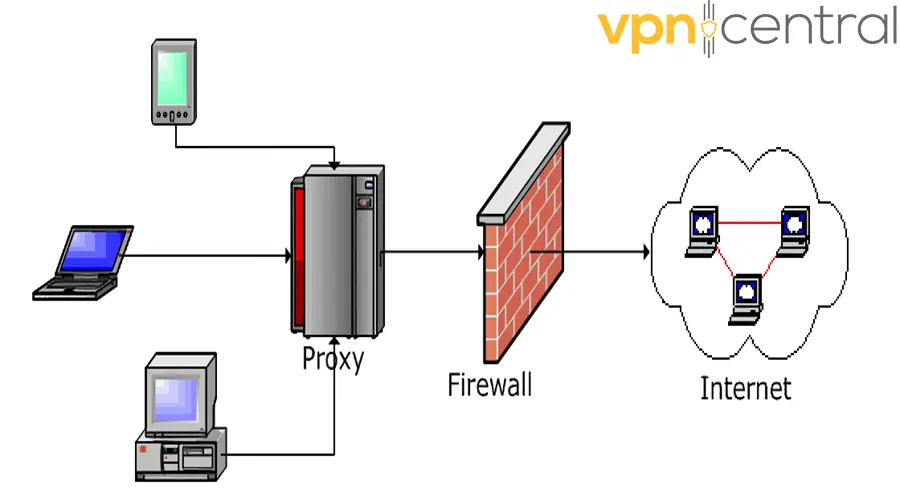
In most cases, a single proxy server serves many clients accessing it. The proxy can therefore efficiently cache documents requested by all its clients.
SOCKS4/5 Proxy
When using a SOCKS network, each and every network application data goes via the SOCKS. This helps SOCKS achieve the following:
- Collect the data.
- Screen the data.
- Filter.
- Control all the network data
- Create a network application data storage.
SOCKS5 is preferred over SOCKS4. SOCKS4 only connects the requests, sets up the proxy, and transmits the application data. SOCKS5 instead supports authentication and encryption of data being transmitted.
Configuring SOCKS5 is also easier and it also supports UDP and TCP.
What Is the Difference Between a Web Proxy and a VPN?
Both web proxies and VPNs provide you with anonymity while surfing the internet. It is just a question of how much anonymity you prefer.
They can all provide you with internet confidentiality and break the geo-locations restrictions.
While they look similar, there are some pretty big differences:
Technology
A web proxy and VPN deliver their services very similarly by acting as an intermediary. They both hide your IP address and respond to your requests.
The difference is that a VPN needs a channeling process that establishes a direct and solid connection between you and the VPN server. A web proxy is simply an open port that anyone can connect to.
While using a web proxy, a single IP address is used by all the clients connected to the proxy (especially for public proxies). With a VPN you will always need to log in and authenticate, and each client is assigned a different IP address.
Security
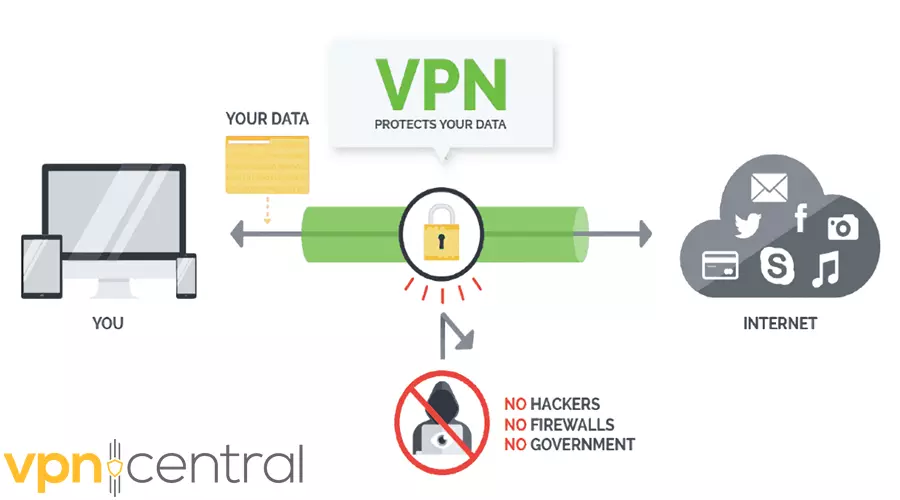
VPNs are more secure than web proxies. A web proxy will only do a basic job by replacing your IP address with another but it will not encrypt your data. With a VPN all traffic is hidden thanks to the channeling method.
Speed
Proxies tend to be faster than VPNs, especially the ones you pay for. This is due to the fact that a proxy doesn’t encrypt your data.
Good VPNs are very fast too but due to the structure of the network and the encryption process, they tend to be slower than web proxies.
Cost
Since less technology is involved, web proxies are usually cheaper than VPNs. You can even find many reliable free web proxies. However, there are affordable premium VPN options.
Considering the big difference in security level, a VPN should always be preferred if you really care about your digital safety and privacy. You may find even a selection of reliable free VPNs, but a free service must be used with extreme caution.
What are web proxies and their use
If you want to visit geo restricted web pages, a web proxy can be handy. A proxy lets you avoid geo-restrictions, location errors, or other blocks that prevent you from enjoying online content.
Some people might argue that a VPN connection can also assist you to access blocked websites. That’s absolutely correct and, in fact, VPNs are the best way to access blocked content.
However, VPNs are not free, while many web proxies are. This is by far the most appealing feature that makes people prefer a Web Proxy over a VPN.
In addition, a web proxy also allows you to surf the internet anonymously more or less like a VPN. They achieve this by rerouting all your traffic through their servers to access the websites you want to visit. As a result, your real IP address is hidden and substituted by the one assigned by the proxy server. This trick gives you a certain degree of anonymity.
Web proxies are easy to use, you just need to access a popular proxy website and enter the URL of the blocked website. You may quickly test how easy it is if you use the free web proxy we have on our website.
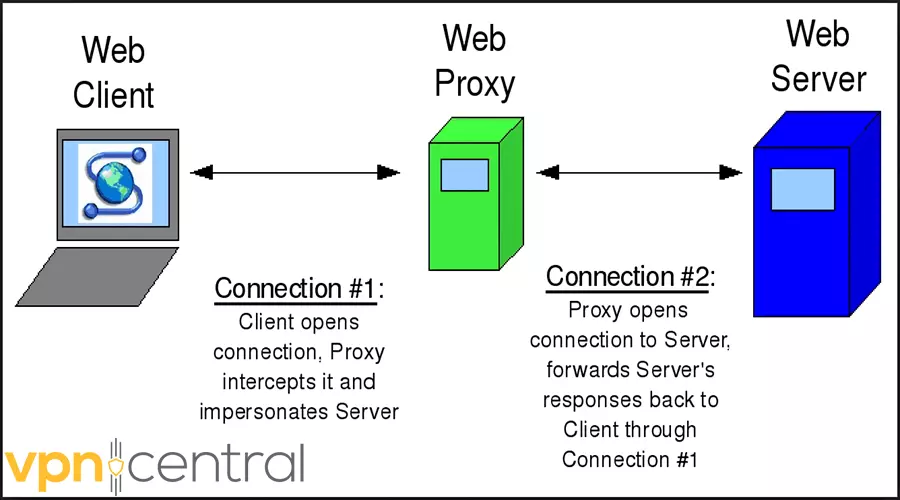
In simple words, a web proxy acts as a middleman between you and the web server.
When you toss a request, it is sent to the proxy. The proxy reaches out to the website and gets the requested webpage and sends it to you. This way you don’t reveal your own IP address.
Below is an illustration of how a web proxy works.
All the listed proxy sites are safe to use, though a much safer option is using a VPN.
If you’re interested in browsing with a higher level of privacy, take a look at our updated list of rotating proxies.


Read our disclosure page to find out how can you help VPNCentral sustain the editorial team Read more


Improve this guide




User forum
4 messages