
Microsoft Teams Mobile Browser Prompt Rollout


 2 min. read
  Published on
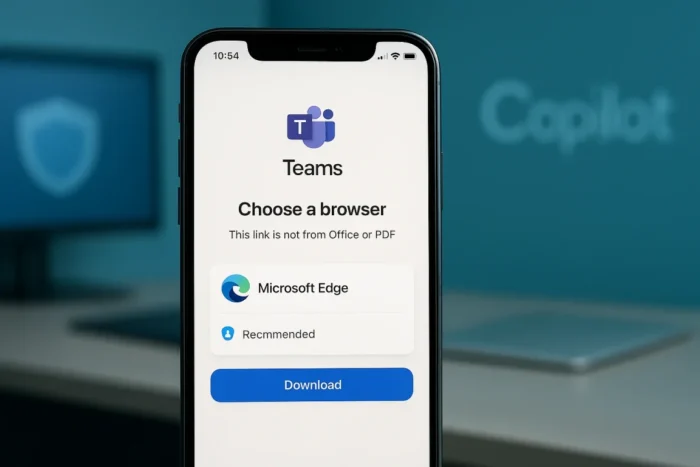
Microsoft Teams mobile apps on Android and iOS will prompt users to choose a browser for non-Office and PDF links starting late February 2026. The bottom-sheet pop-up highlights Microsoft Edge for SSO, Copilot integration, and security features. Users select Edge or default browser; Edge prompts install if missing.
The update targets Worldwide, DoD, GCC, and GCCH tenants. Rollout completes by end of February 2026. Feature improves security and experience by promoting Edge while restoring choice after prior automatic redirects.

Access content across the globe at the highest speed rate.
70% of our readers choose Private Internet Access
70% of our readers choose ExpressVPN

Browse the web from multiple devices with industry-standard security protocols.

Faster dedicated servers for specific actions (currently at summer discounts)
Admins control via TeamsMobilityPolicy PowerShell. Enabled by default as OfferBrowserOptions.
Feature Details
When users tap non-Office/PDF links in Teams mobile, a prompt appears. Edge shows first with benefits listed. “Remember my choice” option available.
If Edge unselected and uninstalled, app store redirect follows. Default browser option always present.
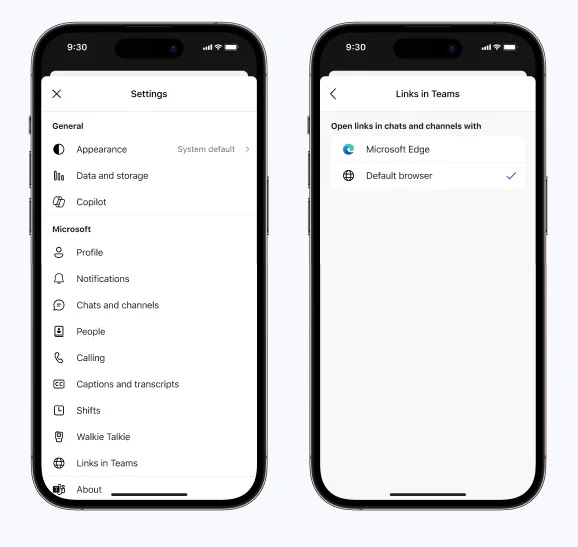
User settings in app: Profile icon > Settings > Links in Teams. Toggle browser preference directly.
No compliance impacts identified. Microsoft monitors DSAT, Edge installs, retention metrics.
Admin Configuration Table
| Policy | Attribute | Value | Effect |
|---|---|---|---|
| TeamsMobilityPolicy | LinksInTeams | OfferBrowserOptions | Prompt enabled (default) |
| TeamsMobilityPolicy | LinksInTeams | UseSystemDefaults | System default browser, no prompt |
PowerShell commands:
Check current
Get-CsTeamsMobilityPolicy -Identity Global | Select Identity, LinksInTeams
Disable prompt
Set-CsTeamsMobilityPolicy -Identity Global -LinksInTeams UseSystemDefaults
Enable prompt
Set-CsTeamsMobilityPolicy -Identity Global -LinksInTeams OfferBrowserOptions
Rollout Timeline
- Start: Late February 2026
- Completion: End February 2026
- Tenants: Worldwide, DoD, GCC, GCCH
- Platforms: Android, iOS Teams mobile
Prior behavior forced Edge. New prompt gives choice but positions Edge prominently.
User Experience Changes
Positive:
- Browser choice restored
- SSO/Copilot in Edge for M365 users
- Enterprise security controls
Considerations:
- Repeated prompts if “Remember” unchecked
- Edge install nudge for new users
- No third-party browsers listed explicitly
Helpdesks prepare for queries. Update documentation.
Enterprise Implications
Organizations standardize on Chrome/Firefox set UseSystemDefaults proactively. Controlled environments avoid disruption.
Test in pilot groups. Brief users on prompt. Monitor adoption metrics via Microsoft reports.
FAQ
Late February 2026 across all tenants. MC1216263
Non-Office documents and PDFs.
Set-CsTeamsMobilityPolicy -LinksInTeams UseSystemDefaults
Yes, prompts download after selection.
Teams app > Settings > Links in Teams
Android/iOS mobile apps only.
DSAT, Edge installs, retention tracked by Microsoft.


Read our disclosure page to find out how can you help VPNCentral sustain the editorial team Read more


Improve this guide



User forum
0 messages