
Fake Google Forms Phishing Steals Google Account Credentials


 3 min. read
  Published on
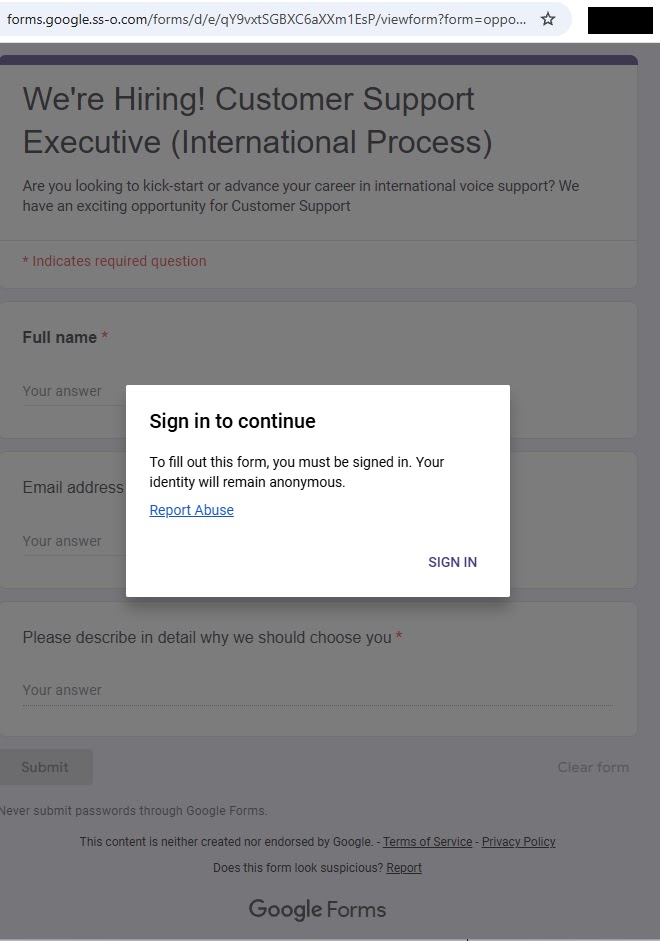
Threat actors launched a phishing campaign targeting job seekers with fake Google Forms sites at forms.google.ss-o[.]com. The fraudulent domain mimics legitimate forms.google.com while suggesting “single sign-on” functionality. Victims reveal Google login credentials through convincing job application lures.
Attackers distribute links via targeted emails and LinkedIn messages. Pages advertise Customer Support Executive positions requiring name, email, and qualifications. Design replicates official Google Forms with logos, colors, and disclaimers.

Access content across the globe at the highest speed rate.
70% of our readers choose Private Internet Access
70% of our readers choose ExpressVPN

Browse the web from multiple devices with industry-standard security protocols.

Faster dedicated servers for specific actions (currently at summer discounts)
Malwarebytes identified the infrastructure during job scam research. The fake site redirects suspicious traffic to local Google search to evade analysis.
Personalized phishing URLs generate via generation_form.php script. Each victim receives unique tracking links. Clicking “Sign in” redirects to id-v4[.]com/generation.php, a credential harvester active for nearly a year.
Phishing Infrastructure
Primary domains:
- forms.google.ss-o[.]com (active phishing)
- id-v4[.]com/generation.php (credential capture)
Redirect logic:
- Legitimate browsers → Google login phishing
- Security scanners → Local Google search
- Known bad User-Agents → Benign pages
Job lure specifics:
- Customer Support Executive position
- “Why do you deserve this role?” open text
- Professional Google Forms styling
Google accounts enable access to Gmail, Drive, YouTube, and connected services. Stolen credentials fuel business email compromise and account takeover chains.
Attack Flow Diagram
| Stage | Action | Victim Experience |
|---|---|---|
| 1 | Phishing email/LinkedIn | Job application link |
| 2 | forms.google.ss-o[.]com | Convincing Google Forms |
| 3 | Form submission | “Sign in with Google” prompt |
| 4 | id-v4[.]com/generation.php | Real Google login page overlay |
| 5 | Credentials captured | Redirect to legitimate search |
Credential harvest success → Attacker gains Gmail/Drive/YouTube access.
Technical Evasion Features
Domain impersonation:
textforms.google.com      ← Legitimate
forms.google.ss-o.com ← Phishing (SS-O = Single Sign-On)
Anti-analysis:
textUser-Agent: Security scanner → 127.0.0.1 Google redirect
User-Agent: Normal browser → Phishing page
Dynamic tracking:
textgeneration_form.php → Unique victim URLs
Session persistence across redirects
Victim Targeting Profile
Primary targets:
- Job seekers (recent graduates, career switchers)
- LinkedIn active professionals
- Entry-level IT/support roles
Distribution channels:
- Unsolicited job offer emails
- LinkedIn InMail messages
- Professional networking spam
Geographic focus: Global English speakers, tech industry concentration.
Protection Measures
Immediate user actions:
- Verify Google Forms URLs end in forms.google.com
- Never enter credentials on job application forms
- Use password manager autofill detection
- Enable Google 2FA immediately
Enterprise controls:
textBlock *.ss-o.com domains
Email filter: "Google Forms" + external links
DLP: Google credentials on non-corporate domains
Train employees: Job offers via official channels only
Browser protections:
textuBlock Origin: forms.google.ss-o.com
HTTPS Everywhere: Reject invalid certs
Password manager warnings
Indicators of Compromise
| Type | Value | Status |
|---|---|---|
| Phishing Domain | forms.google.ss-o[.]com | Active |
| Credential Harvester | id-v4[.]com/generation.php | Taken down |
| Lure Content | “Customer Support Executive” | Active campaign |
| Traffic Redirect | Local Google search | Anti-analysis |
Google Account Defense Layers
Post-compromise:
texthttps://myaccount.google.com/security-checkup
Review recent activity
Sign out all sessions
Change password + enable 2FA
Advanced:
textGoogle Workspace admins → Suspicious login alerts
Gmail security notifications
OAuth app permissions review
Campaign Attribution Notes
Infrastructure reuse:
- id-v4[.]com/generation.php → Multiple phishing ops
- Professional phishing-as-a-service kit
- Job seeker targeting consistent with prior campaigns
Tactics evolution:
text2025: Basic Google Forms abuse
2026: Sophisticated domain + redirect logic
FAQ
forms.google.ss-o[.]com impersonates forms.google.com.
Job application lures → credential phishing → id-v4[.]com capture.
Customer Support Executive requiring Google login.
Redirects security scanners to local Google search.
Password managers block autofill, enable Google 2FA.
Block forms.google.ss-o[.]com + “Google Forms” external links.


Read our disclosure page to find out how can you help VPNCentral sustain the editorial team Read more


Improve this guide




User forum
0 messages