
Kali Linux shows how to run AI-assisted pentesting fully offline with Ollama, 5ire, and MCP Kali Server


 4 min. read
  Published on

Kali Linux has published a new guide that shows how to run AI-assisted penetration testing fully offline, without sending prompts, targets, or tool output to a cloud service. The setup uses a local GPU, Ollama for model serving, MCP Kali Server for tool access, and 5ire as the desktop client that connects everything together.
That matters for red teams, lab environments, and anyone handling sensitive testing data. Kali’s guide makes the case that local inference can reduce privacy and operational security concerns because the model, the tool bridge, and the interface all stay on the same machine.

Access content across the globe at the highest speed rate.
70% of our readers choose Private Internet Access
70% of our readers choose ExpressVPN

Browse the web from multiple devices with industry-standard security protocols.

Faster dedicated servers for specific actions (currently at summer discounts)
Kali’s test system used an NVIDIA GeForce GTX 1060 with 6 GB of VRAM. The team switched to NVIDIA’s proprietary driver stack so CUDA could handle inference, and the guide shows nvidia-smi reporting driver version 550.163.01 and CUDA 12.4 after setup.
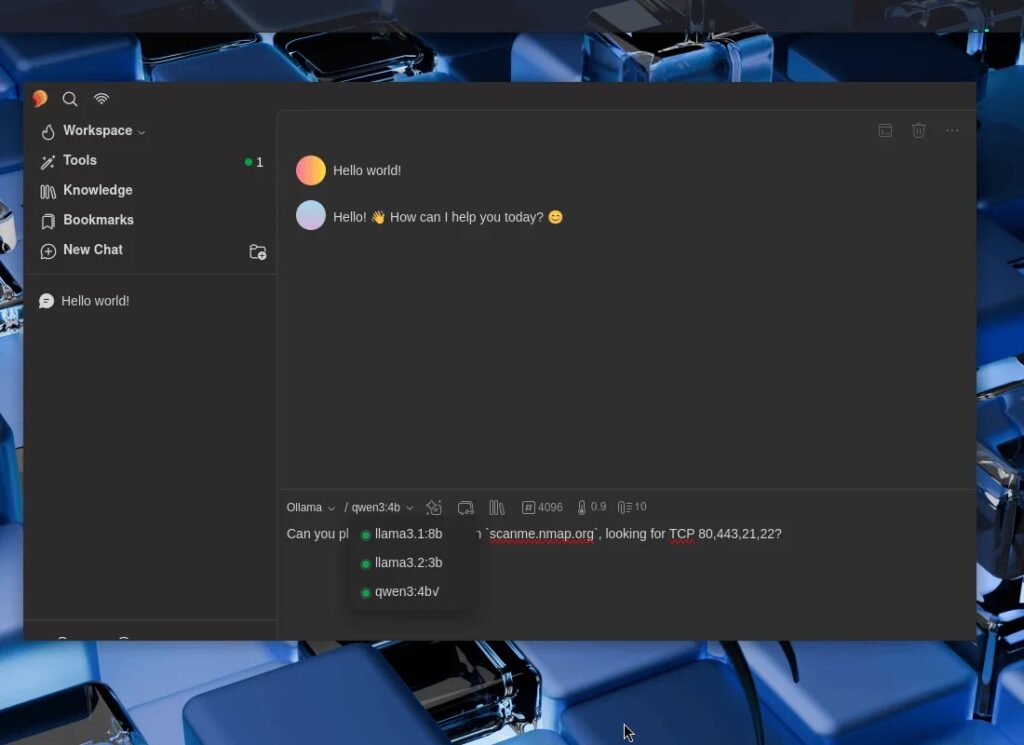
The local model layer runs through Ollama. Kali describes Ollama as a wrapper for llama.cpp, and the guide uses it to pull and serve models small enough to fit inside the system’s VRAM budget. The team tested llama3.1:8b, llama3.2:3b, and qwen3:4b, all chosen because they support tools, which is required for MCP-driven command execution.
The security tooling side comes from mcp-kali-server, which Kali says is already available in its repositories. In the guide, the package exposes a local Flask-based API on 127.0.0.1:5000 and checks for tools such as nmap, gobuster, dirb, and nikto before the MCP client connects.
Because Ollama does not natively support MCP, Kali uses 5ire as the bridge. The guide installs 5ire as an AppImage, enables Ollama as the provider, turns on tool support for each model, and registers /usr/bin/mcp-server as the local tool endpoint inside the GUI.
Kali then validates the full stack with a simple real-world test. Using qwen3:4b, the assistant receives a natural-language prompt asking for a TCP scan of scanme.nmap.org on ports 80, 443, 21, and 22, then invokes nmap through the MCP chain and returns structured results while ollama ps shows GPU-backed processing.
How the offline Kali AI setup works
| Component | Role in the stack |
|---|---|
| NVIDIA GPU + CUDA | Runs local model inference |
| Ollama | Serves local LLMs |
| Supported models | llama3.1:8b, llama3.2:3b, qwen3:4b |
| MCP Kali Server | Exposes pentesting tools through a local API |
| 5ire | Desktop client that connects Ollama to MCP tools |
What Kali actually installed
- NVIDIA proprietary drivers for CUDA-backed inference
- Ollama as a persistent
systemdservice - Local models with tool support enabled
mcp-kali-serverplus tools such asnmap,dirb,gobuster,nikto,hydra,john,sqlmap, andwpscan- 5ire AppImage configured to use Ollama and
/usr/bin/mcp-server

Why this matters for pentesting teams
Kali is not pitching this as a magic autopwn button. The guide shows a practical way to let a local language model interpret natural-language requests and trigger standard security tools on the same machine. That can help with repetitive tasks, lab work, internal testing, and training environments where sending data to outside AI services is not acceptable. This is an inference from Kali’s setup and validation flow.
The hardware limit also matters. Kali chose models that fit a 6 GB VRAM card, which means the setup is accessible on older consumer hardware, but it also means teams need to manage expectations around model size and speed. The tradeoff here is clear: lower recurring service risk in exchange for local hardware constraints. This is an inference based on the published hardware and model sizes in the guide.

Key takeaways
- Kali’s new guide shows a fully local AI-assisted pentesting workflow with no cloud dependency.
- The stack relies on Ollama for local models, MCP Kali Server for tool access, and 5ire as the MCP-capable desktop client.
- Kali tested the setup on an NVIDIA GTX 1060 6 GB system with CUDA enabled.
- The published demo used natural language to trigger an
nmapscan againstscanme.nmap.org.
FAQ
Kali’s latest guide focuses on running the full LLM-assisted testing stack locally with Ollama, 5ire, and MCP Kali Server, instead of relying on cloud AI services.
Kali’s published walkthrough uses an NVIDIA GPU with CUDA support, specifically a GeForce GTX 1060 6 GB. The guide presents that as the reference hardware for local inference.
The guide tested llama3.1:8b, llama3.2:3b, and qwen3:4b. Kali says tool support was a required feature for model selection.
It acts as the bridge between the language model workflow and Kali’s local security tools by exposing them through a local API and MCP server process.


Read our disclosure page to find out how can you help VPNCentral sustain the editorial team Read more


Improve this guide




User forum
0 messages