
Microsoft 365 accounts targeted in phishing wave that abuses OAuth device code flow


 5 min. read
  Published on

Attackers are increasingly hijacking Microsoft 365 accounts without stealing passwords by abusing OAuth device code authentication. Security researchers at ANY.RUN say they found more than 180 phishing URLs tied to this technique in a single week, showing how quickly the tactic is spreading.
The method works because victims complete sign-in on a real Microsoft page. Instead of harvesting credentials on a fake login screen, attackers trick users into entering a short verification code at Microsoft’s legitimate device login page, which then grants the attacker access and refresh tokens for the victim’s account.

Access content across the globe at the highest speed rate.
70% of our readers choose Private Internet Access
70% of our readers choose ExpressVPN

Browse the web from multiple devices with industry-standard security protocols.

Faster dedicated servers for specific actions (currently at summer discounts)
This makes the attack harder to catch than classic phishing. Security tools often look for fake domains, cloned login pages, or stolen passwords. In this case, the victim authenticates through genuine Microsoft infrastructure over encrypted traffic, so the compromise may stay hidden until suspicious activity appears later in logs or mailboxes.
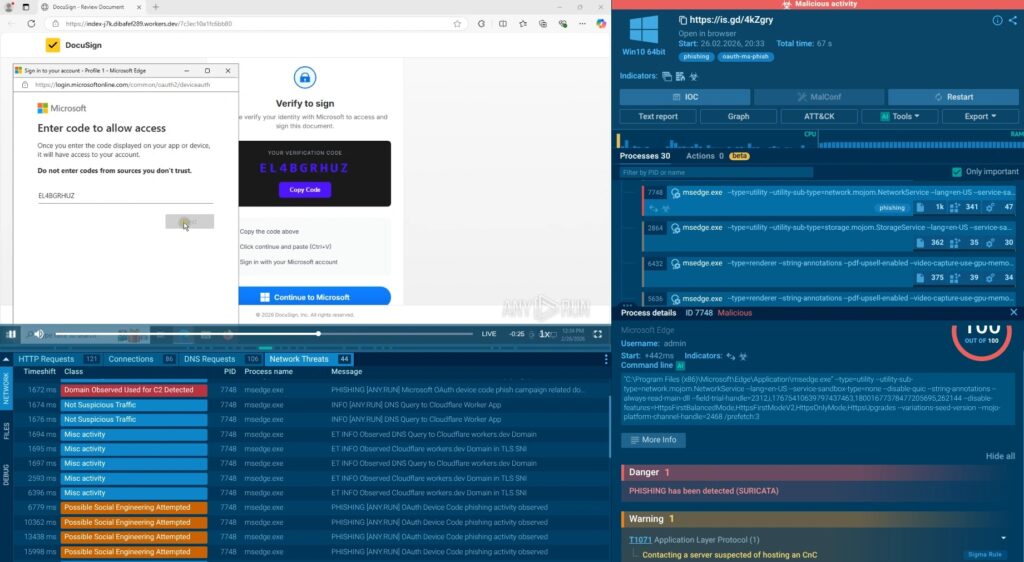
Microsoft has already warned that device code phishing is a growing threat. In its Digital Defense Report 2025, the company said it saw a notable uptick in campaigns that capture access and refresh tokens through device code authentication, enabling account access, data theft, persistent access, and lateral movement while the tokens remain valid.
How the attack works
The device authorization grant was built for devices such as TVs, meeting room systems, and other products that cannot easily display a full login page. Attackers start a real device authorization request, obtain a user code, and then lure the victim into entering that code on Microsoft’s real sign-in page. Once the victim finishes authentication, the attacker receives usable tokens tied to the victim’s Microsoft 365 account.
ANY.RUN says many of the observed lures impersonate document-sharing or signing workflows, including fake DocuSign-style pages. These pages instruct users to copy a code and enter it at Microsoft’s legitimate device login site, which lowers suspicion because the destination domain looks safe.
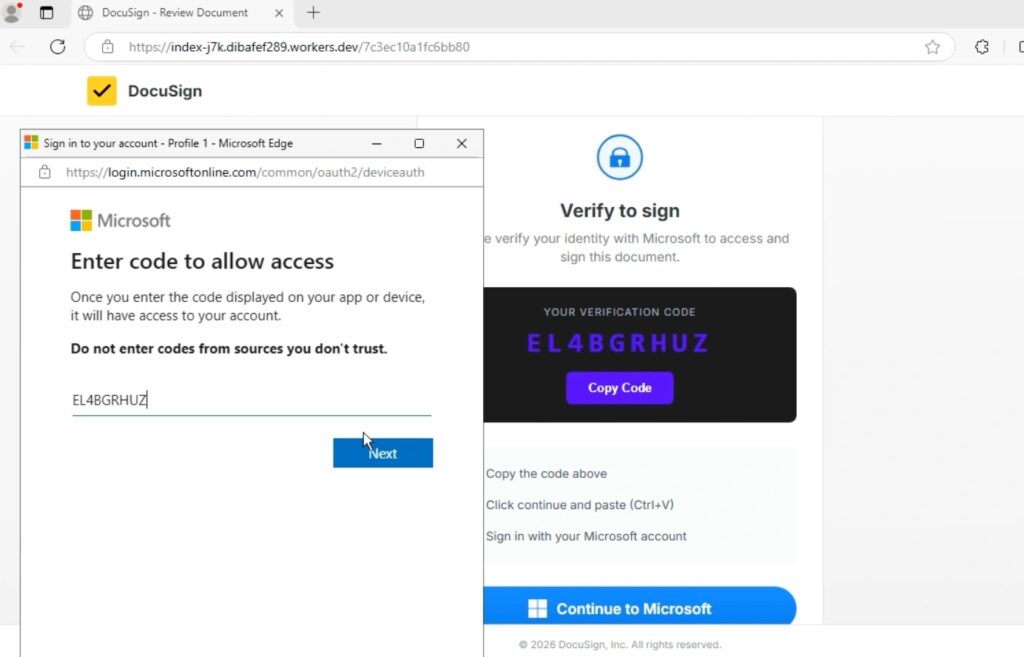
Microsoft described a similar pattern in its February 2025 write-up on Storm-2372. The company said the actor used device code phishing to capture authentication tokens and gain account access, often by sending lures that resembled messaging or meeting experiences.
Why this technique worries defenders
This attack does not need password theft to succeed. It also does not fail just because a user has multi-factor authentication enabled, since the victim completes the MFA challenge during the legitimate sign-in flow. The result is token-based account takeover rather than credential theft.
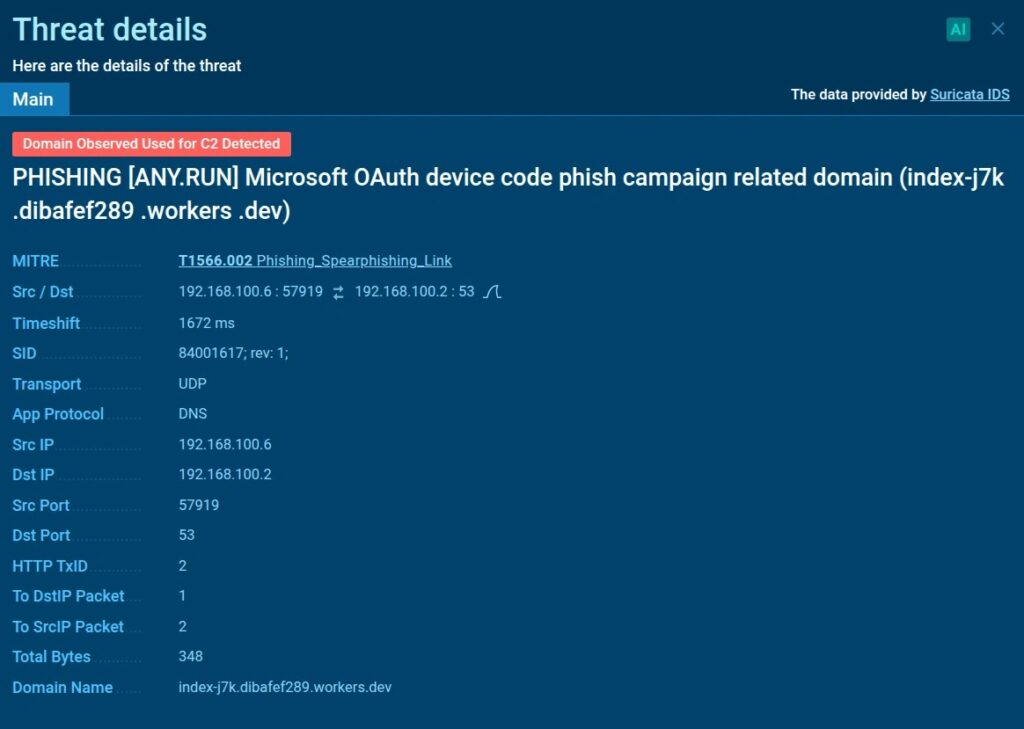
For security teams, that changes the investigation path. Analysts may need to trace OAuth token issuance, suspicious app activity, or unusual sign-ins instead of looking for a password spray or a fake login page. Microsoft notes that device code flow is a high-risk authentication method and specifically recommends controlling it with Conditional Access policies.
Key details at a glance
| Item | Details |
|---|---|
| Technique | OAuth device code phishing |
| Main target | Microsoft 365 accounts |
| What attackers get | Access tokens and refresh tokens |
| Password stolen? | Not required |
| MFA bypassed? | The victim completes MFA on a real Microsoft page |
| Why detection is hard | Uses legitimate Microsoft infrastructure and encrypted HTTPS |
| Recent signal | ANY.RUN reported 180+ malicious URLs in one week |
| Microsoft’s position | Device code phishing is a growing and high-risk threat |
Sources: ANY.RUN, Microsoft Security, Microsoft Digital Defense Report 2025.
What researchers saw in the latest campaign
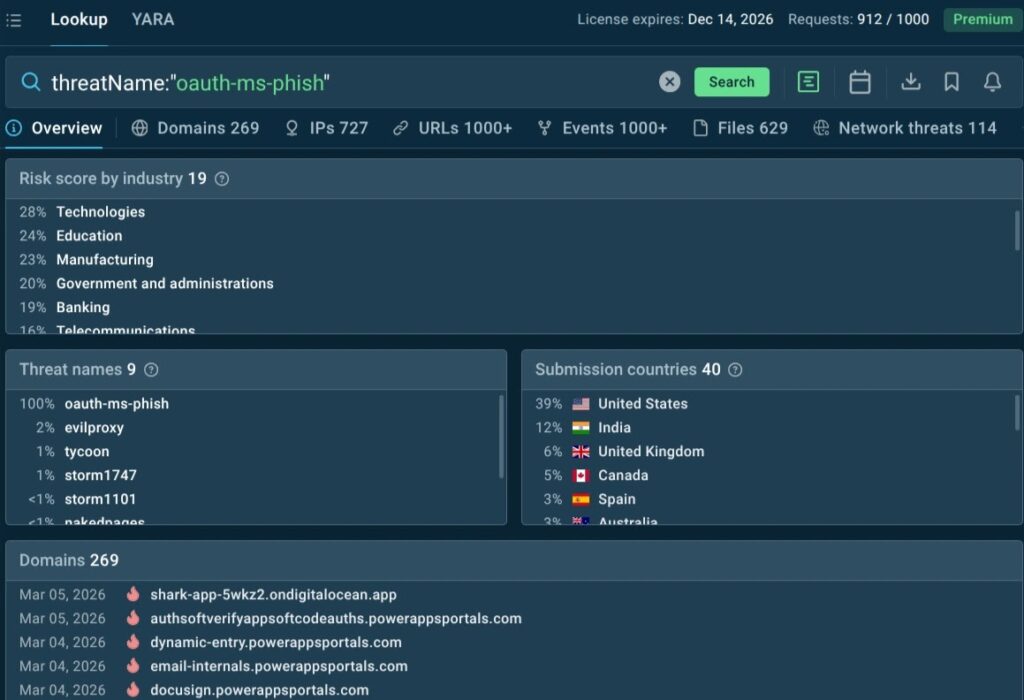
ANY.RUN says the campaign often hides activity behind JavaScript loaders and encrypted HTTPS sessions. The company says its sandbox exposed backend API calls such as /api/device/start and /api/device/status/, along with an X-Antibot-Token header in the phishing flow. Those artifacts can help analysts cluster related infrastructure and improve detections.
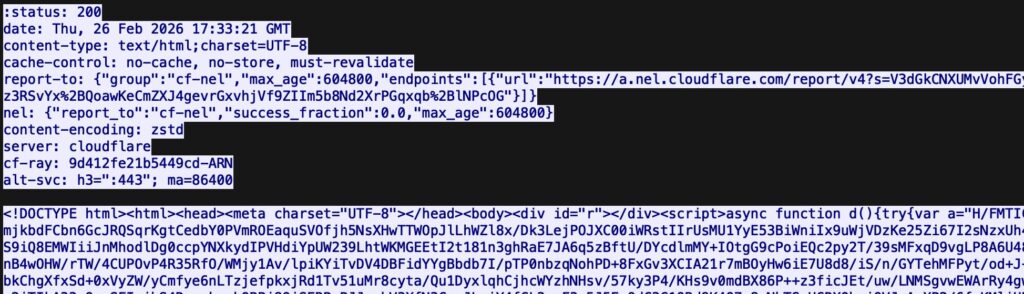
The firm also says the most targeted industries include technology, education, manufacturing, and government and administration, while the United States and India have seen the highest concentration of activity in this dataset.
What Microsoft recommends
Microsoft says organizations should treat device code flow as high risk and manage it through Conditional Access authentication flow policies. The company also recommends security measures such as sign-in risk policies, stronger phishing-resistant authentication where possible, token protection controls, and tighter monitoring for suspicious identity activity.
Microsoft’s May 2025 identity defense guidance says defenders should review sign-ins that use device code flow, monitor unusual application consent behavior, revoke suspicious sessions and refresh tokens, and investigate lateral movement after token theft.
What security teams should do now
- Review whether your organization actually needs device code flow.
- Use Conditional Access to block or tightly control device code flow where possible.
- Hunt for recent sign-ins tied to device code authentication in Entra ID logs.
- Revoke refresh tokens and active sessions for suspected victims.
- Train users that real Microsoft login pages can still appear in phishing chains.
- Watch for document-themed lures that ask users to enter a verification code rather than a password.
FAQ
It is a phishing method where attackers abuse the legitimate device authorization flow to trick a victim into approving the attacker’s sign-in session on a real Microsoft page.
No. The main goal is to obtain access and refresh tokens, not the user’s password.
The victim still performs MFA, but the attacker benefits because the victim authorizes the attacker’s device code session. That is why the attack can succeed without password theft.
Yes. Microsoft has published multiple warnings about device code phishing, including threat reporting on Storm-2372 and broader guidance in its Digital Defense Report 2025 and Entra Conditional Access documentation.
The strongest step is to restrict or block device code flow where it is not needed, then monitor sign-ins, revoke suspicious tokens, and educate users about code-entry lures that use real Microsoft pages.


Read our disclosure page to find out how can you help VPNCentral sustain the editorial team Read more


Improve this guide




User forum
0 messages