
Fake VPN download sites are stealing enterprise logins, Microsoft warns


 4 min. read
  Published on
Employees looking for a VPN client update or installer may now face a more dangerous trap than a broken download page. Microsoft says a threat actor it tracks as Storm-2561 has used fake enterprise VPN websites and poisoned search results to trick users into downloading trojanized VPN installers that steal corporate credentials.
The campaign matters because it targets a familiar workflow. A user searches for terms like a VPN client name plus “download,” lands on a convincing site that mimics a real vendor, installs what looks like a normal client, and then enters company credentials into a fake login window. Microsoft says the malware can steal those credentials, grab VPN configuration data, and quietly persist on the device.

Access content across the globe at the highest speed rate.
70% of our readers choose Private Internet Access
70% of our readers choose ExpressVPN

Browse the web from multiple devices with industry-standard security protocols.

Faster dedicated servers for specific actions (currently at summer discounts)
Microsoft’s write-up shows the operation went beyond one vendor or one fake page. The company found domains and infrastructure impersonating products linked to Ivanti, Cisco, Fortinet, Sophos, SonicWall, Check Point, and WatchGuard, suggesting a broad credential theft effort aimed at enterprise remote access users.
What Microsoft found
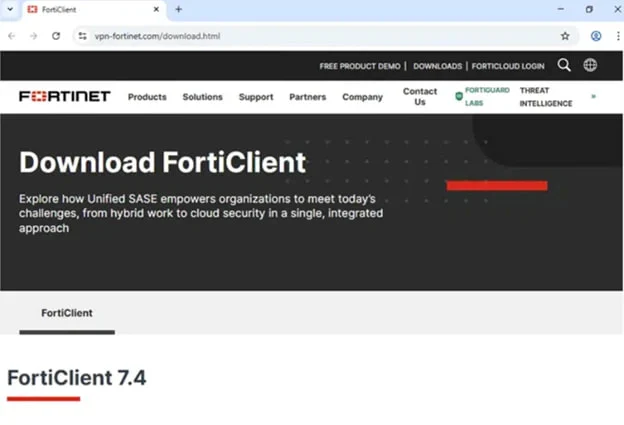
According to Microsoft, Storm-2561 used SEO poisoning to push malicious results for common enterprise VPN download searches. Victims were redirected to spoofed websites that resembled legitimate vendor pages and then sent to a GitHub repository hosting a ZIP archive with a fake MSI installer. Microsoft says that GitHub repository has since been taken down.
Once launched, the fake installer dropped files including a loader and a Hyrax infostealer variant. Microsoft says the malware was signed with a legitimate certificate that has now been revoked, helping it appear more trustworthy during installation.
The fake client then displayed a polished login interface and captured any credentials the victim entered. It also stole VPN configuration data from the legitimate program directory. After that, the malware showed an installation error and redirected the user to the real vendor site, which reduced suspicion and made the compromise harder to notice.
Source: Microsoft
Why this attack is effective
This campaign works because it blends fake search results, cloned vendor branding, signed malware, and a final redirect to the legitimate download page. If the employee later installs the real VPN client and signs in successfully, they may never realize the first installer already stole their credentials. Microsoft says that makes the initial failure easy to dismiss as a routine technical issue.
For security teams, this is also a reminder that search behavior itself can be an attack surface. Users often search for enterprise tools rather than navigating from an approved software portal or IT-managed bookmark. That habit creates an opening for attackers who can manipulate rankings or buy visibility around common software queries. This conclusion is an inference based on Microsoft’s description of the attack chain.
Vendors and products seen in the campaign
| Category | Details |
|---|---|
| Search lure | VPN client download searches |
| Delivery method | SEO poisoning and spoofed vendor websites |
| Malware hosting | GitHub ZIP archive, later removed |
| Stolen data | VPN credentials and configuration data |
| Impersonated brands | Ivanti, Cisco, Fortinet, Sophos, SonicWall, Check Point, WatchGuard |
Source: Microsoft and follow-up reporting.
What defenders should do
Microsoft recommends several steps to reduce risk and catch the campaign early.
- Enable cloud-delivered protection in Microsoft Defender
- Run endpoint detection and response in block mode
- Enforce multi-factor authentication
- Use browsers with SmartScreen enabled
- Monitor for the indicators of compromise Microsoft published
- Train users to avoid downloading enterprise software from search results
What employees should do
A technical defense helps, but user behavior still matters in this case.
- Download VPN clients only from your company’s software portal or a bookmarked vendor page approved by IT
- Do not trust search ads or top search results for enterprise software
- Report installers that fail and then redirect you elsewhere
- Treat unexpected VPN login prompts with caution, especially after a failed install
- Reset credentials quickly if you think you entered them into the wrong client
FAQ
Microsoft attributes the operation to a threat actor it tracks as Storm-2561.
Microsoft says the attackers steal VPN credentials entered into fake client windows and also collect VPN configuration data from local files.
Microsoft identified infrastructure tied to fake pages related to Ivanti, Cisco, Fortinet, Sophos, SonicWall, Check Point, WatchGuard, and others.
Because the malware shows an installation error and then sends users to the real vendor page. If the real client works afterward, the victim may assume the earlier failure was harmless.


Read our disclosure page to find out how can you help VPNCentral sustain the editorial team Read more


Improve this guide

User forum
0 messages