
Microsoft Azure Monitor alerts abused in callback phishing campaign


 6 min. read
  Published on
Threat actors are abusing Microsoft Azure Monitor to send callback phishing emails that look far more legitimate than a typical scam. The messages appear to come from Microsoft’s real [email protected] address, and researchers say attackers do this by creating Azure Monitor alerts with scam text in the alert content rather than spoofing the sender.
That makes this campaign especially dangerous for both businesses and regular users. Because the emails are generated through Microsoft’s own alerting system, they can pass SPF, DKIM, and DMARC checks, which gives them a level of trust that many phishing emails do not have. BleepingComputer says the lures mostly imitate billing, invoice, or payment alerts and try to push victims into calling a phone number controlled by the attacker.

Access content across the globe at the highest speed rate.
70% of our readers choose Private Internet Access
70% of our readers choose ExpressVPN

Browse the web from multiple devices with industry-standard security protocols.

Faster dedicated servers for specific actions (currently at summer discounts)
The scam does not appear to rely on malware in the initial email. Instead, it uses pressure and credibility. Victims are told that Microsoft detected a suspicious charge, often tied to a fake Windows Defender purchase, and are urged to call immediately to avoid suspension or extra fees. That pattern matches classic callback phishing, where the real attack starts over the phone, not in the inbox.
How the Azure Monitor phishing trick works
Microsoft’s own documentation shows that Azure Monitor alerts can send notifications through action groups, including email. Alert rules and action groups are designed to automate notifications when specific conditions are triggered, which gives attackers a legitimate delivery channel if they can set up an alert with misleading text.
According to BleepingComputer, the attackers create easily triggered alert rules for events such as invoices, payments, orders, or similar conditions. They then place the phishing lure in the description or alert text and send the notification to a mailing list they control, which forwards the message to victims while preserving Microsoft’s original headers and authentication results.
Microsoft’s documentation also confirms that Azure Monitor supports custom notification behavior, including customizable email subjects for some alert types and structured alert payloads through the common alert schema. Those are normal platform features, but in this case attackers appear to be twisting those trusted workflows into a phishing delivery system.
| Element | What happens in this campaign |
|---|---|
| Delivery source | Email comes from Microsoft’s real [email protected] sender |
| Phishing lure | Fake billing, invoice, or suspicious charge warning |
| Trigger method | Malicious or misleading Azure Monitor alert rules |
| Social engineering goal | Push the victim to call a fake support number |
| Main risk | Credential theft, payment fraud, or remote access after the phone call |
Sources: BleepingComputer and Microsoft Azure Monitor documentation.
Why these emails look convincing
One reason this campaign works is simple. Many people are trained to inspect the sender domain and email authentication before trusting a message. In this case, that check can mislead them because the sender really is Microsoft infrastructure. Microsoft Q&A posts from March 2026 also describe the same pattern and say the messages are part of a callback phishing attack abusing Azure Monitor notifications.
That does not mean the billing alert itself is legitimate. Microsoft support content and moderator responses make it clear that users should not trust unexpected payment warnings that demand a phone call to a random number. Microsoft’s phishing guidance also tells users to report suspicious messages through Outlook’s built-in phishing reporting tools instead of engaging with the sender.
BleepingComputer says the lures used in this campaign include fake charges around $389 and reference names such as Windows Defender, invoices, orders, memory spikes, or disk issues to make the notification sound like an automated system message. Since the email reaches the inbox through a real Microsoft service, many recipients may never suspect that the phone number is the real payload.
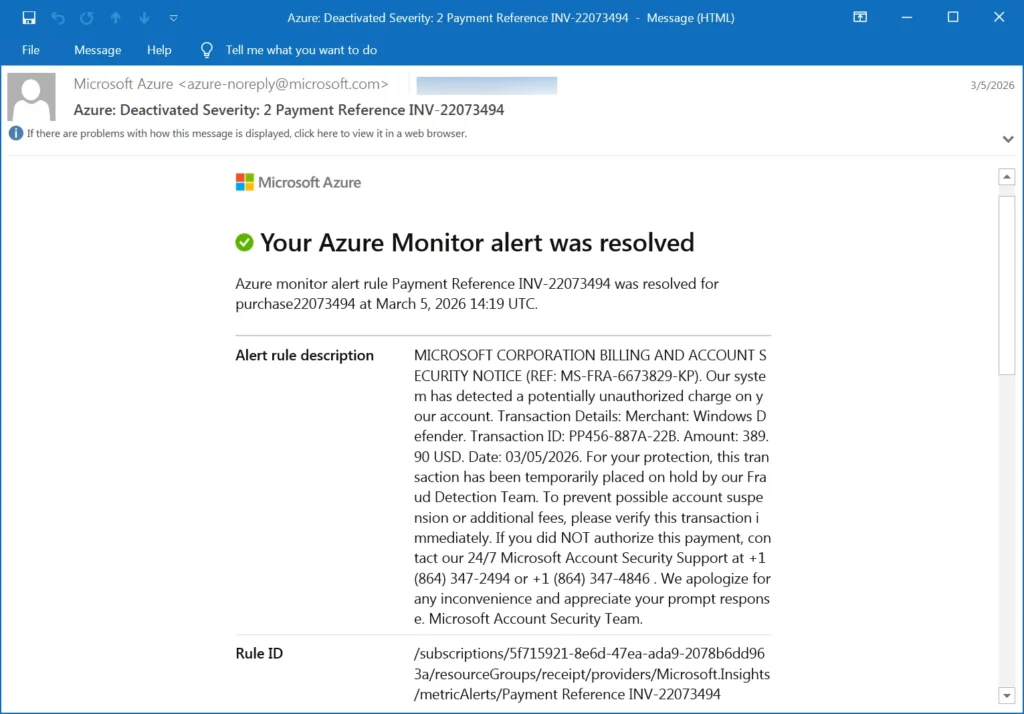
Source: BleepingComputer
What happens if a victim calls
BleepingComputer did not place the calls in its reporting, but it notes that earlier callback phishing campaigns have led to stolen credentials, fraudulent payments, and installation of remote access software. That fits the usual callback scam playbook, where attackers pose as support staff and guide the victim into revealing login details or installing tools that hand over device access.
This campaign could also appeal to attackers targeting businesses. Azure and Microsoft billing alerts look relevant in corporate settings, and a convincing finance-themed message can create just enough urgency for an employee to escalate the issue internally or call without checking the details first. BleepingComputer says the corporate tone suggests the campaign may aim for initial access into business environments.
What users and admins should do
Users should treat any Azure or Microsoft alert that includes a phone number and an urgent billing warning as suspicious, especially if they did not expect an invoice or do not actively manage an Azure subscription. Microsoft’s support guidance says phishing messages should be reported through Outlook rather than answered.
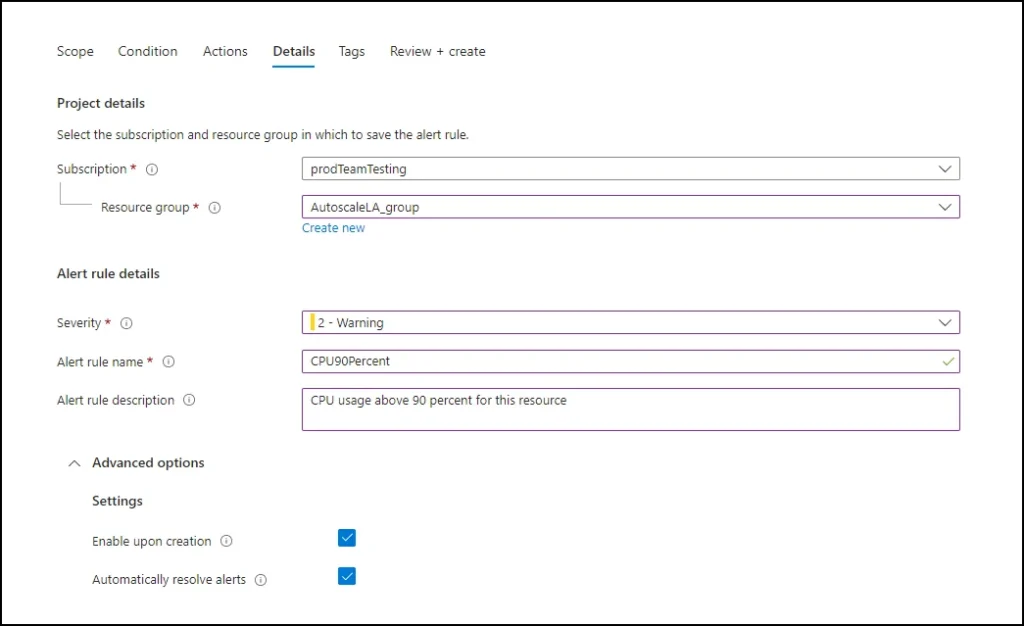
Source: Microsoft
Admins should also review how their mail defenses handle trusted cloud senders. This campaign shows that authentication alone is not enough when attackers abuse real platforms. Detection rules may need to focus more on suspicious phone numbers, scam language, and unexpected alert phrasing inside otherwise authentic service notifications. This is an inference based on the reported delivery method and Microsoft’s alerting architecture.
Warning signs to watch for
- An Azure Monitor email that mentions an unauthorized charge or urgent billing issue
- A request to call a phone number instead of using the normal Microsoft account portal
- Messages sent to people who do not manage Azure resources
- Alert names or descriptions that read more like a scam script than a technical notification
- Pressure to act immediately to avoid suspension, fees, or account lockout
FAQ
No. BleepingComputer says the campaign uses Microsoft’s legitimate Azure Monitor email channel, so the messages are sent from [email protected] rather than from a spoofed domain.
Because the email originates from Microsoft’s real infrastructure, not from a fake sender. That is one reason the scam looks more convincing than standard phishing.
Yes. Microsoft’s documentation says Azure Monitor uses action groups to send notifications such as email, SMS, push alerts, webhooks, and other actions when alert conditions are met.
Do not call the number. Report the email as phishing in Outlook or Outlook.com and verify any billing issue through Microsoft’s official account or Azure portal directly.
I did not find a formal Microsoft incident bulletin dedicated to this specific Azure Monitor abuse campaign. I did find Microsoft documentation that explains how Azure Monitor notifications work, plus Microsoft support and Q&A guidance that identifies these messages as phishing and tells users to report them.


Read our disclosure page to find out how can you help VPNCentral sustain the editorial team Read more


Improve this guide




User forum
0 messages