
North Korean hackers abuse VS Code auto-run tasks to push StoatWaffle malware


 6 min. read
  Published on

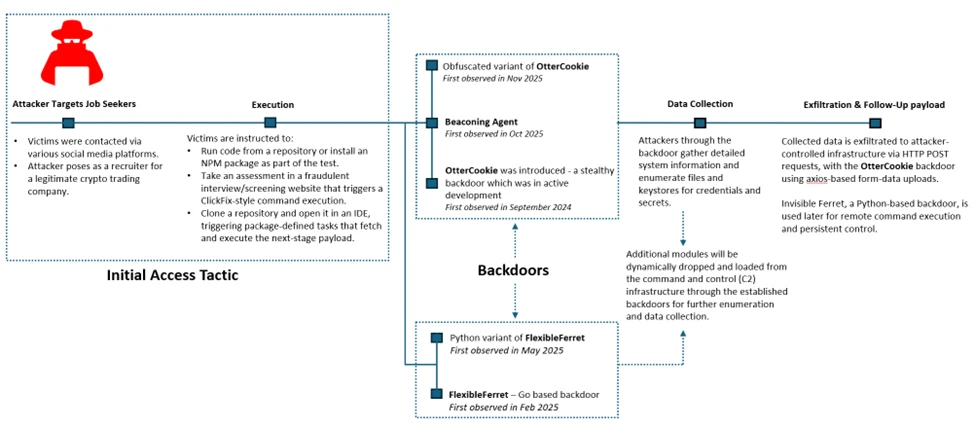
North Korean threat actors have started abusing Visual Studio Code auto-run tasks to infect developers with a malware family called StoatWaffle, according to new research. The activity links back to the broader Contagious Interview campaign, where attackers pose as recruiters and send fake coding tests or project files to developers, founders, and senior engineers. Microsoft says the campaign has remained active since at least December 2022 and increasingly abuses trusted developer workflows to gain initial access.
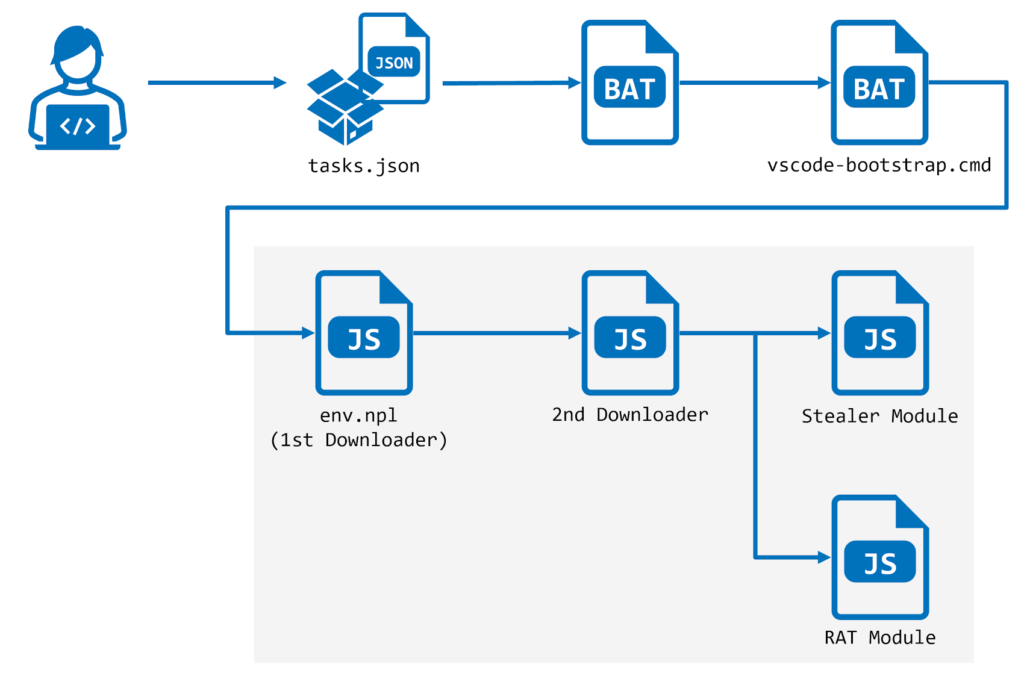
The latest twist involves malicious VS Code projects that include a crafted tasks.json file. When a victim opens the folder in VS Code and trusts the workspace, the task can run automatically and fetch the next-stage payload. In the cases described by NTT Security and echoed in your sample, the attackers used the runOn: folderOpen option to trigger code execution the moment the project opens. Microsoft separately confirmed that attackers in the Contagious Interview campaign have shifted to Visual Studio Code workflows, where trusting the repository can cause the task configuration to run and load a backdoor.

Access content across the globe at the highest speed rate.
🔥 Save 81% + 2 bonus months! 🔥
70% of our readers choose Private Internet Access
70% of our readers choose ExpressVPN
2
Browse the web from multiple devices with industry-standard security protocols.
🔥 Save 73%! 🔥

Faster dedicated servers for specific actions (currently at summer discounts)
🔥 Save 69%! 🔥
This matters because the attack does not rely on a traditional software exploit. Instead, it abuses normal developer behavior. A target thinks they are opening a take-home exercise or interview project, but the project itself carries the infection mechanism. That makes the campaign especially dangerous for software engineers who regularly clone repositories, test packages, and trust new workspaces during hiring processes.
How the VS Code infection chain works
According to the research, the malicious project includes a hidden .vscode/tasks.json file that launches when the folder opens in VS Code. The task downloads remote content from attacker-controlled infrastructure and starts a multi-stage Node.js-based execution chain.
One notable detail stands out. If Node.js is not already installed, the malware downloads it from the official Node.js website and installs it first, then uses it to run the downloader and later stages. That helps the attackers keep the malware cross-platform and lowers the chance that a missing runtime will stop the infection.
Microsoft’s own threat report lines up with that broader pattern. The company says attackers use fake interview processes to convince developers to clone malicious repos from GitHub, GitLab, or Bitbucket, then run packages, scripts, or task configurations that quietly deploy a backdoor in the background.
What StoatWaffle does after execution
The malware family described in the sample is modular. Researchers say StoatWaffle can deploy a stealer module and a remote access trojan, or RAT. The stealer targets credentials and extension data from Chromium-based browsers and Firefox, and on macOS it can also steal the iCloud Keychain database.
The RAT side goes further. It can execute commands, browse directories, upload files, search systems for documents matching keywords, run shell commands, and terminate itself when needed. In short, once it lands, it gives the attacker a flexible foothold on the developer’s machine.
That fits the broader Contagious Interview playbook Microsoft outlined earlier this month. Microsoft said the campaign targets developer endpoints because they often provide access to source code, CI/CD pipelines, cloud environments, signing keys, and cryptocurrency-related assets.
Why this campaign keeps evolving
The same actor cluster has already tied together fake interviews, npm package abuse, malicious repositories, and poisoned developer tooling. Your sample notes that newer VS Code project variants moved away from Vercel-hosted downloads and switched to GitHub Gist-hosted scripts that eventually deploy FlexibleFerret.
Microsoft says the core social engineering method remains effective because it exploits trust. The victim expects to receive code, open projects, install dependencies, and follow setup instructions. During a job interview, those steps feel normal, which lowers suspicion and increases the odds that the target will approve workspace trust or run an unfamiliar command.
Microsoft already changed VS Code to reduce the risk
Microsoft has already responded on the product side. In the January 2026 VS Code release, version 1.109, the company changed the task.allowAutomaticTasks setting so it now defaults to off instead of on. Microsoft said it made that change to improve security and prevent unintended execution of tasks defined in tasks.json when opening a workspace.
That mitigation does not remove the risk entirely, but it raises the bar. If users turn automatic tasks back on, or if they continue to trust suspicious repositories and execute setup steps manually, attackers can still succeed. Microsoft’s broader guidance also stresses using isolated environments for coding tests and reviewing recruiter-provided repositories before running scripts or dependencies.
At a glance
| Item | Key detail |
|---|---|
| Threat actor | North Korean Contagious Interview / WaterPlum cluster, per the sample and Microsoft reporting |
| Main lure | Fake job interviews and coding assessments |
| Delivery method | Malicious VS Code projects with tasks.json auto-run behavior |
| Trigger | Opening and trusting the workspace in VS Code |
| Malware | StoatWaffle |
| Main capabilities | Credential theft, browser data theft, RAT functions, file upload, command execution |
| Cross-platform angle | Node.js runtime installed if missing |
| Microsoft mitigation | task.allowAutomaticTasks defaults to off in VS Code 1.109 |
What developers and companies should do now
- Use a disposable VM or isolated machine for coding tests and take-home assignments. Microsoft explicitly recommends a dedicated, isolated environment for interview tasks.
- Keep VS Code updated to at least version 1.109 so automatic tasks stay disabled by default.
- Do not trust a workspace just because it came from a recruiter or a polished GitHub repository. Review .vscode/tasks.json and setup scripts first. This step follows directly from the task abuse described in the sample and Microsoft’s attack-chain overview.
- Avoid running recruiter-provided commands on a corporate workstation with access to production repos, cloud consoles, wallets, or signing keys. Microsoft warns that these campaigns target developer systems for exactly that reason.
- Treat unexpected requests to install Node.js, npm packages, or VS Code extensions during an interview as a high-risk sign, especially when the codebase comes from an unknown source.
FAQ
StoatWaffle is a modular malware family described in the research summary you shared. It includes a stealer component and a RAT component built around Node.js execution.
The attackers place a malicious tasks.json file inside the project and use auto-run behavior so the task executes when the folder opens and the workspace is trusted.
Yes. Microsoft said the Contagious Interview campaign abuses fake recruitment workflows to trick developers into executing malicious repositories, packages, or task configurations.
Microsoft says that in VS Code 1.109, automatic tasks now default to off to prevent unintended execution of tasks.json content when opening a workspace.


Read our disclosure page to find out how can you help VPNCentral sustain the editorial team Read more


Improve this guide




User forum
0 messages