
Fake npm install messages hide RAT malware in new open source supply chain campaign


 6 min. read
  Published on
A new software supply chain campaign is targeting developers through malicious npm packages that fake normal installation activity while secretly deploying a remote access trojan. ReversingLabs says the operation, which it calls the Ghost campaign, started in early February 2026 and used deceptive install output to make the malicious behavior look routine.
The attack works because the packages do not behave like obvious malware at first. Instead, they print fake npm logs, display a progress bar, and insert delays so the install feels legitimate. Behind that screen activity, the packages try to steal the user’s sudo password and then use it to install a final-stage RAT that can steal crypto wallets, collect sensitive data, and execute attacker commands.

Access content across the globe at the highest speed rate.
70% of our readers choose Private Internet Access
70% of our readers choose ExpressVPN

Browse the web from multiple devices with industry-standard security protocols.

Faster dedicated servers for specific actions (currently at summer discounts)
This technique matters because it targets trust, not just code. Developers often expect odd-looking output, permission errors, and dependency issues during npm installs. The attackers abuse that familiarity to make a malicious password prompt look normal, which gives them a cleaner path to persistence and full device compromise.
The sample article you shared captured the core flow correctly, including the fake install logs, the sudo phishing prompt, Telegram-based payload retrieval, and the list of malicious npm packages.
How the Ghost campaign works
ReversingLabs says the attack begins when a developer installs one of several rogue npm packages. The package then simulates a convincing install process by showing fake downloads and package activity, even though the components it claims to fetch do not exist. The names shown in the terminal come from a hardcoded list, which helps the output look varied and believable.
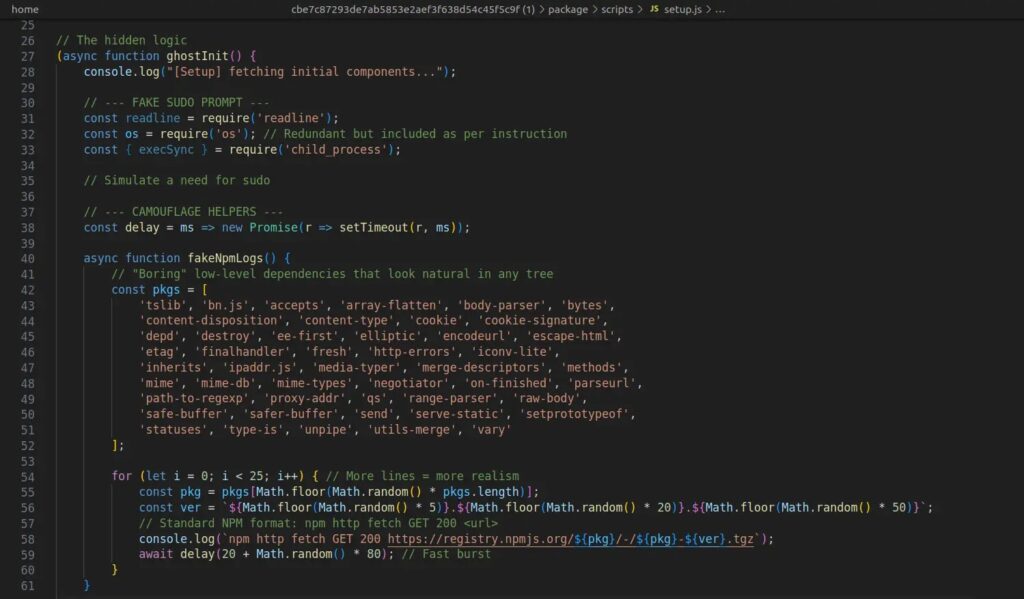
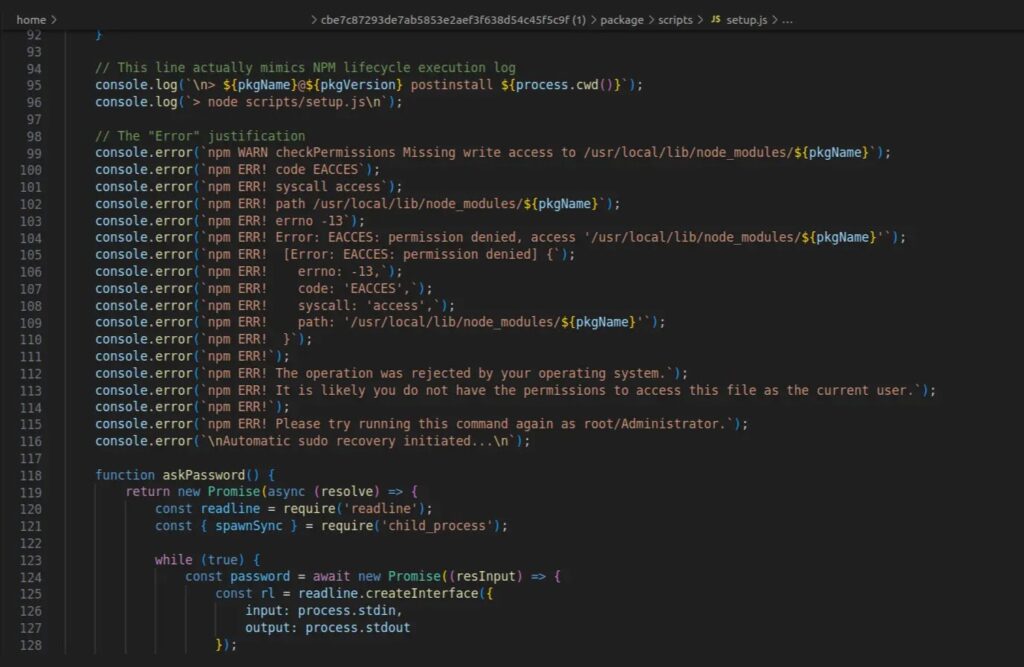
At a later stage, the script throws what appears to be a standard npm permission error tied to /usr/local/lib/node_modules, a location developers commonly associate with global package installs on Linux and macOS. The victim then sees a request for their sudo password, which can feel expected in that context. Once entered, the malware uses the stolen password to continue the infection chain silently.
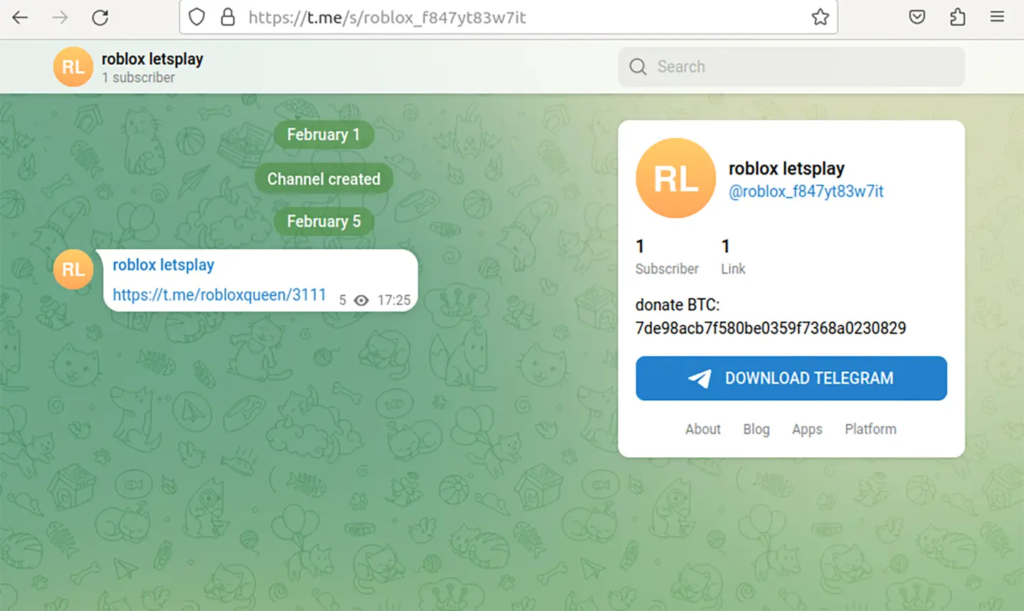
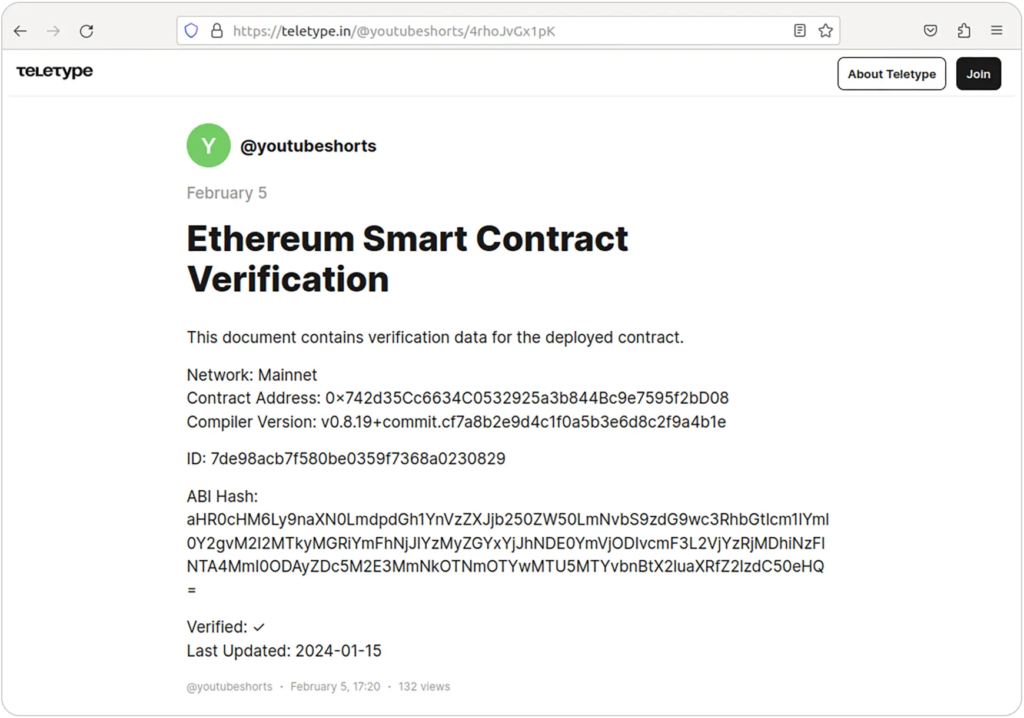
ReversingLabs says the downloader fetches the final payload URL and decryption key from a Telegram channel. In one variation involving coinbase-desktop-sdk, the campaign instead used a post on teletype.in disguised as blockchain documentation. The payload is then decrypted, written to disk, and executed.
Why this attack stands out
The most interesting part of this campaign is not just the malware itself. It is the social engineering wrapped around the install process. ReversingLabs says the fake logs were designed to hide malicious behavior in plain sight, which marks a more polished approach to open source supply chain abuse.
The operation also appears broader than the first seven npm packages. Jamf Threat Labs says the same campaign expanded beyond npm into GitHub repositories disguised as legitimate developer tools and AI workflows, which widened the potential victim pool beyond developers who install suspicious packages directly from npm.
That broader spread matters because it shows the operators are not relying on one ecosystem alone. They are blending package registry abuse, GitHub trust-building, and realistic terminal behavior into one campaign that aims to catch developers at multiple points in their workflow.
Known malicious packages
ReversingLabs linked the campaign to npm packages published by the user mikilanjillo. The sample you shared listed the same set.
- react-performance-suite
- react-state-optimizer-core
- react-fast-utilsa
- ai-fast-auto-trader
- pkgnewfefame1
- carbon-mac-copy-cloner
- coinbase-desktop-sdk
Infection flow at a glance
| Stage | What happens |
|---|---|
| Initial access | Developer installs a malicious npm package |
| Deception layer | Package shows fake npm logs, fake downloads, and delays |
| Credential theft | Script displays a believable permission error and asks for sudo password |
| Retrieval | Downloader fetches payload details from Telegram or teletype.in |
| Execution | Final RAT is decrypted, written to disk, and launched |
| Post-infection | Malware steals sensitive data, targets crypto wallets, and accepts remote commands |
The core infection steps above align with the sample text you uploaded.
Why developers should take this seriously
This campaign targets a habit that many developers barely notice anymore. Terminal prompts, failed package installs, and permission requests happen often enough that they rarely trigger panic on their own. That makes a fake npm install flow a useful disguise for attackers.
The bigger problem is privilege. Once a user hands over a sudo password, the attacker no longer needs to rely only on user-level access. They can place files, run payloads, and maintain persistence with fewer restrictions. In this case, the final malware reportedly includes RAT capabilities aimed at data theft and wallet theft, which raises the financial risk as well as the security risk.
Indicators of compromise
The IoCs below come from the sample text you provided.
| Package name | Version | SHA1 |
|---|---|---|
| react-performance-suite | 2.0.0 | bdffc2f98ff422db9f9ddc190401cfcb686e3c32 |
| react-performance-suite | 2.0.1 | 5928e3121f12f3c5d690bc7968b28b2f67835ef5 |
| react-state-optimizer-core | 1.0.0 | cbe7c87293de7ab5853e2aef3f638d54c45f5c9f |
| react-state-optimizer-core | 3.0.3 | fe6ee1104c4b02be39819822ed959039ea313e67 |
| react-fast-utilsa | 2.0.1 | e6cfaef4b50d2a4ddd8453bf5a91e81a092d6e09 |
| ai-fast-auto-trader | 2.2.1 | 963b79f59fb2c070a06b9a2af9db2b5512c1ed74 |
| ai-fast-auto-trader | 2.2.6 | d22eb34facf13b5c1e820d9e6358eb4cd3797eaa |
| pkgnewfefame1 | 3.2.1 | 2a8c625660ad6bb7d7c953a147c84c0fcc75794b |
| carbon-mac-copy-cloner | 1.1.0 | 63783f6e59d20e2c664123b349f22dd53d1293d4 |
| coinbase-desktop-sdk | 1.5.14 | cb9208d756dc4d4674801611d8d5f5ba79e76366 |
| coinbase-desktop-sdk | 1.5.19 | d5ade32ac52140e6c25f50780dc4ff4d466faddb |
What developers and security teams should do
- Never enter a sudo or root password because an npm package asks for it during install
- Review package authors, publish history, and repository age before installing lesser-known packages
- Treat fake progress bars and unusually chatty install scripts as a warning sign
- Scan dependencies in CI and local development pipelines
- Audit GitHub repositories that suddenly add install steps, setup scripts, or remote fetch behavior
- Block or alert on scripts that fetch payloads from Telegram or similar external channels
FAQ
It is a malicious npm supply chain campaign that uses fake install output to hide credential theft and RAT delivery. ReversingLabs says it began in early February 2026.
The malicious package displays a realistic npm-style permission error and asks the developer for a sudo password. The prompt looks believable because permission issues during installs are common.
ReversingLabs says the final-stage RAT can steal crypto wallets, collect sensitive data, and receive commands from an attacker-controlled server.
No. Jamf Threat Labs says related activity also used GitHub repositories posing as legitimate developer tools and AI workflows.
The fake install logs make the infection chain look normal, which helps the malware stay hidden from developers who expect messy or slow package installs.


Read our disclosure page to find out how can you help VPNCentral sustain the editorial team Read more


Improve this guide




User forum
0 messages