
Fake VS Code security alerts on GitHub used to spread malware in broad developer phishing campaign


 6 min. read
  Published on

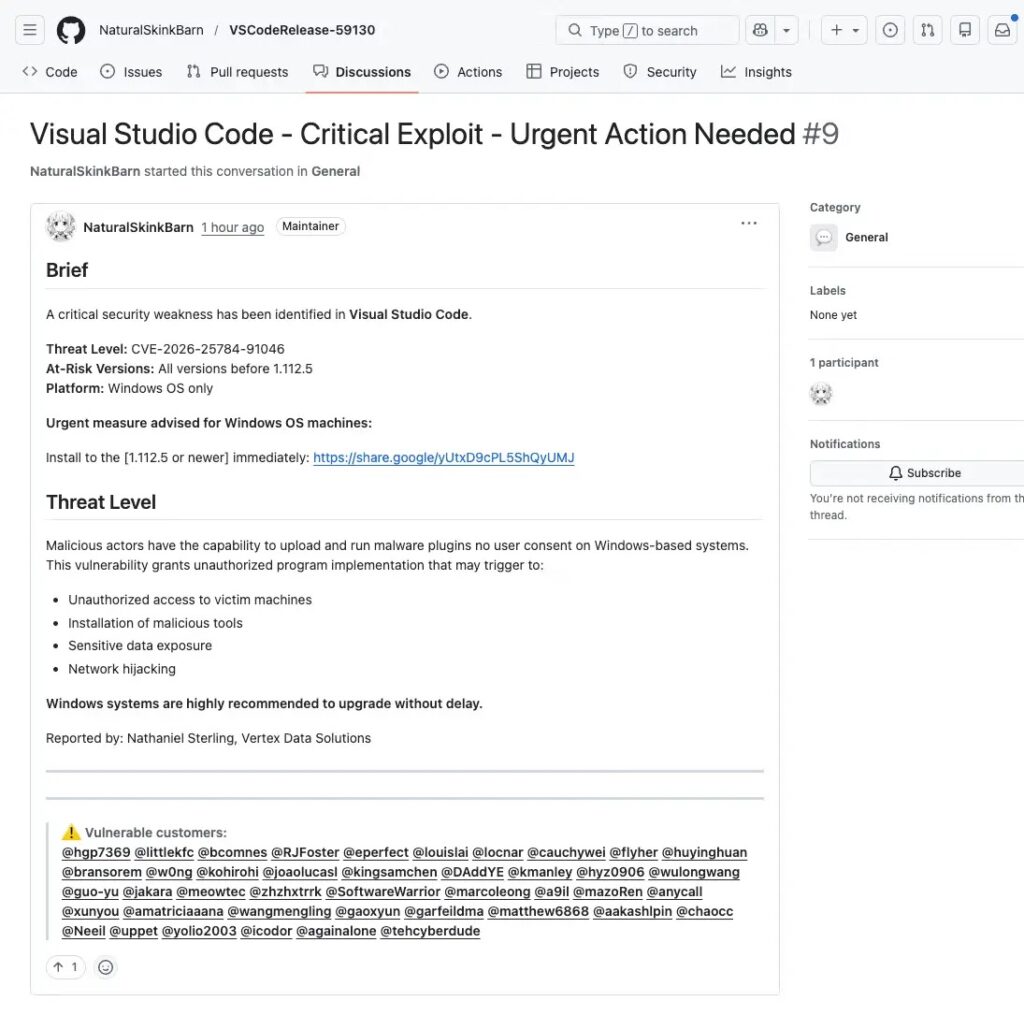
A large phishing campaign is targeting developers on GitHub by posting fake Visual Studio Code security alerts in GitHub Discussions. The posts claim VS Code has a severe vulnerability and push users to install a supposed patched version through external links, but researchers say the campaign actually tries to route victims toward attacker-controlled infrastructure and malware delivery.
The attack works because it blends into a platform developers already trust. The fake alerts appear inside GitHub Discussions, often with urgent wording, fabricated CVE references, and broad mass-tagging of users across unrelated repositories. GitHub Discussions can also trigger email notifications, which gives the campaign a second path into developers’ inboxes.

Access content across the globe at the highest speed rate.
70% of our readers choose Private Internet Access
70% of our readers choose ExpressVPN

Browse the web from multiple devices with industry-standard security protocols.

Faster dedicated servers for specific actions (currently at summer discounts)
Socket researchers say the campaign was widespread, with thousands of near-identical posts appearing across repositories in a short window. The company described it as a coordinated spam operation that used newly created or low-activity accounts to increase reach and reduce suspicion.
The sample article you shared got the main story right. It correctly identified GitHub Discussions as the delivery vehicle, fake VS Code security messages as the lure, and a multi-step redirect chain as part of the attack flow.
How the phishing campaign works
The phishing posts imitate official security advisories. They use alarming titles, claim a critical VS Code issue is under active exploitation, and direct users to download a fixed build from an external source instead of Microsoft’s official update channels. Socket says the links lead to file-sharing or attacker-controlled infrastructure rather than legitimate VS Code distribution points.
This matters because developers do not see the lure in a random email alone. They see it inside GitHub, often in repositories they already watch, and sometimes receive it through GitHub’s own notification system. That makes the message feel more legitimate than a generic phishing email.
Microsoft’s official VS Code update guidance does not distribute emergency patched builds through random download pages in GitHub Discussions. VS Code updates come through the editor’s own update flow and Microsoft’s official site.
Why GitHub Discussions make this campaign effective
The attackers abuse normal collaboration behavior. Developers expect issue threads, alerts, pings, and security chatter in GitHub projects, so a fake security warning can slip into a familiar workflow without standing out right away. Socket says the campaign relied heavily on mass mentions and cross-repository posting to maximize visibility.
The public GitHub community also shows that users noticed suspicious notification emails tied to these fake Discussion posts. One community thread documented a GitHub mention email containing a bogus Visual Studio Code alert and a defanged malicious link, which supports Socket’s finding that the campaign used GitHub’s own notifications as part of the lure.
Multi-step redirect and fingerprinting chain
Socket says one traced payload used a multi-step redirect chain that began at a Google share endpoint. From there, the next step depended on whether the browser had a valid Google cookie. Users with a cookie were redirected to attacker-controlled infrastructure, while users without one were served a fingerprinting page from the Google endpoint itself.
According to Socket, the attacker page then ran obfuscated JavaScript that collected browser details such as timezone, locale, platform, user agent, and signs of browser automation. A hidden iframe also checked for user agent inconsistencies, and the data was submitted automatically to the attacker endpoint. Researchers said this likely acted as a filtering layer to separate real users from bots and security scanners before delivering the next-stage payload.
That extra profiling step makes the campaign more dangerous than simple link spam. It shows the attackers likely wanted to avoid wasting payloads on automated analysis systems and wanted higher confidence that the visitor was a real developer.
Key warning signs developers should watch for
- GitHub Discussion posts that claim an urgent VS Code security issue exists
- External download links that do not point to Microsoft or official VS Code channels
- Made-up CVE numbers or vague version ranges with no official advisory
- Mass-tagging of unrelated developers
- New or low-activity GitHub accounts posting security warnings across many repositories
- Download prompts routed through file-sharing pages or unusual redirect chains
Attack flow at a glance
| Stage | What happens |
|---|---|
| Initial lure | Fake VS Code security alert appears in GitHub Discussions |
| Amplification | GitHub mentions and notifications spread the message to more developers |
| Click path | Victim clicks an external update link |
| Redirection | Link passes through a Google share endpoint and then onward |
| Filtering | Browser fingerprinting checks whether the visitor looks like a real user |
| Final stage | Confirmed targets can be routed to malware, phishing pages, or follow-on payloads |
The core flow above matches the sample text you shared and aligns with Socket’s published research.
Why this campaign matters
This campaign shows that attackers are moving deeper into developer platforms instead of relying only on email or fake package registries. GitHub already plays a central role in software development, so fake security notices inside that environment can exploit urgency and trust at the same time.
It also shows that brand abuse still works. The attackers chose VS Code because it is widely used, familiar, and important enough that many developers may react quickly to a claim of an actively exploited security flaw. When a trusted brand appears inside a trusted platform, many users lower their guard.
What developers and security teams should do
- Verify all VS Code security alerts through official Microsoft channels
- Treat GitHub Discussion posts with external download links as suspicious
- Avoid installing any VS Code build from third-party file-sharing services
- Report suspicious GitHub Discussions and phishing notifications immediately
- Train developers to check official advisories before acting on urgent update notices
- Monitor for repeated mass-tagging and burst posting from new GitHub accounts
FAQ
It targets developers on GitHub by using fake Visual Studio Code security alerts in GitHub Discussions to lure them into clicking malicious links.
No. Researchers say the posts are fake and use fabricated vulnerability claims and external download links to appear legitimate.
The attackers use GitHub Discussions and GitHub notifications because developers trust the platform and often act quickly on security-related messages there.
Socket says the campaign used redirect chains and browser fingerprinting to distinguish real users from bots or automated scanners before sending follow-on content.
Users should verify updates through Microsoft’s official VS Code channels and built-in update flow, not through external links in GitHub posts.


Read our disclosure page to find out how can you help VPNCentral sustain the editorial team Read more


Improve this guide



User forum
0 messages