
Apple adds macOS Tahoe Terminal warning to disrupt ClickFix attacks


 5 min. read
  Published on
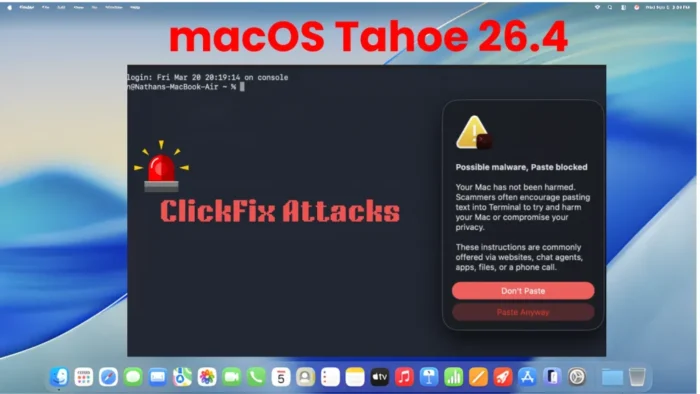
Apple has added a new security warning in macOS Tahoe 26.4 that can stop users before they paste potentially dangerous commands into Terminal. The feature appears designed to break ClickFix-style social engineering, where attackers trick victims into running malicious code themselves.
The timing matters because ClickFix has become one of the more effective social engineering tactics in recent campaigns. Microsoft says the technique relies on phishing pages, malicious ads, or compromised sites that convince people to execute a command manually, which can let malware slip past many automated protections.

Access content across the globe at the highest speed rate.
70% of our readers choose Private Internet Access
70% of our readers choose ExpressVPN

Browse the web from multiple devices with industry-standard security protocols.

Faster dedicated servers for specific actions (currently at summer discounts)
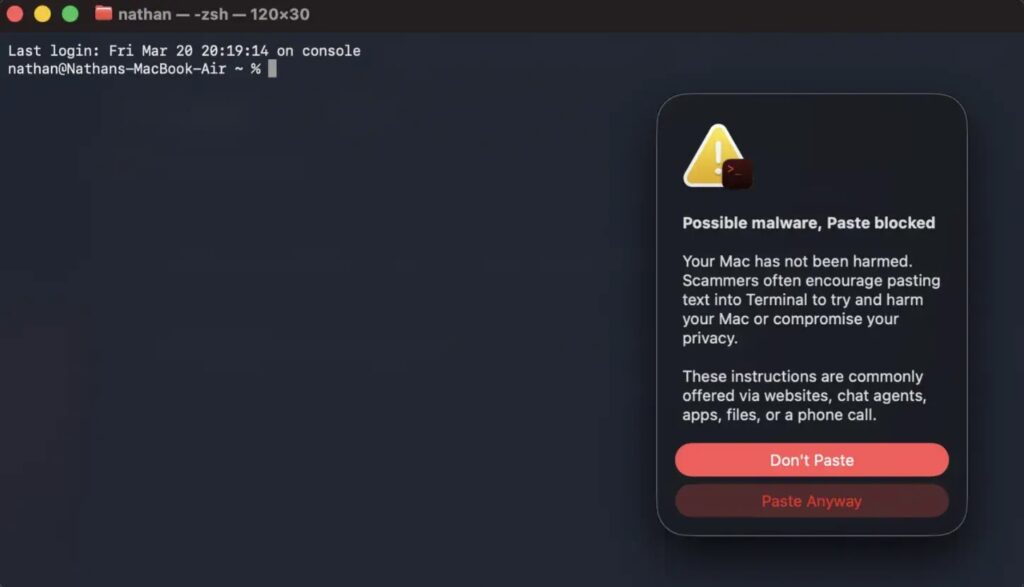
What makes Apple’s move notable is that it targets the human step in the attack chain instead of a software exploit. If the pasted command looks risky, Terminal now shows a warning that says “Possible malware, Paste blocked,” and gives the user the choice to stop or continue.
How the new macOS warning works
According to reports from users testing the release candidate and follow-up coverage from Malwarebytes and BleepingComputer, the warning appears when suspicious content is copied from apps such as Safari and pasted into Terminal. The system blocks the paste first, then explains that scammers often encourage users to paste text into Terminal to harm the Mac or compromise privacy.
Apple has not yet published a dedicated support document that explains the detection logic in detail. BleepingComputer notes that Apple also did not explicitly mention this new Terminal warning in the public macOS Tahoe 26.4 release notes, so some behavior details still come from tester reports rather than formal Apple documentation.
That distinction matters for accuracy. We can say Apple has introduced the protection in macOS Tahoe 26.4, but not all of the finer points in social posts and Reddit threads have been formally documented by Apple yet.
Why ClickFix attacks became such a problem
Microsoft’s threat intelligence team says ClickFix lures trick users into executing malicious commands themselves, often through fake error messages, bogus verification prompts, or support-style instructions. Once the user runs the command, attackers can deploy infostealers, RATs, loaders, or persistence tools, often through fileless techniques.
Microsoft also says the technique has moved beyond Windows. Its August 2025 analysis includes a section on ClickFix targeting macOS users, which shows why Apple would want stronger guardrails inside Terminal.
Malwarebytes says the new Apple warning adds a useful pause before command execution, but it still leaves the final decision to the user. In other words, the protection helps, but it does not remove the need for caution because users can still click “Paste Anyway.”
What else macOS Tahoe 26.4 changes
Apple’s official macOS Tahoe 26.4 release notes do confirm several other platform changes for developers and admins. These include updates involving Rosetta awareness, a virtualization fix for black-screen issues in some new Tahoe virtual machines, a PAC-related networking memory leak fix, and improvements tied to Background Assets, AppKit, StoreKit, and Network MIDI 2.0.
Apple says macOS Tahoe 26 is the final macOS release to support Intel-based Macs, and it notes that organizations can manage Rosetta awareness notifications with the allowRosettaUsageAwareness key. That is an official change in the release notes and not based on outside reporting.
So the bigger story here is twofold. Apple appears to have quietly added a practical anti-ClickFix warning in Terminal, while the official 26.4 notes also ship a broader set of enterprise and developer fixes that matter on managed Macs.
Apple’s new protection at a glance
| Area | What changed | Why it matters |
|---|---|---|
| Terminal security | macOS Tahoe 26.4 warns on some suspicious pasted commands | Can interrupt ClickFix-style attack chains |
| User prompt | “Possible malware, Paste blocked” alert | Forces a pause before execution |
| Attack type | ClickFix social engineering | Targets human behavior, not a software bug |
| Official documentation | No dedicated Apple support note found yet | Some details still rely on observed behavior |
| Other 26.4 changes | Rosetta, virtualization, PAC, StoreKit, Network MIDI 2.0 | Broader admin and developer impact |
What Mac users and admins should do
- Do not paste Terminal commands from websites, chat windows, email messages, or pop-up warnings unless you fully trust the source and understand the command.
- Treat any page that pressures you to “fix” a problem by running Terminal commands as suspicious.
- Upgrade eligible Macs to macOS Tahoe 26.4 or later to get the new warning behavior and the other platform fixes in this release.
- Remind employees that a warning prompt is a chance to stop, not a prompt to click through quickly.
FAQ
ClickFix is a social engineering technique that tricks users into manually running malicious commands, often through fake error pages or verification prompts. Microsoft says attackers use it to deliver payloads such as infostealers, RATs, loaders, and rootkits.
Apple added a Terminal warning that can block the paste of some suspicious commands and alert the user before execution. Outside reporting says the feature appears aimed at ClickFix-style attacks.
Not in a dedicated public support note that I could confirm. Coverage from BleepingComputer says Apple did not specifically mention this warning system in the public 26.4 release notes.
No. It adds friction and can prevent accidental execution, but users can still override the warning and paste the command anyway.


Read our disclosure page to find out how can you help VPNCentral sustain the editorial team Read more


Improve this guide



User forum
0 messages