
WhatsApp malware campaign uses VBS files, cloud downloads, and unsigned MSI backdoors


 5 min. read
  Published on
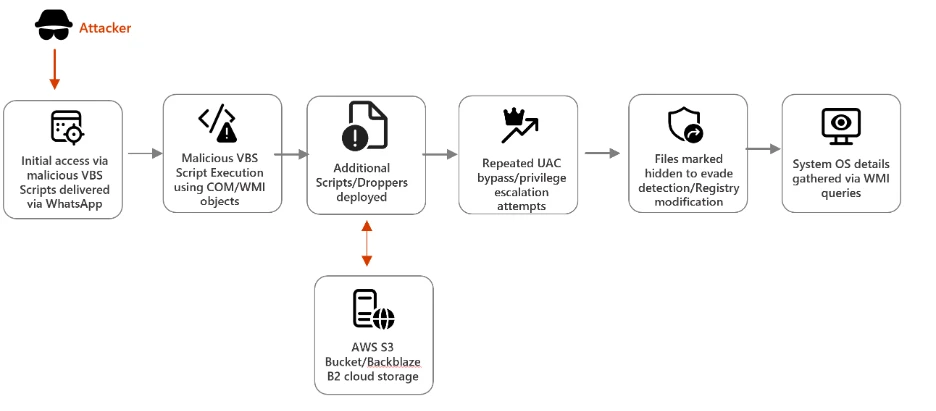
A new malware campaign is abusing WhatsApp to push malicious VBS files to Windows users, according to Microsoft. Once a victim runs the script, the attack moves through several quiet stages that hide behind legitimate Windows tools and trusted cloud platforms before ending with unsigned MSI installers that give attackers remote access.
Microsoft says the attack chain relies on social engineering first, then shifts into stealth. The initial VBS file creates hidden folders in C:\ProgramData, drops renamed copies of built-in Windows utilities, and uses them to fetch additional payloads from cloud services such as AWS S3, Tencent Cloud, and Backblaze B2.

Access content across the globe at the highest speed rate.
70% of our readers choose Private Internet Access
70% of our readers choose ExpressVPN

Browse the web from multiple devices with industry-standard security protocols.

Faster dedicated servers for specific actions (currently at summer discounts)
That makes this campaign notable for two reasons. It uses a familiar messaging platform to get the first file opened, and it blends later activity into normal-looking system behavior, which can make detection harder for users and some defenders. The sample you shared captured the broad outline, but Microsoft’s original research adds the technical detail that matters most for defenders and readers.
How the attack chain works
The infection starts when a victim opens a malicious VBS attachment delivered through WhatsApp. Microsoft says the script drops renamed versions of curl.exe and bitsadmin.exe into hidden directories, disguising them as ordinary files even though their internal PE metadata still reveals the original filenames. That mismatch gives defenders one useful detection clue.
Those renamed tools then pull down secondary VBS payloads from attacker-controlled infrastructure hosted on mainstream cloud services. Microsoft says the files used names such as auxs.vbs and WinUpdate_KB5034231.vbs, which were chosen to look routine and lower suspicion.
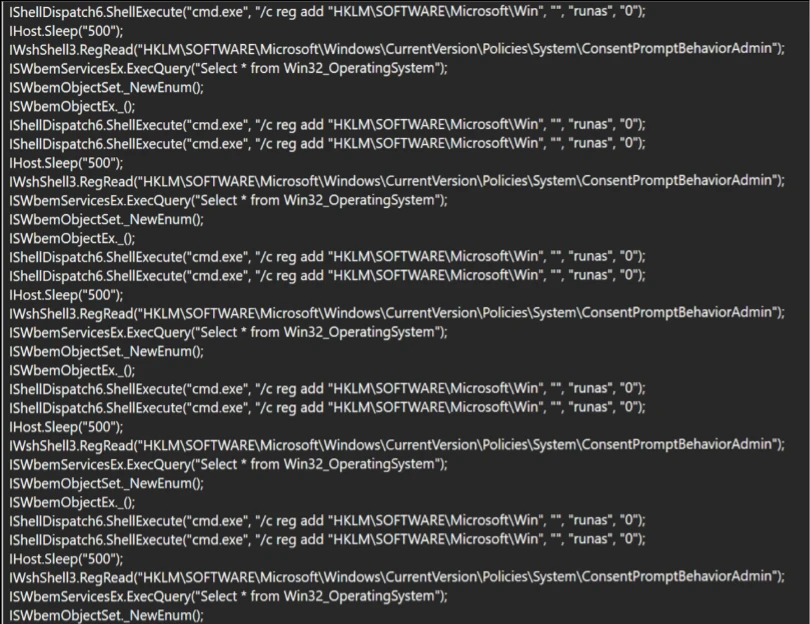
From there, the malware attempts to weaken User Account Control protections by repeatedly launching elevated command execution and modifying registry paths tied to system behavior. After it gains the privileges it wants, the campaign moves to its final delivery stage and runs unsigned MSI packages including Setup.msi, WinRAR.msi, LinkPoint.msi, and AnyDesk.msi.
Why the MSI stage matters
Microsoft says all four MSI files lack valid code-signing certificates. That matters because legitimate enterprise installers of this type usually carry a trusted publisher signature, while unsigned packages should raise immediate concern in managed environments.
The final payload gives attackers persistent remote access to the compromised machine. Microsoft says installers such as AnyDesk.msi can let the operator control the system directly, steal data, deploy more malware, and keep the infected device available for future operations.
The attack also shows why cloud reputation alone is not enough. Because later payloads arrive from well-known platforms that many organizations already trust, malicious downloads can blend into ordinary network traffic unless teams inspect behavior, file lineage, and command usage closely.
What security teams should watch for
Microsoft recommends blocking script hosts such as wscript.exe and cscript.exe in untrusted paths and monitoring renamed Windows utilities that run with unusual command-line arguments. The company also says defenders should watch registry activity carefully, especially repeated UAC tampering and suspicious changes under Windows-related registry locations.
The company also recommends enabling tamper protection, using EDR in block mode, and deploying attack surface reduction rules that stop VBScript from launching downloaded executables. These controls matter because the campaign depends on native tools and staged downloads rather than one obvious standalone malware file.
For users, the first line of defense remains simple. Treat unexpected WhatsApp attachments with the same suspicion you would apply to an email attachment, even if the message appears to come from a known contact or a familiar conversation thread.
Key takeaways
- The campaign starts with malicious VBS files delivered through WhatsApp.
- It hides inside normal Windows activity by abusing built-in tools such as
curl.exeandbitsadmin.exe. - Secondary payloads arrive from trusted cloud platforms including AWS S3, Tencent Cloud, and Backblaze B2.
- The final stage deploys unsigned MSI installers such as
Setup.msi,WinRAR.msi,LinkPoint.msi, andAnyDesk.msi. - Microsoft recommends ASR rules, tamper protection, EDR in block mode, and monitoring for suspicious script and registry behavior.
Attack chain summary
| Stage | What happens | Why it matters |
|---|---|---|
| Initial access | Victim opens a malicious VBS file sent through WhatsApp | Social engineering delivers the first execution point |
| Tool staging | Script drops renamed copies of Windows tools into hidden folders | Helps the malware blend into normal system activity |
| Payload retrieval | Renamed tools fetch more VBS files from cloud-hosted infrastructure | Trusted cloud services can reduce suspicion and bypass weak filtering |
| Privilege escalation behavior | Malware attempts UAC tampering and elevated command execution | Prepares the system for quieter final-stage installation |
| Final payload | Unsigned MSI installers deploy remote access components | Gives attackers persistence and ongoing control |
FAQ
Microsoft’s research describes WhatsApp as the delivery channel for malicious files, not as the vulnerable component that was hacked. The danger comes from opening the attached VBS file.
They do it to hide malicious activity behind legitimate binaries that already exist on Windows systems. Microsoft says the internal metadata can still expose the original filenames, which gives defenders a detection opportunity.
Attackers use trusted platforms because many organizations allow that traffic by default. That can make malicious downloads look less suspicious at first glance.
Microsoft points to script hosts in untrusted paths, suspicious use of renamed Windows utilities, UAC tampering, and VBScript launching downloaded executables as high-value control points.


Read our disclosure page to find out how can you help VPNCentral sustain the editorial team Read more


Improve this guide




User forum
0 messages