
New ClickFix campaign uses macOS Script Editor to deliver Atomic Stealer


 4 min. read
  Published on

A newly spotted ClickFix campaign is targeting Mac users by opening Apple’s built in Script Editor instead of Terminal. The goal stays the same: trick the victim into launching malware that ends with Atomic Stealer, a known macOS infostealer that can grab passwords, browser data, and crypto wallet information.
Yes, this campaign matters because it shows how quickly attackers adapt. After Apple added a warning in macOS Tahoe 26.4 to block risky pasted commands in Terminal, the attackers shifted to another native macOS tool and kept the social engineering lure intact.

Access content across the globe at the highest speed rate.
70% of our readers choose Private Internet Access
70% of our readers choose ExpressVPN

Browse the web from multiple devices with industry-standard security protocols.

Faster dedicated servers for specific actions (currently at summer discounts)
Jamf Threat Labs says the attack abuses the applescript:// URL scheme to launch Script Editor directly from a browser. That change helps the campaign avoid the newer Terminal-focused friction Apple introduced in macOS 26.4.
How the attack works
The lure starts on a fake Apple-themed webpage that presents itself as a disk cleanup or storage fix guide. The page gives the user what looks like a normal maintenance flow, then asks the browser to open Script Editor.
If the user agrees, Script Editor opens with a pre-filled script ready to run. That script hides a malicious command chain, downloads the next stage, and launches the payload without relying on the usual Terminal copy-paste step that many ClickFix attacks use.
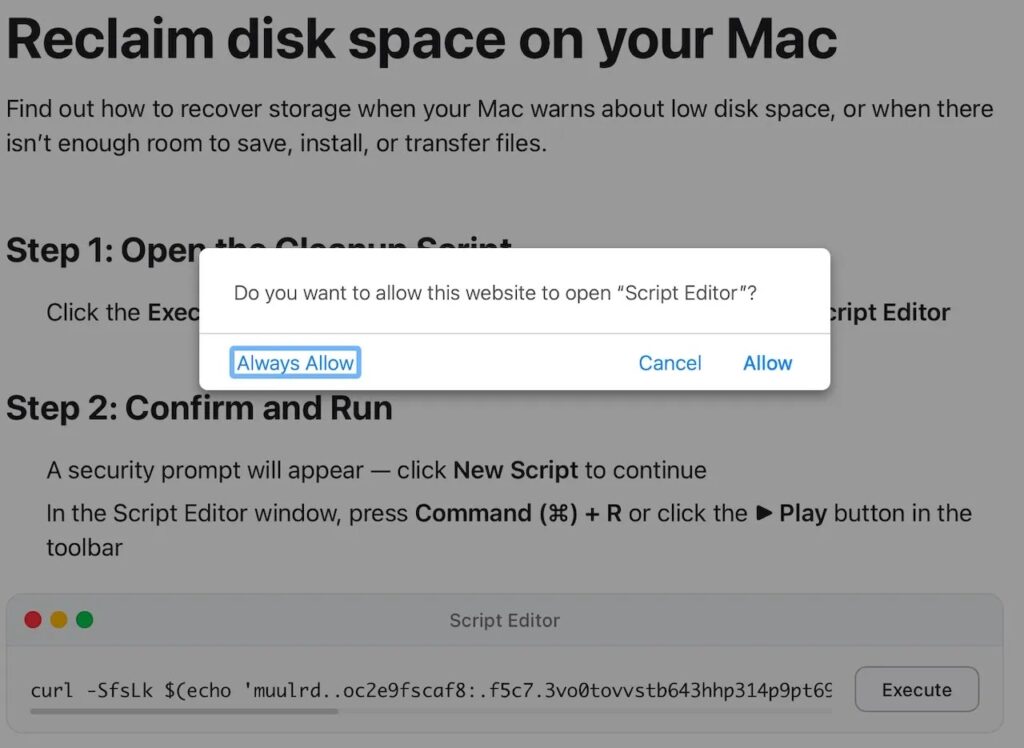
Researchers say the script uses obfuscation, then runs a curl | zsh style flow, decodes a compressed payload, drops a Mach-O binary as /tmp/helper, clears attributes, makes it executable, and runs it. Jamf identified the final malware as a recent Atomic Stealer variant.
Why this campaign stands out
This campaign stands out because it swaps one trusted macOS tool for another. Script Editor is preinstalled, familiar to some users, and less likely to raise suspicion than a direct Terminal prompt in a fake troubleshooting flow.
It also shows a broader problem with ClickFix attacks. Once defenders harden one step, attackers often move the same social engineering playbook to a different app, protocol, or user flow. BleepingComputer’s recent ClickFix coverage shows several malware operators experimenting with fresh delivery paths in 2026.
For Mac users, the real lesson is simple: native apps are not automatically safe when a random website asks you to open them. Apple’s platform protections help, but social engineering still tries to get the user to approve the dangerous step.
What is at risk
Atomic Stealer, also known as AMOS, is not new, but it remains effective. In this case, Jamf says the malware can harvest browser credentials, saved passwords, cryptocurrency wallet data, and other sensitive information from the infected Mac.
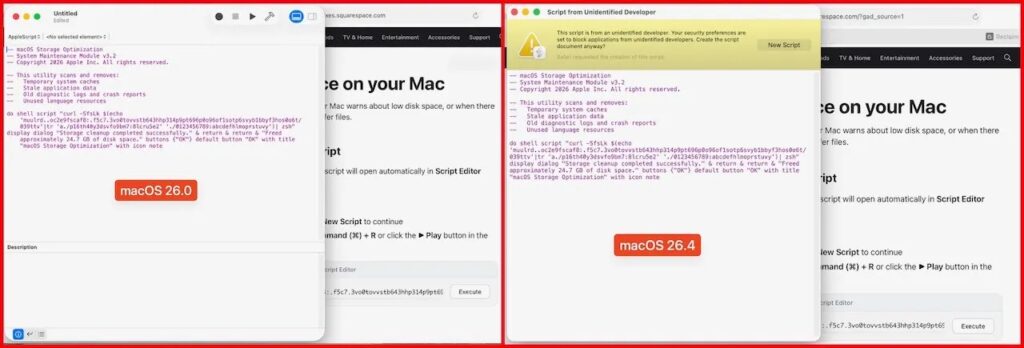
Jamf also published indicators tied to the campaign, including the domain dryvecar.com and fake lure pages hosted on Squarespace and mssg.me. That gives defenders something concrete to block and hunt for in logs.
Apple has not published a statement about this exact campaign as of April 9, 2026. However, Apple’s official security and support guidance continues to stress software updates, trusted app sources, and caution around phishing and social engineering schemes.
Quick breakdown
| Item | What researchers found |
|---|---|
| Delivery method | Fake Apple-themed cleanup page |
| Initial trigger | Browser opens applescript:// link |
| Abused macOS app | Script Editor |
| Evasion angle | Avoids Terminal paste warning workflow |
| Final payload | Atomic Stealer / AMOS |
| Data targeted | Browser data, credentials, wallet information |
| Noted IOCs | dryvecar.com, lure pages on Squarespace and mssg.me |
How to reduce the risk
- Do not approve browser requests to open Script Editor from unknown websites.
- Do not run pre-filled scripts just because the page uses Apple branding.
- Keep macOS updated so Apple’s latest built in protections stay active.
- Limit app installs to trusted sources and review Privacy & Security settings on your Mac.
- Treat disk cleanup pages, fake support prompts, and urgent fix instructions as suspicious until verified.
FAQ
ClickFix is a social engineering tactic that tricks users into launching malicious commands or scripts themselves. On macOS, earlier waves often pushed victims toward Terminal, while this new one uses Script Editor instead.
No. Apple added protection for risky pasted commands in Terminal, but Jamf’s findings show attackers can move to a different native app and still try to fool the user into running the script.
Researchers say it targets browser credentials, saved passwords, cryptocurrency wallets, and other sensitive user data stored on the Mac.
Update macOS, avoid unknown browser prompts that open automation tools, use trusted software sources only, and treat cleanup or repair pages with extra caution. Apple’s official support pages recommend staying current and avoiding social engineering scams.


Read our disclosure page to find out how can you help VPNCentral sustain the editorial team Read more


Improve this guide
User forum
0 messages