
Apple reportedly works on fix for iPhone passcode bug tied to missing Czech keyboard character


 5 min. read
  Published on
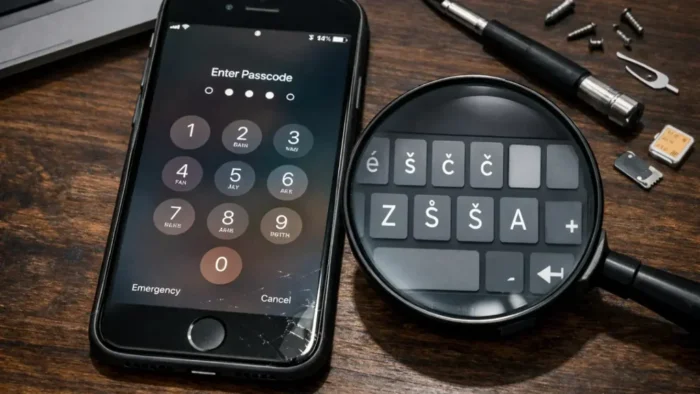
A reported iPhone passcode bug may leave some users locked out of their devices if their custom alphanumeric passcode includes a Czech keyboard character that no longer appears on the lock screen. The issue gained attention after The Register reported that a user could no longer enter the caron, also known as the háček, after updating his iPhone, even though that symbol had been part of his original passcode.
The case centers on Connor Byrne, a 21-year-old student who used a custom alphanumeric passcode on his iPhone 13 instead of a standard four or six digit PIN. According to The Register, one of the characters in that passcode came from the Czech keyboard, and its removal from the lock screen keyboard after the iOS 26 upgrade left him unable to unlock the device.

Access content across the globe at the highest speed rate.
70% of our readers choose Private Internet Access
70% of our readers choose ExpressVPN

Browse the web from multiple devices with industry-standard security protocols.

Faster dedicated servers for specific actions (currently at summer discounts)
The report says Apple is now working on a software fix. However, Apple has not published a public support bulletin or security advisory specifically about this bug, and there is still no official public timeline for when a fix will arrive.
How the bug appears to work
The reported problem does not affect the iPhone’s ability to remember the old passcode. Instead, it appears to affect input on the lock screen keyboard itself. If a required character no longer shows up there, the user cannot type the correct passcode even if they still know it.
That is why this bug stands out. In Byrne’s case, the only built-in recovery path was a factory reset, but that would erase local data that had not been backed up. The Register said he chose to remain locked out rather than wipe the device and lose photos and personal files stored on it.
The story also highlights a broader risk with complex custom passcodes that rely on less common keyboard layouts or symbols. Strong passcodes remain a good security choice, but they become a problem if the required characters do not stay available across updates and lock screen input methods. This broader concern is an inference based on the reported behavior in this case.
Why users care
This is not just a keyboard annoyance. If the missing character sits inside your passcode, the bug can effectively turn a software update into a lockout event. Reports also suggest the issue may have persisted for months for at least one affected user while Apple investigated a fix.
The case has also drawn attention because it involves a security-minded choice that backfired. Byrne reportedly used a more complex passcode to improve protection, yet that same decision made recovery harder once iOS no longer exposed the needed symbol on the lock screen keyboard.
Apple users who rely on custom alphanumeric passcodes should not panic, but they should treat this report as a reminder to check backups and be careful with unusual characters. Apple’s own support guidance continues to stress that if you forget a passcode or cannot use it, you may need to erase the device, which makes current backups critical.
At a glance
| Item | Current status |
|---|---|
| Reported issue | Missing Czech keyboard character can block passcode entry |
| Affected device in report | iPhone 13 |
| Passcode type | Custom alphanumeric |
| Character involved | Caron or háček (ˇ) |
| Reported trigger | iOS 26 update removed the character from the lock screen keyboard |
| Current recovery option | Factory reset if no other method works |
| Fix status | Apple is reportedly working on a software fix |
| Public Apple timeline | Not announced |
What affected users should do now
If you still have access to your iPhone and you use a custom alphanumeric passcode, make sure you have a recent backup before installing major iOS updates. Apple’s support documentation explains how to back up through iCloud or a computer, and that is the safest protection against rare lockout bugs like this one.
If you are already locked out, Apple’s standard support flow for passcode issues centers on erasing the device and restoring from backup. That does not solve the data-loss problem for users with important local files and no recent backup, but it remains Apple’s official recovery path unless the company releases a targeted software fix.
Users who depend on complex passcodes may also want to avoid highly unusual symbols from secondary keyboard layouts until Apple clarifies the scope of the issue. This is a practical precaution based on the reported cause, not a published Apple recommendation.
Practical steps
- Back up your iPhone before major iOS upgrades.
- If you use a custom alphanumeric passcode, review whether it depends on rare symbols from alternate keyboards.
- If you are locked out already, check Apple’s official passcode recovery guidance before trying third-party tools.
- Keep an eye on upcoming iOS 26 release notes for any mention of keyboard or lock screen input fixes. This is a reasonable monitoring step, though Apple has not yet posted a public advisory for this specific bug.
FAQ
Yes, at least in the reported case. If a character required by your passcode no longer appears on the lock screen keyboard, you may be unable to type the correct passcode and unlock the device.
The reported character is the caron, or háček, shown as ˇ, from the Czech keyboard layout.
No. Reports say Apple is working on a fix, but there is no public Apple timeline yet.
Apple’s official passcode recovery guidance says users may need to erase the device and restore it from backup.


Read our disclosure page to find out how can you help VPNCentral sustain the editorial team Read more


Improve this guide




User forum
0 messages