
Gh0st RAT and CloverPlus adware arrive together in stealthy dual-payload attack


 6 min. read
  Published on
Gh0st RAT and CloverPlus adware now appear together in a new dual-payload malware campaign that gives attackers both persistent access and a way to monetize infected systems right away. Splunk Threat Research Team says the loader hides both payloads in its resource section, then deploys them in sequence on the same Windows machine.
That combination makes this campaign more dangerous than a typical adware infection. CloverPlus changes browser behavior and pushes unwanted advertising, while Gh0st RAT can collect system details, maintain persistence, interfere with security-related network activity, and capture keystrokes during Remote Desktop sessions.

Access content across the globe at the highest speed rate.
70% of our readers choose Private Internet Access
70% of our readers choose ExpressVPN

Browse the web from multiple devices with industry-standard security protocols.

Faster dedicated servers for specific actions (currently at summer discounts)
The campaign also reflects a broader shift in malware delivery. Instead of dropping one tool per infection, threat actors now package multiple payloads together so they can steal data, hold access, and generate revenue from the same victim at the same time.
How the loader works
Splunk says the loader starts by hiding two encrypted payloads in its resource section. One of them is the CloverPlus adware component, which the researchers tied to an executable named wiseman.exe. That payload changes startup pages and triggers pop-up advertising activity on the infected system.
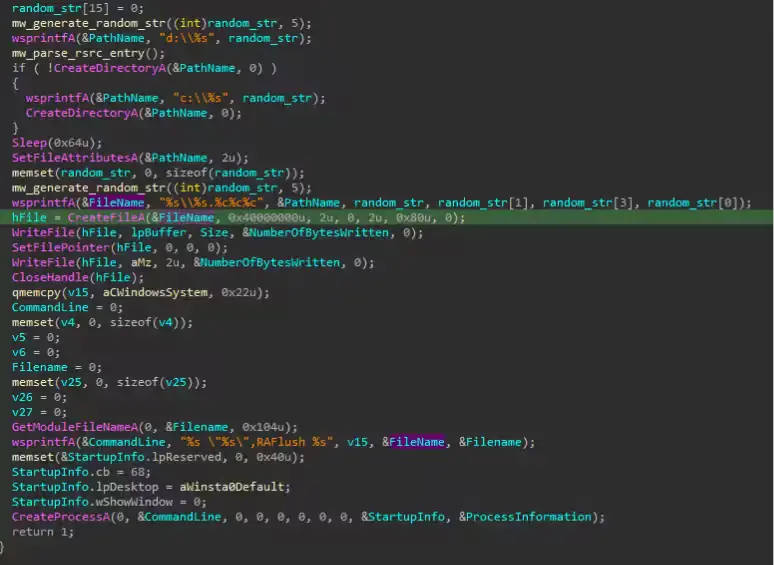
After that, the loader checks whether it is already running from the %temp% folder. If not, it copies itself there, then decrypts the second payload, which is the Gh0st RAT client module stored as an encrypted DLL in the RSRC section of the malware binary.
Once decrypted, the DLL gets written to a randomly named folder at the root of the C:\ drive with a random file name and extension. The malware then launches the payload with rundll32.exe, which helps it blend into normal Windows activity and lowers the chance of easy detection.
What Gh0st RAT does after execution
Splunk’s analysis shows that this Gh0st RAT variant adjusts process token privileges to enable SeDebugPrivilege, which lets it interact with other processes and may support further data theft. It also collects host identifiers such as the MAC address and physical drive serial number so the attacker can track each infected machine inside command-and-control infrastructure.
The RAT also tampers with network behavior. According to Splunk, it identifies the process associated with DNS traffic on port 53, terminates it, removes the related file, and continues by hijacking DNS activity on the compromised host. It can also modify the local hosts file and generate spoofed DNS responses to block access to security-related domains.
Another notable feature involves targeted surveillance. Splunk says the malware watches for mstsc.exe, the Windows Remote Desktop client, and then calls GetKeyState() and GetAsyncKeyState() to log keystrokes during active RDP sessions. That could let attackers capture credentials and other sensitive information typed into remote systems.
Persistence and evasion tactics
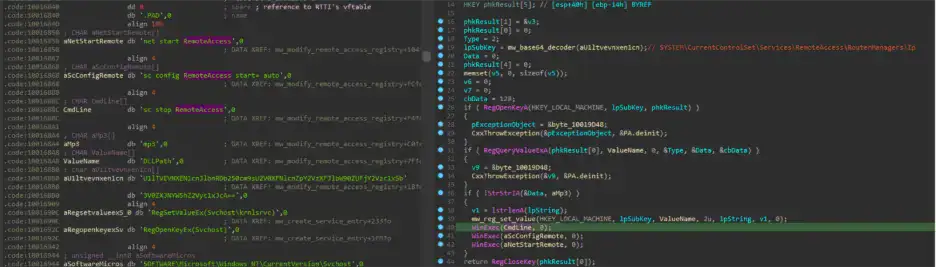
Persistence plays a major role in this campaign. Splunk found that the malware writes itself to the Windows Run registry key so it can return after a reboot. It also abuses SYSTEM\CurrentControlSet\Services\RemoteAccess\RouterManagers\Ip so the Windows Remote Access service loads a malicious DLL with SYSTEM-level privileges.
The RAT goes further by creating a service entry that points to the malicious DLL. That gives it another path to survive reboots and execute in a privileged context without needing to exploit a vulnerability each time it runs.
Splunk also observed anti-analysis behavior. If the malware detects signs of a VMware environment, it can launch a dead drop resolver routine, fetch content from a web page, and parse the title field to resolve a possible command-and-control address. It also uses ping.exe -n to delay execution, which can frustrate sandbox-based analysis.
Why this campaign matters
This campaign stands out because it combines nuisance malware with a fully capable remote access trojan in one delivery chain. CloverPlus brings immediate ad-fraud or click-based monetization, while Gh0st RAT provides deeper access, persistence, and broader post-compromise options.
For defenders, that means a system showing adware symptoms may also carry a far more serious backdoor. A noisy browser infection could distract from registry persistence, service abuse, DNS interference, and keylogging activity happening in the background.
Splunk’s report also suggests that detection needs to focus on behavior, not just malware family names. Watching for rundll32.exe loading odd modules from unusual directories, suspicious execution from %temp%, Run key changes, and registry modifications tied to RemoteAccess services can help surface the threat earlier.
Key behaviors seen in the campaign
| Stage | Observed behavior | Why it matters |
|---|---|---|
| Initial loader activity | Two encrypted payloads hidden in the resource section | Obfuscation helps evade simple detection |
| First payload | CloverPlus adware dropped from loader | Creates immediate monetization path |
| Second payload | Gh0st RAT DLL decrypted and written to random folder | Enables long-term remote access |
| Execution | rundll32.exe launches decrypted DLL | Blends malicious code with trusted Windows activity |
| Persistence | Run key and RemoteAccess service abuse | Helps malware survive reboot and gain SYSTEM execution |
| Evasion | Ping-based delay, VMware checks, DNS interference | Slows analysis and blocks security access |
The table above reflects behavior Splunk documented in its April 17 analysis.
What security teams should watch for
rundll32.exeloading non-standard file extensions or modules from unusual paths.- Processes starting from
%temp%that later decrypt or drop DLL payloads. - Changes to Windows Run keys or
RemoteAccess\RouterManagers\Ipregistry paths. - Unexpected DNS behavior, modified hosts files, or forced
ipconfig /flushdnsexecution. - Keystroke monitoring tied to
mstsc.exeactivity.
FAQ
It delivers two different threats at once. One payload brings adware-based monetization, while the other gives attackers persistent remote access and deeper control of the system.
The loader decrypts the RAT DLL, writes it to a random folder on C:\, and executes it using rundll32.exe.
Yes. Splunk found persistence through the Windows Run registry key, RemoteAccess service abuse, and a service entry tied to the malicious DLL.
It can gather host identifiers, interfere with DNS behavior, block access to some security-related domains, and log keystrokes during RDP sessions.
Behavior-based detections. Security teams should watch for unusual rundll32.exe activity, suspicious %temp% execution, persistence-related registry changes, and DNS tampering.


Read our disclosure page to find out how can you help VPNCentral sustain the editorial team Read more


Improve this guide
User forum
0 messages