
Lazarus hackers target macOS users with Mach-O Man malware kit


 7 min. read
  Published on
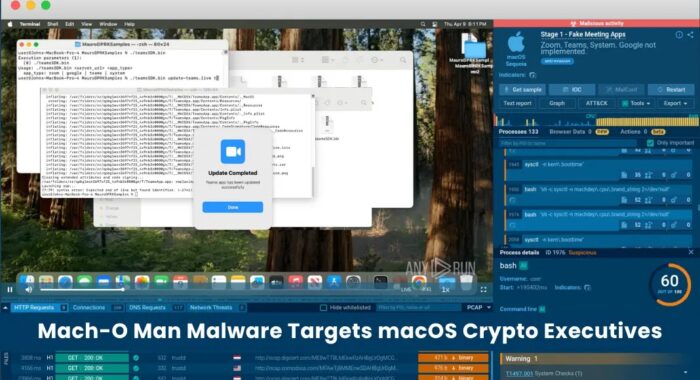
North Korea’s Lazarus Group has been linked to a new macOS malware campaign called Mach-O Man, which targets crypto executives, fintech teams, developers, and other high-value Mac users through fake meeting invitations.
The campaign uses a social engineering technique known as ClickFix. Victims see what looks like a Zoom, Microsoft Teams, or Google Meet meeting page, then receive instructions to paste a command into macOS Terminal to fix a fake connection issue.

Access content across the globe at the highest speed rate.
70% of our readers choose Private Internet Access
70% of our readers choose ExpressVPN

Browse the web from multiple devices with industry-standard security protocols.

Faster dedicated servers for specific actions (currently at summer discounts)
Once the user runs the command, the malware chain starts. Researchers describe Mach-O Man as a native macOS malware kit built with Mach-O binaries, allowing it to run on Intel-based Macs and Apple Silicon systems.
How the Mach-O Man attack works
The attack starts with trust rather than a software exploit. A target may receive a Telegram message from a compromised or impersonated contact, often with an urgent request to join a business meeting.
The meeting link sends the user to a fake collaboration platform. The page then shows a fake error and asks the user to run a Terminal command to fix the problem.
This approach helps the attackers bypass some traditional controls because the victim performs the risky action manually. Security tools may see a user running a command instead of a normal malware installer.
At a glance
| Item | Details |
|---|---|
| Malware name | Mach-O Man |
| Linked threat actor | Lazarus Group |
| Main targets | Crypto, fintech, Web3, developers, executives, and high-value Mac users |
| Initial lure | Fake Zoom, Teams, or Google Meet invitation |
| Social engineering method | ClickFix |
| Platform | macOS |
| File type | Native Mach-O binaries |
| Main risk | Credential theft, browser data theft, Keychain exposure, and account takeover |
| Reported exfiltration channel | Telegram Bot API |
The four-stage malware chain
Mach-O Man runs through several stages after the victim executes the fake meeting command. Each stage handles a different part of the compromise, from initial installation to data theft.
The first stage deploys a stager known as teamsSDK.bin. This component downloads a fake macOS application bundle that impersonates meeting software such as Zoom, Teams, or Google Meet.
Reports say the fake app can apply an ad-hoc code signature and show password prompts to the victim. The prompt may reject the first attempts, then accept the password later to make the flow look more realistic.
What each stage does
| Stage | Component | Purpose |
|---|---|---|
| Stage 1 | teamsSDK.bin | Downloads a fake meeting app and starts the infection flow |
| Stage 2 | D1YrHRTg.bin and variants | Profiles the Mac and sends system data to the command server |
| Stage 3 | minst2.bin | Creates persistence through a LaunchAgent and OneDrive-style disguise |
| Stage 4 | macrasv2 | Steals browser data, Keychain entries, cookies, and other sensitive files |
What the malware collects
The second stage profiles the infected Mac. It can collect system details such as hostname, CPU type, boot time, operating system version, network configuration, running processes, and browser extension data.
The malware reportedly checks browsers including Chrome, Firefox, Safari, Brave, Opera, and Vivaldi. This gives attackers a better picture of where useful credentials and sessions may exist.
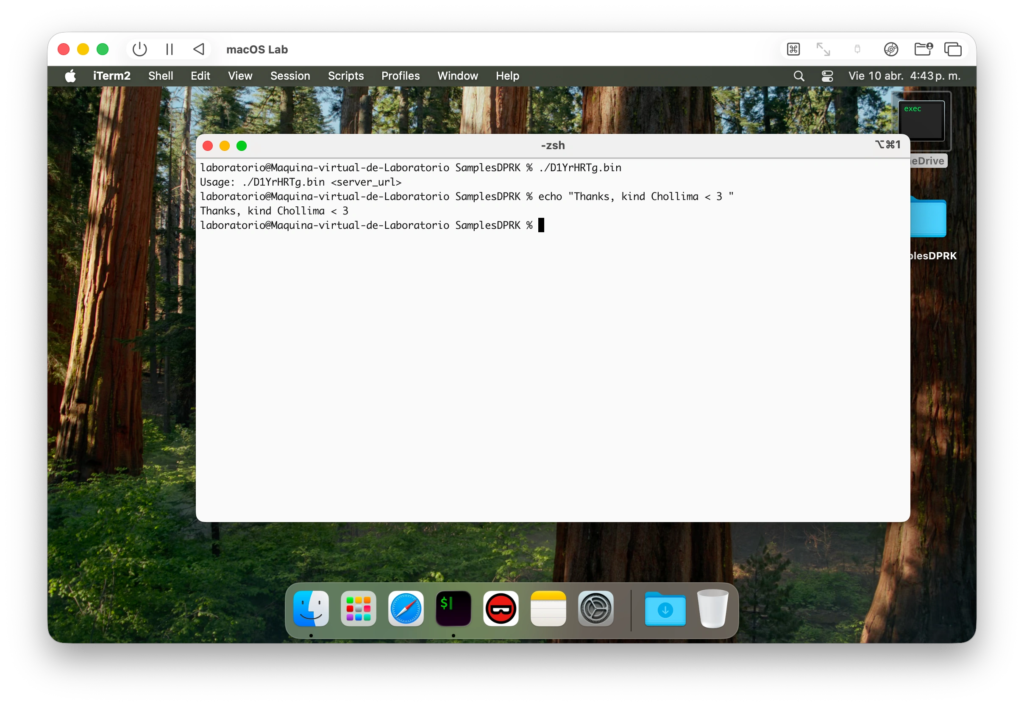
The final stealer component targets browser credentials, session cookies, SQLite-stored browser data, and macOS Keychain entries. That is especially dangerous for users who access financial platforms, crypto wallets, cloud dashboards, SaaS tools, and internal systems from the same Mac.
Why macOS users are being targeted
Many crypto, fintech, and software teams rely heavily on Macs. Developers and executives also tend to have privileged access to source code, production dashboards, cloud tools, private repositories, and financial platforms.
That makes one compromised Mac valuable. A stolen browser session or Keychain credential can give attackers access without needing to exploit a server directly.
Mach-O Man also shows how social engineering has changed. The attack does not need the victim to download a suspicious file from email. It turns a normal business meeting workflow into the infection path.
Persistence and exfiltration
The persistence stage creates a folder named Antivirus Service and drops a binary disguised as OneDrive. It then installs a LaunchAgent named com.onedrive.launcher.plist so the malware can run again when the user logs in.
The stealer collects the data and packages it into an archive named user_ext.zip. Reports say the stolen data is then sent through the Telegram Bot API, which can help the traffic blend into a legitimate service.
The malware also uses a self-deletion script named delete_self.sh to remove components after execution. That can make forensic work harder if teams do not collect logs quickly.
Known weaknesses in the campaign
Researchers also found operational mistakes in the campaign. The attackers reportedly exposed a Telegram bot token, which could let third parties interact with the bot and support takedown work.
Some modules also appear poorly tested. One profiler component can enter an endless loop and repeatedly send the same system profile to the command server.
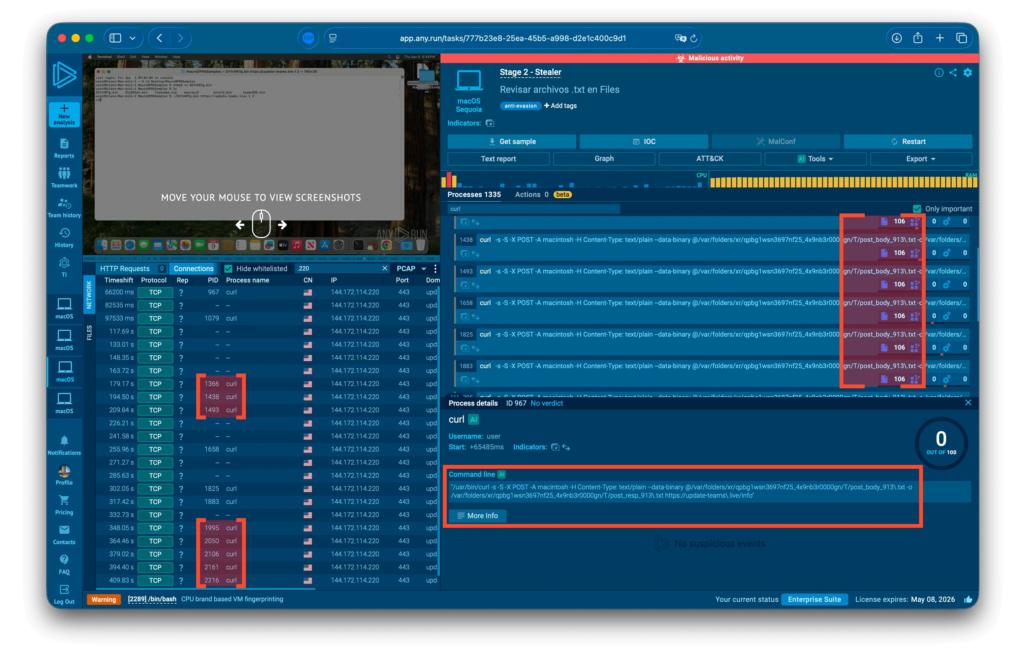
That noisy behavior can help defenders. Repeated curl activity, unusual Terminal commands, and unexpected LaunchAgent creation can provide useful signs during investigation.
What Mac users should do now
- Do not paste Terminal commands from meeting pages, chat messages, or fake connection prompts.
- Treat unexpected Zoom, Teams, Google Meet, and browser repair pages as suspicious.
- Check macOS LaunchAgents for unfamiliar entries, especially files using OneDrive or antivirus-style names.
- Review browser extensions and remove anything unused or unknown.
- Rotate passwords and tokens if a suspicious command ran on a Mac.
- Check recent SaaS, GitHub, cloud, exchange, and wallet activity for unusual logins.
- Use endpoint tools that can inspect macOS-native Mach-O binaries and user-driven command execution.
What security teams should monitor
SOC teams should watch for Terminal commands launched from browser or chat workflows, especially commands involving curl, shell scripts, unknown binaries, or fake meeting domains.
Teams should also audit LaunchAgents for suspicious persistence. The names com.onedrive.launcher.plist, OneDrive, and Antivirus Service deserve attention when they appear outside expected Microsoft or security software paths.
Network teams should review unusual Telegram Bot API traffic from executive, developer, and finance devices. Telegram traffic alone does not prove compromise, but it becomes more serious when paired with suspicious Terminal activity or new LaunchAgents.
Key indicators to check
| Indicator type | Examples |
|---|---|
| Domains | update-teams[.]live, livemicrosft[.]com |
| Files | teamsSDK.bin, D1YrHRTg.bin, minst2.bin, macrasv2, localencode, OneDrive |
| Persistence path | ~/Library/LaunchAgents/com.onedrive.launcher.plist |
| Suspicious folders | Antivirus Service, /Users/$USER/.local/bin/OneDrive |
| Archive name | user_ext.zip |
| Exfiltration channel | Telegram Bot API |
Why this matters
Mach-O Man is another sign that macOS endpoints now sit directly in the path of advanced threat actors. Attackers know that senior employees, developers, and crypto teams often work from Macs with access to sensitive systems.
The campaign also shows why user-driven execution creates a difficult security problem. A person who thinks they are fixing a meeting issue can accidentally grant attackers access to credentials, browser sessions, and business platforms.
For companies in crypto, fintech, and Web3, the response should go beyond user training. Teams need macOS endpoint visibility, stronger controls around Terminal execution, better browser session monitoring, and fast credential rotation procedures.
FAQ
Mach-O Man is a macOS malware kit linked to Lazarus Group activity. It uses native Mach-O binaries and targets credentials, browser data, session cookies, and macOS Keychain entries.
It uses fake meeting invitations and ClickFix prompts. Victims are tricked into pasting a command into macOS Terminal, which starts the malware installation process.
The main targets are crypto executives, fintech companies, Web3 teams, developers, and other high-value macOS users.
Current reporting points to social engineering rather than a macOS software vulnerability. The victim runs the command manually after seeing a fake meeting or connection error.


Read our disclosure page to find out how can you help VPNCentral sustain the editorial team Read more


Improve this guide



User forum
0 messages