
SAP npm Packages Compromised in Supply Chain Attack Targeting Developer Secrets


 5 min. read
  Published on

Several SAP-related npm packages were compromised in a supply chain attack designed to steal developer credentials, cloud secrets, and CI/CD tokens. The malicious versions affected packages used in SAP Cloud Application Programming Model and Cloud MTA build workflows.
Researchers identified four affected versions: @cap-js/sqlite 2.2.2, @cap-js/postgres 2.2.2, @cap-js/db-service 2.10.1, and mbt 1.2.48. Developers and security teams should check lockfiles, package caches, CI logs, and internal registries for these exact versions.

Access content across the globe at the highest speed rate.
70% of our readers choose Private Internet Access
70% of our readers choose ExpressVPN

Browse the web from multiple devices with industry-standard security protocols.

Faster dedicated servers for specific actions (currently at summer discounts)
The attack is being tracked as part of the “Mini Shai-Hulud” supply chain wave. Multiple security firms linked the activity to TeamPCP-style tactics, although attribution confidence varies by vendor.
What was compromised
The affected packages are important because they sit inside normal SAP development workflows. The @cap-js packages support CAP database services, while mbt is used to build Multi-Target Application archives for SAP cloud deployments.
The malicious releases added an npm preinstall hook. That means the malware could run automatically when a developer or CI/CD pipeline installed the package, before normal development work continued.
The hook launched a loader called setup.mjs, which downloaded the Bun JavaScript runtime and used it to run a heavily obfuscated payload named execution.js. Researchers said the legitimate package code still looked mostly normal, which made the compromise harder to spot at first glance.
At a glance
| Package | Compromised version | Typical use |
|---|---|---|
| @cap-js/sqlite | 2.2.2 | SAP CAP SQLite database service |
| @cap-js/postgres | 2.2.2 | SAP CAP PostgreSQL database service |
| @cap-js/db-service | 2.10.1 | SAP CAP database service package |
| mbt | 1.2.48 | SAP Cloud MTA Build Tool |
What the malware tried to steal
The payload targeted both developer workstations and build environments. Aikido said it could collect GitHub tokens, npm tokens, GitHub Actions secrets, cloud credentials, Kubernetes tokens, and local developer configuration files.
Socket also reported that the malware tried to extract secrets from CI runner memory. That matters because CI platforms often mask secrets in logs, but memory scraping can bypass that protection if the runner itself executes malicious code.
The stolen data was encrypted and pushed through GitHub repositories created under victim accounts. Some repositories used the description “A Mini Shai-Hulud has Appeared,” which gave researchers a visible marker for tracking the campaign.
Why this is serious for SAP developers
This is not only a package cleanup problem. If one of the malicious versions ran in a developer laptop or CI pipeline, attackers may have received tokens that can access source code, cloud accounts, npm publishing rights, and deployment systems.
The self-propagation logic makes the risk worse. Researchers said the payload included code to use stolen npm or GitHub credentials to modify other repositories or packages and spread the same malicious files.
That means teams should not stop after deleting the bad package version. They need to assume any secrets available to the affected machine or runner may have been exposed.
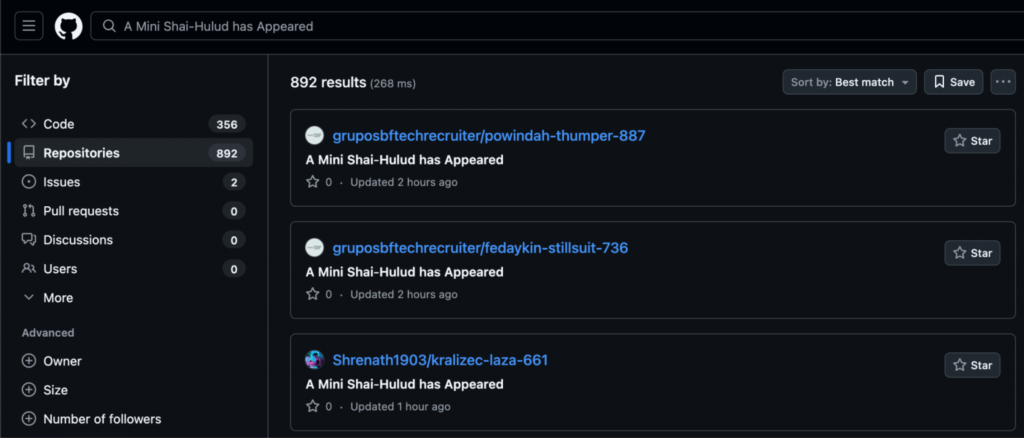
Source: Aikido
How the attack may have started
The exact initial compromise path has not been fully confirmed publicly. Aikido pointed to a likely lead involving an exposed npm token in a CircleCI-related workflow, while StepSecurity reported different paths for mbt and @cap-js packages.
StepSecurity said mbt 1.2.48 appeared to be published through a legitimate automation account, while the @cap-js compromise involved changes to a GitHub release workflow. This points to attackers abusing trusted publishing routes rather than creating fake lookalike packages.
The incident shows why build pipelines and package publishing workflows now need the same level of protection as production infrastructure. A single exposed token can turn a trusted package into a delivery path for malware.
What developers and security teams should do now
- Search package-lock.json, yarn.lock, pnpm-lock.yaml, npm caches, internal mirrors, and CI logs for the four affected versions.
- Remove the malicious versions and update to clean package releases from trusted registry sources.
- Rotate npm tokens, GitHub tokens, cloud credentials, Kubernetes secrets, SSH keys, and CI/CD secrets exposed to affected environments.
- Audit GitHub for unexpected repositories, suspicious commits, unusual workflow changes, and new files under .claude or .vscode folders.
- Check build logs for unexpected Bun downloads, setup.mjs execution, or execution.js activity during npm install.
- Disable unnecessary package lifecycle scripts in CI where possible.
- Move publishing workflows to short-lived tokens, trusted publishing, and strict branch protection.
Why npm lifecycle scripts need more attention
Npm lifecycle scripts are useful for legitimate setup tasks, but attackers keep abusing them because they run automatically during install. Developers may not notice when a package quietly executes extra code during dependency installation.
This campaign also shows attackers adapting to modern development tools. Researchers reported persistence paths involving VS Code tasks and Claude Code configuration files, which could re-run malicious code when someone opened an affected project.
Security teams should treat package installation as a high-risk action in sensitive environments. That includes local developer machines, build runners, release pipelines, and any system with access to cloud or source control secrets.
FAQ
The affected versions were @cap-js/sqlite 2.2.2, @cap-js/postgres 2.2.2, @cap-js/db-service 2.10.1, and mbt 1.2.48.
They added a preinstall hook that ran during npm install. The hook launched a loader that downloaded Bun and executed an obfuscated credential-stealing payload.
GitHub tokens, npm tokens, cloud credentials, Kubernetes secrets, GitHub Actions secrets, SSH keys, and developer configuration files may have been exposed if the malware ran.
Several researchers linked the campaign to TeamPCP-style supply chain activity based on technical overlap and behavior. Some vendors described the confidence level differently, so the safest wording is TeamPCP-linked or TeamPCP-style activity.


Read our disclosure page to find out how can you help VPNCentral sustain the editorial team Read more


Improve this guide


User forum
0 messages