
Open WebUI patches SVG profile image flaw that could lead to one-click RCE


 5 min. read
  Published on

Open WebUI has patched a stored cross-site scripting flaw that could let attackers abuse SVG profile images to run malicious JavaScript in a victim’s browser.
The issue is serious because Open WebUI often runs inside private AI workspaces, where users store prompts, chat histories, documents, API-connected tools, and model access. If a privileged user opens a malicious profile image link while logged in, the attack can move beyond browser script execution and reach remote code execution through Open WebUI’s tool features.

Access content across the globe at the highest speed rate.
70% of our readers choose Private Internet Access
70% of our readers choose ExpressVPN

Browse the web from multiple devices with industry-standard security protocols.

Faster dedicated servers for specific actions (currently at summer discounts)
The vulnerability was publicly disclosed by security researcher Metin Yunus Kandemir after a report submitted in March was later closed as a duplicate. Open WebUI has since shipped fixes that restrict profile image MIME types and block SVG-based stored XSS paths.
Open WebUI SVG vulnerability at a glance
| Detail | Information |
|---|---|
| Product | Open WebUI |
| Issue type | Stored cross-site scripting through SVG image handling |
| Main attack path | Malicious profile image or profile image URL |
| Impact | Account takeover, chat history theft, token theft, and possible RCE against privileged users |
| User interaction | Victim must open the malicious image link |
| Fixed version | 0.9.3 or later for the related GitHub advisory |
| Safer action | Upgrade to the latest available Open WebUI release |
How the attack works
The weakness comes from how Open WebUI handled profile images supplied through data URIs. Instead of accepting only safe image formats, affected versions could process SVG content and serve it inline in the browser.
SVG files can contain script handlers. If the application serves that SVG under the Open WebUI origin, a browser may execute the attacker’s JavaScript as if it belongs to the trusted application.
This creates a stored XSS attack. The attacker prepares the malicious profile image, then tricks a victim into opening the generated image URL or a redirect that leads to it.
Why a browser bug can become RCE
Stored XSS usually starts in the browser, but Open WebUI’s feature set makes the risk more serious for privileged users. Admins and users with tool-related permissions can create or modify tools that run code inside the Open WebUI environment.
If a privileged user opens the malicious link while logged in, the injected script can make authenticated requests in that user’s session. That can allow the attacker to create a malicious tool or abuse existing permissions.
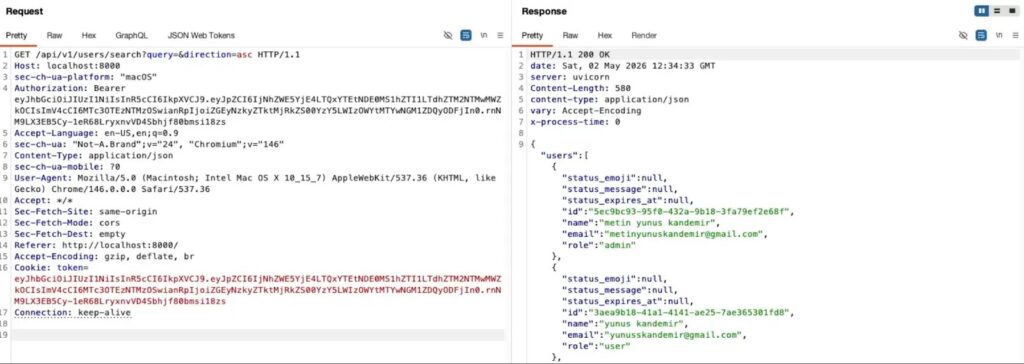
For standard users, the risk still matters. The same browser execution path can expose authentication tokens, user data, and chat history if the attacker’s script collects information from the victim’s session.
Affected users should update Open WebUI
Open WebUI’s GitHub advisory for a related SVG profile-image XSS issue lists versions up to and including 0.9.2 as affected. It lists 0.9.3 and later as patched.
The project’s release notes also mention a profile image MIME-type allowlist. The change allows safer formats such as PNG, JPEG, GIF, and WEBP by default, while blocking stored XSS through SVG or other executable content types.
Admins should move to the latest Open WebUI release instead of stopping at the first fixed version. This matters because the same release cycle included several other security fixes across permissions, file handling, SSRF protection, and profile image validation.
What Open WebUI admins should do now
- Upgrade Open WebUI to the latest available release.
- Confirm that profile image uploads allow only safe raster formats such as PNG, JPEG, GIF, and WEBP.
- Block SVG uploads and SVG data URIs for profile images.
- Limit workspace tool permissions to trusted users only.
- Review admin accounts and remove unnecessary elevated access.
- Check logs for unusual tool creation, profile image changes, or suspicious redirects.
- Ask users not to open unexpected Open WebUI profile image links.
Why AI workspaces are attractive targets
Open WebUI is a popular self-hosted interface for local and remote AI models. Many teams use it to connect users with Ollama, OpenAI-compatible APIs, retrieval systems, tools, documents, and internal workflows.
That makes the browser session valuable. A stolen token can expose chat history, private prompts, internal documents, and model access. A compromised admin session can create a wider security problem.
AI platforms also sit close to sensitive business data. Security teams should treat them like internal application platforms, not simple chat front ends.
Mitigation steps if immediate patching is not possible
Organizations that cannot update right away should reduce exposure until they complete the upgrade. The safest temporary step is to restrict who can access Open WebUI and who can change profile images.
Admins should also block SVG as a profile image format at the reverse proxy, WAF, or application layer where possible. They should review whether users can create tools, import tools, or manage workspace features without a business need.
These mitigations only reduce the attack surface. They do not replace the upstream fix, because the safest long-term response is to run a patched Open WebUI version.
FAQ
It is a stored XSS flaw where malicious SVG content can run JavaScript when a victim opens a profile image URL served by Open WebUI.
Yes, it can lead to RCE if the victim has permissions that allow tool creation or tool import. The injected script can abuse the victim’s active session.
The attacker does not need the victim’s password if the victim is already logged in and opens the malicious link.
Admins should avoid running affected versions up to 0.9.2 for the related SVG profile-image advisory and should upgrade to the latest available release.


Read our disclosure page to find out how can you help VPNCentral sustain the editorial team Read more


Improve this guide




User forum
0 messages