
No blind spots: how MSSPs prevent incidents with live threat visibility


 6 min. read
  Published on
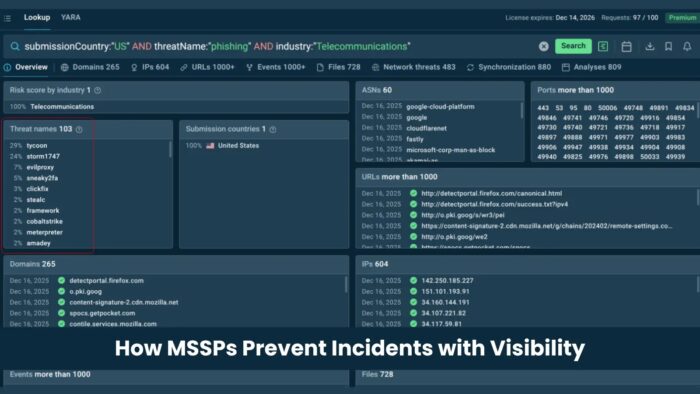
MSSPs prevent incidents by seeing active threats early, connecting that intelligence to client environments, and acting before alerts turn into breaches.
That visibility depends on the quality of threat data. Slow feeds, stale indicators, and context-free alerts leave gaps across detection, triage, incident response, and reporting.

Access content across the globe at the highest speed rate.
70% of our readers choose Private Internet Access
70% of our readers choose ExpressVPN

Browse the web from multiple devices with industry-standard security protocols.

Faster dedicated servers for specific actions (currently at summer discounts)
Live threat intelligence feeds help close those gaps by giving analysts fresh indicators from real attack activity. For MSSPs, this can improve detection speed, reduce alert noise, and support faster response across many client environments.
Why MSSPs need better threat visibility
Managed security teams work under constant pressure. They monitor multiple client environments, handle large alert volumes, and must meet strict response expectations.
The main problem is not always the number of tools. It is often the freshness and accuracy of the data behind those tools.
A phishing domain, command-and-control server, or malware delivery URL may stay invisible if the SIEM, firewall, or EDR only checks older indicators. That delay gives attackers room to move.
Threat visibility gaps MSSPs need to close
| Workflow | Common blind spot | How live TI feeds help |
|---|---|---|
| Detection | New malicious infrastructure is missing from rules | Fresh IOCs can feed SIEM, IDS, firewall, and EDR systems |
| Alert triage | Analysts see an indicator but lack context | Sandbox links show malware behavior, network calls, and related activity |
| Incident response | Responders waste time validating indicators manually | Pre-validated IOCs help teams scope and contain threats faster |
| Client reporting | Reports focus on alert volume instead of prevention value | Threat intelligence data helps show blocked campaigns and reduced exposure |
How live threat intelligence changes SOC operations
Live threat intelligence is most useful when it reflects attacks happening now. That means it should come from malware execution, phishing analysis, network behavior, and real-world investigations.
ANY.RUN’s Threat Intelligence Feeds are built from sandbox analysis sessions. The feeds include malicious IPs, domains, and URLs, along with context from the analysis session that produced each indicator.
This gives analysts more than a simple IOC match. They can see how malware behaved, what infrastructure it contacted, and why the indicator matters.
Why context matters as much as speed
A fast indicator without context can still create noise. Analysts need to know whether a domain connects to credential theft, malware delivery, command-and-control traffic, or another attack stage.
Context also helps junior analysts make better decisions. Instead of escalating every suspicious match, they can review the related sandbox session and understand the behavior behind the alert.
For MSSPs, this matters at scale. A feed that enriches alerts with behavior, source, and confidence can reduce repeated manual work across many client environments.
Where TI feeds fit inside MSSP workflows
- Send fresh IOCs into SIEM platforms for correlation with client logs.
- Push malicious IPs and domains into firewall and proxy blocklists.
- Use sandbox context to speed up alert triage.
- Feed indicators into SOAR playbooks for automated containment.
- Support threat hunting with recently observed attacker infrastructure.
- Use evidence from threat intelligence data in client reports.
Integrations matter for managed security providers
MSSPs cannot afford threat intelligence sources that require heavy custom development for every client. The feed must fit the tools analysts already use.
ANY.RUN supports delivery through formats and access methods such as STIX/TAXII, API, SDK, and MISP. This helps teams connect threat data to SIEM, TIP, IDS, IPS, EDR, and SOAR workflows.
Microsoft Sentinel also supports STIX/TAXII threat intelligence ingestion. This allows MSSPs to bring external indicators into Sentinel and use them for analytics, hunting, enrichment, and automation.
Example: using TI feeds with Microsoft Sentinel
An MSSP can connect a threat intelligence feed to Microsoft Sentinel through a TAXII connector. Once ingested, indicators can support detection rules, incident enrichment, hunting queries, and automated response actions.
For example, a newly observed command-and-control domain can enter Sentinel as a threat indicator. Sentinel can then compare it against DNS logs, proxy logs, firewall data, and endpoint telemetry.
If a client environment shows traffic to that domain, the SOC can investigate quickly. A SOAR playbook can also help block the domain, isolate an endpoint, or create a high-priority incident for analyst review.
How live TI feeds improve client reporting
Clients want to know whether their MSSP is reducing risk, not just closing tickets. Threat intelligence helps show that value more clearly.
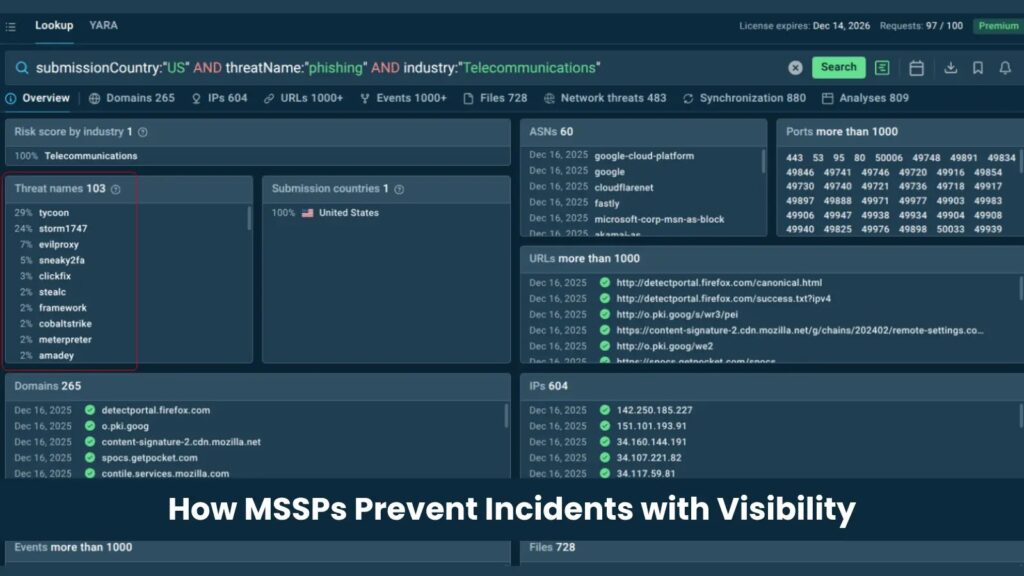
Instead of reporting only alert counts, MSSPs can show which active campaigns were blocked, which malicious domains were detected, and which client systems avoided exposure.
This turns reporting into a prevention story. It helps security leaders explain why managed detection and response work matters before an incident causes damage.
What to look for in a threat intelligence feed
| Requirement | Why it matters |
|---|---|
| Fresh indicators | Attack infrastructure changes quickly, so delayed data can miss active campaigns |
| Behavioral context | Analysts need to understand what the indicator does and why it is dangerous |
| High confidence | Noisy feeds increase false positives and analyst fatigue |
| SIEM and SOAR support | Threat data must work inside existing SOC workflows |
| Standard formats | STIX/TAXII, MISP, and API access reduce integration friction |
| Client-level flexibility | MSSPs need to apply intelligence across different environments and tool stacks |
Why better data beats more alerts
More alerts do not automatically make clients safer. In many SOCs, more alerts only increase fatigue and slow down response.
Better threat intelligence changes the quality of the signal. It helps teams identify malicious infrastructure faster, confirm risk with evidence, and automate the response where it makes sense.
For MSSPs, this creates a practical advantage. The provider can protect more clients with consistent visibility, faster triage, and clearer reporting.
How MSSPs should operationalize TI feeds
- Start with SIEM correlation for malicious IPs, domains, and URLs.
- Add feed matches to alert triage workflows with sandbox context.
- Use automation for low-risk actions such as enrichment and ticket creation.
- Reserve blocking and endpoint isolation for high-confidence indicators and approved playbooks.
- Review feed performance regularly to reduce false positives.
- Build client reports around threats blocked, exposure reduced, and response time improved.
The bottom line for MSSPs
The strongest MSSPs do not rely only on analyst skill or tool count. They build their operations around timely, accurate, and actionable intelligence.
Live threat intelligence feeds help teams close the gap between attacker activity and defender visibility. That gap often decides whether a client faces a blocked attempt or a full incident.
For managed security providers, the goal is simple: detect earlier, prioritize smarter, respond faster, and prove value with evidence.
FAQ
Yes. High-confidence feeds can help analysts prioritize alerts that match active malicious infrastructure and ignore lower-value noise.
Sandbox-generated IOCs come from real malware or phishing analysis sessions, so they include behavior and context instead of only static indicator data.
Threat intelligence feeds help MSSPs enrich alerts, detect malicious infrastructure, automate response workflows, and report measurable prevention value to clients.
Live threat visibility means seeing current attacker infrastructure, malware behavior, and malicious indicators while campaigns are still active.


Read our disclosure page to find out how can you help VPNCentral sustain the editorial team Read more


Improve this guide




User forum
0 messages