
VoidStealer malware bypasses Chrome protection to steal browser data


 8 min. read
  Published on

VoidStealer is a Windows infostealer that can bypass Chrome’s App-Bound Encryption and steal sensitive browser data, including session cookies and credentials protected by the browser.
Researchers say the malware uses a debugger-based technique to capture Chrome’s master key from memory when the browser briefly decrypts it during normal operation. This lets VoidStealer avoid older bypass methods that require privilege escalation or direct code injection.

Access content across the globe at the highest speed rate.
70% of our readers choose Private Internet Access
70% of our readers choose ExpressVPN

Browse the web from multiple devices with industry-standard security protocols.

Faster dedicated servers for specific actions (currently at summer discounts)
The technique matters because App-Bound Encryption was designed to make browser data theft harder for malware running as the logged-in Windows user. VoidStealer shows that infostealers continue to adapt, especially when they can target the short moment when protected data becomes readable inside the browser process.
What is VoidStealer?
VoidStealer is a malware-as-a-service infostealer promoted on cybercrime forums since late 2025, according to Gen Digital. Its developers continued updating it through early 2026, with version 2.0 introducing the new App-Bound Encryption bypass in March.
Like other infostealers, VoidStealer focuses on data that helps attackers hijack accounts, impersonate users, and move through online services. Browser cookies are especially valuable because they can let attackers reuse an active login session without knowing the password.
The malware’s new bypass does not break Chrome’s encryption in the traditional sense. It waits until Chrome decrypts its own data, then reads the key directly from memory.
| Item | Details |
|---|---|
| Malware name | VoidStealer |
| Malware type | Information stealer |
| Model | Malware-as-a-service |
| Main target | Browser data on Windows |
| Protection bypassed | Chrome App-Bound Encryption |
| Main technique | Debugger-based extraction of the v20 master key from browser memory |
How Chrome App-Bound Encryption works
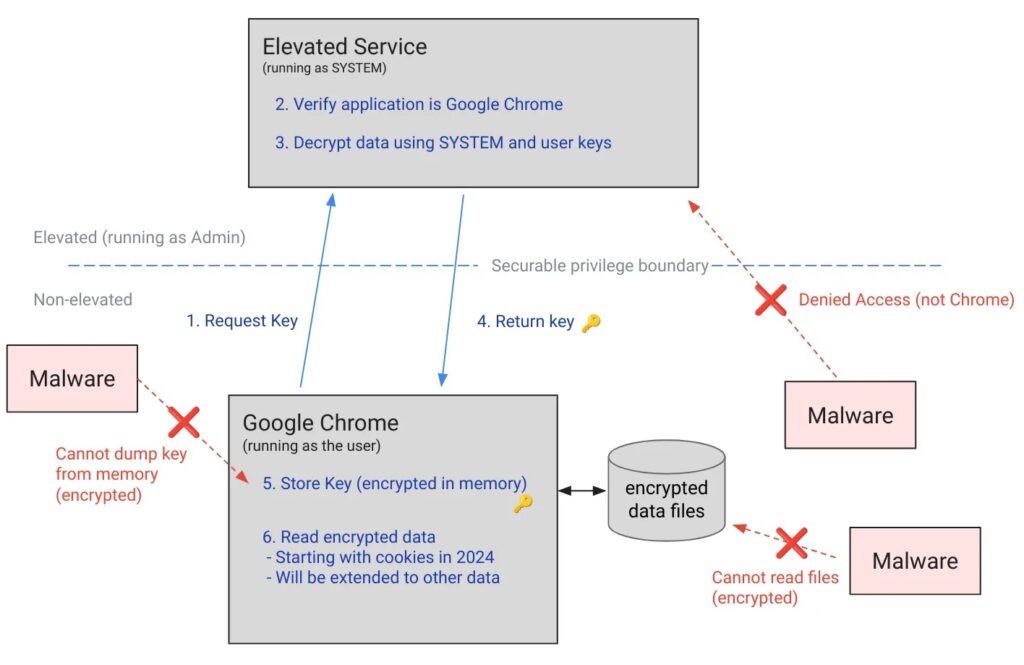
Google introduced App-Bound Encryption for Chrome on Windows in 2024 with Chrome 127. The goal was to make cookie theft harder for infostealer malware.
Before App-Bound Encryption, Chrome on Windows relied mainly on DPAPI to protect browser secrets at rest. DPAPI helps protect data from other users on the same machine and from offline attacks, but it does not stop malware already running as the signed-in user.
App-Bound Encryption adds another layer. It ties encrypted browser data to the Chrome application and uses a privileged service to check whether the request comes from Chrome. If another app tries to decrypt the same data, the request should fail.
How VoidStealer bypasses the protection
VoidStealer avoids asking the App-Bound Encryption service for the key. Instead, it attaches to the browser process as a debugger and waits for Chrome or Edge to load the relevant browser module.
The malware then places hardware breakpoints at carefully chosen locations in the browser code. When the browser reaches the point where the protected key appears in memory as readable data, VoidStealer pauses execution and reads the key with standard Windows debugging and memory-reading functions.
Gen Digital said this approach requires neither privilege escalation nor code injection. That makes it quieter than many earlier App-Bound Encryption bypasses, which often relied on injecting code into the browser or running with higher privileges.
- VoidStealer starts or attaches to a browser process.
- It monitors browser loading events through debugging APIs.
- It looks for the code path tied to App-Bound decryption.
- It sets a breakpoint where the master key becomes readable in memory.
- It reads the v20 master key directly from the browser process.
- It can then decrypt protected browser data.
Which browsers are affected?
Gen Digital said VoidStealer targets Chrome and Edge in its observed implementation. The targeted modules include chrome.dll and msedge.dll.
Kaspersky also warned that the same concept applies to other Chromium-based browsers that use App-Bound Encryption, including Brave, Opera, Vivaldi, and others. The current code may target Chrome and Edge directly, but the broader technique can extend further.
This does not mean every browser is compromised in the same way. It means the underlying method targets how Chromium-based browsers handle protected data once that data must be decrypted for normal use.
| Browser | Risk described by researchers |
|---|---|
| Google Chrome | Directly targeted by the analyzed VoidStealer technique. |
| Microsoft Edge | Directly targeted through msedge.dll in the analyzed implementation. |
| Brave | Potentially exposed if it uses the same relevant Chromium App-Bound Encryption behavior. |
| Opera | Potentially exposed if it uses the same relevant Chromium App-Bound Encryption behavior. |
| Vivaldi | Potentially exposed if it uses the same relevant Chromium App-Bound Encryption behavior. |
Why session cookie theft is dangerous
Passwords are not the only browser data attackers want. Session cookies can be even more useful because they may let criminals access accounts that already passed a login check.
If an attacker steals a valid session cookie, they may be able to open a victim’s account without entering a password or passing multi-factor authentication again. Many services now detect stolen cookies more aggressively, but cookie theft remains a major infostealer goal.
For businesses, stolen browser sessions can expose email, cloud dashboards, source code platforms, payment portals, advertising accounts, customer tools, and internal SaaS systems.
Why VoidStealer is harder to spot
Security tools often flag code injection, privilege escalation, or suspicious attempts to call protected decryption services. VoidStealer’s debugger-based method can create a lower detection footprint because it uses debugging and memory-reading behavior instead.
That does not make it invisible. Gen Digital said defenders can look for suspicious use of debugging APIs, hidden or suspended browser processes, and unusual memory access against browser processes.
The malware may also try to hide the browser window while it launches or attaches to it. Researchers noted that starting a browser with hidden or suspended process flags can act as an additional warning sign.
| Detection clue | Why it matters |
|---|---|
| Unexpected debugger attachment to Chrome or Edge | Normal user activity rarely requires a random process to debug the browser. |
| ReadProcessMemory calls against browser processes | This can indicate attempts to scrape sensitive data from memory. |
| Suspended or hidden browser launches | Malware may hide browser activity while extracting keys. |
| Hardware breakpoint behavior | VoidStealer uses breakpoints to catch the key at the right moment. |
| Infostealer activity after cracked software installs | Stealers often spread through fake tools, pirated apps, and unofficial downloads. |
What users should do
Users should treat VoidStealer as a reminder that browser protections reduce risk but do not replace basic device security. If malware runs on the device, saved browser data can still become a target.
The safest approach is to avoid running unknown software, pirated tools, fake installers, cracked games, and suspicious browser extensions. These remain common delivery paths for infostealers.
Users should also reduce the amount of valuable data stored in the browser. A dedicated password manager can limit exposure, especially when it requires a separate unlock step and supports strong account security.
- Keep Chrome, Edge, and other Chromium browsers updated.
- Install Windows updates and security patches promptly.
- Do not download cracked software, fake utilities, or unofficial installers.
- Use a trusted security tool that monitors suspicious behavior.
- Use a dedicated password manager for important accounts.
- Remove old saved passwords and payment details from the browser.
- Enable multi-factor authentication on email, banking, cloud, and work accounts.
- Sign out of sensitive accounts when you finish using shared or risky devices.
What businesses should monitor
Business users face extra risk because browser sessions often connect to high-value work accounts. A stolen cookie from a developer, admin, finance employee, or executive can give attackers a shortcut into important services.
IT teams should monitor for suspicious debugging activity against browsers, unexpected browser child processes, and unusual access to browser profile directories. Endpoint tools should also alert when processes read sensitive browser memory.
Companies should combine browser hardening with identity protections. Conditional access, device compliance checks, session revocation, phishing-resistant MFA, and rapid cookie invalidation can reduce the impact of stolen browser data.
- Restrict local admin rights where possible.
- Block or alert on suspicious debugging of browser processes.
- Monitor access to Chrome and Edge profile data.
- Use endpoint detection rules for infostealer behavior.
- Require MFA for cloud and SaaS accounts.
- Revoke sessions quickly after suspected device compromise.
- Train users to avoid fake updates and cracked software.
Browser encryption still helps, but it is not enough
Chrome’s App-Bound Encryption raised the cost of cookie theft and made older infostealer techniques noisier. That remains useful. VoidStealer does not erase the value of the feature.
However, the malware shows the limit of any browser-side protection once malicious code runs on the same device. If the browser must decrypt data to use it, attackers will keep looking for ways to catch that data at the moment it becomes readable.
The practical lesson is clear. Users should keep browsers updated, avoid untrusted downloads, and reduce stored sensitive data. Businesses should watch for debugger abuse and treat browser sessions as high-value credentials.
FAQ
VoidStealer is a Windows information-stealing malware sold as a malware-as-a-service tool. It targets browser data such as session cookies and credentials, and newer versions can bypass Chrome’s App-Bound Encryption by reading the browser master key from memory.
VoidStealer attaches to Chrome or Edge as a debugger, sets hardware breakpoints, and waits until the browser briefly holds the v20 master key in readable memory. It then extracts the key with memory-reading functions instead of directly breaking the encryption.
Researchers said the new debugger-based bypass does not require privilege escalation or code injection. That makes the technique stealthier than many earlier App-Bound Encryption bypass methods.
The analyzed VoidStealer implementation directly targets Chrome and Edge. Researchers also warned that similar methods can apply to other Chromium-based browsers that use App-Bound Encryption, including Brave, Opera, and Vivaldi.
Users should keep browsers and Windows updated, avoid pirated software and fake installers, use a trusted security tool, enable multi-factor authentication, and avoid storing highly sensitive passwords or payment details directly in the browser.


Read our disclosure page to find out how can you help VPNCentral sustain the editorial team Read more


Improve this guide




User forum
0 messages