
Fake Video Player Updates Spread Miner and RAT Malware Through Pirated Streaming Sites


 7 min. read
  Published on

Security researchers have uncovered a malware campaign that uses fake video player updates on pirated streaming and digital library sites to install a cryptocurrency miner and a remote access trojan on Windows systems. According to Securelist, the infection starts when a user tries to watch a video and sees a prompt claiming that a video player plugin needs an update.
The fake update downloads a ZIP archive that contains a legitimate-looking executable named HLS Installer.874.exe and a malicious DLL file. When the user runs the executable, the malware uses DLL side-loading to execute hidden code under the cover of a trusted process.

Access content across the globe at the highest speed rate.
70% of our readers choose Private Internet Access
70% of our readers choose ExpressVPN

Browse the web from multiple devices with industry-standard security protocols.

Faster dedicated servers for specific actions (currently at summer discounts)
The campaign mainly targets users who visit illegal movie, TV, and book sites. Securelist said the websites tied to this activity reached about 40 million visits in April 2026, giving the attackers a large pool of potential victims.
How the Fake Update Attack Works
The lure looks simple. A user opens a pirated streaming page, tries to play content, and receives a message that the player plugin is outdated. The update prompt then delivers the malicious archive instead of a real media component.
Once the victim runs the installer, the malicious DLL loads inside the execution flow. This technique matches the kind of DLL side-loading behavior described by MITRE D3FEND, where attackers plant a malicious library next to a legitimate application so the trusted program loads attacker-controlled code.
The malicious DLL also contains junk data designed to slow analysis. Researchers found code that triggers a stack overflow, builds a return-oriented programming chain, decrypts the next stage, and loads the main malware module into memory.
| Stage | What Happens | Why It Matters |
|---|---|---|
| Fake prompt | The site says the video player plugin is outdated | It tricks users into trusting the download |
| ZIP download | The archive contains HLS Installer.874.exe and a malicious DLL | The package looks like a normal installer |
| DLL side-loading | The malicious library runs through a legitimate executable | It helps the malware blend into normal process activity |
| Payload launch | The malware decrypts and loads its main module | The system receives both mining and RAT capabilities |
The Malware Installs a Miner and a RAT
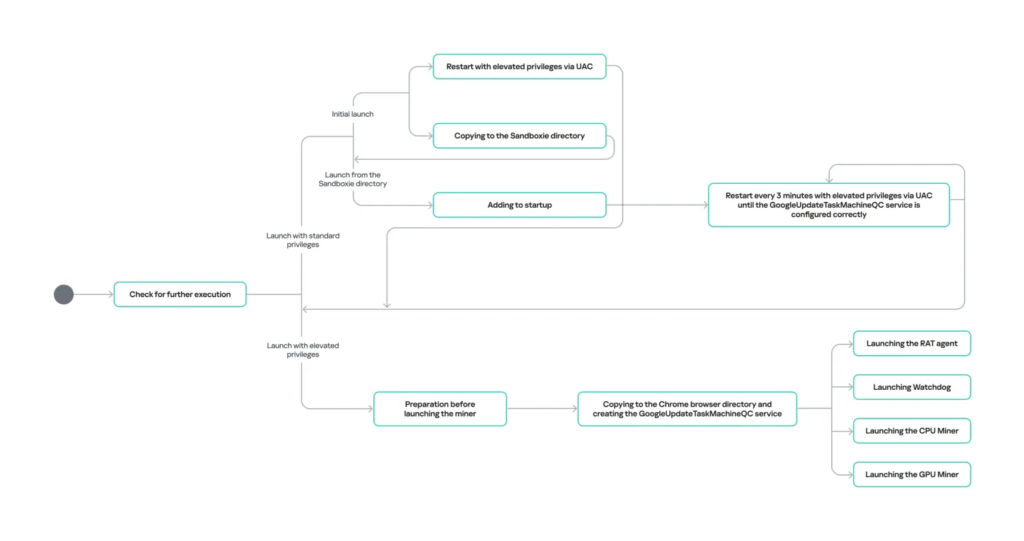
The main payload includes a modified version of SilentCryptoMiner. Once active, it can use the victim’s CPU and GPU to mine cryptocurrency in the background, which can slow the PC, increase power use, and reduce hardware life over time.
The campaign also includes a RAT component. This gives attackers remote access to the infected machine, with the ability to run commands, execute files, and push additional payloads. That makes the infection more serious than a basic cryptominer.
Securelist said the malware checks in with attacker infrastructure before moving forward. It sends system details through DNS-based communication and waits for a server response, which helps the operators filter victims and avoid some test or analysis environments.
Persistence Makes Cleanup Harder
The malware creates persistence by registering a fake Google service named GoogleUpdateTaskMachineQC. It also stores files under C:\ProgramData\Google\Chrome, which can make the activity look less suspicious during a quick review.
A watchdog component runs inside explorer.exe and checks every few seconds whether the miner is still active. If a security tool or administrator removes part of the infection without stopping the watchdog first, the malware can restore deleted components from encrypted backups.
This persistence model means cleanup requires more than deleting one suspicious file. On Windows systems with stubborn malware, Microsoft recommends using tools such as Microsoft Defender Offline to scan from a trusted environment before Windows fully loads.
Why Pirated Content Sites Remain a Major Risk
The campaign shows why illegal streaming and download sites remain a common malware delivery channel. Users expect playback issues, pop-ups, and update prompts on these pages, which makes social engineering easier for attackers.
Securelist also connected the current activity to earlier campaigns involving pirated digital libraries and fake browser crash pages. While the delivery pages have changed, the broader approach has stayed similar: lure users with free content, push a fake update, then install malware.
The high traffic behind these sites increases the possible reach. Even if only a small share of visitors click the fake update, the attacker can still infect a large number of devices because the victim pool is so large.
Signs That a System May Be Infected
- Unexpected CPU or GPU usage when no heavy apps are open
- Unusual fan noise, heat, or battery drain
- Suspicious files under C:\ProgramData\Google\Chrome
- A service named GoogleUpdateTaskMachineQC
- Unexpected activity inside explorer.exe or conhost.exe
- DNS traffic to unknown or algorithmically generated domains
- Connections linked to miner configuration or RAT command servers
Security Teams Should Watch for These Behaviors
Enterprise defenders should review endpoint telemetry for DLL side-loading, unusual child processes, fake Google updater services, and code injected into explorer.exe or conhost.exe. MITRE’s DLL side-loading entry gives useful context for how this technique helps attackers execute malicious code through otherwise legitimate software.
Teams should also monitor DNS traffic for suspicious patterns. Securelist reported that the malware uses changing command-and-control domains for the RAT component and a separate server to retrieve miner configuration.
| Indicator Type | Indicator | Description |
|---|---|---|
| Download domain | urush1bar4[.]online | Malicious archive delivery |
| File name | HLS Installer.874.exe | Legitimate executable used in the side-loading chain |
| Service name | GoogleUpdateTaskMachineQC | Fake Google service used for persistence |
| RAT C2 domain | 5d14vnfb[.]space | Reported RAT command server |
| RAT C2 domain | r7mvjl67[.]space | Reported RAT command server |
| RAT C2 domain | zgj1tam9[.]space | Reported RAT command server |
| RAT C2 domain | jeaw520i[.]space | Reported RAT command server |
| RAT C2 domain | qdmagva5[.]space | Reported RAT command server |
| Configuration server | 107[.]172[.]212[.]235 | Miner configuration retrieval |
| Control panel domain | m4yuri[.]online | UnamWebPanel control panel |
| Control panel domain | kristina[.]quest | UnamWebPanel control panel |
How Users and Admins Can Reduce the Risk
The most direct defense is to avoid pirated streaming, movie, and book download sites. These platforms often rely on misleading ads, fake update messages, and bundled downloads that train users to click through warnings.
Users who suspect an infection should disconnect the device from the network, run a full security scan, and check startup services before logging in to sensitive accounts. Microsoft’s Defender Offline scan can help when malware tries to hide or defend itself while Windows is running.
Administrators should block known indicators, review endpoint detections around the fake service name, and inspect machines that show unexplained GPU or CPU usage. If the watchdog is active, responders should stop the injected component before deleting miner files, or the malware may restore itself.
The Bottom Line
This campaign combines a familiar fake update trick with a more damaging payload mix. Victims do not just lose system performance to cryptocurrency mining. They may also give attackers remote access to the device.
The attack also shows why software update prompts from random websites should never be trusted. Real browser, codec, and media player updates should come from official apps, built-in update systems, or verified vendor websites.
FAQ
It is a malware campaign that uses fake plugin update prompts on pirated streaming and digital library sites. The download installs a cryptocurrency miner and a remote access trojan on Windows systems.
Researchers reported a legitimate-looking executable named HLS Installer.874.exe inside the downloaded ZIP archive. It runs alongside a malicious DLL used in the infection chain.
The malware can mine cryptocurrency using the victim’s CPU or GPU and run a RAT component that gives attackers remote control. It also creates persistence and uses a watchdog to restore removed components.
Users should avoid pirated streaming and download sites, ignore update prompts shown by random websites, and install updates only from official app stores, vendor websites, or built-in update tools.
Security teams should look for the GoogleUpdateTaskMachineQC service, suspicious files in C:\ProgramData\Google\Chrome, unusual activity in explorer.exe or conhost.exe, abnormal CPU or GPU usage, and DNS traffic to known campaign indicators.


Read our disclosure page to find out how can you help VPNCentral sustain the editorial team Read more


Improve this guide


User forum
0 messages