
Typosquatted npm Packages Target Cloud and CI/CD Secrets in Developer Environments


 6 min. read
  Published on
Microsoft has exposed a fast-moving npm supply chain campaign that used 14 typosquatted packages to steal cloud credentials and CI/CD secrets from developer systems. According to the Microsoft Security Blog, a newly created npm maintainer account published the malicious packages within a four-hour window on May 28, 2026.
The packages copied naming patterns tied to OpenSearch, Elasticsearch, DevOps tooling, and environment-configuration utilities. Once installed, they ran credential-harvesting code during the npm install process and targeted secrets used in AWS, HashiCorp Vault, GitHub Actions, and npm publishing workflows.

Access content across the globe at the highest speed rate.
70% of our readers choose Private Internet Access
70% of our readers choose ExpressVPN

Browse the web from multiple devices with industry-standard security protocols.

Faster dedicated servers for specific actions (currently at summer discounts)
The campaign matters because it did not only steal local secrets from developer workstations. It also aimed at credentials that could let an attacker move into cloud accounts, alter CI/CD workflows, or publish malicious package updates through compromised npm maintainer access.
What Microsoft Found in the npm Campaign
The package cluster used the maintainer alias vpmdhaj and included both scoped and unscoped packages. Microsoft’s incident analysis says several of the unscoped packages also spoofed the legitimate OpenSearch repository metadata, making them look more trustworthy during a quick review.
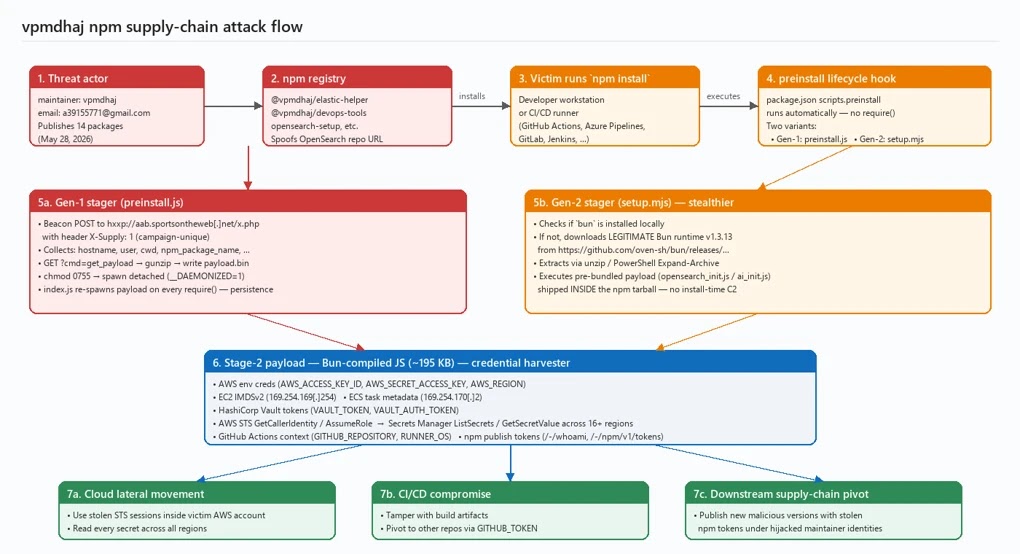
The affected packages used similar payloads and targeted developers who were likely working with search infrastructure, cloud services, or deployment automation. That made the campaign especially risky for organizations that store credentials in local environments or CI/CD runners.
| Package | Impersonated or Targeted Area |
|---|---|
| @vpmdhaj/elastic-helper | Elasticsearch and OpenSearch helper tooling |
| @vpmdhaj/devops-tools | DevOps setup utilities |
| @vpmdhaj/opensearch-setup | OpenSearch setup tooling |
| @vpmdhaj/search-setup | Search engine configuration |
| opensearch-security-scanner | OpenSearch security tooling |
| opensearch-setup | OpenSearch setup |
| opensearch-setup-tool | OpenSearch setup tooling |
| opensearch-config-utility | OpenSearch configuration |
| search-engine-setup | Search engine setup |
| search-cluster-setup | Search cluster configuration |
| elastic-opensearch-helper | Elasticsearch and OpenSearch helper tooling |
| vpmdhaj-opensearch-setup | Author-branded OpenSearch setup |
| env-config-manager | Environment configuration |
| app-config-utility | Application configuration |
How the Malicious Packages Ran Code
The attack started during installation. Each package used install-time scripts, a behavior supported by npm lifecycle hooks, to execute code before the victim imported or used the library in an application.
Microsoft observed two stager variants. The older variant contacted an external command-and-control server, sent host information, and downloaded a second-stage payload. The newer variant used a quieter approach by downloading the legitimate Bun runtime and running a pre-bundled malicious script already hidden inside the npm package.
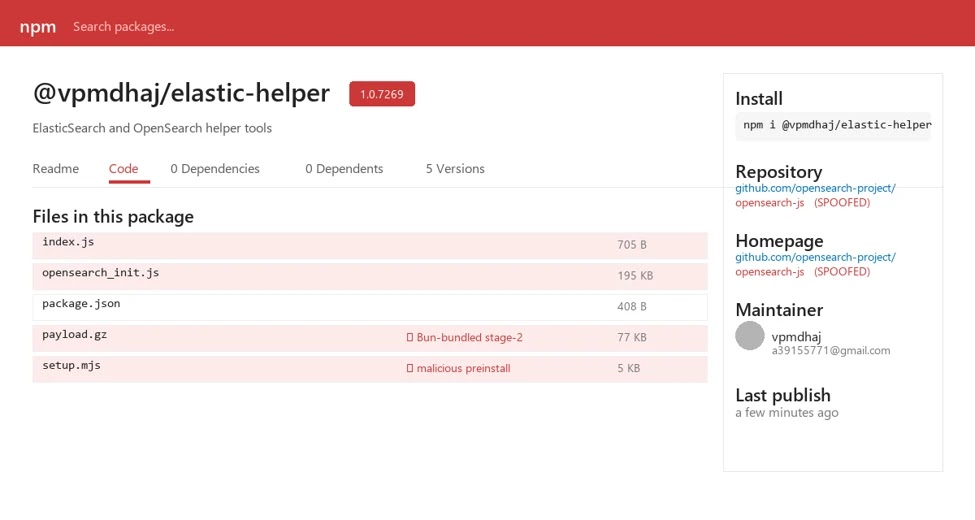
This change made the later packages harder to spot through simple network monitoring. Instead of pulling the main payload from a suspicious server during installation, the package used legitimate tooling to launch the credential harvester locally.
What Secrets the Payload Tried to Steal
The second-stage payload focused on cloud and pipeline secrets. Microsoft said it queried AWS credential sources, including the AWS Instance Metadata Service, environment variables, ECS task metadata, and AWS Secrets Manager across more than 16 regions.
The malware also looked for HashiCorp Vault tokens and CI/CD context. It checked for repository and runner details connected to GitHub Actions tokens, which can help an attacker understand whether the compromised machine is a developer workstation or a build environment.
- AWS environment credentials and STS sessions
- AWS Secrets Manager data across multiple regions
- HashiCorp Vault tokens
- GitHub Actions workflow context
- npm publish tokens
- Host details such as platform, username, working directory, and package version
Why npm Publish Tokens Increase the Risk
The most serious part of the campaign is the focus on npm publish tokens. Static publish tokens can let an attacker update packages owned by a legitimate developer or organization. That can turn one infected machine into a wider supply chain compromise.
This is why trusted publishing has become an important defense for package maintainers. It uses OIDC-based publishing from approved CI/CD workflows and removes the need to store long-lived npm tokens in local machines or pipeline secrets.
| Credential Type | Potential Impact |
|---|---|
| AWS credentials | Cloud access, lateral movement, and secret enumeration |
| Vault tokens | Access to application secrets and internal credentials |
| GitHub Actions context | Repository and workflow targeting |
| npm publish tokens | Malicious updates to trusted packages |
What Developers and Security Teams Should Do Now
Organizations should first identify whether any of the affected packages were installed on developer machines, CI runners, build containers, or temporary pipeline environments on or after May 28, 2026. Package-lock files, CI logs, npm cache records, and build artifacts can help confirm exposure.
Any credentials available to those systems should be rotated. That includes AWS IAM keys, STS sessions, Vault tokens, GitHub workflow secrets, and npm tokens. Security teams should also review logs for suspicious Bun downloads, detached Node.js child processes, access to AWS metadata endpoints, and outbound traffic to the defanged domain aab.sportsontheweb[.]net.
For new installs, teams can use the npm ignore-scripts option in workflows where dependencies do not require install scripts. This can stop preinstall and postinstall hooks from running automatically, although teams should test builds before applying it globally.
Package maintainers should move release automation to npm trusted publishing where supported. This lowers the value of stolen local secrets because the publishing workflow no longer depends on a reusable npm token stored in a machine or CI secret.
GitHub users should also review workflow permissions and reduce default access where possible. The GitHub GITHUB_TOKEN documentation explains that GitHub creates a token for each workflow job, and teams should limit permissions to the minimum needed for automation.
AWS teams should review CloudTrail for unusual STS and Secrets Manager activity from developer or build infrastructure. They should also review IMDSv2 guidance and harden instance metadata access where workloads do not need broad metadata exposure.
Indicators Security Teams Should Review
| Type | Indicator |
|---|---|
| Maintainer alias | vpmdhaj |
| a39155771@gmail[.]com | |
| C2 domain | aab.sportsontheweb[.]net |
| HTTP header | X-Supply: 1 |
| AWS metadata endpoint | 169.254.169.254 |
| ECS metadata endpoint | 169.254.170.2 |
| Payload filename | opensearch_init.js |
| Alternate payload filename | ai_init.js |
| Dropped binary | payload.bin |
The Bottom Line
This npm campaign shows how quickly a small set of lookalike packages can threaten cloud and CI/CD environments. The attacker relied on simple social engineering, automatic install scripts, and developer trust in familiar package names.
The immediate priority is exposure review and credential rotation. The longer-term lesson is just as important: organizations should reduce static secrets in build systems, limit package install script execution where possible, and move package publishing workflows toward short-lived, identity-based authentication.
FAQ
Microsoft found 14 malicious npm packages that copied names linked to OpenSearch, Elasticsearch, DevOps, and configuration tools. The packages ran malicious code during installation and tried to steal cloud and CI/CD secrets.
The payload targeted AWS credentials, HashiCorp Vault tokens, GitHub Actions context, npm publish tokens, and other environment-based secrets available on developer machines or CI/CD runners.
Stolen npm publish tokens can let an attacker publish malicious updates to packages owned by a legitimate maintainer. This can expand a single workstation compromise into a broader software supply chain attack.
They should remove the package, review lockfiles and build logs, rotate exposed AWS, Vault, GitHub, and npm credentials, and check systems for suspicious Bun downloads, detached Node.js processes, and unusual outbound connections.
It can reduce risk by preventing npm lifecycle scripts from running automatically during installation. However, teams should test it before applying it broadly because some legitimate packages rely on install scripts.


Read our disclosure page to find out how can you help VPNCentral sustain the editorial team Read more


Improve this guide


User forum
0 messages