
BLUERABBIT Backdoor Targets Windows Systems With Encryption, Data Theft, and Disk Wiping


 9 min. read
  Published on

A new Windows backdoor called BLUERABBIT can steal files, encrypt data, and wipe disks on compromised systems. The malware was first observed in mid-to-late March 2026 and is suspected of targeting organizations in Israel, according to a Binary Defense report.
Researchers describe BLUERABBIT as a Golang-based intrusion tool with ransomware and destructive capabilities. It can profile a system, capture screenshots, control a machine remotely, exfiltrate files, encrypt data with a .candy extension, and overwrite drives.

Access content across the globe at the highest speed rate.
🔥 Save 81% + 2 bonus months! 🔥
70% of our readers choose Private Internet Access
70% of our readers choose ExpressVPN
2
Browse the web from multiple devices with industry-standard security protocols.
🔥 Save 73%! 🔥

Faster dedicated servers for specific actions (currently at summer discounts)
🔥 Save 69%! 🔥
Binary Defense links the malware to a likely Iran-nexus activity cluster. The same cluster was previously associated with BLUEWIPE and SEWERGOO, two tools reported in 2025. The analyzed BLUERABBIT sample also kept debug symbols intact, showing the internal name “Rabbit.”
BLUERABBIT Uses Enterprise Tools to Hide Command Traffic
BLUERABBIT stands out because it does not rely only on common web-based command-and-control traffic. Instead, it uses enterprise-style services that can look normal in some business networks.
The malware uses RabbitMQ for tasking. RabbitMQ documentation describes AMQP as a messaging protocol that lets client applications communicate with message brokers, which explains why this traffic may blend into environments that already use message queues.
The backdoor also uses Redis for task state and results. The Redis project is widely used for fast data storage and application workflows, which can make unusual Redis traffic harder to notice without strong network baselines.
| Component | Legitimate use | BLUERABBIT use |
|---|---|---|
| RabbitMQ | Enterprise message queuing | Command tasking over AMQP |
| Redis | Fast data store and application cache | Task state and command results |
| MinIO | S3-compatible object storage | File exfiltration to attacker-controlled storage |
| Windows scheduled task | Routine automation | Persistence under a fake update name |
The Malware Persists as a Fake OneDrive Update
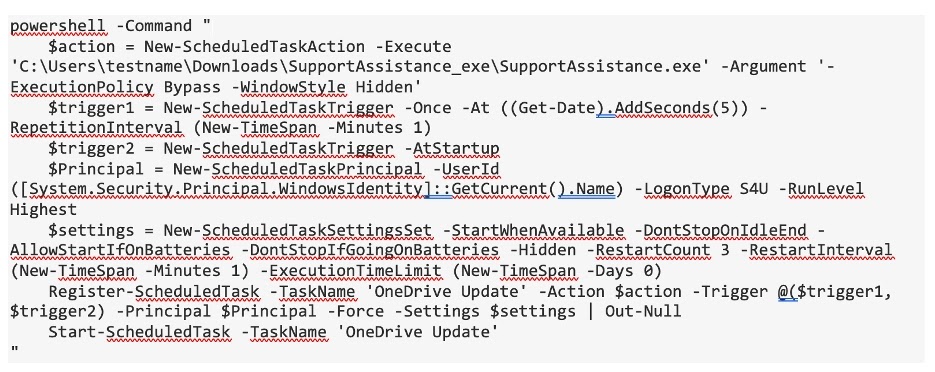
After execution, BLUERABBIT checks a Windows registry key to determine whether it has already run. On first execution, it creates a scheduled task named “OneDrive Update,” using a trusted Microsoft-related name to reduce suspicion.
Microsoft’s Task Scheduler documentation explains that scheduled tasks run when defined triggers are met. BLUERABBIT abuses that Windows feature to relaunch itself every minute and survive reboot events.
This persistence method means killing the visible process is not enough. Defenders must also find and remove the scheduled task, review the related registry entries, and check for other signs of compromise on the host.
- Scheduled task name: OneDrive Update
- Repeat interval: about 60 seconds
- Startup trigger: used to survive reboots
- Registry tracking: used to determine prior execution
- Goal: keep the backdoor running after interruption
BLUERABBIT Combines Theft With Destructive Payloads
BLUERABBIT can steal files before it starts encryption or wiping. This gives operators a double-extortion path, where victims can lose sensitive data before they even notice encrypted files.
For exfiltration, the malware uses MinIO-compatible storage. MinIO is a legitimate object storage platform with S3-compatible workflows, but BLUERABBIT uses attacker-controlled infrastructure to move staged data out of the victim environment.
The destructive side is broader than standard ransomware. BLUERABBIT can encrypt files across logical drives, change the desktop wallpaper, and use two disk-wiping modules. One overwrites drives with random data, while another uses multiple overwrite patterns to make recovery far harder.
| Capability | Impact |
|---|---|
| System profiling | Collects operating system, hardware, network, domain, and security product details |
| Remote access | Allows operator interaction through remote control and shell execution |
| File theft | Stages files and sends them to attacker-controlled storage |
| File encryption | Adds the .candy extension and disrupts business data access |
| Disk wiping | Overwrites drives and can render systems unrecoverable |
| Anti-recovery behavior | Disables recovery-related settings and targets boot files |
Boot File and Recovery Changes Increase the Damage
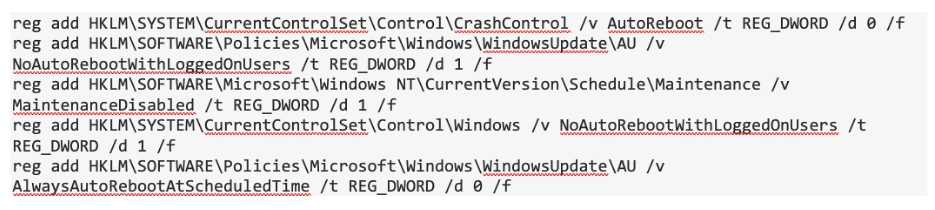
Before destructive actions begin, BLUERABBIT changes ownership and access controls for critical boot files. It also modifies Windows settings related to reboot and recovery behavior.
The second Binary Defense analysis reference notes that these changes can prevent normal recovery behavior once encryption or wiping starts. That makes containment and backup readiness more important.
Security teams should treat attempts to change ownership of boot files as urgent. Such activity should rarely happen outside approved patching, imaging, or recovery work.
- Watch for ownership changes on bootmgr, ntoskrnl.exe, winload.exe, and winload.efi.
- Investigate registry changes that disable recovery or reboot behavior.
- Alert on unexpected access-control changes to Windows boot components.
- Check whether suspicious changes happened before encryption or wiping.
- Validate backups from clean systems before restoration.
Why RabbitMQ and Redis Traffic Matters for Detection
AMQP traffic from endpoint workstations can be a high-confidence signal in many environments. Servers may legitimately communicate with message brokers, but ordinary laptops and desktops usually should not connect to unknown external RabbitMQ infrastructure.
The second RabbitMQ AMQP reference helps explain why defenders should baseline broker connections. A message-broker protocol is not automatically malicious, but unexpected destinations, usernames, authentication patterns, or workstation-origin traffic deserve review.
The same logic applies to the second Redis reference. Redis traffic from unusual endpoints can indicate unauthorized tooling, especially when it appears alongside suspicious scheduled tasks, staging directories, or outbound file movement.
| Detection area | What to look for |
|---|---|
| AMQP traffic | Endpoint devices connecting to unknown RabbitMQ servers |
| Redis traffic | Unexpected Redis connections from workstations or non-application systems |
| MinIO usage | MinIO client activity from non-server endpoints or unusual parent processes |
| GUID-like folders | Directories shaped like GUIDs but containing letters beyond A through F |
| Scheduled task | A hidden or repeated task named OneDrive Update |
| Boot file access | Unexpected take ownership or permission changes on boot files |
MinIO Client Activity Can Signal Data Exfiltration
BLUERABBIT stages stolen files in GUID-like directories before exfiltration. Binary Defense noted that these directories can include letters beyond the hexadecimal range used by legitimate Windows GUIDs, which gives defenders a practical hunting signal.
The second MinIO object storage reference matters because S3-compatible tools can blend into developer and server workflows. On endpoints, however, unexpected MinIO client activity should receive immediate attention.
Investigators should review process trees around MinIO execution. If the client is launched by an unusual application, service, script engine, or unknown binary, it may indicate automated data staging or exfiltration.
- Search for GUID-like staging directories with non-hex characters.
- Review outbound S3-style traffic from user endpoints.
- Investigate MinIO client launches from unexpected parent processes.
- Check whether staged files match sensitive business data.
- Correlate file movement with RabbitMQ and Redis activity.
Indicators of Compromise Reported by Researchers
Security teams can use the following indicators as a starting point for hunting. These values should be combined with behavioral detection because attacker infrastructure can change quickly.
| Type | Indicator |
|---|---|
| SHA-256 | 633d4cbd496b1094495da89a64f5e6c31a0f6d4d1488411db5b0cba1cfe42001 |
| SHA-256 | 9706a192e2c1a1faaf0a521daf31c2af60ff4590e3f47bbb4abc227f42af0683 |
| SHA-256 | ce9ad5f6c12019f4aae5b189bd8ddf5bb09e75b06a0a587b25a855c65948c913 |
| SHA-256 | f622ed85ef31ad4ab973f4e74524866fe1bb44f0965ad2b2ad796cd657a05bfd |
| IP address | 185.182.193[.]21 |
| IP address | 212.8.248[.]104 |
| JA3 | 806dab5164cf60d94026b88ab2d9851d |
| JA3 | d80125b9429e9d5f06ace959f00de8d0 |
| JA3S | d75f9129bb5d05492a65ff78e081bcb2 |
| JA4 | t13i131000_f57a46bbacb6_e5728521abd4 |
| JA4 | t13i130900_f57a46bbacb6_e7c285222651 |
How Defenders Should Respond
Organizations should first confirm whether endpoints or servers have communicated with the listed infrastructure or produced matching malware hashes. They should then hunt for the behavioral indicators that make BLUERABBIT easier to identify even when infrastructure changes.
The second Windows Task Scheduler reference is relevant because defenders should inspect repeated startup tasks, especially those using trusted service names without a valid software owner. A fake OneDrive-themed task should receive close review.
Response teams should isolate affected hosts, preserve forensic data, check for exfiltration, and verify whether encryption or wiping preparation has started. If BLUERABBIT has staged files or changed boot-related settings, teams should treat the incident as more than a simple malware removal case.
- Isolate systems showing BLUERABBIT indicators.
- Preserve volatile evidence before rebuilding machines.
- Search for the OneDrive Update scheduled task.
- Review RabbitMQ, Redis, and S3-compatible traffic from endpoints.
- Check for unusual MinIO client execution.
- Review boot file ownership changes and recovery-related registry modifications.
- Assume data may have been stolen before encryption or wiping.
- Restore only from clean, tested backups.
BLUERABBIT Shows How Destructive Malware Is Evolving
BLUERABBIT combines several tools and techniques that defenders usually track separately. It uses enterprise messaging for control, data storage workflows for exfiltration, scheduled tasks for persistence, and destructive modules for impact.
That combination makes it more dangerous than a basic ransomware payload. The malware can give operators remote access, steal files, damage recovery options, encrypt business data, and wipe disks when instructed.
For organizations exposed to Iran-linked cyber activity, the priority is proactive hunting. Network baselines, endpoint telemetry, suspicious scheduled task monitoring, and verified backups can limit the damage before operators trigger the most destructive parts of the malware.
FAQ
BLUERABBIT is a Golang-based Windows backdoor with remote access, file theft, ransomware, and disk-wiping capabilities. Researchers say it is linked to a likely Iran-nexus activity cluster and has been suspected of targeting Israeli organizations.
BLUERABBIT can profile the system, receive commands, capture screenshots, provide remote control, stage and steal files, encrypt data with a .candy extension, and wipe disks using destructive overwrite routines.
BLUERABBIT uses RabbitMQ over AMQP for tasking, Redis for command state and results, and MinIO-compatible object storage for file exfiltration. This makes its traffic look more like enterprise application traffic than common malware web traffic.
Key signs include a scheduled task named OneDrive Update, unexpected AMQP or Redis traffic from endpoints, MinIO client activity from unusual parent processes, GUID-like folders with non-hex characters, and ownership changes on Windows boot files.
Organizations should isolate affected systems, preserve forensic evidence, hunt for the reported indicators, inspect scheduled tasks and network traffic, verify whether data was stolen, review recovery-related registry changes, and restore only from clean backups.


Read our disclosure page to find out how can you help VPNCentral sustain the editorial team Read more


Improve this guide




User forum
0 messages