
GreatXML BitLocker Bypass PoC Targets Windows Defender Offline Scan State


 5 min. read
  Published on
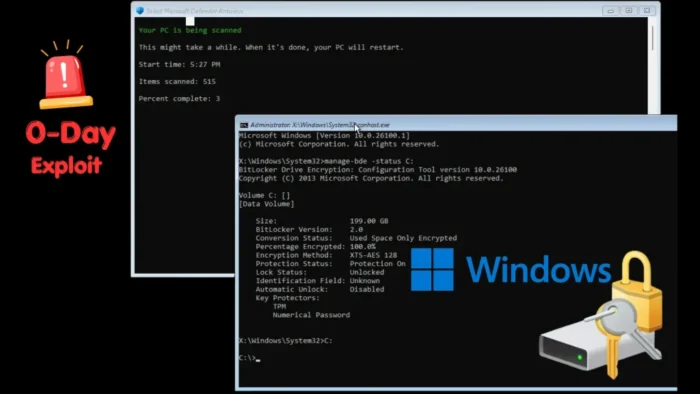
A public proof-of-concept called GreatXML claims to bypass BitLocker protection on some Windows systems by abusing the state created around Microsoft Defender Offline Scan and Windows Recovery Environment.
The issue requires physical access to the device and does not appear to have an official Microsoft CVE or MSRC advisory yet. Public reports from The Hacker News and SecurityWeek say the PoC can expose a BitLocker-protected volume under specific conditions.

Access content across the globe at the highest speed rate.
70% of our readers choose Private Internet Access
70% of our readers choose ExpressVPN

Browse the web from multiple devices with industry-standard security protocols.

Faster dedicated servers for specific actions (currently at summer discounts)
The risk matters most for stolen laptops, insider access, repair-chain exposure, and unmanaged systems that rely on TPM-only BitLocker protection. It does not describe a remote attack that can compromise Windows devices over the internet.
GreatXML Focuses on WinRE and Defender Offline Scan
GreatXML centers on the Windows Recovery Environment, the recovery mode Windows uses for repair, reset, recovery, and some security operations. Microsoft says Microsoft Defender Offline restarts the device and performs a quick scan in Windows Recovery Environment.
Public reporting says the GreatXML PoC abuses that recovery-state behavior with crafted XML recovery artifacts. I have kept the technical details high level because the public PoC already lowers the barrier for abuse.
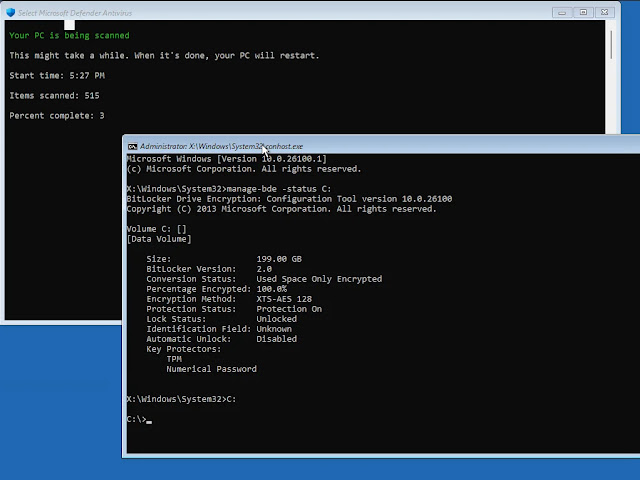
Hive Security describes GreatXML carefully as a public BitLocker-bypass PoC claim involving WinRE, Defender Offline Scan state, and XML answer-file processing. That distinction matters because Microsoft has not yet published a formal advisory for GreatXML.
| Item | Details |
|---|---|
| Name | GreatXML |
| Type | Claimed BitLocker security feature bypass |
| Attack requirement | Physical access to the device |
| Microsoft CVE | No official CVE found at publication time |
| Affected area | Windows Recovery Environment and Defender Offline Scan workflow |
| Main risk | Access to data on BitLocker-protected systems under specific conditions |
Why TPM-Only BitLocker Configurations Face More Risk
GreatXML highlights a long-running problem with stolen or physically accessed Windows devices. TPM-only BitLocker configurations can unlock during certain trusted boot flows without asking the user for an extra secret.
Microsoft’s BitLocker countermeasures documentation explains that TPM plus PIN adds another layer because the user must enter a PIN before the device can continue the startup process.
That does not mean TPM-only BitLocker has no value. It still protects against many offline attacks. However, GreatXML and similar recovery-environment bypass research show why high-risk devices need stronger startup authentication and tighter control over recovery workflows.
Reports Link GreatXML to a Wave of Windows PoC Releases
The Hacker News report says GreatXML appeared shortly after another Microsoft Defender-related exploit called RoguePlanet and after YellowKey, a BitLocker bypass tracked as CVE-2026-45585.
SecurityWeek reported that the GreatXML PoC can spawn a command prompt with SYSTEM privileges in Recovery Mode. The same report notes that the exploit targets Defender’s offline scan behavior rather than a typical Windows login path.
The researcher behind the release has used aliases including Nightmare-Eclipse, Chaotic Eclipse, and MSNightmare. Multiple public write-ups say the release came during a broader dispute over Microsoft vulnerability handling and bug bounty decisions.
Admins Should Treat the PoC as a Physical Access Risk
Security teams should not treat GreatXML like a remote enterprise worm. The more realistic risk involves an attacker who can touch the machine, tamper with recovery-related storage, or handle the device before the owner notices.
Even so, organizations should not ignore it. Laptops assigned to executives, finance staff, developers, administrators, legal teams, and traveling employees often contain high-value credentials and sensitive files.
Microsoft’s Windows Security guidance confirms that Defender Offline Scan uses a reboot-based recovery workflow, so administrators should review how they manage recovery partitions, WinRE access, and BitLocker startup policies.
- Use TPM plus PIN for high-risk laptops instead of TPM-only BitLocker where practical.
- Restrict physical access to devices that store sensitive data.
- Review whether users have recently run Defender Offline Scan on sensitive systems.
- Monitor for unusual recovery-environment activity where endpoint tools provide visibility.
- Keep Windows, Defender, firmware, and recovery images updated.
- Watch for future Microsoft guidance, a CVE assignment, or mitigation steps.
Microsoft Patch Status Remains Unclear
At publication time, I found no Microsoft advisory specifically naming GreatXML. That makes the issue different from YellowKey, which Microsoft addressed through a CVE and mitigation guidance.
Hive Security’s analysis also says defenders should describe GreatXML carefully until Microsoft or independent researchers publish deeper validation. The public PoC claim still justifies hardening because it targets a sensitive recovery path.
Organizations should prioritize stronger BitLocker startup protection, especially on devices exposed to theft or uncontrolled physical access. Microsoft’s BitLocker security guidance remains the clearest official starting point until Microsoft comments directly on GreatXML.
FAQ
GreatXML is a public proof-of-concept claim for a BitLocker security feature bypass involving Windows Recovery Environment and Microsoft Defender Offline Scan behavior.
No official Microsoft CVE or MSRC advisory for GreatXML was found at publication time. Public reports currently describe it as a claimed zero-day PoC.
Current public reporting describes GreatXML as a physical-access attack. It does not describe a remote attack that can compromise Windows devices over the internet.
TPM-only BitLocker may face more risk because it can unlock during trusted boot flows without requiring a user-entered PIN. TPM plus PIN gives stronger protection for high-risk devices.
Administrators should monitor Microsoft guidance, keep Windows and Defender updated, review WinRE and recovery partition controls, and use TPM plus PIN for devices that face higher theft or physical-access risk.


Read our disclosure page to find out how can you help VPNCentral sustain the editorial team Read more


Improve this guide
User forum
0 messages