
AutoJack Shows How One Web Page Could Hijack an AI Agent and Run Code


 8 min. read
  Published on
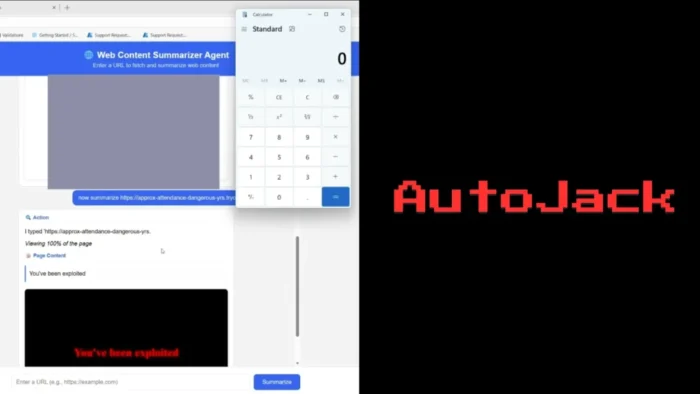
Microsoft researchers have detailed AutoJack, an exploit chain that showed how a single malicious web page could hijack a local AI browsing agent and trigger code execution on the host machine.
The issue affected AutoGen Studio, Microsoft Research’s open-source prototyping interface for multi-agent AI systems. In a Microsoft Security Blog post, the company said the chain allowed untrusted web content rendered by a browsing agent to reach a local Model Context Protocol WebSocket and spawn arbitrary processes on the host.

Access content across the globe at the highest speed rate.
🔥 Save 81% + 2 bonus months! 🔥
70% of our readers choose Private Internet Access
70% of our readers choose ExpressVPN
2
Browse the web from multiple devices with industry-standard security protocols.
🔥 Save 73%! 🔥

Faster dedicated servers for specific actions (currently at summer discounts)
🔥 Save 69%! 🔥
Microsoft stressed that the vulnerable MCP WebSocket surface was never included in a Python Package Index release. The current AutoGen Studio PyPI package remains listed as version 0.4.2.2, while the hardened development branch includes the relevant fixes.
AutoJack Crossed the Localhost Trust Boundary
AutoJack matters because many developer tools treat localhost as a trusted boundary. That assumption breaks when an AI agent can browse untrusted web pages while also running on the same machine as privileged local services.
In the demonstrated chain, a developer ran AutoGen Studio locally while using a browsing agent, such as a web summarizer built with a headless browser. If the agent loaded a malicious page, that page could attempt to reach the local AutoGen Studio MCP control plane.
The attack did not require the user to manually run a command. The user only needed to submit or expose the browsing agent to a malicious URL. The agent’s browser then became the delivery path for the attack.
The Three Weaknesses Behind AutoJack
Microsoft said AutoJack chained three weaknesses in the AutoGen Studio MCP WebSocket surface. Each weakness carried risk on its own, but the full chain created a remote code execution path from a web page to the local host.
The first issue involved origin validation. The MCP WebSocket accepted localhost-style origins, which can make sense for a normal browser tab. However, a browser controlled by a local AI agent can still interact with local services in ways a remote attacker cannot do directly.
The second issue involved authentication. AutoGen Studio’s middleware skipped certain WebSocket-style paths, including MCP routes, but the MCP handler did not enforce its own authentication check.
| Weakness | What went wrong | Impact |
|---|---|---|
| Missing origin validation | Localhost checks did not account for AI-controlled browser activity | A malicious page rendered by the agent could reach local services |
| Missing authentication | MCP WebSocket routes skipped normal middleware checks | The local control channel could accept unauthenticated connections |
| Command injection | Tool parameters could be supplied through a query parameter | The host could spawn attacker-chosen processes |
How the Proof of Concept Worked
The third weakness involved unsafe handling of MCP server parameters. Microsoft said the endpoint accepted a server_params query value, decoded it, parsed it into StdioServerParams, and passed the command and arguments to the tool-running path without an executable allowlist.
In the proof of concept, the malicious page opened a WebSocket connection to the local AutoGen Studio MCP endpoint. AutoGen Studio then decoded the supplied parameters and launched a process under the developer’s account.
Microsoft demonstrated the issue with a benign calculator launch. In a real attack, the same primitive could have started a more harmful command, depending on the privileges of the AutoGen Studio process and the controls on the machine.
Microsoft Hardened the AutoGen Studio Main Branch
The issue was reported to the Microsoft Security Response Center, and maintainers hardened the upstream main branch. The GitHub commit shows changes tied to hardening the AutoGen Studio MCP WebSocket endpoint.
Microsoft said the updated implementation no longer accepts server parameters directly through the WebSocket URL. Instead, parameters are stored server-side and keyed by a UUID, which prevents an attacker from injecting arbitrary tool parameters through a crafted URL.
The fix also tightened the authentication skip list so MCP routes no longer bypass the standard authentication path. Developers building AutoGen Studio from source should use a build at or after the b047730 commit.
PyPI Users Were Not Exposed to This Specific Chain
The AutoJack disclosure has an important limitation. Microsoft said the affected MCP WebSocket surface was not included in the published PyPI release, so users who installed AutoGen Studio through pip were not exposed to this specific exploit chain.
The autogenstudio PyPI listing describes AutoGen Studio as an app for rapidly prototyping AI agents and workflows. It also warns that the project remains under active development and is not meant to be production-ready.
That distinction matters. The risk was not a mass-exploited production vulnerability. It was a development-stage security finding that highlights a broader design issue for local AI agent tools.
AutoGen Studio Is a Research Prototype
AutoGen Studio gives developers a low-code interface to compose agents, attach tools, and test multi-agent workflows. The AutoGen Studio documentation says it is designed for rapid prototyping and is not intended as a production-ready application.
That warning becomes more important as AI agents gain access to browsers, files, APIs, terminals, and local control planes. A prototype that works well in a lab may need stronger authentication, authorization, logging, and isolation before wider deployment.
The installation guide recommends installing AutoGen Studio from PyPI unless users plan to modify the source code. Developers who work from source should pay closer attention to branch state, commit history, and security changes.
Why AutoJack Is Important for AI Agent Security
AutoJack shows a wider risk pattern for agentic AI systems. If an AI agent can browse untrusted content and also talk to privileged local services, the local machine becomes part of the attack surface.
This is not only an AutoGen Studio problem. Any AI development environment that exposes a powerful local control plane can face similar risks if it trusts localhost, skips authentication, or accepts dangerous tool parameters from model-accessible paths.
The core issue is agent identity. Developers should avoid letting experimental agents inherit the same permissions, tokens, files, and network access as the human user who started them.
- Do not treat localhost as a complete security boundary.
- Authenticate and authorize every local control plane.
- Allowlist commands, tools, files, and network destinations.
- Run browsing agents in containers, virtual machines, or separate OS users.
- Block direct access from untrusted web content to privileged local services.
- Monitor child processes spawned by AI tools and development frameworks.
- Keep source-built agent tools updated to hardened commits.
Recommended Steps for Developers
Developers using AutoGen Studio from PyPI should confirm they are using the published package and avoid mixing it with unreviewed source builds. Teams working from source should update to a hardened main-branch build at or after Microsoft’s fix.
Developers should also isolate browsing agents from their main workstation identity. Running agents in containers, disposable virtual machines, or controlled developer environments can reduce the impact if a web page or tool call behaves unexpectedly.
The broader lesson from the AutoJack research is clear. AI agents that browse the open web need the same kind of security boundaries as browsers, automation tools, and remote code execution surfaces.
What to Check in Agent Frameworks
Security teams should review agent frameworks for local services, WebSocket endpoints, exposed tool APIs, and routes that skip authentication. Any path that can create files, execute tools, connect to networks, or spawn processes needs strict controls.
The AutoGen Studio security note already tells users that production applications should implement their own authentication, security features, and access controls. AutoJack shows why that advice matters.
Teams should also follow the AutoGen installation guidance carefully and avoid running experimental source builds on developer machines that hold sensitive credentials, signing keys, cloud tokens, or production access.
FAQ
AutoJack is an exploit chain described by Microsoft researchers that showed how a malicious web page rendered by a local AI browsing agent could reach AutoGen Studio’s local MCP WebSocket and trigger code execution on the host.
Microsoft said the affected MCP WebSocket surface was never included in a PyPI release, so users who installed AutoGen Studio from PyPI were not exposed to this specific chain.
AutoJack chained localhost origin trust, missing authentication on MCP WebSocket routes, and unsafe handling of tool parameters. Together, those issues allowed a malicious page rendered by an AI agent to reach a local control plane and spawn a process.
Yes. Microsoft said AutoGen Studio maintainers hardened the upstream main branch. The fix moved MCP parameters to server-side storage and tightened authentication handling for MCP routes.
Developers should isolate browsing agents, authenticate local control planes, avoid trusting localhost alone, allowlist dangerous actions, restrict tool execution, and avoid running experimental agent frameworks with access to sensitive credentials.


Read our disclosure page to find out how can you help VPNCentral sustain the editorial team Read more


Improve this guide




User forum
0 messages